Protecting WhatsApp’s Cloud Backups with End-to-End Encryption
WhatsApp has long offered end-to-end encryption for messages by default, ensuring that only the sender and recipient can read them. The service is now extending that same protection to the backups users store in cloud services like Google Drive and iCloud. Once the optional feature is enabled, neither WhatsApp nor the cloud provider will be able to read the backup’s contents or access the key used to encrypt them.
How Key Storage Works
To enable end-to-end encrypted backups, WhatsApp built a new system that works on both iOS and Android. When a user turns the feature on, the backup is encrypted with a unique random key. The user then chooses between two methods for managing that key: manually storing it or protecting it with a personal password.
If a password is selected, the key is stored in what WhatsApp calls a Backup Key Vault. This vault is built on hardware security modules (HSMs)—specialized hardware designed to safely hold encryption keys. The HSM enforces password verification and permanently destroys the key after a set number of failed attempts, shielding it from brute-force attacks. WhatsApp may know that a key exists in the vault, but it never has access to the key itself.
The client communicates with the HSM-based vault through WhatsApp’s front-end service, ChatD, which handles client connections and authentication. Even though ChatD passes messages between the client and vault, it cannot read the encrypted contents of those exchanges.
The vault is designed for high availability to support WhatsApp’s scale of over 2 billion users. The service is geographically distributed across multiple data centers so that a single data center failure will not make backup keys unreachable.
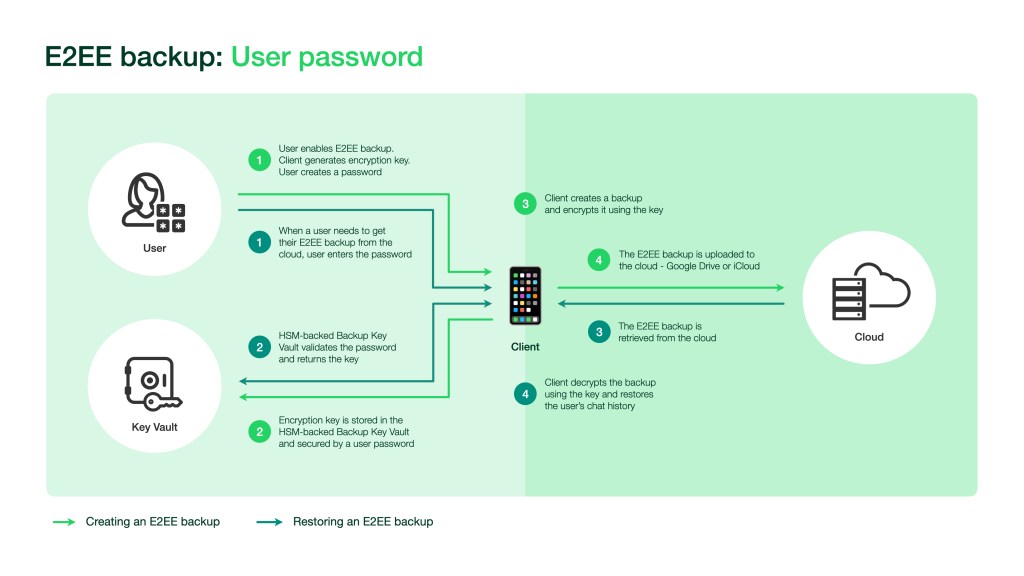
With end-to-end encrypted backups enabled, the backup data is encrypted as a continuous stream using symmetric encryption with the generated key. After encryption, the backup can be stored off-device in the user’s chosen cloud service.
Retrieving a Backup
The decryption process depends on how the user chose to secure the encryption key:
- When using a password, the user enters it, and it is encrypted before being sent to the Backup Key Vault for verification.
- Once the password is verified, the vault returns the encryption key to the WhatsApp client.
- The client uses that key to decrypt the stored backup.
Users who opted to keep the 64-digit encryption key themselves must enter it manually to access their backup.
End-to-end encrypted backups will be available on both iOS and Android in the coming weeks.



