WhatsApp Rebuilds Its Architecture for Phone-Independent Multi-Device Use
WhatsApp is rolling out a limited public beta of a redesigned multi-device capability that lets people use the same account on a phone plus up to four companion devices simultaneously—even if the phone is off or out of battery. The underlying goal was to remove the smartphone as the mandatory hub while preserving end-to-end encryption and message privacy.
Dropping the Phone as the Source of Truth
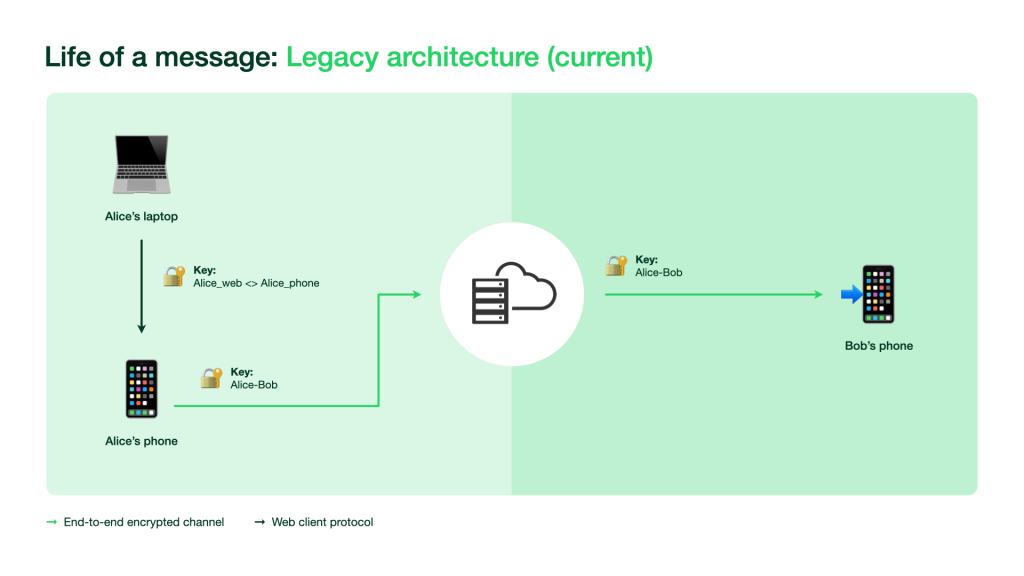
Previously, companion apps for web, macOS, Windows, and Portal depended on the phone as the primary device. The phone was the source of truth for all data and the only device that could encrypt messages or initiate calls. Companion devices held a persistent secure connection with the phone and essentially mirrored its content. This made synchronization straightforward but introduced reliability problems: companions were slow and frequently disconnected when the phone had poor connectivity, a low battery, or when the operating system killed the app process. It also limited users to one active companion device at a time, so they couldn’t take a call on Portal while checking messages on a PC.
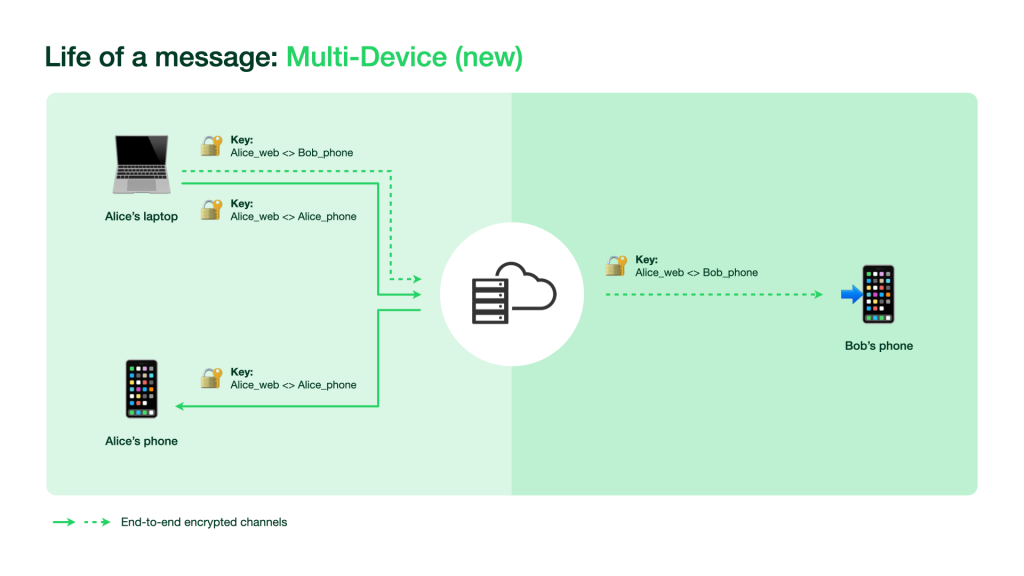
In the new architecture, each device connects to WhatsApp independently and no single phone acts as the authoritative source. The difficulty was achieving this without storing private messages on servers in new or insecure ways.
Per-Device Identity Keys
In the earlier model, every WhatsApp user was identified by a single identity key from which all encrypted communication keys were derived. With multi-device, each linked device gets its own identity key. The WhatsApp server maintains a mapping between a user’s account and all their device identities; when someone sends a message, they fetch the recipient’s device key list from the server.
To guard against a malicious or compromised server surreptitiously adding devices to an account, WhatsApp combined several safeguards. Security codes now represent the combination of all of a user's device identities, allowing contacts to verify every device they are messaging. The company is also introducing Automatic Device Verification, which lets devices establish mutual trust automatically. Users then only need to compare security codes when a contact reregisters the entire account, rather than each time a new device is linked.
Users also get more direct control: linking a new companion device requires scanning a QR code from the phone, with biometric authentication where enabled. Users can see all linked companion devices, check when they were last active, and log them out remotely.
Keeping Messages Private Without a Phone Relay
One-on-one chats use a client-fanout model. The sending client encrypts and transmits the message once per device in the sender’s and recipient’s device lists, with each copy individually encrypted under the pairwise session established with that specific device. Messages are not stored on the server after delivery. Group chats retain the same scalable Sender Key encryption scheme from the Signal Protocol.
Voice and Video Call Encryption
Calls follow a similar per-device pattern:
- The caller generates random 32-byte SRTP master secrets for each of the recipient’s devices.
- The caller sends an incoming call message to each recipient device via the client-fanout mechanism; each device receives its encrypted SRTP master secret.
- Whichever device answers uses its assigned master secret to start an SRTP-encrypted call.
SRTP master secrets remain only in client memory and only for the duration of the call; WhatsApp servers never have access to them. For group calls, the server selects at random one participant device (either the caller or an accepted device) to generate the SRTP master secret and distribute it to other active participants through pairwise end-to-end encryption. The keys are regenerated whenever someone joins or leaves the call.
Synchronizing History and Application State
To deliver a consistent experience across devices, WhatsApp synchronizes more than just messages. Contact names, chat archive status, and starred messages are all kept in sync with end-to-end encryption between a user's own devices.
When a companion device is linked, the primary device encrypts a bundle of recent chat history and transfers it to the new device. The decryption key arrives separately via an end-to-end encrypted message. Once the companion device downloads, decrypts, and stores the messages locally, the keys are deleted and the device reads history from its own local database.
Application state changes—adding a contact, muting a chat, starring a message—require ongoing synchronization. WhatsApp’s server securely stores a copy of each application state that all of a user's devices can access. All of this information, including metadata about what kind of user data is stored or accessed, is end-to-end encrypted with keys that change constantly and are known only to the user's devices.
Beta Rollout
The beta starts with a small group of existing beta program users. WhatsApp says it will keep optimizing performance and adding remaining features before expanding availability. Beta participants can opt out at any time. Details on joining are available through the WhatsApp Help Center, and the full technical description is in the updated security whitepaper.



