

CodeQL as a query language
CodeQL treats source code as data. It builds a database of facts about a program, then lets you interrogate that database using QL, a declarative, logical query language. A query expresses a pattern you want to find—a SQL injection, for instance—and the tool returns every place in the codebase that matches. Queries are open source, and anyone can write and contribute them.
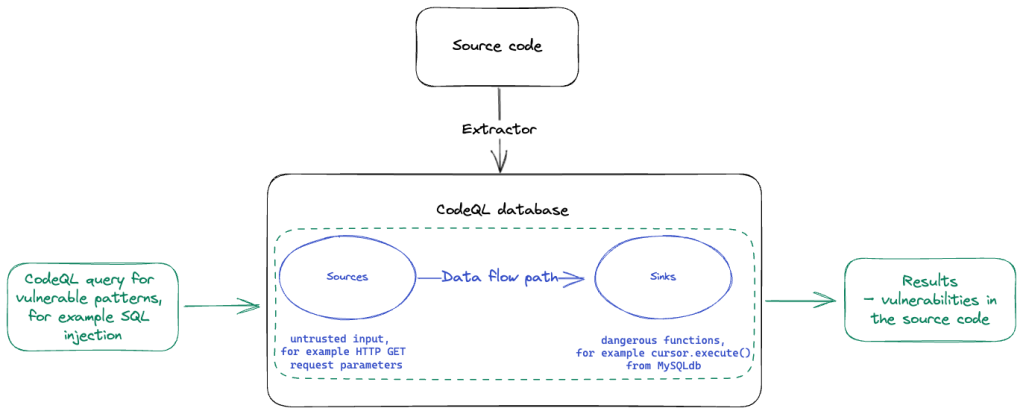
The supported languages are C/C++, C#, Go, Java, Kotlin, JavaScript, Python, Ruby, TypeScript, and Swift. Before writing queries by hand, though, it helps to know which of the surrounding products and workflows do what. This part walks through the most beginner-friendly options first, then moves toward deeper customization. You do not need to master all of them; a working familiarity with a few will make auditing and debugging easier and give you more accurate results later.
Starting with code scanning
The quickest way to try CodeQL is to enable code scanning with the CodeQL GitHub Action on a repository. GitHub Actions is a CI/CD platform for automating build, test, and deployment pipelines; an action is a reusable custom application for that platform. Code scanning is one such action, and on public repositories it is free. For interpreted languages, setup is usually automatic. Compiled languages need a bit more configuration, documented in the guide for the CodeQL workflow.
Try it on a fork of GitHubSecurityLab/codeql-zero-to-hero. The repository contains deliberately vulnerable snippets, and the action will surface several alerts under the Security tab. Setup takes under a minute, and scanning runs for a few minutes more.
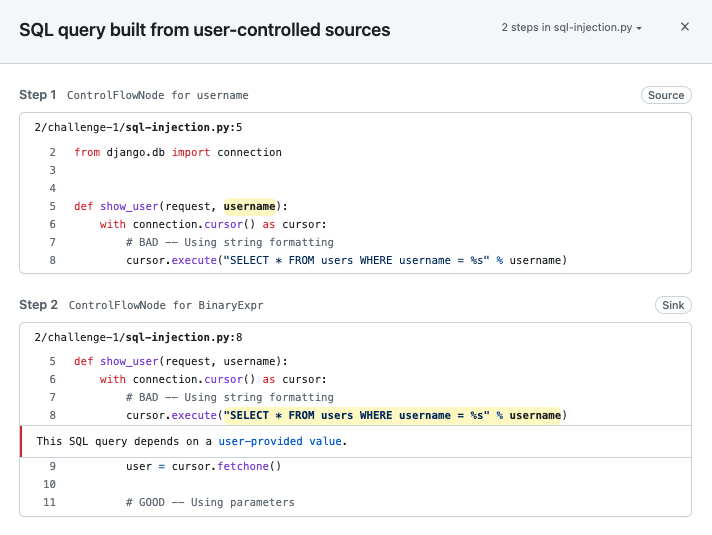
When you open an alert—say, for SQL injection—the “Show paths” button displays the data flow path from source to sink. In the training repository these paths are short, since the code is intentionally simple. Real vulnerabilities usually have longer paths, often spanning multiple files.
Why start here
Code scanning with CodeQL has three advantages for a security researcher:
- It is automatic. The action installs dependencies and builds the database for you, for most languages via the default setup/workflow.
- It re-runs on changes. New commits or pull requests trigger a rebuild and reanalysis within minutes.
- It tests against the full default query suite fast, giving you an initial picture of what issues a codebase may have before you dig deeper. Forking a target and enabling code scanning gives you a quick vulnerability overview.
Be aware that the default suite is tuned for accuracy and a very low false-positive rate. Additional query suites exist—experimental queries, false-positive-prone queries, and exploratory ones—and can be enabled by editing the action configuration, as described in the documentation on built-in query suites.
Common uses beyond scanning
Automated scanning for hundreds of vulnerability types (see the supported CWE list) is only one use. CodeQL is also a manual review aid and an exploration tool:
- Variant analysis. If you find a SQL injection in one spot, CodeQL can search the whole codebase for other instances of the same pattern.
- Attack surface mapping. You can ask CodeQL where untrusted inputs come from, which dangerous functions exist, and whether those sources reach those sinks.
What’s inside a CodeQL database
CodeQL doesn’t analyze raw source files directly. Instead, each language’s code is first extracted into a CodeQL database — a relational representation of the codebase. During extraction, CodeQL either parses the source directly or instruments an existing compiler for that language during a build. The resulting database stores information about source elements like classes and functions in separate tables, with relationships between them. Each language defines its own schema, but the higher-level QL libraries that ship with CodeQL provide consistent wrappers around those schemas, so most people work with the same query language across languages.
Extraction details differ between languages, mainly because of intrinsic differences in how they are built and run. Interpreted languages are extracted by parsing the code. Compiled languages require CodeQL to observe a build, which means the build has to succeed — for those languages, dependencies must be installed to the extent the build needs them. For interpreted languages, dependencies don’t need to be installed; their source is only included if it was present in the scanned filesystem at database creation time.
In both cases, the database typically won’t contain the full source of external dependencies. Compiled-language databases hold compile-time information such as method signatures, while interpreted-language libraries are designed to reason about API calls without seeing the dependency source. Most standard CodeQL libraries for each language are built around this distinction.
Getting a database: download or build
GitHub hosts over 200,000 CodeQL databases for popular open source projects, and you can download them directly through the CodeQL extension in VS Code or via the GitHub API. If a database isn’t available for a repository you care about, requesting one will trigger an attempt to create it. Downloading from GitHub is the quickest way to start analyzing a codebase.
You can also create a database locally with the CodeQL command line tool. The easiest installation path is installing the CodeQL CLI as an extension to GitHub’s official gh CLI tool. Creation is straightforward for interpreted languages, but for compiled languages you’ll need to replicate the project’s build environment. CodeQL is free to use on open source repositories; see the CodeQL license for details.
One important caveat: a database is a snapshot of a specific state of the repository. GitHub stores only the newest version — typically built from the latest commit. If you need to analyze an older revision, for example to investigate a vulnerability that existed in a previous release, you’ll have to check out that older code and build the database yourself with the CodeQL CLI.
For either approach, challenge 2 walks through setting up a full CodeQL workspace in a preconfigured GitHub codespace — VS Code, the CodeQL extension, the CLI, and a ready-made database are all included. Challenge 3 covers creating a database from a local checkout of the vulnerable code used in earlier exercises. Instructions for both are in the GitHubSecurityLab/codeql-zero-to-hero repository.
Sharing results with SARIF
CodeQL reports code scanning results using the Static Analysis Results Interchange Format (SARIF). SARIF has become the standard output format for static analysis tools, making it straightforward to share findings across different tools and pipelines.
Writing Your First QL Queries
With a CodeQL database and the VS Code extension set up, it's time to work with the QL query language itself. Queries against a CodeQL database can target both syntactic elements—like abstract syntax tree (AST) nodes such as function calls or definitions—and semantic elements from structures CodeQL builds on top of the AST, like the data flow graph. That graph is what lets you ask whether user-controlled data can reach a sink like a SQL query.
The Anatomy of a Basic Query
QL's syntax mirrors SQL's structure with three core clauses:
fromdeclares the types and variables you're querying over.whereapplies logical conditions to those variables; it's optional if you have no filters.selectdefines what appears in the results.
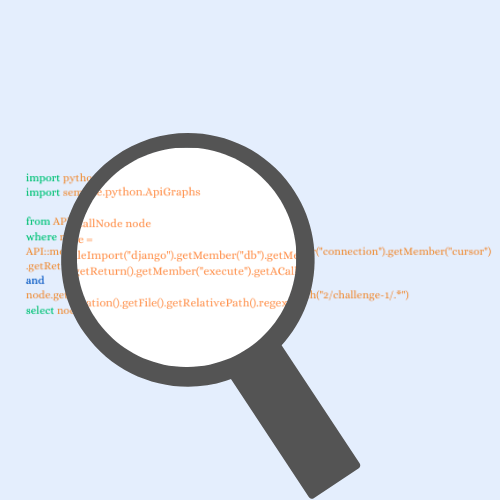
To find all function calls in a Python project, a minimal query imports the Python library and declares a Call variable:
1. import python
2.
3. from Call c
4. where c.getLocation().getFile().getRelativePath().regexpMatch("2/challenge-1/.*")
5. select c, "This is a function call"
Walking through this query line by line, the import on line 1 pulls in the Python library's internal structures and logic so you can reference classes like Call. Line 3 declares the variable c of type Call—the type representing every call in the program. Line 4 restricts the results via c.getLocation(), which returns a call's location; chaining .getFile().getRelativePath() and applying regexpMatch("2/challenge-1/.*") limits results to source files within a specific folder. Finally, line 5 reports each matching call with a note.
Adding Conditions to Find Specific Calls
Showing every call in a codebase quickly becomes unwieldy. Narrowing the search to calls to a particular function, such as eval, requires a few more conditions:
1. import python
2.
3. from Call c, Name name
4. where name.getId() = "eval" and
5. c.getFunc() = name and
6. c.getLocation().getFile().getRelativePath().regexpMatch("2/challenge-1/.*")
7. select c
QL is a declarative, logical language, so the order of conditions doesn't matter, and you can combine them with and, or, and not. Importantly, the equality sign in QL asserts equality rather than performing assignment—the operands work symmetrically.
In this query, the filters specify:
- In Pythons,
evalis a variable read (of typeName) followed by a call operator. TheNametype represents these variable read expressions. name.getId() = "eval"restricts theNameexpression to those whose string name iseval.c.getFunc() = namelinks the call to thatNameexpression, ensuring the function being called is the one we've just identified.c.getLocation().getFile().getRelativePath().regexpMatch("2/challenge-1/.*")further restricts matches to files within the challenge folder.- The
selectclause then outputs the qualifying calls.
These operations on variables are formally called predicates—built-in functions that return information about the values they're called on. To see what other types and predicates are available, hovering over an identifier in the VS Code extension shows its definition.
Encapsulating Logic with Predicates
A predicate in QL acts like a mini from-where-select query, encapsulating reusable logic. For instance, the Call type's built-in getFunc() predicate returns the callable being called; for a call like eval("some code"), getFunc() returns the expression eval. You can also write custom predicates to package your own conditions:
import python

predicate isEvalCall(Call c, Name name) {
  c.getFunc() = name and
  name.getId() = "eval"
}

from Call c, Name name
where isEvalCall(c, name) and
  c.getLocation().getFile().getRelativePath().regexpMatch("2/challenge-1/.*")
select c, "call to 'eval'."
This predicate reproduces the same logic as the query above. To create one:
- Add a predicate template indicating the return value (none here), arguments, and body.
import python

predicate <name>(<variable type>:<variable name>) {
}

from Call c, Name name
where name.getId() = "eval" and
  c.getFunc() = name and
  c.getLocation().getFile().getRelativePath().regexpMatch("2/challenge-1/.*")
select c
- Name the predicate (must start lowercase, camelCase recommended) and move your variable declarations from the
fromclause into the predicate. Move the conditions fromwhereinto the predicate's body.
import python

predicate isEvalCall(Call c, Name name) {
  c.getFunc() = name and
  name.getId() = "eval"
}

from Call c, Name name
where c.getFunc().toString() = "eval" and
  c.getLocation().getFile().getRelativePath().regexpMatch("2/challenge-1/.*")
select c, "call to 'eval'."
- Replace the moved condition with a call to the predicate:
import python

predicate isEvalCall(Call c, Name name) {
  c.getFunc() = name and
  name.getId() = "eval"
}

from Call c, Name name
where isEvalCall(c, name) and
  c.getLocation().getFile().getRelativePath().regexpMatch("2/challenge-1/.*")
select c, "call to 'eval'."
The benefit is reusability: queries that call isEvalCall(c) become easier to read and test.
Defining Your Own Types with Classes
QL is object-oriented, letting you define new types with classes. Since a class describes a set of values, you can create one to represent every call to a function named eval. This requires a characteristic predicate restricting the initial values from the supertype:
import python

class EvalCall extends Call {
  EvalCall() {
    exists(Name name |
      this.getFunc() = name |
      name.getId() = "eval")
  }
}

from Call c
where c instanceof EvalCall and
  c.getLocation().getFile().getRelativePath().regexpMatch("2/challenge-1/.*")
select c, "call to 'eval'."
This class is built as follows:
- The class extends the type
Call, which defines its initial universe of values. All new classes in CodeQL must have at least one supertype. - The characteristic predicate determines what makes this type different: an
EvalCallis aCallwhose function name iseval.
import python

class <name> extends <type> {
  <characteristic predicate>() {
  }
}

from Call c, Name name
where name.getId() = "eval" and
  c.getFunc() = name and
  c.getLocation().getFile().getRelativePath().regexpMatch("2/challenge-1/.*")
select c
- Since the original condition used a
Namevariable not available at the class level, anexists(Name name | this.getFunc() = name | name.getId() = "eval")expression introduces that local variable scoped between the pipe characters.
import python

class EvalCall extends Call {
  EvalCall() {
    exists(Name name |
      this.getFunc() = name |
      name.getId() = "eval")
  }
}

from Call c, Name name
where name.getId() = "eval" and
  c.getFunc() = name and
  c.getLocation().getFile().getRelativePath().regexpMatch("2/challenge-1/.*")
select c
- The final query then filters on the new type via
call instanceof EvalCall, which is effectively the same as checking each of the characteristic predicate's conditions.
import python

class EvalCall extends Call {
    EvalCall() {
        exists(Name name |
            this.getFunc() = name |
            name.getId() = "eval")
    }
}

from Call c
where c instanceof EvalCall and
c.getLocation().getFile().getRelativePath().regexpMatch("2/challenge-1/.*")
select c, "call to 'eval'."
It's worth noting that predicates and classes that achieve the same result will likely be compiled down to identical internal representations. CodeQL often provides multiple syntactically different routes to the same query, so your choice can be guided by readability rather than optimization.
If you're unsure which type or predicate to use when examining new code, the AST view is your best guide for the syntactic structure you need to target.
Beyond syntactic queries, CodeQL also supports reasoning about semantic elements. One of its most powerful mechanisms is the taint tracking configuration that underpins security queries. This lets you declare sources (where untrusted input may arise), sinks (dangerous APIs), and optionally sanitizers (which break the flow). A predicate then determines whether a path exists between a source and a sink, indicating a potential vulnerability. Rather than writing one, you can also run the preexisting security query packs from the CodeQL repository, which target specific vulnerability classes per language.
Where to go from here
Once the basics are comfortable, the next step is seeing how other researchers frame the same problem. Different presenters take noticeably different routes toward the same vulnerability class, and that variation is instructive in itself. The GitHub Satellite 2020 workshops are a good entry point:
- Java workshop—video and repository (recommended starting point).
- JavaScript workshop—video and repository.
GitHub Universe produced a workshop repository covering C/C++, Java, and Ruby, with corresponding C/C++ and Java videos. If you prefer a more competitive format, GitHub Security Lab has published C, Java, JavaScript, and Go challenges used in previous CTFs.
Closing thoughts
The material above should be enough to run CodeQL's built-in queries with confidence, understand how modeling works, and start writing simple custom queries. That foundation opens up considerably more territory—taint tracking and deeper security research are the natural next topics.
Trouble with a challenge or a query you are writing? The GitHub Security Lab Slack server is open to anyone and staffed by CodeQL engineers and security researchers who answer questions about queries, modeling, and tooling. You can also ask in the CodeQL repository discussions or the GitHub Security Lab repository discussions. If CodeQL helped you find a vulnerability, the lab would like to hear about it—reach out on Slack or tag @ghsecuritylab on Twitter.



