
How to centralize CodeQL-based code scanning across an application portfolio
Rolling out a static analysis security testing (SAST) workflow at enterprise scale means more than adding a job to a single pipeline. Security teams need a repeatable pattern that applications teams can adopt without duplicating the entire scan setup in every repository, and developers shouldn’t have to stray far from their normal build-and-release flow.
GitHub code scanning with the CodeQL engine handles the analysis. The challenge for large enterprises is typically integration: many organizations use third-party CI/CD tools such as Jenkins or ADO, and the application security team wants to manage the CodeQL stages centrally while leaving room for per-application customization.
Centralizing the integration with CI templates
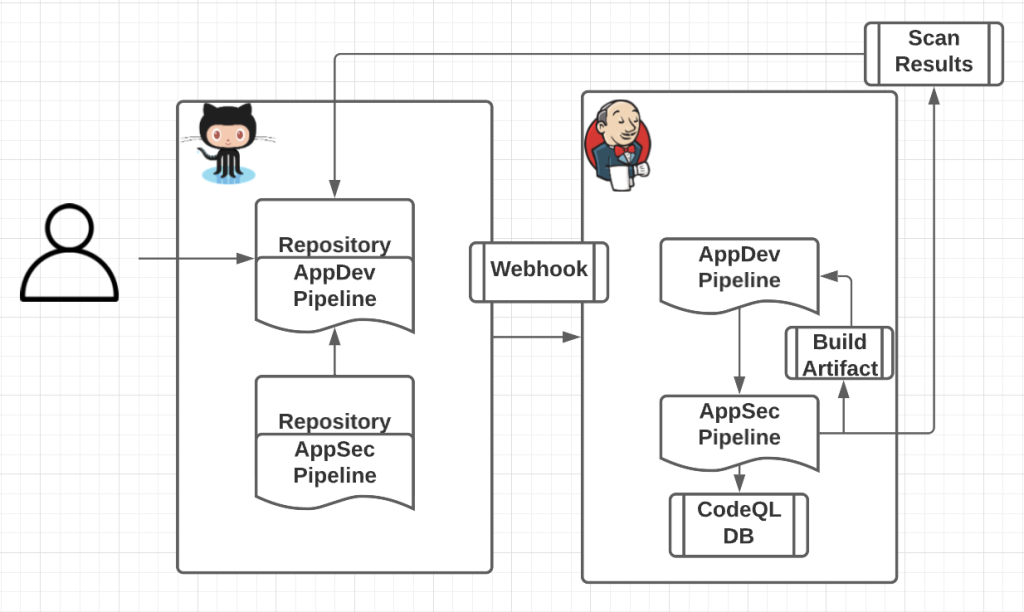
Most CI platforms support modular, reusable templates — Jenkins shared libraries or ADO Pipeline Templates, for example. The AppSec team can use that mechanism to externalize the core CodeQL functionality (create, analyze, upload) in a shared library, while individual development teams supply only what is unique to their application: specific build commands, additional queries, or extra sources and sinks. The pipeline pseudocode below shows an application team’s workflow that simply loads a centrally managed security library and passes in the build command:
### Application Teams Pipeline

@Library(["central-security-library"])
# This introduces the reusable step “codescan”, which is used below.

stage('Build & Scan'){

  steps{

    codescan("$REF_PARAMS"),

    {

### Teach “appsec-workflow” how to build the application via $BUILD_ARGS.

      sh("mvn clean package -f ./main/pom.xml")

    }

  }

}
With this approach, the central library carries the bulk of the CodeQL logic, enabling consistent results and faster adoption.
Build once, scan once, ship the same artifact
Beyond reuse, a major optimization is enabled by letting the shared component perform the build itself rather than having it observe a separate scan build. Using CodeQL CLI indirect build tracing, the library wraps the build process between the init and analyze steps. CodeQL automatically detects all build steps executed in that window as it gathers the data and call-flow context it needs.
An ADO pipeline example (pseudocode) illustrates how the caller workflow initializes CodeQL with indirect build tracing, invokes the build command arguments passed by the calling pipeline, and then analyzes the resulting database:
### Centralized Security Library Workflow

# Initialize the CodeQL database using `codeql database init --begin tracing`.

- task: CmdLine@1

  displayName: Initialize CodeQL database

  inputs:

      # Assumes the source code is checked out to the current working directory.

      # Creates a database at `/codeql-dbs/example-repo`.

      # Ensure you "source" the relevant environment variables after this step!

      script: "codeql database init --language $LANG --source-root . --begin-tracing /codeql-dbs/example-repo"

# Set CodeQL environment variables

- … [docs](https://codeql.github.com/docs/codeql-cli/creating-codeql-databases/#example-of-creating-a-codeql-database-using-indirect-build-tracing)

# Build the App with Args

- task: CmdLine@1

  displayName: Build app with build command Args from caller

  inputs:

      script: $BUILD_ARGS

# Use `codeql database finalize` to complete database creation after the build is done.

- task: CmdLine@2

   displayName: Finalize CodeQL database

   inputs:

      script: 'codeql database finalize /codeql-dbs/example-repo'

# Analyze the database

- task: CmdLine@2

   displayName: Analyze CodeQL database

   inputs:

      script: 'codeql database analyze /codeql-dbs/example-repo java-code-scanning.qls --sarif-category=java --format=sarif-latest --output=/temp/example-repo-java.sarif'

# Upload the results.

- task: CmdLine@2

   displayName: Upload CodeQL results

   inputs:

      script: 'echo "$TOKEN" | codeql github upload-results

    --repository=$BUILD_REPOSITORY_NAME \ --ref=$BUILD_SOURCEBRANCH \  --commit=$BUILD_SOURCEVERSION

    --sarif=/temp/example-repo-java.sarif --github-auth-stdin'
The outcome is twofold. The build produces the standard deployable artifact, and CodeQL produces a database representing the source code in the same single build. The analysis completes, results are exported to a SARIF file, and that file uploads to the application team’s GitHub repository for immediate review. The rest of the app team’s CI pipeline continues unchanged.
For application developers, the result is security visibility inside the features being delivered, with no separate scanning step or extra build to maintain. For application security teams, the benefit is a scalable integration that is consistent, lightweight, and respectful of developers’ existing pipelines.



