
Security overview opens up across GitHub Enterprise
GitHub is widening access to its security overview, the centralized dashboard that tracks application security risk across repositories. Previously, the security overview was limited to organization owners and security managers in organizations with GitHub Advanced Security. Now, all GitHub Enterprise accounts have access, and every user within an enterprise can view the pages—not just those in administrative roles.
The view each user gets is scoped to the repositories and alerts they can already see. Users with write access to a repository see code scanning alert counts and enablement details for that repository. Users with admin access additionally see Dependabot and secret scanning alert counts and enablement details.
What the dashboards surface
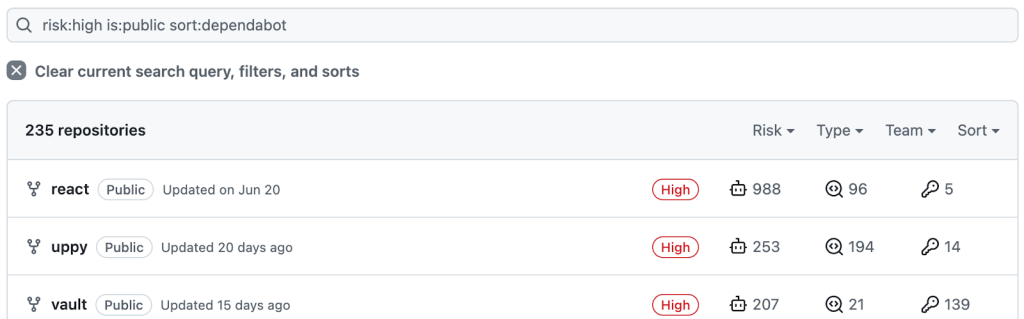
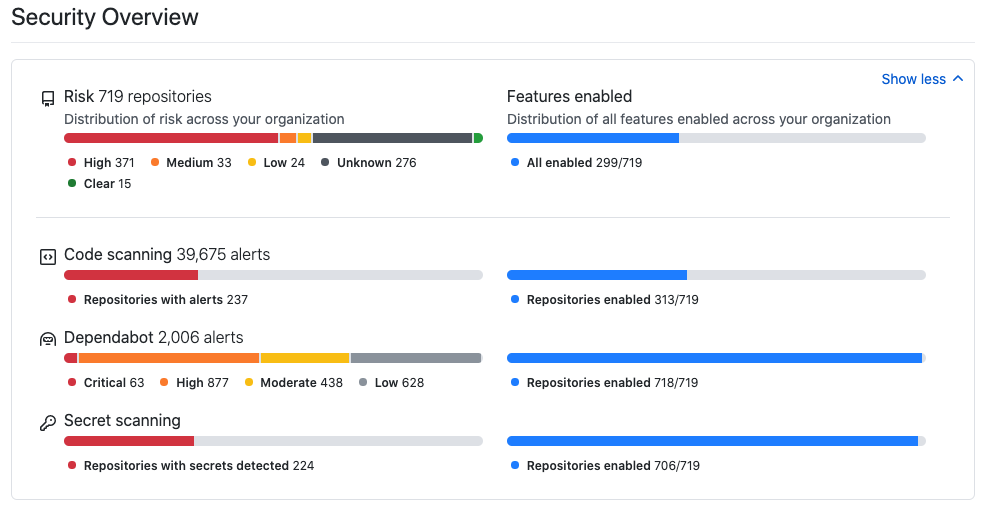
The security overview shows which security features are enabled across every repository in your organization, and it flags repositories where features haven't been turned on—areas of unknown risk. For any repository where you're an admin or security manager, you get a repository-level view with an assigned risk category, the security features enabled, and active alert counts. From there you can drill into an individual repository to enable features or review the full list of alerts.
The specific alert types covered:
- Dependabot alerts—available on any repository. These flag vulnerable dependencies based on the GitHub Advisory Database.
- Code scanning alerts—available on any public repository, or any private repository with GitHub Advanced Security. These surface potential vulnerabilities in your own code, found by CodeQL or a third-party static analysis tool you've configured.
- Secret scanning alerts—available on any repository with GitHub Advanced Security. These flag credentials committed to your code. GitHub also scans all pushes to public repositories for secrets and sends findings to its secret scanning partners; for example, committing an AWS key and secret to a public repository triggers an alert from AWS within seconds.
Filtering down to what matters
The dashboards include a comprehensive set of filters so you can narrow the view to a subset of repositories—for example, high-risk public repositories with Dependabot alerts. You can also run targeted searches for specific open alerts, such as a particular CVE.