
What does "reliable" mean for a web app?
The web reaches people on many devices and network types. That makes it hard to define, let alone deliver, a reliable experience. You can think about reliability in a few distinct ways.
Offline reliability
Users expect platform-specific mobile apps to open and work without a network connection. That same expectation is now carrying over to the web. Building web apps that function offline has historically been difficult, but it is a legitimate goal for modern web development.
Reliability under poor connectivity
A web app that loads quickly on a fast wi-fi connection may fail that expectation on a cellular or high-latency connection. The often-cited "lie-fi" scenario—where a connection appears active but delivers data very slowly—is another challenge. A reliable app must be fast enough for users in all these conditions, not just under ideal ones.
Building blocks for reliable apps
The modern web platform provides service workers and the Cache Storage API to address these challenges. These technologies let you place code between your web app and the network. In many cases, that code can bypass the network entirely, serving previously cached content instead of making a request to the server.
A concrete way to measure reliability
Once a service worker is in place, verifying that it actually works is tricky. You need to know whether the app really avoids the network, and whether a small change to a caching strategy breaks the offline experience.
Lighthouse offers a specific audit that directly addresses this: Responds with a 200 OK while offline.
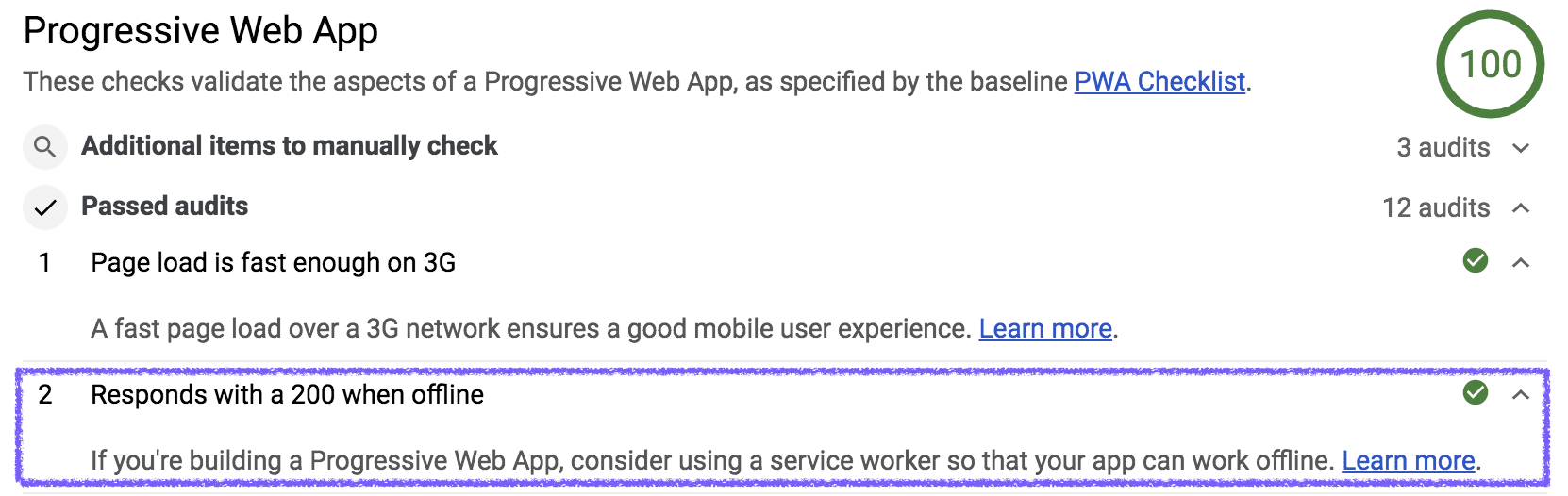
The test is straightforward: Lighthouse simulates a loss of network connectivity in the browser, then attempts to load the audited URL. It checks whether the app responds with a status code of 200 under that condition. This provides a controlled, repeatable way to test one dimension of reliability—offline behavior.
Where to start
If you are new to this, expect to fail the "Responds with a 200 while offline" audit on the first run. That is normal. Unless you are using a customized starter template, web apps do not come with that type of reliability enabled by default.
The path forward involves identifying what your web app loads during normal operations and using that knowledge to build caching strategies that make the app resilient. As you make changes, re-run the Lighthouse audit to verify that your offline experience remains intact. Each run serves as a checkpoint on the way to turning a fresh web app into a reliable progressive web app.



