When the Rule Deserves a Second Look
Every frontend developer has internalized the commandment: never block the main thread. It’s repeated in every performance guide, and for good reason. The browser’s main thread is single-threaded, and it’s shared — rendering, input handling, and JavaScript all compete for the same slice of time. The longer any single task holds the thread, the more sluggish the interface feels.
That logic pushes work into background workers, service workers, and other isolated contexts. But the “shared-nothing” architecture that makes those contexts safe also makes them expensive to talk to. Moving data between contexts requires serialization, copying, and deserialization — and that transfer itself can block the main thread just as effectively as the computation you were trying to avoid.
In some cases, the cost of shipping data to a background context exceeds the cost of simply processing it on the main thread. That counterintuitive reality emerged while building a Chrome extension with screenshot capabilities, and it’s worth examining where the conventional wisdom stops holding.
Isolation Comes at a Price
Browsers run multiple isolated environments simultaneously, each with its own memory space and access rules:
- Main thread — JavaScript logic, DOM access, rendering, and user interaction.
- Web Workers — JavaScript execution without DOM access, intended for heavy data tasks.
- Service Workers — Network proxies that can intercept requests and run even when the page is closed.
- Chrome extension contexts — Background service workers, content scripts, and Offscreen Documents.
These environments cannot read each other’s variables directly. They communicate by passing messages through APIs like postMessage(), and that’s where the hidden cost lives.
When you call postMessage() with a data payload, the browser invokes the Structured Clone Algorithm (SCA). Similar in spirit to JSON.stringify() but more powerful, SCA performs a deep recursive copy: it walks the entire data structure, clones every value, serializes it into a transportable format, ships the bytes to the target context, and reconstructs the object on the receiving side.
For small objects like {theme: "dark"}, SCA is imperceptible. But SCA is a synchronous, blocking O(n) operation — the cost scales linearly with data size. Send an 8MB image payload to a worker, and the main thread must pause to complete the serialization and copying before the worker even begins processing.
If the time to pack, ship, unpack, and return exceeds the time to just process the data synchronously, offloading becomes counterproductive.
Transferable Objects Aren’t Always the Answer
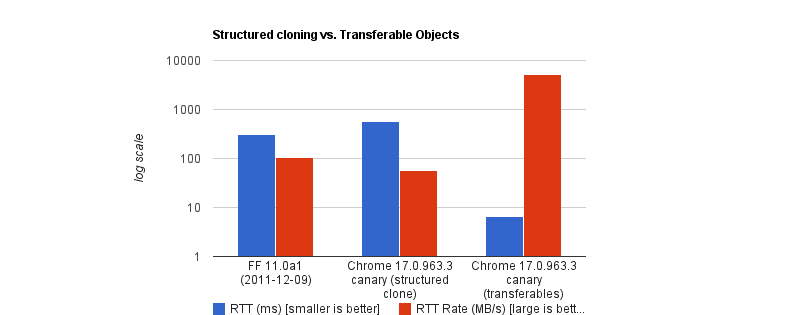
Developers chasing maximum performance often reach for Transferable objects — ArrayBuffer, ImageBitmap, or MessagePort — which bypass SCA entirely. Instead of copying, the browser transfers ownership of the data from one context to another. The sending context loses access instantly; the receiver takes full control. Chrome’s benchmarks show transferring a 32MB ArrayBuffer can complete in under 7ms, versus roughly 300ms for cloning — roughly a 43x speedup.

But Transferable objects come with significant limitations:
- Data is lost after transfer. If the UI still needs the original data — for example, to display an image preview — it’s no longer accessible.
- Not everything is transferable. Plain JavaScript objects, Blobs, and Base64 strings cannot be transferred.
- API constraints. In Chrome extensions,
chrome.runtime.sendMessage()still forces JSON serialization.
For the screenshot extension in question, Transferable objects were simply not viable.
The Reasoning Behind Isolation
Offloading long-running CPU tasks to background threads is correct in principle. A browser must paint a new frame every 16.6ms to maintain fluid motion, and any task exceeding 50ms is classified as a “long task” that risks jank. Background execution protects the UI from those stalls.
The problem arises when “never block the main thread” becomes an absolute rule rather than a heuristic. The real question isn’t whether to block — it’s whether a given task is more expensive to process or more expensive to move.
The rule is less “never block the main thread” than “never block the main thread for too long.”
A Case Where the Recommended Path Was Slower
The screenshot extension used the recommended architecture: an Offscreen Document running in the background, handling canvas operations. Offscreen Documents are a solid fit for DOM work in extension contexts — they have a DOM and canvas support, making them ideal for cropping, stitching, watermarking, or other image manipulation.
The implementation proceeded in three steps:
- The background Service Worker captured a screenshot via
chrome.tabs.captureVisibleTab(), returning a Base64-encoded data URL string. - The Service Worker sent this payload to the Offscreen Document via
chrome.runtime.sendMessage(). - The Offscreen Document loaded the image into an
<img>element, drew it to a canvas, applied crop coordinates, encoded the result, and sent the processed image back.
Testing revealed a consistent 2–3 second lag — hardly the “instant” experience a screenshot tool should deliver. The bottleneck wasn’t image processing; it was transport.
captureVisibleTab() returns a Base64 URL string that can reach roughly 1MB on a standard 1080p display, depending on image detail. On high-DPI displays like Retina MacBooks, the image size effectively doubles by default. Since extension messaging relies on JSON serialization, the payload gets serialized at least twice — once in transit to the Offscreen Document, and again when the processed result returns to the background worker. The cropping itself was fast; the data transfer was not.
The High-DPI Complication
A subtler problem emerged alongside the latency. Crop results were off — images were scaled incorrectly or coordinates landed in the wrong places. The cause lay in mismatched coordinate systems.
The content script captured crop region coordinates using getBoundingClientRect(), which measures in CSS pixels. But Chrome’s native screenshot capture doesn’t automatically crop at CSS resolution — it uses physical hardware pixels, and the devicePixelRatio (DPR) determines the conversion factor between the two systems. On a Retina display with DPR 2, a user who highlights a 400x300 CSS pixel region is actually selecting an 800x600 physical pixel area in the captured image.
One CSS pixel equals one physical pixel at DPR 1. On Retina or modern 4K displays, DPR is typically 2 or 3.
Producing an accurate crop requires applying the correct DPR scaling to the capture coordinates. But Offscreen Documents have no physical display — they default to a DPR of 1. To compensate, the extension would need to capture the devicePixelRatio from the active tab, serialize it, pass it alongside the image, and manually apply the scaling math in the background context. Complexity compounds quickly.
At that point, the question becomes legitimate: what if the “wrong” approach — doing the work directly on the main thread — actually delivered the better experience?
When Blocking the Main Thread Is the Right Call
Developers often take the stance that only UI work belongs on the main thread. That rule has merit, but it ignores a class of tasks where the user explicitly asks for an immediate result and the work itself is fast — on the order of a second or less. In those cases, keeping the work on the main thread can be the better engineering decision.
That was the situation when rearchitecting an image capture flow. The original design sent work to an Offscreen Document:
Background → [serialize] → Offscreen Document → [serialize] → Background → Content ScriptThe revision scrapped that entirely and moved processing into the active tab:
- The background Service Worker captures the screen and produces a Base64 string.
- The background sends that payload directly to the content script in the active tab using
chrome.scripting.executeScript(). - The content script — running on the main thread — draws the image to a canvas, performs the crop with the correct DPR value, and copies the result to the clipboard.
// Background Script
const screenshotUrl = await chrome.tabs.captureVisibleTab(undefined, { format: "png" });

// Inject the processing function into the active tab as a content script
await chrome.scripting.executeScript({
  target: { tabId: activeTab.id },
  func: processAndCopyImage,
  args: [{ base64Image: screenshotUrl, cropData: userSelection }]
});
This eliminates several context hops and the round trips required for JSON serialization. The only cross-context transfer left is the data URL going from the background to the content script. The Retina DPI problem also disappears: the content script runs inside the real tab, where it can read the monitor's actual devicePixelRatio.
The trade-off is that the main thread is now occupied during image processing. That is acceptable, though, when the rule becomes "do not block the main thread for too long." A task the user requests that finishes in about one second is a fair candidate. The inverse principle also holds: do not isolate a process when the data transfer cost exceeds the processing cost.
A Cost-Based Decision Model
The choice of whether to offload work comes down to where the expense sits:
Compute-Heavy Tasks (CPU-Bound)
These tasks spend most of their time on calculations or heavy transformations — image compression, audio profiling, physics simulation. Their cost is in computation, not data volume, so the transfer overhead is negligible next to the work itself.
Data-Heavy Tasks (Data-Bound)
These are the opposite. An operation like image cropping, filtering an array, or a shallow copy is cheap to execute but expensive to move. When the payload is megabytes and the operation runs in 50ms, offloading to the background is often negative-sum: you pay more in transport than you save in isolation.
One way to frame the decision:
Total Time = Serialization Cost
  + Transit
  + Background Processing Time
  + Deserialization Cost
If the background processing time dominates your operation, isolation wins. But when serialization, deserialization, and transit add up to more than the actual work, keep it inline.
When unsure whether a task is CPU-heavy or data-heavy, measure it. performance.mark() and performance.measure() around postMessage calls can profile the transfer cost directly.