
Rendering large lists without tanking performance
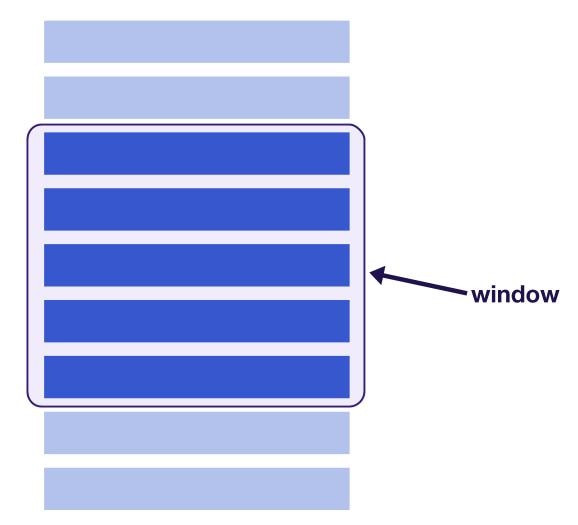
Long lists and tables are a common performance bottleneck in React apps. Rendering hundreds or thousands of DOM nodes at once slows down initial paint, makes scrolling janky, and inflates memory usage. react-window solves this with virtualization: it renders only the items currently visible in the viewport, reusing DOM nodes as the user scrolls. The result is a constant, small number of mounted elements regardless of the total list size.
Fixed vs. variable size lists
react-window exports two primary list components: FixedSizeList for items of identical dimensions, and VariableSizeList when row heights or widths differ.
FixedSizeList
For a one-dimensional list where every item is the same size, pass height, width, and itemSize props to FixedSizeList. The child render function receives the item index and a style object — you must attach that style to the row element, since the library positions every row absolutely and sets its dimensions inline.
import React from 'react';
import { FixedSizeList } from 'react-window';

const items = [...] // some list of items

const Row = ({ index, style }) => (
  <div style={style}>
     {/* define the row component using items[index] */}
  </div>
);

const ListComponent = () => (
  <FixedSizeList
    height={500}
    width={500}
    itemSize={120}
    itemCount={items.length}
  >
    {Row}
  </FixedSizeList>
);

export default ListComponent;
Access the item data via the index argument, e.g. items[index].
VariableSizeList
When items vary in size, swap in VariableSizeList. The API is the same, but itemSize becomes a function that receives the item index and returns its size. In real applications, derive these sizes from your data model or an API rather than randomizing them as in the example below.
import React from 'react';
import { VariableSizeList } from 'react-window';

const items = [...] // some list of items

const Row = ({ index, style }) => (
  <div style={style}>
     {/* define the row component using items[index] */}
  </div>
);

const getItemSize = index => {
  // return a size for items[index]
}

const ListComponent = () => (
  <VariableSizeList
    height={500}
    width={500}
    itemCount={items.length}
    itemSize={getItemSize}
  >
    {Row}
  </VariableSizeList>
);

export default ListComponent;
Grids for multi-dimensional data
To virtualize a two-dimensional grid, use the grid components. FixedSizeGrid and VariableSizeGrid work like their list counterparts but require separate dimensions and counts for columns and rows. In FixedSizeGrid, you provide columnCount, rowCount, columnWidth, and rowHeight. For VariableSizeGrid, pass functions that calculate the width and height for each column and row.

Combining virtualization with infinite loading
Infinite scroll is a common pattern for lazy-loading list data. It avoids loading every item up front, but still leaves you with thousands of DOM nodes in the document after the user has scrolled far enough. That large DOM is itself a performance problem, since style recalculation and mutations slow down as the node count grows.
The right approach is to keep a small window of rendered nodes via react-window while still fetching additional entries as the user approaches the end. The companion package react-window-infinite-loader wires those two behaviors together.
State for the loaded items lives in the parent component. A loadMore callback is passed down to the list so the infinite loader can trigger a fetch when the scroll position reaches the threshold.
import React, { Component } from 'react';

import ListComponent from './ListComponent';

class App extends Component {
  constructor(props) {
    super(props);
    this.state = {
      items: [], // instantiate initial list here
      moreItemsLoading: false,
      hasNextPage: true
    };

    this.loadMore = this.loadMore.bind(this);
  }

  loadMore() {
   // method to fetch newer entries for the list
  }

  render() {
    const { items, moreItemsLoading, hasNextPage } = this.state;

    return (
      <ListComponent
        items={items}
        moreItemsLoading={moreItemsLoading}
        loadMore={this.loadMore}
        hasNextPage={hasNextPage}
      />
    );
  }
}

export default App;
The list component wraps the FixedSizeList inside an InfiniteLoader. Three props matter here:
isItemLoaded— predicates whether a given item has been loaded yet.itemCount— the total expected number of items, including those not yet fetched.loadMoreItems— a callback that returns a promise resolving to more list data.
The list is rendered via a render prop that also receives onItemsRendered and ref, which the package requires internally to track the scroll position and current visible range.
import React from 'react';
import { FixedSizeList } from 'react-window';
import InfiniteLoader from "react-window-infinite-loader";

const ListComponent = ({ items, moreItemsLoading, loadMore, hasNextPage }) => {
  const Row = ({ index, style }) => (
     {/* define the row component using items[index] */}
  );

  const itemCount = hasNextPage ? items.length + 1 : items.length;

  return (
    <InfiniteLoader
      isItemLoaded={index => index < items.length}
      itemCount={itemCount}
      loadMoreItems={loadMore}
    >
      {({ onItemsRendered, ref }) => (
        <FixedSizeList
          height={500}
          width={500}
          itemCount={itemCount}
          itemSize={120}
          onItemsRendered={onItemsRendered}
          ref={ref}
        >
          {Row}
        </FixedSizeList>
      )}
  </InfiniteLoader>
  )
};

export default ListComponent;
When a not-yet-loaded item is about to be rendered, you can show a placeholder based on its index. This keeps the UI smooth while the background request for newer entries completes.
const Row = ({ index, style }) => {
  const itemLoading = index === items.length;

  if (itemLoading) {
      // return loading state
  } else {
      // return item
  }
};
In this scenario, scrolling returns 10 more users from the random user API each time you approach the bottom, while the DOM itself only ever contains the visible window of rows.
Overscanning to avoid blank flashes
Virtualized lists render items strictly inside the viewport. During fast scrolling, the visible window can change faster than React mounts new nodes, producing a brief flash of empty space. react-window mitigates this with the overscanCount prop. Setting it to a value above the default of 1 renders that many extra items above and below the visible window at all times.
<FixedSizeList
  //...
  overscanCount={4}
>
  {...}
</FixedSizeList>
A higher value gives the scroll handler buffer so the next batch of rows is already in place. Don't set it too high though — the entire point is to keep the mounted node count small, and overscanning defeats that if overdone. For grids, use overscanColumnsCount and overscanRowsCount to control the horizontal and vertical buffer independently.
Adopting virtualization
To put this into practice in your own app, start by measuring rendering and scrolling performance so you know the baseline cost of the current list — the FPS meter in Chrome DevTools exposes frame rate drops caused by overly large DOM trees.
Then follow this rough sequence:
- Add
react-windowto the long lists or grids that are hurting performance first. - If a feature is absent from
react-windowand you can't extend it,react-virtualizedoffers a more feature-complete API. - Layer
react-window-infinite-loaderon top when you need lazy-loaded items on scroll. - Set
overscanCounton lists andoverscanColumnsCount/overscanRowsCounton grids to hide blank flashes — with a value that's just enough to be smooth, not so large that it recreates the DOM bloat you're trying to eliminate.


