
Utility classes typically do one job, so you generally don't want outside styles overriding them. The blunt instrument for this is !important, and Tailwind's config file includes an !important option that appends it to every utility class. That works, but CSS Cascade Layers offer a cleaner way to settle specificity conflicts.
Layers group styles together, and a layer's precedence beats a selector's specificity; specificity only matters within a single layer. Declaring a sensible layer order is therefore a good way to prevent conflicts when custom styles live next to those from a framework like Tailwind.
How Tailwind's output is built
A Tailwind source .css file usually starts something like this:
@tailwind base;
@tailwind components;
@tailwind utilities;
@tailwind variants;
Per the official Tailwind docs, these are directives — Tailwind-specific at-rules that provide special functionality for Tailwind projects. The @tailwind directive inserts Tailwind's base, components, utilities and variants styles.
In the generated CSS file, the reset known as Preflight comes first as part of the base styles, followed by the CSS variables Tailwind needs. The components section is where your own custom classes belong. Utility classes used in your markup come next, and variants (hover, focus, responsive styles, and so on) appear last.
Tailwind's own @layer
Tailwind has its own @layer syntax, which is distinct from the CSS standard. It is compiled away rather than making it into the output, and it exists to inject extra styles into a chosen part of the output file. To add styles to the base output, for example:
@layer base {
  h1 {
    font-size: 30px;
  }
}
components is empty by default, so it serves purely as a place for your own classes. The Tailwind-idiomatic route is @apply (though Tailwind's creator has recently advised against it), but plain classes work too:
@layer components {
  .btn-blue {
    background-color: blue;
    color: white;
  }
}
Switching to the CSS standard
The CSS standard version is considerably more capable. Here is the same setup rewritten to use it:
@layer tailwind-base, my-custom-styles, tailwind-utilities;

@layer tailwind-base {
  @tailwind base;
}

@layer tailwind-utilities {
  @tailwind utilities;
  @tailwind variants;
}
These layers are not compiled away — the browser understands them, and DevTools in Edge, Chrome, Safari and Firefox will list the layers you've defined.
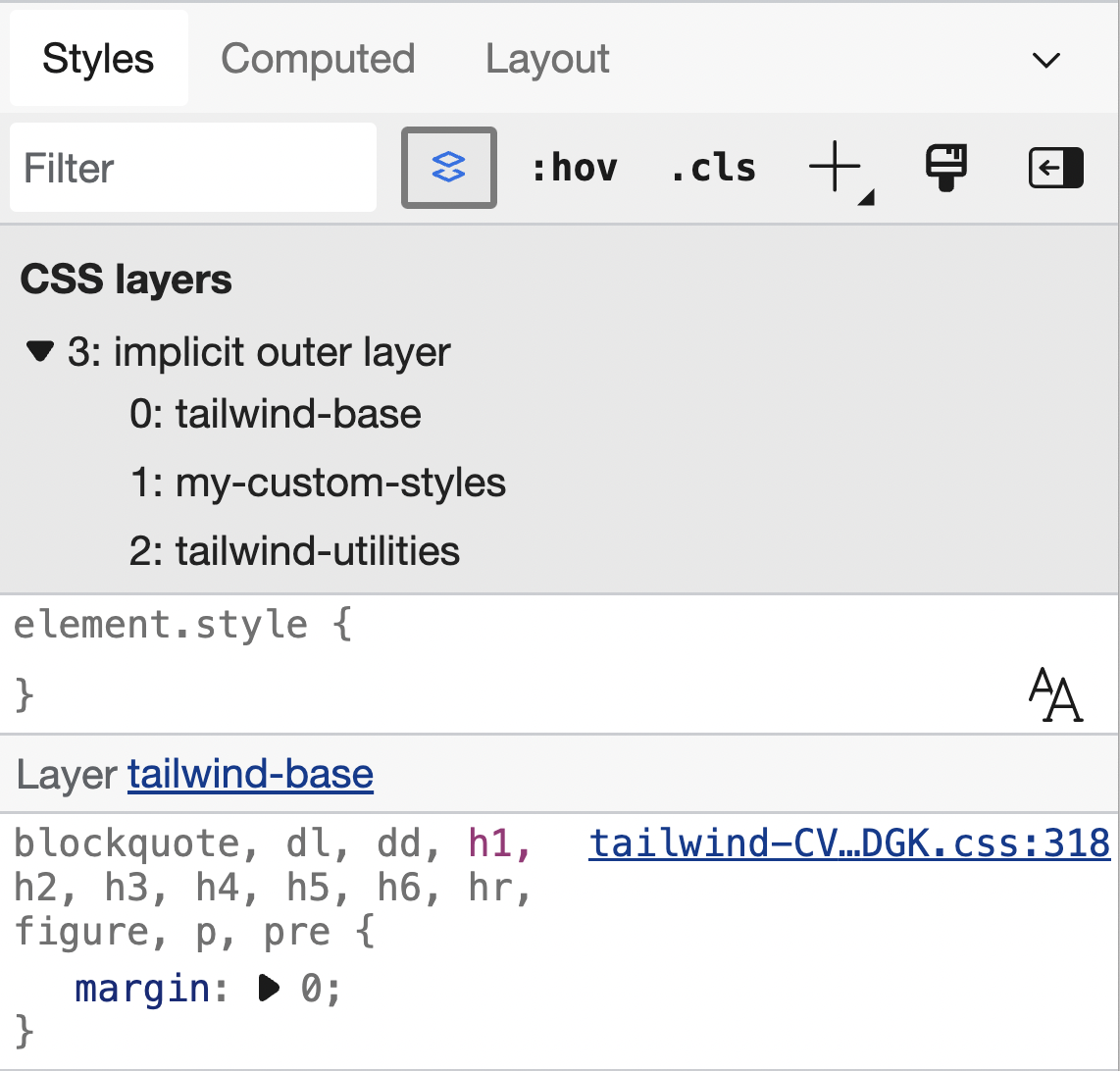
The number and names of layers are up to you; in this example all custom styles sit in one layer, my-custom-styles. The layer order is fixed on the first line:
@layer tailwind-base, my-custom-styles, tailwind-utilities;That declaration must come before any other code that uses @layer. Layer power increases from left to right: the first entry is the least powerful and the last is the most powerful. So tailwind-base is overridden by every layer after it, while tailwind-utilities always wins over the rest — regardless of source order or specificity. Utilities and variants could be split into separate layers, but Tailwind's maintainers guarantee variants trump utilities as long as the variants directive appears below the utilities one.
Anything outside a layer beats anything inside a layer, the one exception being styles marked !important. That makes it viable to leave utilities and variants unlayered instead:
@layer tailwind-base, tailwind-components, my-custom-styles;

@layer tailwind-base {
  @tailwind base;
}

@layer tailwind-components {
  @tailwind components;
}

@tailwind utilities;
@tailwind variants;
The payoff: complex selectors under control
Advanced selectors still have their place. Consider a keyboard-only variant of :focus-within built with :has (available starting in Chrome 105), which styles a parent when a child receives focus. Tailwind 3.1 added custom variants — for instance <div class="[&:has(:focus-visible)]:outline-red-600"> — but writing the CSS directly is sometimes simpler:
@layer tailwind-base, my-custom-styles;
@layer tailwind-base {
  @tailwind base;
}

@tailwind utilities;

@layer my-custom-styles {
  .radio-container {
    padding: 4px 24px;
    border: solid 2px rgb(230, 230, 230);
  }
  .radio-container:has(:focus-visible) {
    outline: solid 2px blue;
  }
}
Now suppose one instance needs outline-color changed from blue to something else, on an element carrying both the Tailwind class .outline-red-600 and our .radio-container:has(:focus-visible) class:
<div class="outline-red-600 radio-container"> ... </div>Ordinarily the higher specificity of .radio-container:has(:focus-visible) would neutralize the Tailwind class even when it appears later in the source order. The Tailwind @layer directive only relies on source order, but the standard @layer overrules specificity. The practical result is that custom styles can use elaborate selectors and still be overridden by Tailwind utilities where needed, with no !important required.




