
Memoization as a caching strategy
React's core job is keeping the UI in sync with state through re-renders. Each re-render produces a fresh snapshot of the UI as JavaScript objects. React doesn't update individual DOM nodes directly; it generates an entire new snapshot on every state change and diffs it against the previous one.
React comes heavily optimized out of the box, so most re-renders are cheap. But when a snapshot takes a long time to generate — because of a heavy computation or a deep component tree — performance problems appear. useMemo and useCallback are optimization tools that work in two distinct ways:
- Reducing work done in each render
- Reducing the number of renders a component performs
Heavy computation case
Consider a component that finds all prime numbers between 0 and a user-supplied selectedNum. The calculation loops through every number in range, checking primality — work that grows with the input and can involve tens of thousands of iterations.
The problem appears when the component manages unrelated state. Add a digital clock that updates time once per second:
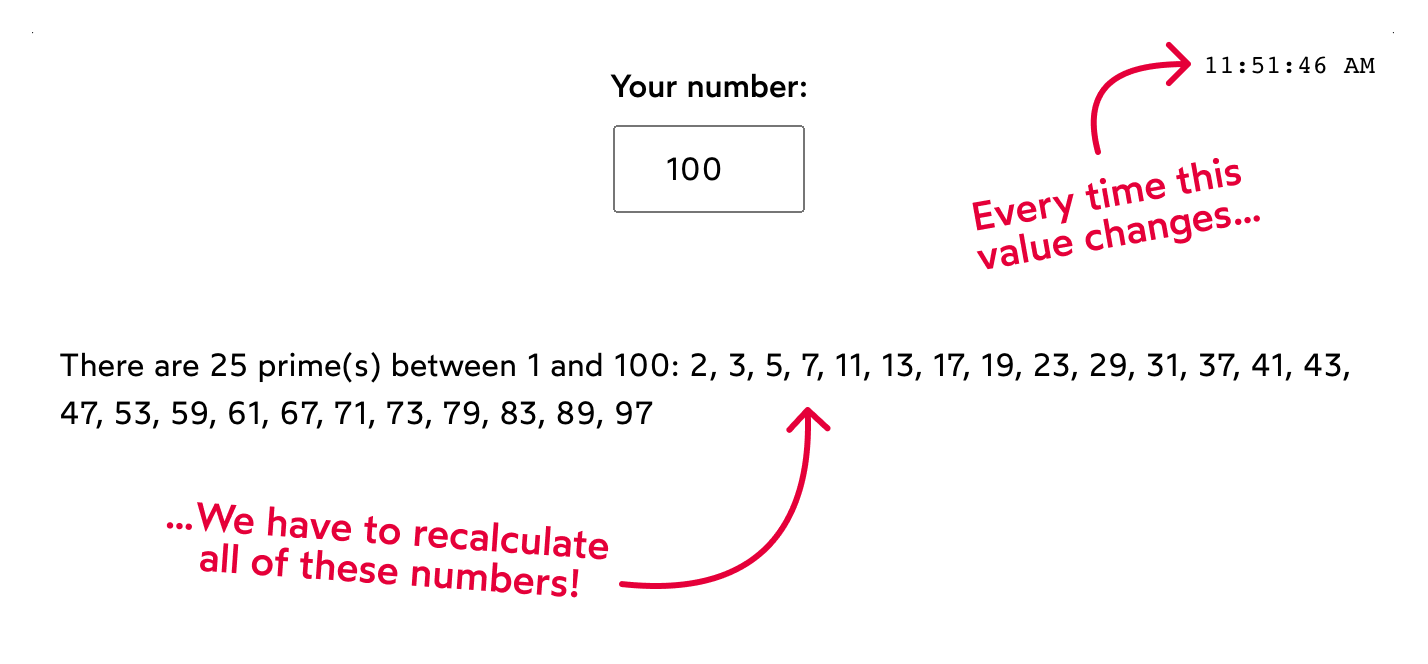
Since the component re-renders whenever either state variable changes, the prime calculation runs every second, even when selectedNum hasn't moved. JavaScript runs on a single thread, so this constant computation competes with user interactions and can make the app feel unresponsive on slower devices.
useMemo solves this by remembering a computed value between renders. It takes two arguments: a function containing the work, and a dependencies array. On the initial render, React invokes the function and stores the returned value. On later renders, React checks the dependencies; if none changed, it skips the function and returns the cached result. Changing selectedNum invalidates the cache and triggers recalculation.
In short, useMemo is a cache where the dependency list dictates invalidation. Here it tells React to recalculate primes only when selectedNum changes:
const allPrimes = React.useMemo(() => {
  const result = [];

  for (let counter = 2; counter < selectedNum; counter++) {
    if (isPrime(counter)) {
      result.push(counter);
    }
  }

  return result;
}, [selectedNum]);
Restructuring instead of memoization
Memoization isn't always the best first move. Often you can eliminate the problem by reshaping your component tree. Instead of keeping the prime logic and the clock in the same component, split them:
import React from 'react';

import Clock from './Clock';
import PrimeCalculator from './PrimeCalculator';

function App() {
  return (
    <>
      <Clock />
      <PrimeCalculator />
    </>
  );
}

export default App;
When Clock and PrimeCalculator are separate children of App, each manages its own state. A re-render in one doesn't trigger the other, so the heavy computation stops running on every clock tick.
The conventional advice is to lift state up, but sometimes the right answer is pushing state down. Each component should own one responsibility; the original App was handling two unrelated concerns.
When state legitimately needs to live higher in the tree, though, splitting components alone won't help. Suppose time must sit above PrimeCalculator:
import React from 'react';
import { getHours } from 'date-fns';

import Clock from './Clock';
import PrimeCalculator from './PrimeCalculator';

// Transform our PrimeCalculator into a pure component:
const PurePrimeCalculator = React.memo(PrimeCalculator);

function App() {
  const time = useTime();

  // Come up with a suitable background color,
  // based on the time of day:
  const backgroundColor = getBackgroundColorFromTime(time);

  return (
    <div style={{ backgroundColor }}>
      <Clock time={time} />
      <PurePrimeCalculator />
    </div>
  );
}

const getBackgroundColorFromTime = (time) => {
  const hours = getHours(time);

  if (hours < 12) {
    // A light yellow for mornings
    return 'hsl(50deg 100% 90%)';
  } else if (hours < 18) {
    // Dull blue in the afternoon
    return 'hsl(220deg 60% 92%)'
  } else {
    // Deeper blue at night
    return 'hsl(220deg 100% 80%)';
  }
}

function useTime() {
  const [time, setTime] = React.useState(new Date());

  React.useEffect(() => {
    const intervalId = window.setInterval(() => {
      setTime(new Date());
    }, 1000);

    return () => {
      window.clearInterval(intervalId);
    }
  }, []);

  return time;
}

export default App;
Wrapping the expensive component with React.memo turns it into a pure component: it will only re-render when its props or internal state change. This protects it from unrelated parent updates that cause re-renders.
The perspective shift matters here. The first approach memoizes a specific computation — the prime-number algorithm. The second approach memoizes the entire component, optimizing the parent rather than individual lines of code. Both achieve the same outcome: the expensive calculation only runs when selectedNum changes. Each tool has its place, though in pure-component situations a known problem emerges: pure components re-render more often than expected, even when nothing appears to have changed.
Why React.memo() Doesn't Always Work
Consider a Boxes component wrapped in React.memo(), rendering a set of colorful boxes. It receives just one prop: a boxes array. In the parent component, there's also some unrelated state, like a user's name. Logically, when the name changes, Boxes should not re-render—its props haven't changed.
import React from 'react';

import Boxes from './Boxes';

function App() {
  const [name, setName] =
    React.useState('');
  const [boxWidth, setBoxWidth] =
    React.useState(1);

  const id = React.useId();

  // Try changing some of these values!
  const boxes = [
    {
      flex: boxWidth,
      background: 'hsl(345deg 100% 50%)',
    },
    {
      flex: 3,
      background: 'hsl(260deg 100% 40%)',
    },
    {
      flex: 1,
      background: 'hsl(50deg 100% 60%)',
    },
  ];

  return (
    <>
      <Boxes boxes={boxes} />

      <section>
        <div className="row">
          <label htmlFor={`${id}-name`}>
            Name:
          </label>
          <input
            id={`${id}-name`}
            type="text"
            value={name}
            onChange={(event) => {
              setName(event.target.value);
            }}
          />
        </div>
        <label htmlFor={`${id}-box-width`}>
          First box width:
        </label>
        <input
          id={`${id}-box-width`}
          type="range"
          min={1}
          max={5}
          step={0.01}
          value={boxWidth}
          onChange={(event) => {
            setBoxWidth(
              Number(event.target.value)
            );
          }}
        />
      </section>
    </>
  );
}

export default App;
Yet, it does re-render. Why? Because on every render of the parent, you create a brand new array and pass it down. Value-wise, it's the same data, but reference-wise, it's a totally different object.
This is a fundamental JavaScript behavior, not a React quirk. Forget React and consider plain JavaScript:
function getNumbers() {
  return [1, 2, 3];
}

const firstResult = getNumbers();
const secondResult = getNumbers();

console.log(firstResult === secondResult);
Are firstResult and secondResult equal? They both look like [1, 2, 3]. So with the === operator, they should be equal, right? Not exactly.
The === operator doesn't compare the contents of objects and arrays; it compares whether two things are the same thing in memory. Two identical-looking arrays are distinct, like identical twins—they aren't the same person.

A React component is just a JavaScript function. When you render it, you invoke it. When the name state changes in the parent, the whole component function re-runs.
// Every time we render this component, we call this function...
function App() {
  // ...and wind up creating a brand new array...
  const boxes = [
    { flex: boxWidth, background: 'hsl(345deg 100% 50%)' },
    { flex: 3, background: 'hsl(260deg 100% 40%)' },
    { flex: 1, background: 'hsl(50deg 100% 60%)' },
  ];

  // ...which is then passed as a prop to this component!
  return (
    <Boxes boxes={boxes} />
  );
}
This re-execution constructs a fresh boxes array, which is then passed as a prop. From Boxes's perspective, the prop value looks new, even if its structure is the same. React.memo() sees a new reference and lets the re-render through.
useMemo for Reference Preservation
To solve this, you want to keep the same array reference between renders unless its dependencies change. That's precisely what useMemo does:
const boxes = React.useMemo(() => {
  return [
    { flex: boxWidth, background: 'hsl(345deg 100% 50%)' },
    { flex: 3, background: 'hsl(260deg 100% 40%)' },
    { flex: 1, background: 'hsl(50deg 100% 60%)' },
  ];
}, [boxWidth]);
In this case, the calculation isn't expensive—you aren't computing heavy numbers. The goal is purely to preserve the array reference. The dependency, boxWidth, is listed because a change in box width should trigger a new array and thus a re-render of Boxes.
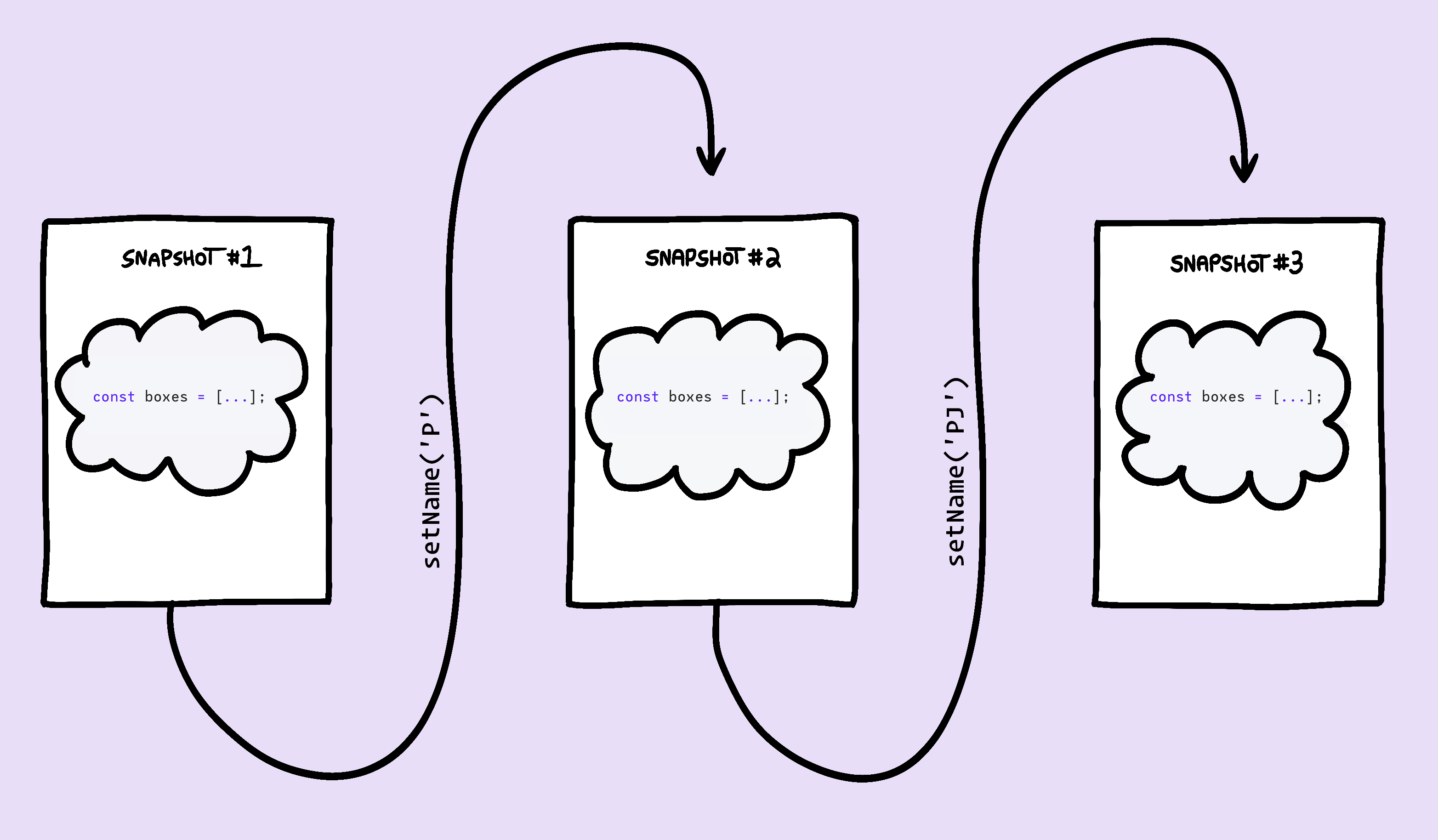
Without useMemo, each render snapshot creates a brand-new object. With it, React reuses the previously-created array:
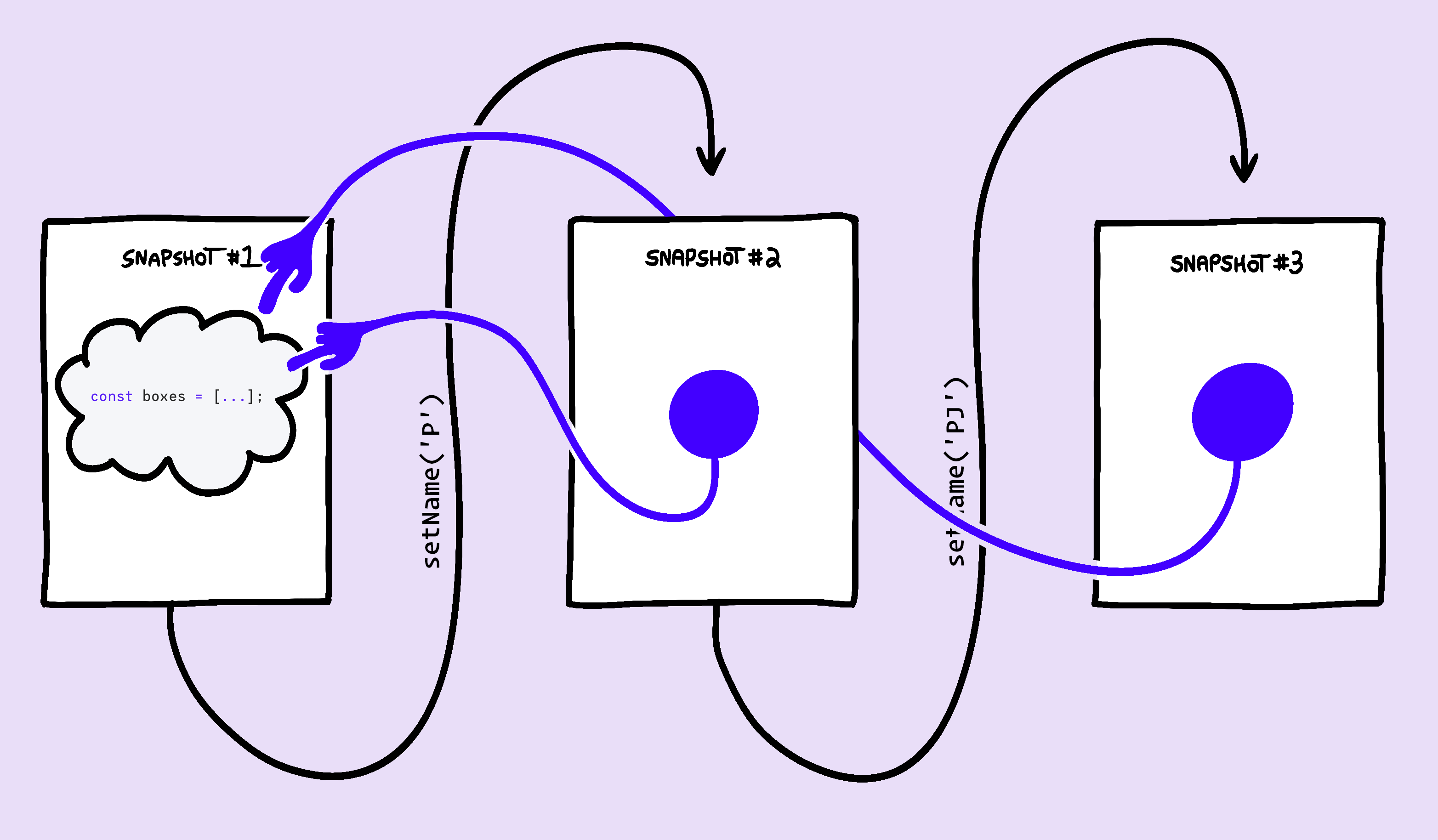
By preserving the reference, pure components can finally ignore renders that don't affect their props or UI.
useCallback: The Same Idea For Functions
If objects and arrays are compared by reference, then so are functions. A function defined inside a component body is re-created on every render, producing an identical-but-unique function instance each time:
const functionOne = function() {
  return 5;
};
const functionTwo = function() {
  return 5;
};

console.log(functionOne === functionTwo); // false
Here's a common counter example with a “Mega Boost” button that jumps the count by a large amount.
import React from 'react';

import MegaBoost from './MegaBoost';

function App() {
  const [count, setCount] =
    React.useState(0);

  function handleMegaBoost() {
    setCount(
      (currentValue) => currentValue + 1234
    );
  }

  return (
    <>
      Count: {count}
      <button
        onClick={() => {
          setCount(count + 1);
        }}
      >
        Click me!
      </button>
      <MegaBoost
        handleClick={handleMegaBoost}
      />
    </>
  );
}

export default App;
In this scenario, the MegaBoost component is memoized with React.memo and doesn't depend on count, but it still re-renders whenever count changes. The culprit is again a new reference: the parent creates a fresh handleMegaBoost function on every render.
You could fix it using useMemo by returning a function instead of an array:
const handleMegaBoost = React.useMemo(() => {
  return function() {
    setCount((currentValue) => currentValue + 1234);
  }
}, []);
That works, but there's a dedicated tool. useCallback does exactly the same thing, purpose-built for functions. It memoizes the function you pass it and threads that same reference between renders:
const handleMegaBoost = React.useCallback(() => {
  setCount((currentValue) => currentValue + 1234);
}, []);
In fact, these two calls are equivalent:
// This:
React.useCallback(function helloWorld(){}, []);

// ...Is functionally equivalent to this:
React.useMemo(() => function helloWorld(){}, []);
So useCallback is syntactic sugar—a nicer syntax for memoizing callback functions.
A Practical Approach to Using These Hooks
Wrapping every array, object, and function in these hooks is a waste of effort. React is highly optimized, and most re-renders aren't costly. The best strategy is reactive: if things feel sluggish, use the React Profiler to hunt down slow renders. Often, restructuring the app gets better results than sprinkling in hooks.
There are a couple of specific scenarios where pre-emptive use of these hooks makes sense:
In generic custom hooks
Custom hooks are often meant to be reused in many places. If you build a useToggle hook, for example, memoizing the toggle function with useCallback is wise:
function useToggle(initialValue) {
  const [value, setValue] = React.useState(initialValue);

  const toggle = React.useCallback(() => {
    setValue(v => !v);
  }, []);

  return [value, toggle];
}
Why does this matter? You don't know every future consumer of this hook. Over 30 to 40 uses, that extra efficiency can meaningfully reduce the number of unnecessary re-renders in an app.
In context providers
When providing data via Context, you often pass a large object down as the value.
const AuthContext = React.createContext({});

function AuthProvider({ user, status, forgotPwLink, children }){
  const memoizedValue = React.useMemo(() => {
    return {
      user,
      status,
      forgotPwLink,
    };
  }, [user, status, forgotPwLink]);

  return (
    <AuthContext.Provider value={memoizedValue}>
      {children}
    </AuthContext.Provider>
  );
}
Wrapping it in useMemo is generally a good practice. Without it, every consumer—even pure components—will re-render when the provider's parent re-renders, because they get a fresh object reference each time.


