
Inverse Trigonometry in CSS
The forward trigonometric functions sin(), cos() and tan() take an angle and return a ratio. The inverse functions run the other direction: given a ratio, they return the angle that produced it. In CSS that means acos() undoes cos(), asin() undoes sin(), and atan() and atan2() undo tan(). Elsewhere they are written as arcsin(), arccos() and arctan(), a naming convention that comes from the fact that each angle maps to an arc on a circle's circumference. Inside a unit circle — where the radius is 1 — the arc length equals the angle in radians.
Formally, the definitions pair up as follows:
y = acos(x)such thatx = cos(y)y = asin(x)such thatx = sin(y)y = atan(x)such thatx = tan(y)
Limits on the inverses of sin() and cos()
Sine and cosine accept any angle but always return a value between -1 and 1, so their inverses are only defined on that interval. Because a value like 0 is produced by many different angles (cos(90°) and cos(270°) among them), the domain and range are restricted to keep the inverse single-valued:
acos()accepts numbers from-1to1and returns angles from0°to180°.asin()accepts numbers from-1to1and returns angles from-90°to90°.
A call such as asin(1.2) falls outside that input interval; per the spec, values outside the domain of acos() and asin() resolve to NaN. This is what limits their practical reach.
atan() and atan2()
atan() has no such restriction, because tan() can return any value between -Infinity and Infinity. Its domain is therefore the whole number line, and it returns angles between -90° and 90°. That range makes it the more versatile of the inverses, and it pairs with atan2(), which splits the two sides of the tangent ratio into separate arguments:
atan(opposite/adjacent)atan2(opposite, adjacent)
Recovering an angle from a triangle
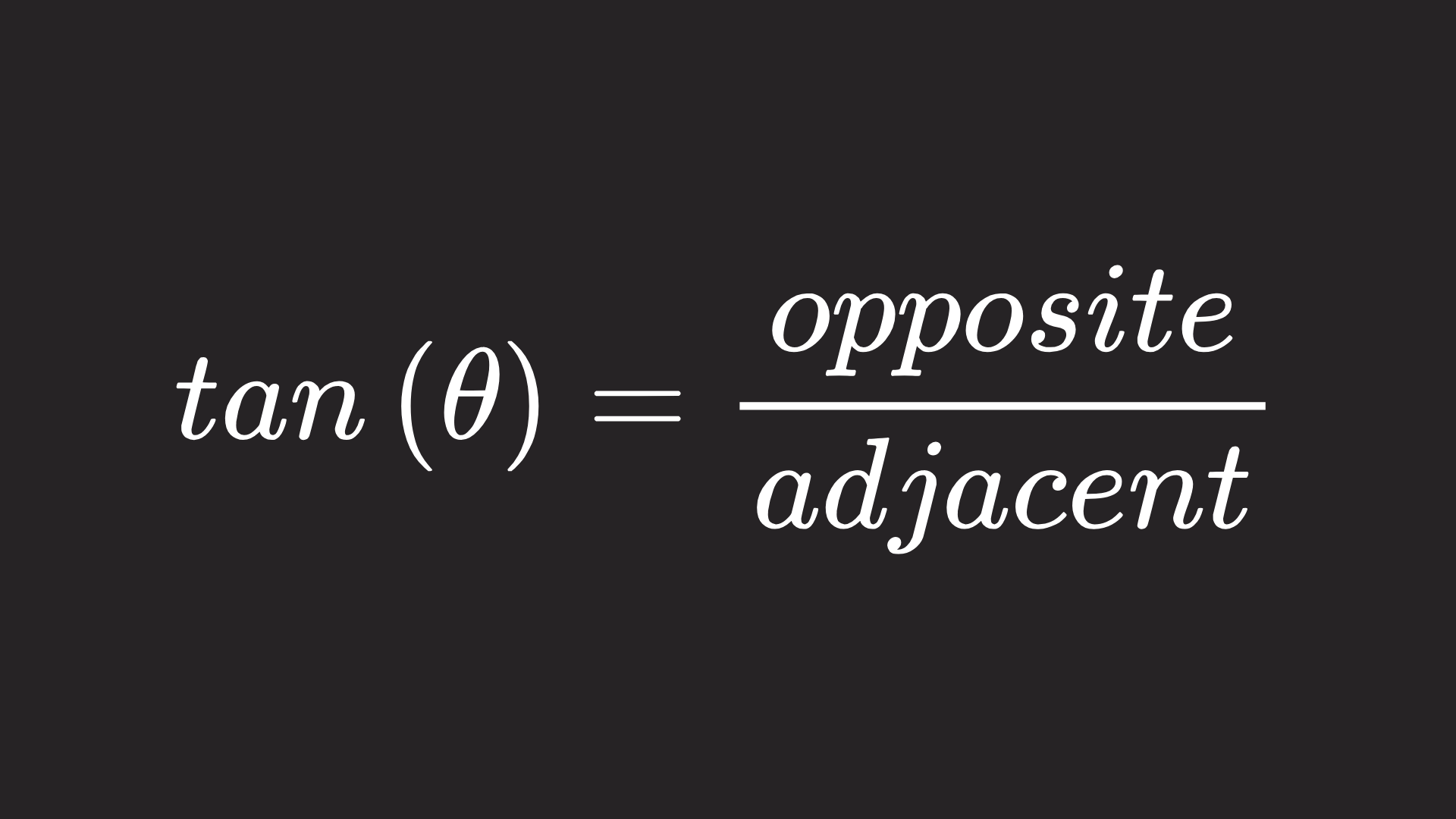
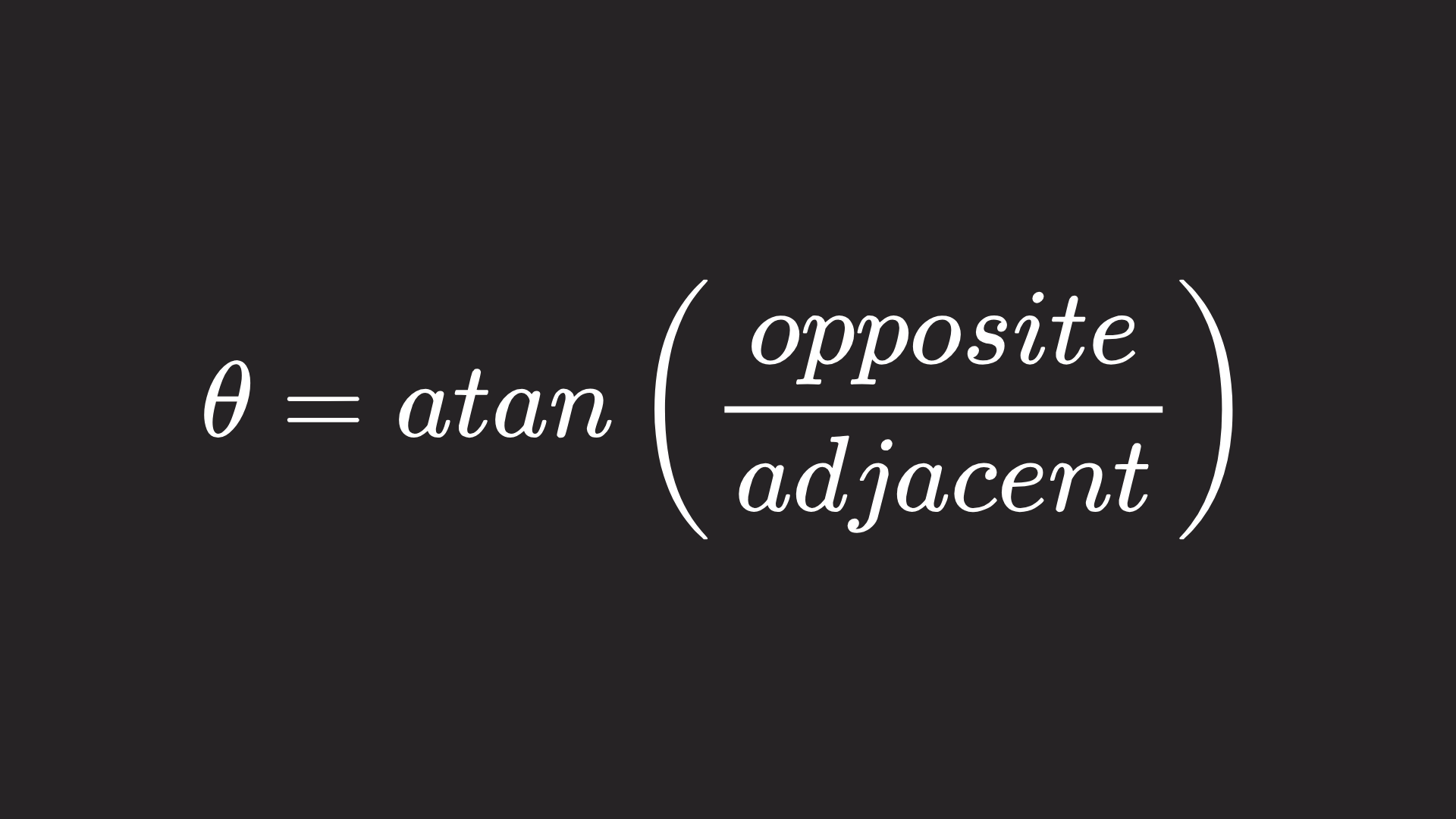
Triangles were the working material of the previous entries in this series, where tan() solved for one side once a side and an angle were known. The more typical problem is the reverse: both side lengths are available, and the angle is the unknown. Solving the tangent relationship for the angle gives the inverse form.
Conic gradients at any aspect ratio
Angle computation matters whenever an angle must adapt to an element's dimensions. A linear gradient with a fixed angle stays put as the element resizes; linear-gradient() sidesteps the problem with keywords like to top right, which keeps the gradient running corner to corner. conic-gradient() offers no equivalent syntax, so a fixed angle decays as the element changes shape. Treating the width as the adjacent side and the height as the opposite side turns the gradient into a right triangle whose angle can be recovered with atan().

.gradient {
  --angle: atan(var(--height-gradient) / var(--width-gradient));
}
Because conic-gradient() measures from the top edge (conic-gradient(from 0deg)), the result is offset by 90deg.
.gradient {
  --rotation: calc(90deg - var(--angle));
  background: conic-gradient(from var(--rotation), #84a59d 180deg, #f28482 180deg);
}
The same approach rescues Ana Tudor's variable aspect ratio card with two conic gradients meeting along the diagonal. Her 2021 post predates browser implementations, so the gradients had to be built without trigonometry; with atan() available, each of the two gradients covering half the background needs only an --angle and --rotation. In a perfect square both are simply 45deg, but generally they are derived with atan() as above.
.gradient {
  background:
    /* one below */
    conic-gradient(
      from var(--rotation) at bottom left,
      #b9eee1 calc(var(--angle) * 1 / 3),
      #79d3be calc(var(--angle) * 1 / 3) calc(var(--angle) * 2 / 3),
      #39b89a calc(var(--angle) * 2 / 3) calc(var(--angle) * 3 / 3),
      transparent var(--angle)
    ),
    /* one above */
    conic-gradient(
      from calc(var(--rotation) + 180deg) at top right,
      #fec9d7 calc(var(--angle) * 1 / 3),
      #ff91ad calc(var(--angle) * 1 / 3) calc(var(--angle) * 2 / 3),
      #ff5883 calc(var(--angle) * 2 / 3) calc(var(--angle) * 3 / 3),
      transparent var(--angle)
    );
}
.gradient {
--angle: atan(var(--height-gradient) / var(--width-gradient));
--rotation: calc(90deg - var(--angle));
}Why atan2() needs two arguments
When atan() is fed opposite/adjacent, it cannot see the signs that were divided away. On an x-y plane, measuring from the positive x-axis, sin() yields the y-coordinate and cos() the x-coordinate, so the angle follows from the quotient of the two. Collapsing y and x into one ratio makes a negative y indistinguishable from a negative x, and two negatives look the same as two positives — distinct points report the same angle.
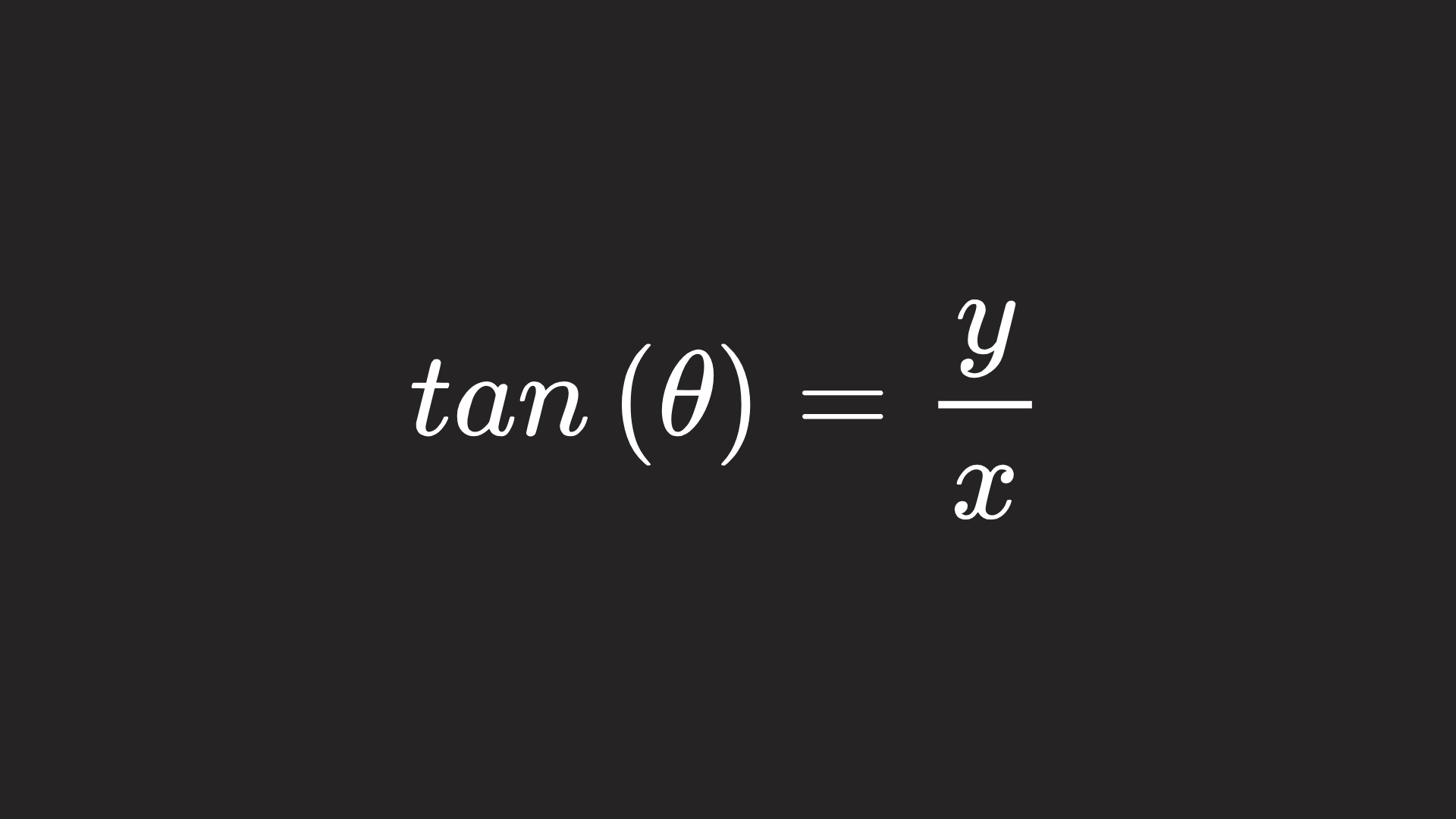
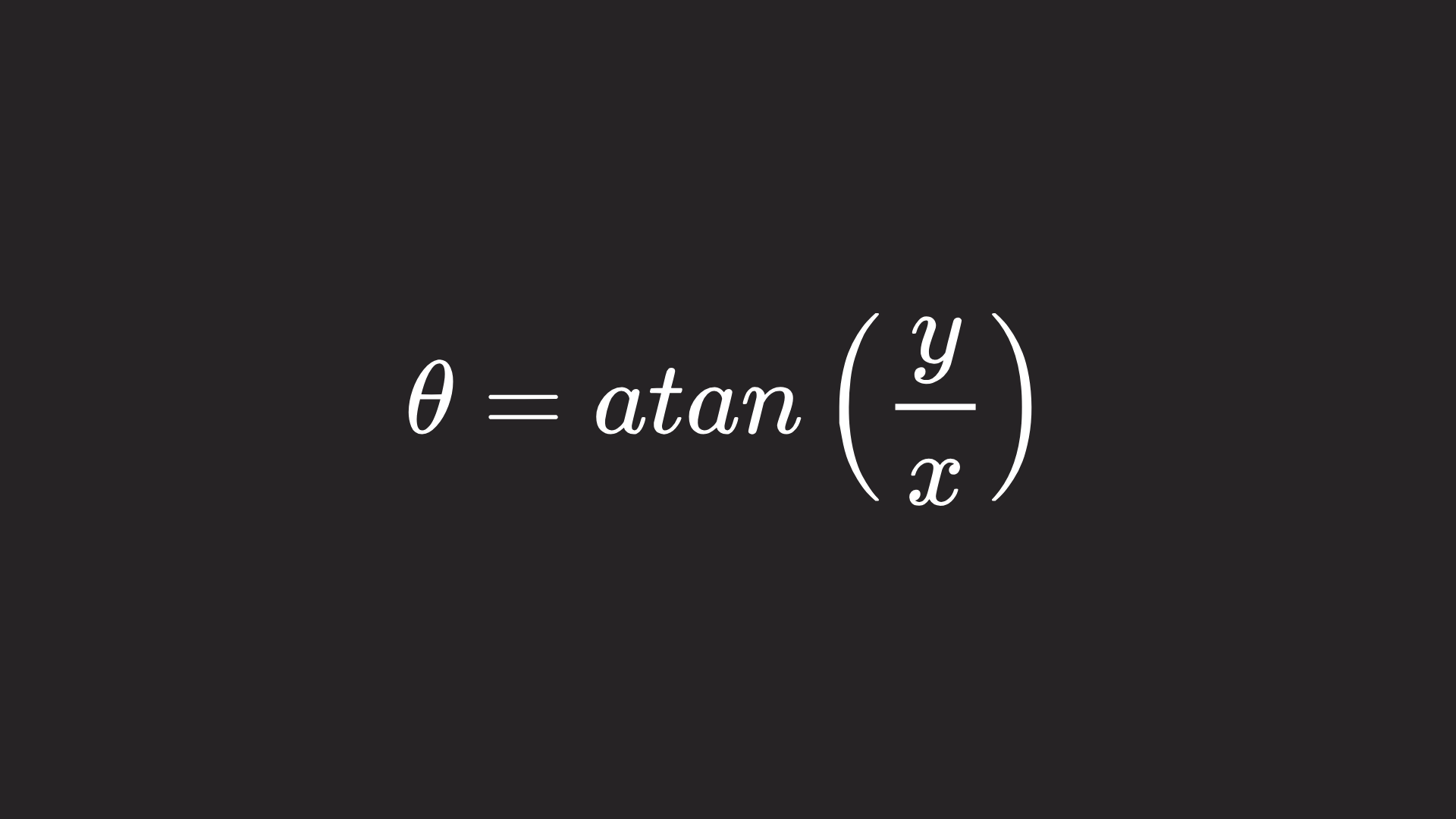

atan2() avoids the collapse because it receives the coordinates separately and can return the correct angle anywhere on the plane.
A worked example: an eye that tracks the pointer
Tracking a mouse position is a natural fit for atan2(). The page carries the pointer coordinates in two custom properties, --m-x and --m-y, set from JavaScript, since CSS alone cannot observe the pointer's position. The element's eyes are pseudo-elements; they are first rotated to align with the positive x-axis, pointing right, and then turned by atan2(var(--m-y), var(--m-x)).
const body = document.querySelector("body");

// listen for the mouse pointer
body.addEventListener("pointermove", (event) => {
  // set variables for the pointer's current coordinates
  let x = event.clientX;
  let y = event.clientY;

  // assign those coordinates to CSS custom properties in pixel units
  body.style.setProperty("--m-x", `${Math.round(x)}px`);
  body.style.setProperty("--m-y", `${Math.round(y)}px`);
});
.helpy::before,
.helpy::after {
/* rotate the eyes by it's starting position, plus the atan2 of the coordinates */
rotate: calc(135deg + atan2(var(--m-y), var(--m-x)));
}One refinement remains: coordinates measured from the top-left corner of the page miss an element that sits some distance away from it. Shifting the origin onto the element — subtracting its padding and half its size — fixes the blind spot and is required for placing the element anywhere other than the corner.
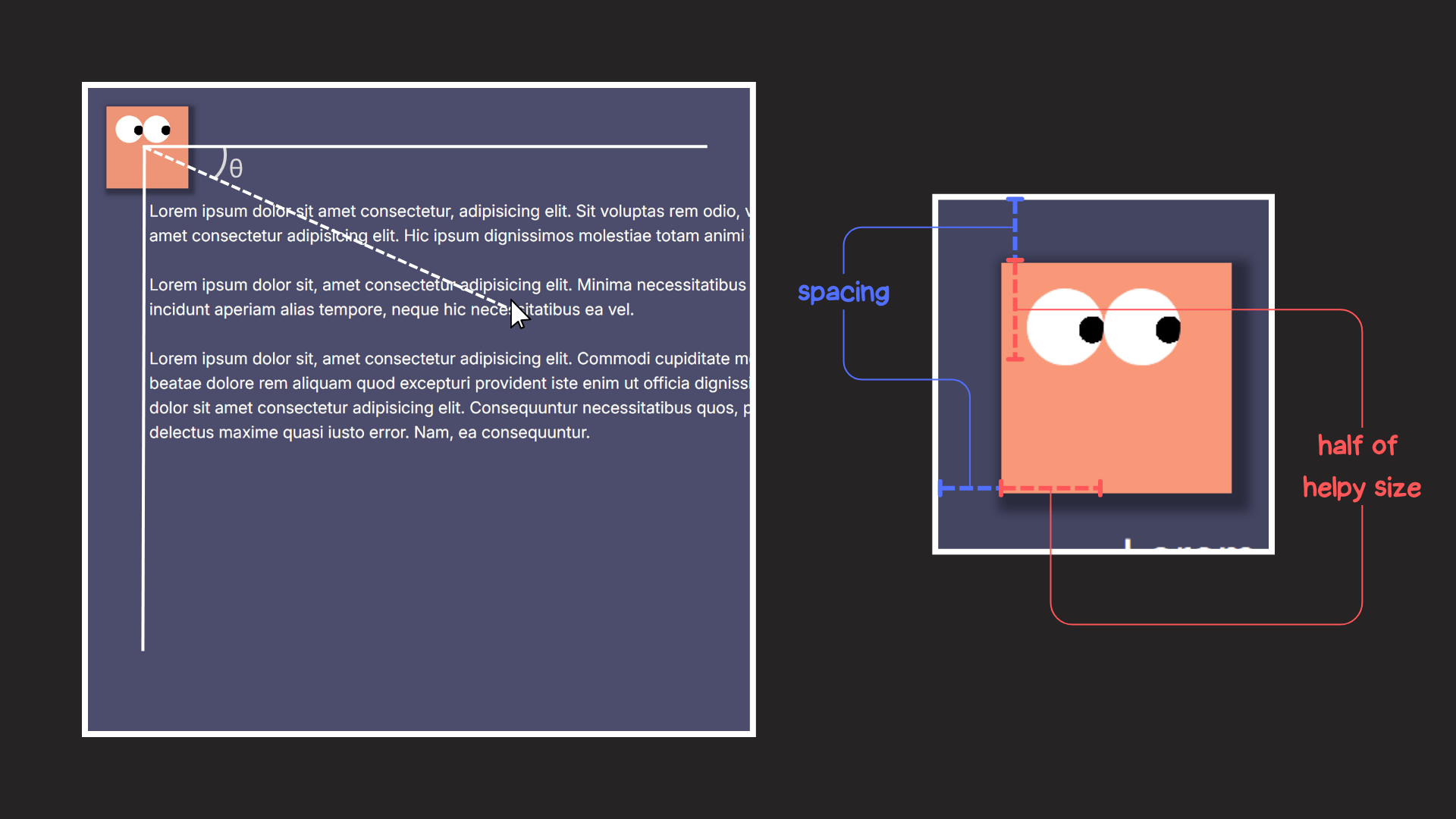
.helpy::before,
.helpy::after  {
  rotate: calc(
    135deg +
      atan2(
        var(--m-y) - var(--spacing) - var(--helpy-size) / 2,
        var(--m-x) - var(--spacing) - var(--helpy-size) / 2
      )
  );
}
Casting units to numbers with atan2() and tan()
atan2() supports a trick, first described by Jane Ori in 2023, for converting a dimension into a plain number. Feeding a tan() of the value into atan2() strips the unit; a viewport width, for instance, can be captured as an integer in a custom property. This is not trigonometry per se, but it is useful, and the technique also underpins animations driven by viewport resizing.
@property --100vw {
  syntax: "<length>;";
  initial-value: 0px;
  inherits: false;
}

:root {
  --100vw: 100vw;
  --int-width: calc(10000 * tan(atan2(var(--100vw), 10000px)));
}
Not covered: the reciprocal functions
The reciprocals are still absent from CSS. Each is one divided by a supported function:
- The secant, or
sec(x), is1 / cos(x). - The cosecant, or
csc(x), is1 / sin(x). - The cotangent, or
cot(x), is1 / tan(x).
All of them live on the same unit circle as the functions already available, and a single demo can show every covered function plotted together.




