How the Streams API works
Modern browsers have always streamed assets like HTML or video during download, but JavaScript itself only gained programmatic access to streaming data when fetch with streams arrived in 2015. Previously, processing a resource meant downloading the entire file, deserializing it into a usable format, and only then working on it. With the Streams API, you can process raw data progressively as soon as it reaches the client, without waiting for a full buffer, string, or blob to materialize.
That unlocks use cases that were awkward or impossible before:
- Video effects: piping a readable video stream through a transform stream that applies effects in real time.
- Data (de)compression: piping a file stream through a transform stream that selectively (de)compresses it.
- Image decoding: piping an HTTP response stream through transform streams that decode bytes into bitmap data and then translate bitmaps into PNGs. Inside a service worker's
fetchhandler, this transparently polyfills new image formats like AVIF.
Core concepts
Before diving into the three stream types, it helps to understand the vocabulary used throughout the API.
Chunks
A chunk is a single piece of data written to or read from a stream. A stream can contain chunks of any type, even mixed types within the same stream. Chunks are rarely the smallest atomic unit of data—a byte stream might use chunks of 16 KiB Uint8Array units rather than individual bytes.
Readable streams
A readable stream represents a source from which you read—data comes out of it. Concretely, it is an instance of the ReadableStream class.
Writable streams
A writable stream is a destination into which you write—data goes in to it. It is an instance of the WritableStream class.
Transform streams
A transform stream is a pair of streams: a writable side and a readable side. Writing to the writable side causes new data to become available on the readable side—similar to a simultaneous interpreter translating speech on the fly. Any object with both a writable and a readable property can act as a transform stream, though the standard TransformStream class makes it easy to create a properly entangled pair.
Pipe chains
Streams are primarily combined by piping. A readable stream pipes directly into a writable stream with its pipeTo() method, or through one or more transform streams using pipeThrough(). A set of streams piped together is called a pipe chain.
Backpressure
Once a pipe chain is built, it propagates signals controlling how fast chunks flow. If any step can't keep up, the signal travels backward through the chain until the original source slows down. This normalizing process is called backpressure.
Teeing
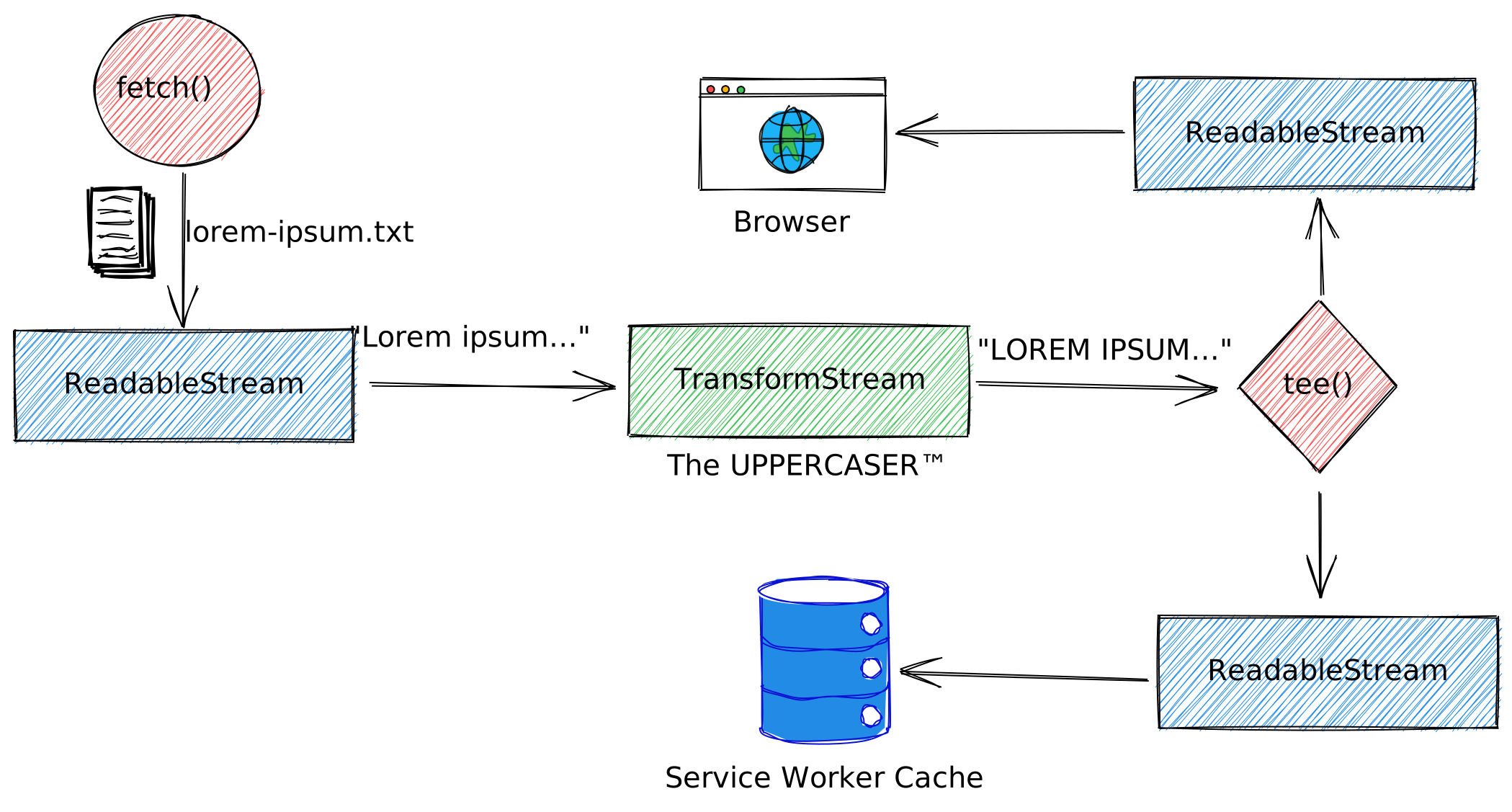
A readable stream's tee() method—named for the shape of an uppercase ‘T’—locks the original stream so it can no longer be used directly, but creates two new independent branches for consumption. Teeing matters because streams cannot be rewound or restarted.
Browser support
ReadableStream and WritableStream are available in Chrome 43+, Edge 14+, Firefox 65+, and Safari 10.1+. TransformStream arrived later, supported in Chrome 67+, Edge 79+, Firefox 102+, and Safari 14.1+.
Inside a readable stream
A readable stream is a data source wrapped in a ReadableStream object, created with the ReadableStream() constructor. Underlying sources come in two flavors:
- Push sources emit data continuously once accessed, leaving you to start, pause, or cancel the flow. Live video streams and event streams from servers or WebSockets are typical examples.
- Pull sources must be asked for data explicitly.
fetch()andXMLHttpRequestcalls are the common cases.
Data flows sequentially in chunks. Chunks placed into the stream are enqueued and tracked in an internal queue until read. A queuing strategy assigns a size to each chunk and compares the sum against a high water mark to signal backpressure.
Chunks are retrieved one at a time through a reader, which together with any processing code is called a consumer. Each stream has an associated controller used to manage it. A stream can be read by only one reader at a time: creating a reader makes it active and locks the stream until the reader is released. Alternatively, a stream can be teed to allow concurrent readers.
Constructing and consuming streams
The ReadableStream() constructor takes an optional underlyingSource object whose methods define stream behavior:
start(controller)runs at construction. Return a promise for asynchronous setup. Thecontrolleris aReadableStreamDefaultControllerwithclose(),enqueue(), anderror()methods.pull(controller)is called repeatedly while the internal queue is below its high water mark. If it returns a promise, the next call waits for fulfillment; a rejection errors the stream.cancel(reason)fires when a consumer cancels.
const readableStream = new ReadableStream({
  start(controller) {
    /* … */
  },

  pull(controller) {
    /* … */
  },

  cancel(reason) {
    /* … */
  },
});
/* … */
start(controller) {
  controller.enqueue('The first chunk!');
},
/* … */
The optional queuingStrategy argument has two parameters:
highWaterMark: a non-negative number; the queue fills to its high water mark before backpressure occurs.size(chunk): returns a finite non-negative size for a chunk. The result drivesdesiredSizeon the controller and controls whenpull()runs.
const readableStream = new ReadableStream({
    /* … */
  },
  {
    highWaterMark: 10,
    size(chunk) {
      return chunk.length;
    },
  },
);
Reading requires a ReadableStreamDefaultReader acquired via getReader(), which locks the stream. Each call to the reader’s read() returns a promise that resolves according to the stream state:
- With a chunk queued:
{ value: chunk, done: false } - On stream close:
{ value: undefined, done: true } - On stream error: reject with the error
const reader = readableStream.getReader();
while (true) {
  const { done, value } = await reader.read();
  if (done) {
    console.log('The stream is done.');
    break;
  }
  console.log('Just read a chunk:', value);
}
To see whether a stream is already claimed, check the ReadableStream.locked property:
const locked = readableStream.locked;
console.log(`The stream is ${locked ? 'indeed' : 'not'} locked.`);
A complete example
The example below constructs a stream whose underlyingSource is the TimestampSource class. Its start() method enqueues a timestamp every second for ten seconds, then closes the stream. Consumption happens through getReader() and repeated read() calls until done.
class TimestampSource {
  #interval

  start(controller) {
    this.#interval = setInterval(() => {
      const string = new Date().toLocaleTimeString();
      // Add the string to the stream.
      controller.enqueue(string);
      console.log(`Enqueued ${string}`);
    }, 1_000);

    setTimeout(() => {
      clearInterval(this.#interval);
      // Close the stream after 10s.
      controller.close();
    }, 10_000);
  }

  cancel() {
    // This is called if the reader cancels.
    clearInterval(this.#interval);
  }
}

const stream = new ReadableStream(new TimestampSource());

async function concatStringStream(stream) {
  let result = '';
  const reader = stream.getReader();
  while (true) {
    // The `read()` method returns a promise that
    // resolves when a value has been received.
    const { done, value } = await reader.read();
    // Result objects contain two properties:
    // `done`  - `true` if the stream has already given you all its data.
    // `value` - Some data. Always `undefined` when `done` is `true`.
    if (done) return result;
    result += value;
    console.log(`Read ${result.length} characters so far`);
    console.log(`Most recently read chunk: ${value}`);
  }
}
concatStringStream(stream).then((result) => console.log('Stream complete', result));
Repeatedly checking done in a loop is clunky. A more ergonomic approach is asynchronous iteration:
for await (const chunk of stream) {
  console.log(chunk);
}
A polyfill can bring this behavior to environments that don’t support it yet:
if (!ReadableStream.prototype[Symbol.asyncIterator]) {
  ReadableStream.prototype[Symbol.asyncIterator] = async function* () {
    const reader = this.getReader();
    try {
      while (true) {
        const {done, value} = await reader.read();
        if (done) {
          return;
          }
        yield value;
      }
    }
    finally {
      reader.releaseLock();
    }
  }
}
Teeing streams
The tee() method splits a readable stream into a two-element array of new ReadableStream instances, allowing two readers to consume the same data independently. A service worker, for instance, could use it to relay a fetched response to the browser while simultaneously writing it to the cache, since a body can be consumed only once. Both branches must be canceled to cancel the original stream; teeing locks the stream for its duration.
const readableStream = new ReadableStream({
  start(controller) {
    // Called by constructor.
    console.log('[start]');
    controller.enqueue('a');
    controller.enqueue('b');
    controller.enqueue('c');
  },
  pull(controller) {
    // Called `read()` when the controller's queue is empty.
    console.log('[pull]');
    controller.enqueue('d');
    controller.close();
  },
  cancel(reason) {
    // Called when the stream is canceled.
    console.log('[cancel]', reason);
  },
});

// Create two `ReadableStream`s.
const [streamA, streamB] = readableStream.tee();

// Read streamA iteratively one by one. Typically, you
// would not do it this way, but you certainly can.
const readerA = streamA.getReader();
console.log('[A]', await readerA.read()); //=> {value: "a", done: false}
console.log('[A]', await readerA.read()); //=> {value: "b", done: false}
console.log('[A]', await readerA.read()); //=> {value: "c", done: false}
console.log('[A]', await readerA.read()); //=> {value: "d", done: false}
console.log('[A]', await readerA.read()); //=> {value: undefined, done: true}

// Read streamB in a loop. This is the more common way
// to read data from the stream.
const readerB = streamB.getReader();
while (true) {
  const result = await readerB.read();
  if (result.done) break;
  console.log('[B]', result);
}
Byte streams and BYOB readers
For byte-oriented data, a dedicated extended version of the readable stream minimizes copies and guarantees byte-aligned output rather than strings or array buffers of varying types. It also supports bring-your-own-buffer (BYOB) readers. These readers provide stability by avoiding writing twice into a detached buffer and can reduce garbage collection pressure, as buffers can be reused.
Set the type: "bytes" option in the constructor to create such a stream:
new ReadableStream({ type: 'bytes' });
The controller supplied to the underlying source is then a ReadableByteStreamController. Its enqueue() method requires an ArrayBufferView; byobRequest exposes the current BYOB pull request, and desiredSize indicates how much data can be accepted. In this mode, the queuingStrategy takes only highWaterMark and expresses it in bytes.
Obtain a BYOB reader with:
ReadableStream.getReader({ mode: "byob" })
Reads then pass a provided ArrayBufferView to the read(view) method for precise buffer control:
const reader = readableStream.getReader({ mode: "byob" });

let startingAB = new ArrayBuffer(1_024);
const buffer = await readInto(startingAB);
console.log("The first 1024 bytes, or less:", buffer);

async function readInto(buffer) {
  let offset = 0;

  while (offset < buffer.byteLength) {
    const { value: view, done } =
        await reader.read(new Uint8Array(buffer, offset, buffer.byteLength - offset));
    buffer = view.buffer;
    if (done) {
      break;
    }
    offset += view.byteLength;
  }

  return buffer;
}
The following utility returns byte streams that fill a caller-supplied buffer instead of enforcing a fixed chunk size, enabling zero-copy reads from randomly generated data:
const DEFAULT_CHUNK_SIZE = 1_024;

function makeReadableByteStream() {
  return new ReadableStream({
    type: 'bytes',

    pull(controller) {
      // Even when the consumer is using the default reader,
      // the auto-allocation feature allocates a buffer and
      // passes it to us via `byobRequest`.
      const view = controller.byobRequest.view;
      view = crypto.getRandomValues(view);
      controller.byobRequest.respond(view.byteLength);
    },

    autoAllocateChunkSize: DEFAULT_CHUNK_SIZE,
  });
}
The anatomy of a writable stream
A WritableStream is a destination for data, represented in JavaScript by an object of that name. It wraps a lower-level I/O destination, the underlying sink, with standard queuing and backpressure handling. A writer sends data to the stream one chunk at a time. The code that produces those chunks, together with the writer, is called the producer.
A stream lock ensures only one writer can write at a time. When a writer is active, it's locked to the stream; to attach a different writer you first need to release the current one. An internal queue holds chunks that have been written but not yet processed. A queuing strategy manages backpressure by assigning each chunk a size and comparing the queue total against a high water mark. Finally, each stream has an associated controller you can use to manage the stream, for example to abort it.
Constructing a WritableStream
You instantiate a WritableStream with its constructor. The first optional argument, underlyingSink, defines how the stream behaves via these methods:
start(controller)— Called immediately after construction to set up access to the sink. Can return a promise for async setup.write(chunk, controller)— Called when a chunk is ready for the sink. Runs only after previous writes succeed and never after close/abort. Returns a promise for async writes.close(controller)— Called when the app finishes writing. Executes only after queued writes succeed and should finalize and release the sink.abort(reason)— Called for an abrupt close, discarding queued chunks. Unlikeclose(), it fires even with pending writes.
The controller parameter passed to these methods is a WritableStreamDefaultController. Its single method, error(), causes any further interaction with the stream to fail. It also exposes a signal property with an AbortSignal to stop operations when needed.
const writableStream = new WritableStream({
  start(controller) {
    /* … */
  },

  write(chunk, controller) {
    /* … */
  },

  close(controller) {
    /* … */
  },

  abort(reason) {
    /* … */
  },
});
The optional queuingStrategy argument to the constructor shapes how backpressure is computed:
highWaterMark— a non-negative number representing the queue threshold.size(chunk)— a function returning a finite non-negative size for each chunk, used to compute backpressure.
To start writing, call getWriter() to obtain a WritableStreamDefaultWriter. This locks the stream to that writer. Then writer.write(chunk) sends a chunk to the stream and returns a promise indicating whether the sink accepted it — not necessarily that the data is durably stored.
/* … */
write(chunk, controller) {
  try {
    // Try to do something dangerous with `chunk`.
  } catch (error) {
    controller.error(error.message);
  }
},
/* … */
const writer = writableStream.getWriter();
const resultPromise = writer.write('The first chunk!');
Check whether a stream currently has an active writer via its locked property.
const locked = writableStream.locked;
console.log(`The stream is ${locked ? 'indeed' : 'not'} locked.`);
const writableStream = new WritableStream({
  start(controller) {
    console.log('[start]');
  },
  async write(chunk, controller) {
    console.log('[write]', chunk);
    // Wait for next write.
    await new Promise((resolve) => setTimeout(() => {
      document.body.textContent += chunk;
      resolve();
    }, 1_000));
  },
  close(controller) {
    console.log('[close]');
  },
  abort(reason) {
    console.log('[abort]', reason);
  },
});

const writer = writableStream.getWriter();
const start = Date.now();
for (const char of 'abcdefghijklmnopqrstuvwxyz') {
  // Wait to add to the write queue.
  await writer.ready;
  console.log('[ready]', Date.now() - start, 'ms');
  // The Promise is resolved after the write finishes.
  writer.write(char);
}
await writer.close();
Piping into a writable stream
The ReadableStream.pipeTo() method connects a readable stream to a writable one. It returns a promise that resolves when the pipe completes or rejects on error.
const readableStream = new ReadableStream({
  start(controller) {
    // Called by constructor.
    console.log('[start readable]');
    controller.enqueue('a');
    controller.enqueue('b');
    controller.enqueue('c');
  },
  pull(controller) {
    // Called when controller's queue is empty.
    console.log('[pull]');
    controller.enqueue('d');
    controller.close();
  },
  cancel(reason) {
    // Called when the stream is canceled.
    console.log('[cancel]', reason);
  },
});

const writableStream = new WritableStream({
  start(controller) {
    // Called by constructor
    console.log('[start writable]');
  },
  async write(chunk, controller) {
    // Called upon writer.write()
    console.log('[write]', chunk);
    // Wait for next write.
    await new Promise((resolve) => setTimeout(() => {
      document.body.textContent += chunk;
      resolve();
    }, 1_000));
  },
  close(controller) {
    console.log('[close]');
  },
  abort(reason) {
    console.log('[abort]', reason);
  },
});

await readableStream.pipeTo(writableStream);
console.log('[finished]');
Building a transform stream
A TransformStream represents a data pipeline stage: readable on one side, writable on the other, with data processed in between. Construct it with TransformStream(); the first optional argument is a transformer object whose methods define the transformation:
start(controller)— Called immediately. Use it to enqueue prefix chunks withcontroller.enqueue(), independent of writes to the writable side.transform(chunk, controller)— Called for each chunk from the writable side, but only afterstart()and never afterflush(). This is where transformation happens; usecontroller.enqueue()to emit zero or more results. Omitting this method gives you an identity transform.flush(controller)— Called after all writes transformed and just before closing. Ideal for enqueuing suffix chunks. A rejected promise here errors both sides.
The second and third constructor arguments are optional queueing strategies: writableStrategy and readableStrategy. These follow the patterns of writable and readable streams respectively.
const transformStream = new TransformStream({
  start(controller) {
    /* … */
  },

  transform(chunk, controller) {
    /* … */
  },

  flush(controller) {
    /* … */
  },
});
// Note that `TextEncoderStream` and `TextDecoderStream` exist now.
// This example shows how you would have done it before.
const textEncoderStream = new TransformStream({
  transform(chunk, controller) {
    console.log('[transform]', chunk);
    controller.enqueue(new TextEncoder().encode(chunk));
  },
  flush(controller) {
    console.log('[flush]');
    controller.terminate();
  },
});

(async () => {
  const readStream = textEncoderStream.readable;
  const writeStream = textEncoderStream.writable;

  const writer = writeStream.getWriter();
  for (const char of 'abc') {
    writer.write(char);
  }
  writer.close();

  const reader = readStream.getReader();
  for (let result = await reader.read(); !result.done; result = await reader.read()) {
    console.log('[value]', result.value);
  }
})();
Chaining streams with pipeThrough()
The ReadableStream.pipeThrough() method sends a stream through a transform stream (or any writable/readable pair) and locks it for the pipe's duration. This approach is ideal for processing data as it arrives, rather than buffering a full download first. The following example shows a function that uppercases all text from a fetch() stream chunk by chunk.
const transformStream = new TransformStream({
  transform(chunk, controller) {
    console.log('[transform]', chunk);
    controller.enqueue(new TextEncoder().encode(chunk));
  },
  flush(controller) {
    console.log('[flush]');
    controller.terminate();
  },
});

const readableStream = new ReadableStream({
  start(controller) {
    // called by constructor
    console.log('[start]');
    controller.enqueue('a');
    controller.enqueue('b');
    controller.enqueue('c');
  },
  pull(controller) {
    // called read when controller's queue is empty
    console.log('[pull]');
    controller.enqueue('d');
    controller.close(); // or controller.error();
  },
  cancel(reason) {
    // called when rs.cancel(reason)
    console.log('[cancel]', reason);
  },
});

(async () => {
  const reader = readableStream.pipeThrough(transformStream).getReader();
  for (let result = await reader.read(); !result.done; result = await reader.read()) {
    console.log('[value]', result.value);
  }
})();
function upperCaseStream() {
  return new TransformStream({
    transform(chunk, controller) {
      controller.enqueue(chunk.toUpperCase());
    },
  });
}

function appendToDOMStream(el) {
  return new WritableStream({
    write(chunk) {
      el.append(chunk);
    }
  });
}

fetch('./lorem-ipsum.txt').then((response) =>
  response.body
    .pipeThrough(new TextDecoderStream())
    .pipeThrough(upperCaseStream())
    .pipeTo(appendToDOMStream(document.body))
);
Putting it all together
The bundled demo exercises all three stream types with real examples of pipeThrough(), pipeTo(), and tee(). You can run it in its own window or examine the source code directly.
Streams built into the browser
The browser offers several ready-made streams that handle common data-conversion and I/O tasks. For example, an in-memory Blob can be turned into a readable stream with the stream() method. Because a File is just a specialized Blob, the same approach works for files selected by the user.
For text encoding, the streaming counterparts to the classic APIs are TextDecoderStream and TextEncoderStream.
Binary compression and decompression can be handled entirely in the browser without a service worker. The CompressionStream and DecompressionStream transform streams take a binary stream and apply a compression format, such as gzip, on the fly.
Writable streams are also present in platform APIs. The File System Access API exposes FileSystemWritableFileStream, which lets scripts write to files on the user's device. Experimental fetch() request streams provide a way to pipe a writable stream to an outgoing HTTP request.
The Serial API depends on both kinds of streams for reading from and writing to serial ports. Likewise, the WebSocketStream API aims to bring stream semantics to WebSocket communication.
Where to learn more
Additional background and working examples are available from the Streams specification, its companion demos, and a polyfill that implements the API in environments without native support. Useful historical material includes Jake Archibald's posts on web streams and on async iterators and generators. A Stream Visualizer can help you observe how different backpressure settings affect the flow of chunks.


