
Multiple Shadow Trees and the LIFO Render Stack
An element can attach more than one shadow root. The markdown that follows demonstrates what happens when multiple shadow roots are attached to the same host:
<div id="example1">Light DOM</div>
<script>
  var container = document.querySelector('#example1');
  var root1 = container.createShadowRoot();
  var root2 = container.createShadowRoot();
  root1.innerHTML = '<div>Root 1 FTW</div>';
  root2.innerHTML = '<div>Root 2 FTW</div>';
</script>
Only the last shadow tree attached actually renders; "Root 2 FTW" wins the render. Older roots are effectively bypassed for normal rendering purposes. Shadow insertion points (<shadow>) reintroduce those older trees. Unlike <content>, which projects a host's light DOM, a <shadow> placeholder hosts another entire shadow tree:
<div id="example2">Light DOM</div>
<script>
var container = document.querySelector('#example2');
var root1 = container.createShadowRoot();
var root2 = container.createShadowRoot();
root1.innerHTML = '<div>Root 1 FTW</div><content></content>';
**root2.innerHTML = '<div>Root 2 FTW</div><shadow></shadow>';**
</script>
In this example, the order is meaningful: the inserted <shadow> controls where the older root's content appears relative to the current root's. Additionally, the element now has a <content> insertion point, which pulls the light DOM along for rendering. To reference the older tree rendered at a <shadow> element, use .olderShadowRoot:
**root2.olderShadowRoot** === root1 //true
Accessing the Host's Shadow Root
Any element with a shadow tree is approachable from outside via .shadowRoot:
var root = host.createShadowRoot();
console.log(host.shadowRoot === root); // true
console.log(document.body.shadowRoot); // null
To prevent that access, redefine .shadowRoot to return null:
Object.defineProperty(host, 'shadowRoot', {
  get: function() { return null; },
  set: function(value) { }
});
That is a hack, and it only hides an internal reference. Shadow DOM is not a security boundary; treat it primarily as structure and encapsulation for your component's internals.
Scripted Construction and Insertion Point APIs
For programmatic use, the HTMLContentElement and HTMLShadowElement interfaces exist. When you need a particular element from the host to render into a slot in the shadow tree, the select attribute accepts CSS selectors:
<div id="example3">
  <span>Light DOM</span>
</div>
<script>
var container = document.querySelector('#example3');
var root1 = container.createShadowRoot();
var root2 = container.createShadowRoot();

var div = document.createElement('div');
div.textContent = 'Root 1 FTW';
root1.appendChild(div);

 // HTMLContentElement
var content = document.createElement('content');
content.select = 'span'; // selects any spans the host node contains
root1.appendChild(content);

var div = document.createElement('div');
div.textContent = 'Root 2 FTW';
root2.appendChild(div);

// HTMLShadowElement
var shadow = document.createElement('shadow');
root2.appendChild(shadow);
</script>
This construction itself doesn't physically move DOM nodes—insertion points project them for rendering only. The nodes stay intact in the host. They are considered "distributed nodes" once they cross the rendering boundary:
<div><h2>Light DOM</h2></div>
<script>
var root = document.querySelector('div').createShadowRoot();
root.innerHTML = '<content select="h2"></content>';

var h2 = document.querySelector('h2');
console.log(root.querySelector('content[select="h2"] h2')); // null;
console.log(root.querySelector('content').contains(h2)); // false
</script>
Two smaller APIs exist for reflection and querying. For any <content> node, query its distribution:
<div id="example4">
  <h2>Eric</h2>
  <h2>Bidelman</h2>
  <div>Digital Jedi</div>
  <h4>footer text</h4>
</div>

<template id="sdom">
  <header>
    <content select="h2"></content>
  </header>
  <section>
    <content select="div"></content>
  </section>
  <footer>
    <content select="h4:first-of-type"></content>
  </footer>
</template>

<script>
var container = document.querySelector('#example4');

var root = container.createShadowRoot();

var t = document.querySelector('#sdom');
var clone = document.importNode(t.content, true);
root.appendChild(clone);

var html = [];
[].forEach.call(root.querySelectorAll('content'), function(el) {
  html.push(el.outerHTML + ': ');
  var nodes = el.getDistributedNodes();
  [].forEach.call(nodes, function(node) {
    html.push(node.outerHTML);
  });
  html.push('\n');
});
</script>
Likewise, for an individual element, locate the insertion points it flips into:
<div id="host">
  <h2>Light DOM
</div>

<script>
  var container = document.querySelector('div');

  var root1 = container.createShadowRoot();
  var root2 = container.createShadowRoot();
  root1.innerHTML = '<content select="h2"></content>';
  root2.innerHTML = '<shadow></shadow>';

  var h2 = document.querySelector('#host h2');
  var insertionPoints = h2.getDestinationInsertionPoints();
  [].forEach.call(insertionPoints, function(contentEl) {
    console.log(contentEl);
  });
</script>
Visualizing Insertion Points
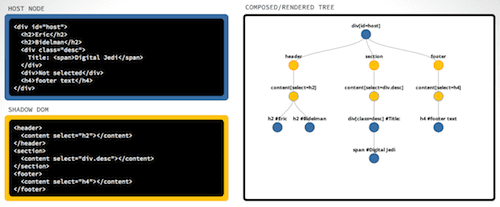
Shadow DOM rendering is easier to grasp visually than through a text wall. An interactive D3-powered tool allows you to edit markup on both lanes and observe how insertion points actually swizzle host nodes into the shadow rendering pipeline.
Event Retargeting
A result of encapsulation is that some events disregard the boundary layer, while others stop entirely. For those that cross the boundary, the target is retargeted back to the host element. That way internals of a shadow tree don't leak out to event listeners bound on the host.
For input-focused events, the retargeting is visible: an input's focusin bubble is reported on the host node instead of on the input element itself. With the mouseout event, the same boundary applies. Moving within deep, internal markup of a shadow tree from one nested node to another will typically not trigger endless mouseout events on the host.
Events that Do Not Propagate Across the Boundary
The following event types are wholly internal:
aborterrorselectchangeloadresetresizescrollselectstart
Conclusion
Shadow DOM lays out persistent encapsulation without <iframe> workarounds. Structurally deep for new adopters; the features described here pull back the curtain on how multiple roots, insertion points, and the non-binding event model operate internally. Building familiarity with these pieces collectively works toward a stronger whole-platform understanding.


