
Why script evaluation can stall your page
When optimizing for Interaction to Next Paint (INP), most guidance centers on improving how interactions themselves run—for instance, yielding with setTimeout to break up long tasks. Those techniques give the main thread room to handle user input sooner. But script loading also produces long tasks, and those can interfere with interactions while the page is still loading.
This article looks at how browsers schedule the work of evaluating scripts and what you can do to reduce the main-thread impact of that work during page load.
What happens during script evaluation
If you profile an application with heavy JavaScript, you've likely seen long tasks attributed to Evaluate Script. Evaluation is a required step before execution: JavaScript is compiled just-in-time, so the browser first parses the script for errors, then compiles it into bytecode, and finally executes it.

This process is necessary but can be problematic. Users often try to interact with a page shortly after it first paints, yet a page that has rendered hasn't necessarily finished loading. If the main thread is busy evaluating scripts, interactions that happen during that window can be delayed—even if the interactivity in question doesn't depend on JavaScript at all, or depends on scripts that have already loaded.
How script type affects task scheduling
The way browsers dispatch tasks for script evaluation depends on how you load the script—via a standard <script> tag or as an ES module with type=module. The major browser engines handle these cases differently, so it helps to know what to expect in each.
Classic scripts via the <script> element
When you load scripts with regular <script> elements, the number of evaluation tasks generally matches the number of script tags. Every <script> element triggers a task to parse, compile, and execute its script. This holds true in Chromium-based browsers, Safari, and Firefox.
That matters if your bundler combines everything the page needs into a single script. In that case, you get one script evaluation task—which is fine unless the script is large. A huge script means a single long task that can block the main thread.
You can avoid that by shipping less JavaScript per request and loading more individual, smaller scripts. This won't eliminate the work, but it replaces one potentially long task with several smaller ones that are less likely to block the main thread for extended periods.
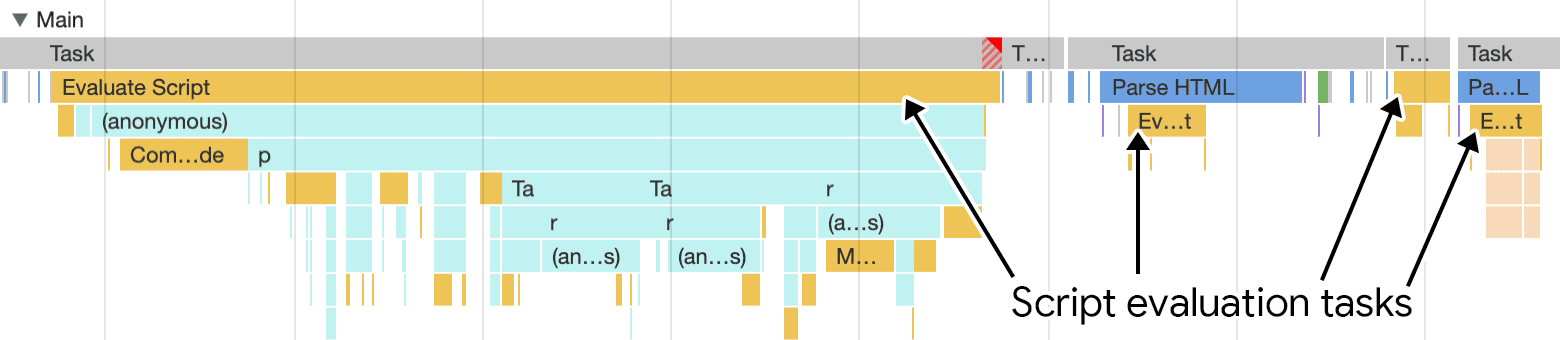
<script> elements present in the page's HTML. This is preferable to sending one large script bundle to users, which is more likely to block the main thread.
This approach is conceptually similar to yielding during interaction callbacks, except the yield points come from splitting your bundled JavaScript into smaller files rather than from await or setTimeout within a callback.
ES modules via type=module
Native ES modules, loaded with the type=module attribute, offer developer experience benefits—like avoiding a build step for production code, especially when combined with import maps. But the way browsers schedule module work differs by engine.
Chromium-based browsers
In Chrome and other Chromium browsers, loading ES modules creates different task types than classic scripts. Each module gets a task labeled Compile module for the compilation step.

After compilation, executing module code shows up as Evaluate module activity.

The notable benefit in Chromium is that compilation is broken into separate tasks per module, which helps avoid a single long task. The evaluation phase still costs something, but shipping less JavaScript remains the best lever. ES modules also come with two inherent advantages:
- Module code runs in strict mode automatically, which allows JavaScript engines to make optimizations not possible in non-strict contexts.
- Scripts loaded with
type=moduleare deferred by default. Adding theasyncattribute changes that behavior if you need it.
Safari and Firefox
Safari and Firefox take a different approach: each module is evaluated in its own separate task. If you load a single top-level module that only statically imports other modules, every module in that chain will be fetched and evaluated in its own task.
Dynamic import()
Dynamic import() lets you load a chunk of JavaScript on demand from anywhere in a script—the basis of code splitting. This approach improves INP in two ways:
- Deferring modules reduces the JavaScript loaded during startup, easing main thread contention and leaving more room for user interactions.
- Each dynamic
import()call effectively separates compilation and evaluation of the loaded module into its own task.
That said, a dynamic import() that pulls in a very large module will still produce a large evaluation task. If an interaction happens to coincide with that task, the main thread can be blocked. Keeping the total JavaScript footprint small is still important.
Dynamic imports behave consistently across major browser engines: the number of resulting script evaluation tasks matches the number of modules loaded.
Web workers
Web workers offer a way to move script evaluation off the main thread entirely. The worker registration code runs on the main thread, but everything inside the worker runs on its own thread. Workers can also load external scripts via importScripts or static import statements in browsers that support module workers. In all cases, the evaluation work happens off the main thread, freeing it up for user interactions.
Splitting scripts: what to weigh before you do it
Breaking scripts into smaller files limits long tasks, but the decision involves a few trade-offs beyond just file count.
Compression gets worse as files shrink
Compression is less efficient on smaller scripts, while larger scripts benefit much more from it. So, you're balancing smaller chunks against overall load time. Bundlers can help manage this output size:
- With webpack, the
SplitChunksPluginplugin is the tool for the job. ItsSplitChunksPlugindocumentation details options for managing asset sizes. - For bundlers like Rollup and esbuild, you can use dynamic
import()calls in your code. These bundlers—and webpack too—will automatically split the dynamically imported asset into its own separate file, keeping initial bundle sizes down.
Caching gets better with smaller files
Large, monolithic bundles hurt repeat-visit performance through cache invalidation. When you update first-party code—new package versions or bug fixes—the whole bundle is invalidated and downloaded again. Splitting scripts not only divides evaluation work across smaller tasks, it also means returning visitors are more likely to fetch scripts from the browser cache rather than the network, leading to a faster overall page load.
Nested modules and startup latency
If you ship ES modules in production with the type=module attribute, watch out for module nesting. This is when an ES module statically imports another, which statically imports another:
// a.js
import {b} from './b.js';

// b.js
import {c} from './c.js';
Without bundling, this creates a chain of network requests: requesting a.js from a <script> element triggers a request for b.js, which in turn requests c.js. A bundler avoids this chain—but make sure your bundler is configured to still break up the scripts into smaller pieces. If you're not bundling, the modulepreload resource hint can preload ES modules ahead of time to prevent these request chains.
Bottom line
Optimizing script evaluation is a balancing act. Splitting scripts spreads evaluation work over many smaller tasks, giving the main thread more room to handle user interactions instead of blocking. Here's a summary of what you can do:
- When using the
<script>element withouttype=module, avoid very large scripts that kick off expensive evaluation tasks. Spread the work across more<script>elements. - Using
type=modulefor native ES modules creates individual evaluation tasks for each separate module script. - Use dynamic
import()to shrink initial bundles. Bundlers treat these as "split points," emitting a separate script per dynamic import. - Weigh trade-offs: larger scripts compress better, but they concentrate expensive evaluation into fewer tasks and hurt caching. Smaller scripts improve cache efficiency.
- If you use native ES modules without a bundler, use the
modulepreloadresource hint to speed up startup loading. - Above all, ship as little JavaScript as possible.


