
Next.js has picked up attention through Cassidy Williams' Blogvent series on the Netlify Blog, much of which focuses on the framework. A good entry point is her next-netlify-starter, which ships with React Fast Refresh already configured. The framework also makes it straightforward to import a <Head> component on any page and use it to manage what would normally live in the document's <head>.
The rendering spectrum as the main draw
What stands out most is how naturally Next.js covers the whole range of rendering strategies. Static-file rendering is the default the framework pushes you toward, and a page only needs a small addition to become server-rendered:
export async function getServerSideProps() {
  // Fetch data from external API
  const res = await fetch(`https://.../data`)
  const data = await res.json()

  // Pass data to the page via props
  return { props: { data } }
}
The premise behind that switch is data: if a page needs a server to fetch what it renders, doing that work server-side lets the page render quickly and, where necessary, without JavaScript — which is good for SEO. It does require a Node server available to handle the work. On Netlify, that role is filled by a function (a Node Lambda), and wiring it up takes little more than adding an entry to netlify.toml:
[[plugins]]
  package = "@netlify/plugin-nextjs"
Client-side rendering remains part of the mix as well, and it is fast once the site has booted. In practice you get static output where static output suffices, server rendering where it is required, and client-side rendering in between.
Static and SSR output side by side
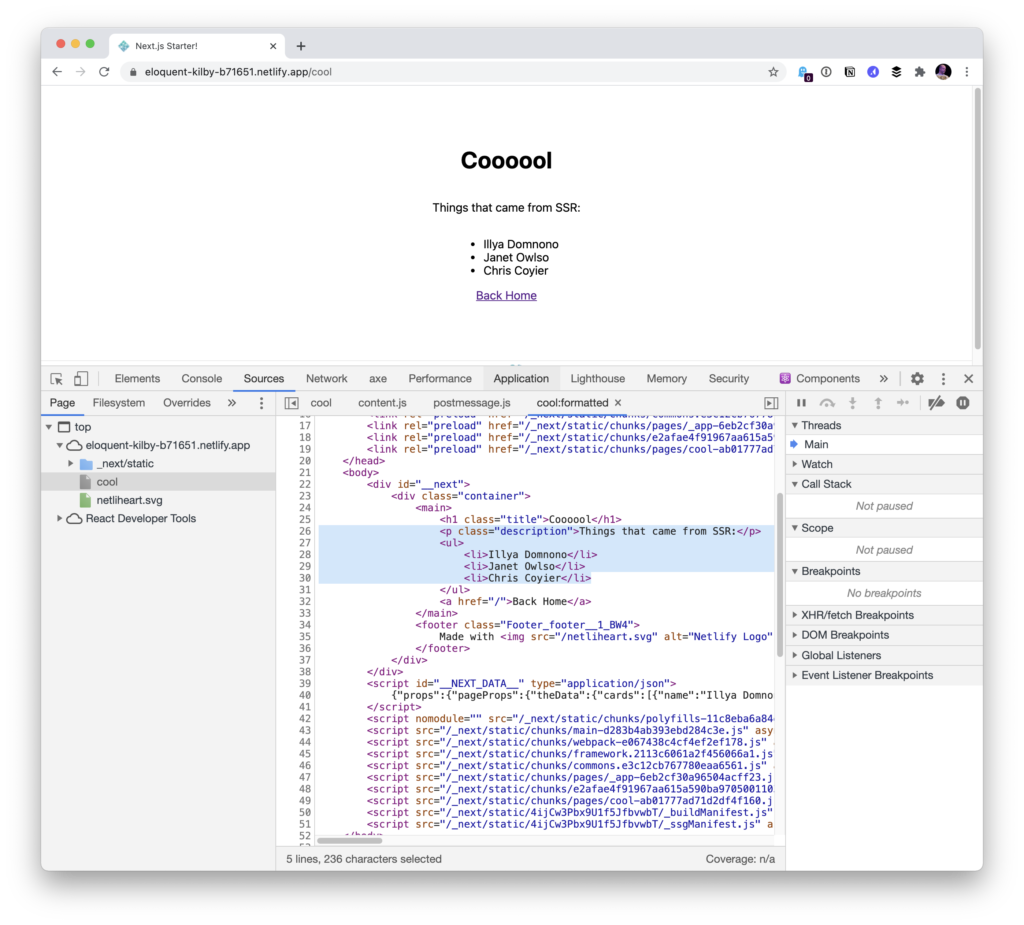
A quick experiment with an SSR route alongside the homepage showed both returning static HTML on load — the homepage being static and the /cool route being server-rendered:
For teams already working in React, Next.js offers a workable balance of simplicity and power, and it runs on Netlify with minimal friction.




