
Escaping the HTML Email Rabbit Hole
Hand-writing HTML emails is a time capsule experience. Without support for CSS Grid or Flexbox, you're back to <table> layouts and a minefield of client-specific quirks. Even with research and early testing, a "perfect" build often arrives broken in someone's inbox.
To escape that cycle, the key is to stop hand-authoring the raw output and instead layer abstraction on top. A workflow that leverages MJML, a React-based component layer, and MDX makes composing a newsletter as straightforward as drafting a blog post.
MJML: The Email Abstraction Layer
MJML is a responsive email framework that handles the heavy lifting of cross-client compatibility. The MJML team has cataloged the quirks of dozens of clients and baked fixes into their framework. As long as you stick to MJML's conventions, you avoid most rendering disasters.
A typical MJML document is built from nested structures. Here's a simple example:
<mjml>
  <mj-body width="500">
    <mj-section background-color="#EFEFEF">
      <mj-column>
        <mj-text font-size="20px">Hello World</mj-text>
      </mj-column>
    </mj-section>
  </mj-body>
</mjml>
When compiled, the output is far from pretty, but it's an email-safe block of HTML that works across clients:
<body style="word-spacing:normal;">
  <div style="">
    <!--[if mso | IE]><table align="center" border="0" cellpadding="0" cellspacing="0" class="" style="width:600px;" width="600" ><tr><td style="line-height:0px;font-size:0px;mso-line-height-rule:exactly;"><![endif]-->
    <div style="margin:0px auto;max-width:600px;">
      <table align="center" border="0" cellpadding="0" cellspacing="0" role="presentation" style="width:100%;">
        <tbody>
          <tr>
            <td style="direction:ltr;font-size:0px;padding:20px 0;text-align:center;">
              <!--[if mso | IE]><table role="presentation" border="0" cellpadding="0" cellspacing="0"><tr><td class="" style="vertical-align:top;width:600px;" ><![endif]-->
              <div class="mj-column-per-100 mj-outlook-group-fix" style="font-size:0px;text-align:left;direction:ltr;display:inline-block;vertical-align:top;width:100%;">
                <table border="0" cellpadding="0" cellspacing="0" role="presentation" style="vertical-align:top;" width="100%">
                  <tbody>
                    <tr>
                      <td align="left" style="font-size:0px;padding:10px 25px;word-break:break-word;">
                        <div style="font-family:Ubuntu, Helvetica, Arial, sans-serif;font-size:20px;line-height:1;text-align:left;color:#000000;">Hello World</div>
The actual output in production is even larger—often over 100 lines. You can explore a full output via MJML's live REPL.
Core Building Blocks
An email in MJML is a collection of sections using the <mj-section> tag. These form distinct visual chunks and cannot be nested. Inside each section, you place one or more columns using <mj-column>. On wide screens, columns sit side-by-side; on mobile, they stack. That stacking behavior is what gives MJML emails their "responsive" property.
Content within columns uses a set of standard components. For example, <mj-image> renders a fluid image tag and accepts an href attribute to automatically wrap the image in an anchor. Text is less standardized: all textual elements are represented via <mj-text> where you apply styles as inline attributes to achieve heading visuals:
<mj-text
  align="center"
  font-size="32px"
  font-weight="bold"
  color="#FF0000"
>
MJML's CSS subset is minimal. Rather than a margin property, you'll rely on padding attributes or the <mj-spacer> element. For more complex needs like lists, MJML provides the escape hatch of <mj-raw>, which pipes raw HTML straight through without processing:
<mj-raw>
  <ul>
    <li>An</li>
    <li>unordered</li>
    <li>list</li>
  </ul>
</mj-raw>
This tag is a double-edged sword: it grants full HTML flexibility but removes the guardrails that ensure universal rendering. There are also utilities like <mj-social> for sharing links and <mj-accordion> for expandable content blocks. The available set is understandably smaller than CSS, and might feel limiting for wildly ambitious layouts—but for professional templates, it's powerful enough. The official docs detail the full component set and underlying patterns.
Compiling to HTML
MJML ships a CLI to transform the input:
$ mjml input.mjml -o output.htmlThe CLI exposes config options for validating strictly and minifying output, which you can review in their command-line documentation.
Rather than baking the CLI into a build step, integration often happens directly in the web framework. For a Next.js app, create an API endpoint that processes a template string through the custom mjml NPM package:
// pages/api/generate-email.js
import compileMjml from 'mjml'

export default async function generateEmail(req, res) {
  const html = compileMjml(`
    <mjml>
      <mj-body width="500">
        <mj-section background-color="#EFEFEF">
          <mj-column>
            <mj-text font-size="20px">
              Hello World!
            </mj-text>
          </mj-column>
        </mj-section>
      </mj-body>
    </mjml>
  `)

  return res.send(html)
}
Hitting localhost:3000/api/generate-email returns compiled markup in the browser, ready to copy and paste into your mailing platform.
Custom Components with mjml-react
MJML itself supports a custom component interface, but it's awkward. If your stack is already React-based, mjml-react offers a cleaner path. Instead of writing MJML by hand, you author React components that feed into a dedicated render function—analogous to renderToString from ReactDOMServer, but it emits a complete the HTML document in two steps:
import {
  render,
  Mjml,
  MjmlBody,
  MjmlSection,
  MjmlColumn,
  MjmlText,
} from 'mjml-react';

const { html, errors } = render(
  <Mjml>
    <MjmlBody width={500}>
      <MjmlSection backgroundColor="#EFEFEF">
        <MjmlColumn>
          <MjmlText fontSize="20px">Hello world!</MjmlText>
        </MjmlColumn>
      </MjmlSection>
    </MjmlBody>
  </Mjml>,
  { validationLevel: 'soft' }
);- It transforms React components (e.g.,
<MjmlText>) into an intermediate MJML string ("<mjml-text>"). - It passes that MJML through the standard compiler to produce the final email-safe HTML.
This approach reuses your React muscle memory when styling. Rather than hunting through MJML docs for styling solutions on inconsistent tags, define your own domain-specific components:**
function LinkToPost({ socialImage, title, href }) {
  return (
    <>
      <MjmlImage href={href} src={socialImage} />
      <MjmlText fontSize="21px">
        <a href={href}>{title}</a>
      </MjmlText>
      <MjmlDivider />
    </>
  );
}
With the declaration above, the API endpoint becomes a simple server-side render:
// pages/api/generate-email.js
import {
  render,
  Mjml,
  MjmlBody,
  MjmlSection,
  MjmlColumn,
  MjmlText,
} from 'mjml-react';

import LinkToPost from '@/components/email/LinkToPost'

export default async function generateEmail(req, res) {
  const { html, errors } = render(
    <Mjml>
      <MjmlBody width={500}>
        <MjmlSection backgroundColor="#EFEFEF">
          <MjmlColumn>
            <LinkToPost
              socialImage="/images/og-image.jpg"
              title="Some Blog Post"
              href="/blog/some-post"
            />
          </MjmlColumn>
        </MjmlSection>
      </MjmlBody>
    </Mjml>,
    { validationLevel: 'soft' }
  );

  if (errors) {
    return res.status(500).json({
      errors,
    });
  }

  return res.send(html)
}
Reusable Templates
Most email output starts from a fixed "shell" filled with unique page content. This pattern is expressible in the component model by defining a structural component:
// components/email/Template.js
function Template({ children }) {
  return (
    <Mjml>
      <MjmlBody width={500}>
        {/* Custom decorative component */}
        <Hero />

        {/* Content for the email goes here */}
        <MjmlSection backgroundColor="#EFEFEF">
          <MjmlColumn>
            {children}
          </MjmlColumn>
        </MjmlSection>

        {/* Footer stuff, like the unsubscribe link */}
        <MjmlSection>
          <MjmlText>
            <a href="{{unsubscribe_url}}">
              Unsubscribe
            </a>
          </MjmlText>
        </MjmlSection>
      </MjmlBody>
    </Mjml>
  )
}
The trick to using it across several campaigns is to layer each issue's content within a template invocation:
function Email001() {
  return (
    <Template>
      <MjmlText>
        Good afternoon!
      </MjmlText>
      <MjmlText>
        Lorem Ipsum is simply dummy text of the printing and typesetting industry. Lorem Ipsum has been the industry's standard dummy text ever since 1966, when designers at Letraset and James Mosley, the librarian at St Bride Printing Library in London, took a 1914 Cicero translation and scrambled it to make dummy text for Letraset's Body Type sheets.
      </MjmlText>
      <MjmlText>
        Until next time!
      </MjmlText>
      <MjmlText>
        —Josh
      </MjmlText>
    </Template>
  )
}
Composing in MDX
Manually declaring components for every paragraph is tedious. Start with MDX, which is Markdown that accepts embedded components. A .mdx file feels like a word document:
Hello world!
============

This is a paragraph with some **bold words**.

[Visit the homepage](https://my-website.com) for more words.

Here's a custom component:

<SomeFancyReactWidget />
To convert that content into email elements, override the defaults with your definitions. The rendering engine—here, next-mdx-remote—can map a plain Markdown paragraph to your custom React component that emits MJML:
function Paragraph({ children }) {
  return (
    <MjmlText
      fontSize="18px"
      lineHeight={1.5}
    >
      {children}
    </MjmlText>
  );
}
The end result is that your MDX paragraphs are captured and transformed directly into styled MJML components, effectively letting Markdown become the email authoring format:
// pages/api/generate-email.js
import fs from 'fs';
import { render } from 'mjml-react';
import { serialize } from 'next-mdx-remote/serialize';
import { MDXRemote } from 'next-mdx-remote';

import Template from '@/components/email/Template'
import Paragraph from '@/components/email/Paragraph'

const COMPONENTS = {
  p: Paragraph
}

export default async function generateEmail(req, res) {
  const fileContent = fs.readFileSync('/path/to/email.mdx');

  // Prepare the MDX file to be rendered
  const mdx = await serialize(fileContent);

  // Compile into HTML
  const { html, errors } = render(
    <Template>
      <MDXRemote
        {...mdx}
        components={{
          p: Paragraph,
        }}
      />
    </Template>,
    { validationLevel: 'soft' }
  );

  if (errors) {
    return res.status(500).json({
      errors,
    });
  }

  return res.send(html)
}
Mapping the Full Pipeline
The multi-step transformation in this workflow is dense but maintains a clear chain:
- Author email content in MDX.
- Have the API read that
.mdxsource file. - Process and convert Markdown blocks into JSX components (e.g., paragraphs into
<Paragraph>tags). - Pass the JSX through the
renderfunction, which resolves components to MJML and "compiles" the MJML to final<p>HTML.
The precise stack depends on your project's existing tooling. Using next-mdx-remote made sense as it made sense to sit on top of existing blog infrastructure. Products might vary based on constraints:
- For teams without developers authoring each send, wiring up a CMS over Markdown instead makes sense.
- If custom components are just superfluous edge cases, bare Markdown remains viable.
- For a solution that isn't tightly coupled to the Next.js ecosystem, the mdx-bundler library merits consideration.
Parameterizing Email Selection
Currently, the API endpoint loads a hard-coded path to one email. To support multiple newsletters, I assign each issue a numeric ID — the first email in the new system is 001.mdx, the second is 002.mdx — and pass that ID via a query parameter. For example, visiting /api/generate-email?id=001 should render the content of 001.mdx.
The API route update looks like this:
const ROOT_CONTENT_PATH = path.join(process.cwd(), '/emails');

export default async function generateEmail(req, res) {
  const { id } = req.query;

  const emailPath = path.join(ROOT_CONTENT_PATH, `/${id}.mdx`);
  const fileContent = fs.readFileSync(emailPath);

  // All the rest of the stuff is the same
}
Adding a “View on Web” Link
A “View on web” link is a standard fallback for email clients that mangle HTML, and it also makes it easy for readers to share the issue in Slack, Discord, or save it for later. Since the API already returns a complete HTML document, adding a link to that endpoint in the template seems like the obvious solution.
The catch came with file loading in production. My attempts with fs.readFileSync failed under the deployed Next.js environment — a known issue discussed in this GitHub discussion. A workaround using getStaticPaths and getStaticProps to pre-generate a page per email resolved the problem, though ultimately it was a hacky path. Rather than repeat that approach, the cleaner design passes an id prop into the Template component:
// components/email/Template.js
function Template({ id, children }) {
  const viewOnWebLink = `/emails/${id}`;

  return (
    <Mjml>
      <MjmlBody width={500}>
        {/* View on Web link */}
        <MjmlSection>
          <MjmlText>
            Not rendering correctly?
            <a href={viewOnWebLink}>
              View on Web
            </a>
          </MjmlText>
        </MjmlSection>

        {/* Custom decorative component */}
        <Hero />

        {/* Content for the email goes here */}
        <MjmlSection backgroundColor="#EFEFEF">
          <MjmlColumn>
            {children}
          </MjmlColumn>
        </MjmlSection>

        {/* Footer stuff */}
        <MjmlSection>
            <a href="{{unsubscribe_url}}">
              Unsubscribe
            </a>
          </MjmlText>
        </MjmlSection>
      </MjmlBody>
    </Mjml>
  );
}
Handling Email Service Providers
Sending email reliably is a separate engineering problem, which is why most publishers use an Email Service Provider (ESP) like ConvertKit, Mailchimp, or ActiveCampaign. These tools are designed for non-developers, so they usually ship their own template system with either pre-designed layouts or a visual editor:
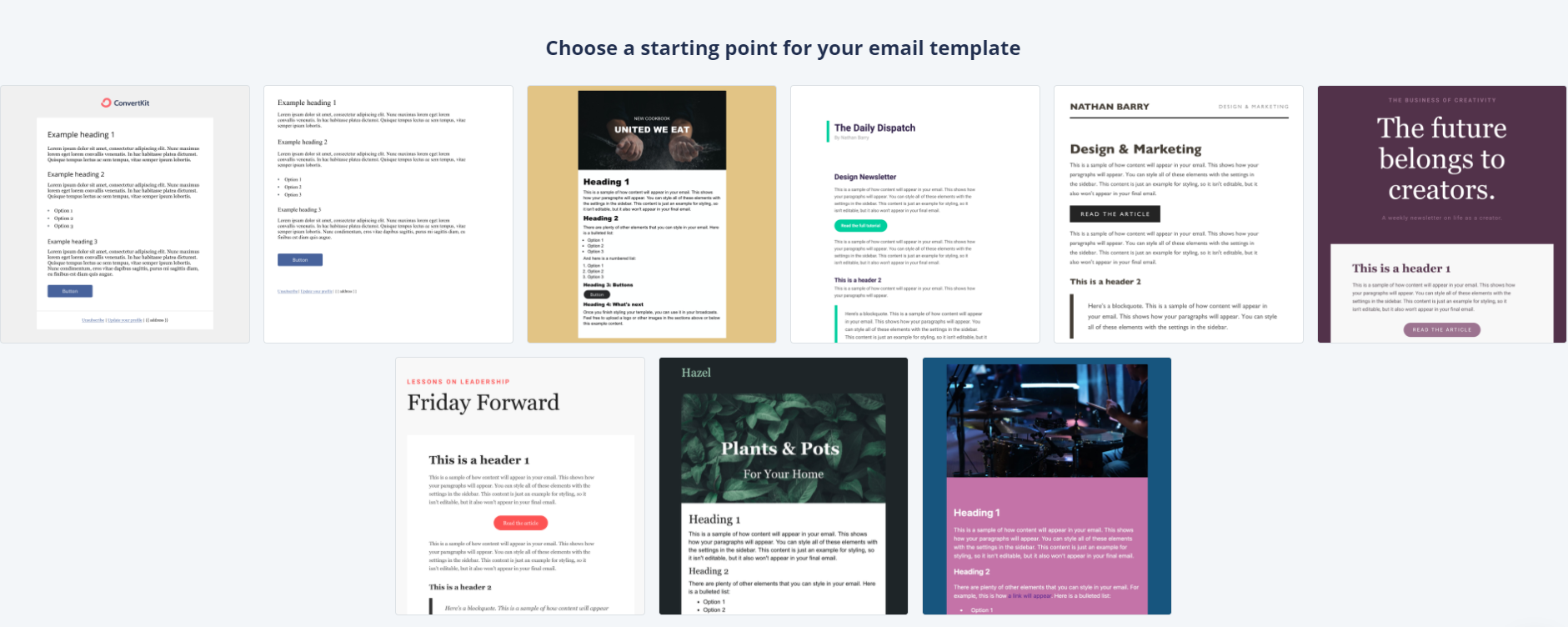
Much like the Template component discussed earlier, an ESP template is a shell that holds the standard elements — the unsubscribe link, your physical mailing address — and opens a slot where each message's body is inserted.
The mismatch here is that my API endpoint emits a complete HTML document (doctype, head, styles) and not a fragment for the ESP's message slot. Splitting the output across two routes wasn't attractive for two reasons:
- MJML doesn't generate partial documents, so isolating the inner content would require fragile HTML string surgery.
- The ESP shell is supposed to stay identical for every campaign, but I wanted the "View on Web" link to live inside that shell — breaking that static assumption.
The pragmatic workaround was to make the ESP template a nearly empty shell that only contains a merge tag:
{{ message_content }}{{ message_content }} is a merge tag the ESP replaces on send. The full generated document — including <!DOCTYPE>, the website fonts, the unsubscribe link, and the address block — becomes the message itself, and the ESP is used only as an SMTP relay. When a new issue is ready, I create a broadcast, select that blank shell, and paste in the HTML from my local generation step.
This approach leans on ConvertKit's permissiveness. Not every ESP will accept a tangle of full HTML documents as "content," but ConvertKit validates only that the final assembled email is coherent and contains an unsubscribe mechanism. If your ESP is stricter, the integration step will differ; some will urge you to manage all that markup inside their own system.
Recapping the Trade-Offs
The whole system turned out harder than expected, largely because the email ecosystem differs from the modern web stack:
- It's table-based layout and dated CSS, not Flexbox or Grid.
- The MDX-to-email pipeline spans several tools with narrow purposes.
- Wiring this into the existing blog infrastructure created extra integration friction.
Those costs came with clear benefits. Authoring a newsletter feeling exactly like writing a blog post — same MDX, same shell, same local preview loop — is a marked quality-of-life improvement. The exact shape of that pipeline will change with your stack and priorities, but any setup that puts the developer experience on a par with regular web writing is worth some extra plumbing.


