

React-spring is a physics-based animation library for React, and among its features is support for SVG morphing. Its distinctive advantage for this task is that morphing is configured directly in the markup where the SVG path descriptors live, which keeps path data where you would naturally look for it. A typical use case is an onboarding sequence where the morph runs as a background effect, complementing foreground animation rather than dominating the scene.
Modeling the paths
Morphing starts with the vector models, and they are the majority of the work. Most explorations begin with an SVG document drawn in a vector editor; Inkscape is one common choice.
Draw at the exact proportions you intend to use in the browser. Sharing one coordinate system between the vector editor and the code makes it easier to perceive what you are building. For an icon intended to be 24px by 30px including padding, make the document 24 pixels wide and 30 pixels tall. Proportions can be corrected later, since SVG scales regardless.
The document for the example is 256 pixels wide and 464 pixels high.
Node placement and node count are where the animation's groundwork is laid. One set of nodes transforms into another, so both collections must contain the exact same number of nodes, and they must correlate in some deliberate way. Every node's position and curvature affects the outcome.
Account for both shapes when drawing. If one vector contains parts the other lacks, or the models otherwise differ, inserting extra nodes in specific places helps. Forming strategies — this corner goes there, this straight line bulges into a curve — keeps the motion coherent. A comparison pen demonstrates the difference: on the left, nodes making up the numbers one and two are placed randomly with no relation, and the morph reads poorly; on the right, placement is carefully planned and the result is much more coherent.
Building each state
The first shape is drawn with the line tool. Because this model is abstract it is somewhat forgiving — placement and curvature still matter, but there is room for sloppiness. Expect the models to be iterative; it usually takes an iteration or two before the animation shines.
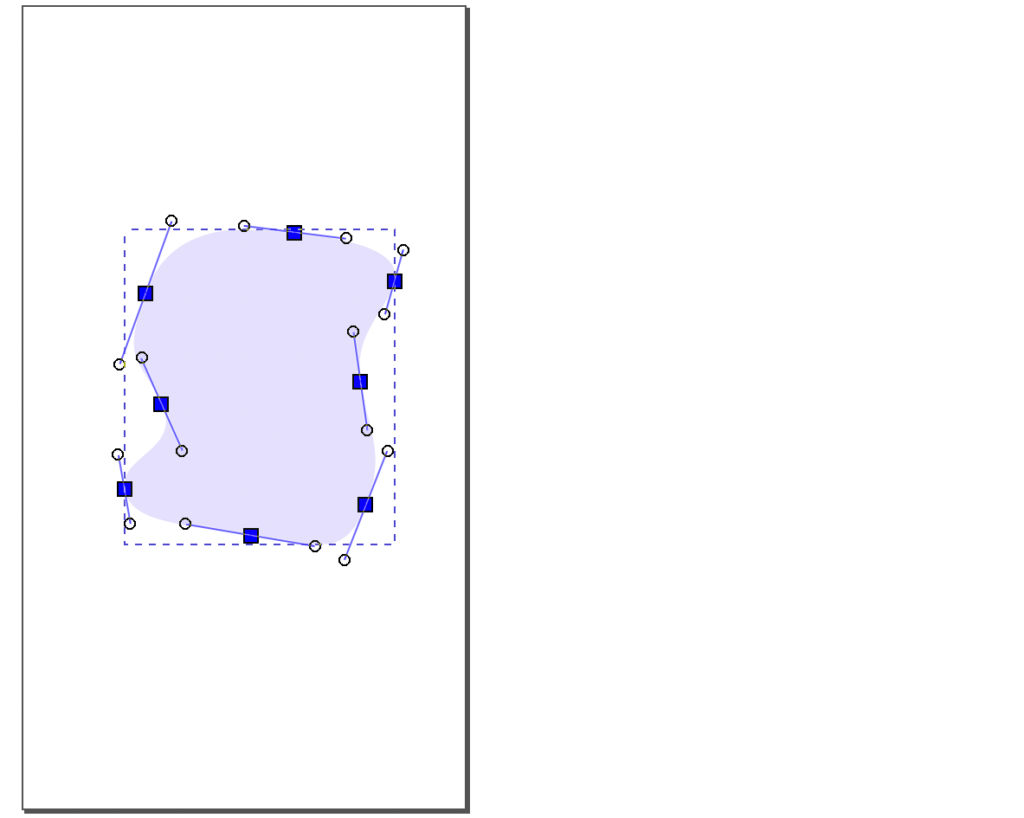
The completed first model is a smooth abstract SVG shape with eight nodes.
The second model, or state, is the shape the first set morphs into. It may be the end state for a single morph, or a step along the way like a keyframe. This example uses three steps, each correlated with the previous one. Duplicating the first vector to create the second is one way to guarantee matching node counts and a consistent look and feel.
Watch the vector editor. Editors typically optimize for file size and format, and saving changes can make the models incompatible. Inspecting the SVG code after saving is a useful habit, and familiarity with the path descriptor format helps even though it is cryptic at first. Disabling optimization in the editor's preferences is worth considering.

Repeat the process for the third shape: copy, relocate all nodes, and set the third color.
Wiring up the animation
Once the models exist, most of the work is done and the animation layer is small. React-spring provides hooks for animation and morphing, and useSpring fits this example — it is intended for single animations.
const [{ x }, set] = useSpring(() => ({
  x: 0,
}));
This yields an animation property, x, around which the morph is built. Animation properties can be altered to produce nearly any kind of animation, and values can be changed through interpolation if they are off.
The second parameter, the set function, triggers updates. The snippet below updates the animation value x from a gesture handler, useDrag, from the react-use-gesture library; react-spring supports many other ways to trigger animations.
const bind = useDrag(
  ({ movement: [x] }) => {
    // ...
    set({ x });
  },
);
Combining the models with the markup takes two pieces: adding the animated keyword to the JSX to activate react-spring's animation system, and using the interpolation call to — previously named interpolate — to convert drag distances into morphed shapes. The output array holds the models already discussed. Copy the path descriptors from the SVG files into the markup: three d descriptors from three separate path elements in three separate SVG files are combined into one.
<svg ...>
  <animated.path
    d={x.to({
      range: [-400, -200, 0],
      output: [
        // First model
        "M 157.81292,131.16918 C 128.33979,127.45582 59.004493,121.76045 53.287478,168.06051 47.570462,214.36057 86.454799,213.14326 77.881699,234.66986 69.308599,256.19646 59.042495,268.13837 67.634107,288.98209 76.225718,309.82581 103.27857,320.05328 138.34249,312.55156 173.40641,305.04984 204.93111,298.87002 208.02612,279.75926 211.12113,260.6485 189.48716,257.88808 188.5557,229.54606 187.62424,201.20404 212.01456,174.45091 200.8528,155.7634 189.69104,137.07589 187.28605,134.88254 157.81292,131.16918 Z",
        // Second model
        "M 157.81292,131.16918 C 128.33979,127.45582 48.756902,138.1566 53.287478,168.06051 57.818054,197.96442 75.182448,197.77187 73.782662,224.42227 72.382877,251.07266 70.314846,257.89078 72.757903,278.7345 75.20096,299.57822 88.114636,303.32873 113.94876,307.60312 139.78288,311.87751 159.84171,314.24141 176.25858,295.13065 192.67546,276.01989 203.83379,256.86332 190.60522,228.5213 177.37665,200.17928 205.866,189.8223 211.10039,171.13479 216.33478,152.44728 187.28605,134.88254 157.81292,131.16918 Z",
        // Third model
        "M 157.81292,131.16918 C 128.33979,127.45582 86.672992,124.83473 71.733144,166.01099 56.793295,207.18725 69.033893,203.92043 80.955976,230.57083 92.87806,257.22123 55.968217,259.9403 59.436033,279.75926 62.90385,299.57822 94.985717,299.83924 132.0922,306.16316 169.19868,312.48708 186.48544,320.38997 198.80328,288.98209 211.12113,257.57422 199.73475,245.59097 195.72902,217.24895 191.72328,188.90693 209.96504,178.54995 215.19943,159.86244 220.43382,141.17493 187.28605,134.88254 157.81292,131.16918 Z",
      ],
    })}
  />
</svg>
Compared with a standard JSX path element, three things change to produce the morph:
- the
animatedkeyword is added so thepathelement animates with react-spring, - the descriptor
dgoes from a string to a react-spring interpolation, - the distance
xis converted into a keyframe animation between threepathdescriptors.
Working between tools
There is no perfect environment yet for working with SVG. The current workflow moves back and forth between the vector editor, the IDE, and the browser, with some copying and redundancy involved. Experiments with scripts that parse SVGs have not produced something applicable to all scenarios, and a more seamless SVG workflow would be a welcome improvement.




