Building a calendar without dependencies
Plenty of calendar tutorials lean on CSS Grid for layout, real data, or a framework for state. The trickier parts tend to get skipped: timezones, date formats, localization, and dates flowing correctly from one month into the next. JavaScript's built-in APIs cover more of this than many developers assume, so instead of reaching for older libraries, we can build a solid calendar in vanilla JavaScript with semantic markup, screenreader-friendly <time> tags, and the Intl.Locale, Intl.DateTimeFormat, and Intl.NumberFormat APIs.
We'll call the component kalEl — short for "kalender element" in the author's native language, and also Superman's Kryptonian name. The entry point is a function that renders a single month:
function kalEl(settings = {}) { ... }A full year is rendered later by calling this method from [...Array(12).keys()].
Locale-aware configuration
Most calendars highlight the current date, so we start with a reference for it:
const today = new Date();Next comes a configuration object merged with the optional settings passed to the primary method:
const config = Object.assign(
  {
    locale: (document.documentElement.getAttribute('lang') || 'en-US'),
    today: {
      day: today.getDate(),
      month: today.getMonth(),
      year: today.getFullYear()
    }
  }, settings
);
The locale comes from a lang attribute on the root <html> element, falling back to en-US when none is present — the first internationalization step. The config object also carries the initial date, so a missing date in settings falls back to today:
const date = config.date ? new Date(config.date) : today;Formatting needs to know whether a week starts on Sunday or Monday, which varies by locale. When that information is available, we use it; otherwise Intl.Locale's weekInfo object supplies a firstDay property, along with the days assigned to the weekend:
if (!config.info) config.info = new Intl.Locale(config.locale).weekInfo || {
  firstDay: 7,
  weekend: [6, 7]
};
Fallbacks matter here. For en-US the first day of the week is Sunday, which defaults to a value of 7 — deliberately offset, since getDay() returns days as [0-6] with 0 for Sunday. Weekends are Saturday and Sunday, so [6, 7]. Before weekInfo existed, supporting international calendars meant maintaining large collections of per-region data. Passing en-GB now returns:
// en-GB
{
  firstDay: 1,
  weekend: [6, 7],
  minimalDays: 4
}
Brunei (ms-BN) puts the weekend on Friday and Sunday:
// ms-BN
{
  firstDay: 7,
  weekend: [5, 7],
  minimalDays: 1
}
The minimalDays property is the fewest days required in the first week of a month for it to count as a full week — one day in some regions, all seven in others.
Within the kalEl method we define a render method and gather the remaining data before rendering:
const render = (date, locale) => { ... }const month = date.getMonth();
const year = date.getFullYear();
const numOfDays = new Date(year, month + 1, 0).getDate();
const renderToday = (year === config.today.year) && (month === config.today.month);The final value is a Boolean checking whether today falls inside the month being rendered.
Semantic markup
Getting the semantic tags right from the outset buys accessibility up front.
The non-semantic <kal-el> wrapper is fine — there is no semantic <calendar> element. Were we not building a custom element, <article> would likely be the best fit, since a calendar can stand on its own page.
Months, days, and numbers
The <time> element carries a lot of weight: it lets screenreaders and search engines parse dates consistently. "January 2023" looks like this:
<time datetime="2023-01">January <i>2023</i></time>The weekday row is trickier. Full day names are ideal but consume space, so the shorthand names live in an <ol>, one <li> per day:
<ol>
  <li><abbr title="Sunday">Sun</abbr></li>
  <li><abbr title="Monday">Mon</abbr></li>
  <!-- etc. -->
</ol>
A CSS-only approach could show full names by default via this markup:
<ol>
  <li>
    <abbr title="S">Sunday</abbr>
  </li>
</ol>
…and hide them when space runs short, falling back to the title attribute:
@media all and (max-width: 800px) {
  li abbr::after {
    content: attr(title);
  }
}
We skip that route, because Intl.DateTimeFormat handles it below.
Each date number is an <li> in the ordered list, with an inline <time> wrapping the number itself:
<li>
  <time datetime="2023-01-01">1</time>
</li>
To style weekday and weekend numbers differently later, the markup adds data-* attributes for exactly that: data-weekend and data-today.
Weeks number 52 in a year, sometimes 53. Displaying the week's number adds context, and a data-weeknumber attribute acts as both styling hook and data carrier on each week's first date:
<li>
  <time datetime="2023-01-08">8</time>
</li>
Rendering dates with the Intl APIs
Rendering starts by configuring the <kal-el> element with its firstDay property, so it knows which day opens the week:
<kal-el>Markup is built with template literals, and dates are formatted for an international audience through Intl.DateTimeFormat, using the locale established earlier.
Month and year heading
Intl.DateTimeFormat can produce the long month name ("February") or the short one ("Feb."). The heading above the calendar uses long:
<time datetime="${year}-${(pad(month))}">
  ${new Intl.DateTimeFormat(
    locale,
    { month:'long'}).format(date)} <i>${year}</i>
</time>
Weekday labels
The grid's weekday row needs both the long name ("Sunday") and the short one ("Sun"), so the short form can serve when the calendar is short on space:
Intl.DateTimeFormat([locale], { weekday: 'long' })
Intl.DateTimeFormat([locale], { weekday: 'short' })
A small helper makes calling either form simpler:
const weekdays = (firstDay, locale) => {
  const date = new Date(0);
  const arr = [...Array(7).keys()].map(i => {
    date.setDate(5 + i)
    return {
      long: new Intl.DateTimeFormat([locale], { weekday: 'long'}).format(date),
      short: new Intl.DateTimeFormat([locale], { weekday: 'short'}).format(date)
    }
  })
  for (let i = 0; i < 8 - firstDay; i++) arr.splice(0, 0, arr.pop());
  return arr;
}
Invoked in the template like so:
<ol>
  ${weekdays(config.info.firstDay,locale).map(name => `
    <li>
      <abbr title="${name.long}">${name.short}</abbr>
    </li>`).join('')
  }
</ol>
The day grid
The dates live in an <ol>:
${[...Array(numOfDays).keys()].map(i => {
  const cur = new Date(year, month, i + 1);
  let day = cur.getDay(); if (day === 0) day = 7;
  const today = renderToday && (config.today.day === i + 1) ? ' data-today':'';
  return `
    <li${today}${i === 0 || day === config.info.firstDay ? ``:''}${config.info.weekend.includes(day) ? ` data-weekend`:''}>
      <time datetime="${year}-${(pad(month))}-${pad(i)}" tabindex="0">
        ${new Intl.NumberFormat(locale).format(i + 1)}
      </time>
    </li>`
}).join('')}
Step by step: a dummy array based on the number of days is created for iteration; a day variable tracks the current day; the discrepancy between Intl.Locale and getDay() is corrected; a data-* attribute is added when day equals today; and the <li> is returned as a string with merged data. The tabindex="0" makes the element focusable via keyboard navigation after any positive tabindex values — and positive tabindex values themselves should never be used.
A helper pads the numbers in the datetime attribute:
const pad = (val) => (val + 1).toString().padStart(2, '0');Week numbers get a helper too, a cleaned-up version of an existing script rather than original code:
function getWeek(cur) {
  const date = new Date(cur.getTime());
  date.setHours(0, 0, 0, 0);
  date.setDate(date.getDate() + 3 - (date.getDay() + 6) % 7);
  const week = new Date(date.getFullYear(), 0, 4);
  return 1 + Math.round(((date.getTime() - week.getTime()) / 86400000 - 3 + (week.getDay() + 6) % 7) / 7);
}
With those pieces in place, changing the lang attribute on <html> is all it takes to shift the calendar's context to another region:
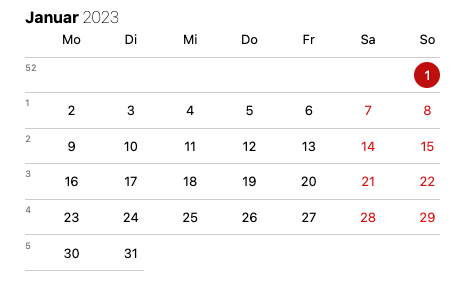
de-DE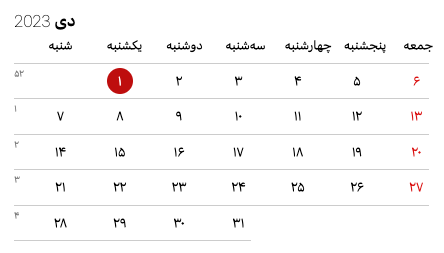
fa-IR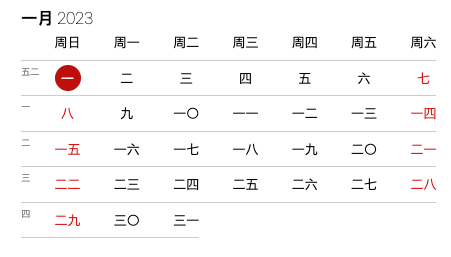
zh-Hans-CN-u-nu-hanidecGrid and layout styling
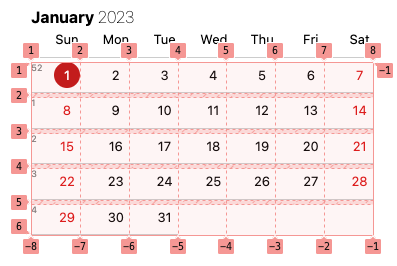
All dates are a single <ol> of list items, and CSS Grid turns them into a readable calendar. The layout can repurpose a starter calendar template, updated with the :is() relational pseudo-class. Configurable custom properties are prefixed ---kalel- to avoid conflicts.
kal-el :is(ol, ul) {
  display: grid;
  font-size: var(--kalel-fz, small);
  grid-row-gap: var(--kalel-row-gap, .33em);
  grid-template-columns: var(--kalel-gtc, repeat(7, 1fr));
  list-style: none;
  margin: unset;
  padding: unset;
  position: relative;
}
Borders around date numbers help separate them visually:
kal-el :is(ol, ul) li {
  border-color: var(--kalel-li-bdc, hsl(0, 0%, 80%));
  border-style: var(--kalel-li-bds, solid);
  border-width: var(--kalel-li-bdw, 0 0 1px 0);
  grid-column: var(--kalel-li-gc, initial);
  text-align: var(--kalel-li-tal, end);
}
A seven-column grid works cleanly only when the month's first day coincides with the locale's first day of the week — the exception rather than the rule. Usually the month's start must shift to a different weekday:
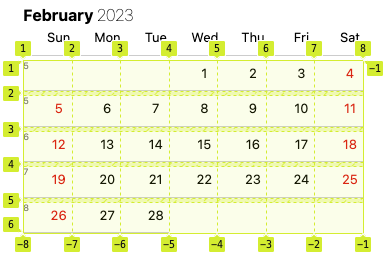
The data-* attributes from the markup let us set which grid column (--kalel-li-gc) holds the first date number:
[data-firstday="1"] [data-day="3"]:first-child {
  --kalel-li-gc: 1 / 4;
}
Here the span runs from the first grid column to the fourth, automatically pushing Day 2 into the fifth column and onward.
Styling for the current date makes it stand out:
[data-today] {
  --kalel-day-bdrs: 50%;
  --kalel-day-bg: hsl(0, 86%, 40%);
  --kalel-day-hover-bgc: hsl(0, 86%, 70%);
  --kalel-day-c: #fff;
}
Weekend numbers are tinted reddish, selected via the :not() pseudo-class so the current date stays untouched:
[data-weekend]:not([data-today]) {
  --kalel-day-c: var(--kalel-weekend-c, hsl(0, 86%, 46%));
}
Week numbers precede each week's first date via the data-weeknumber attribute, but they don't display until revealed on a ::before pseudo-element:
[data-weeknumber]::before {
  display: var(--kalel-weeknumber-d, inline-block);
  content: attr(data-weeknumber);
  position: absolute;
  inset-inline-start: 0;
  /* additional styles */
}
Extending to a full year
The render method can be called as many times as needed, changing only the integer identifying the month — 12 calls for the current year:
[...Array(12).keys()].map(i =>
  render(
    new Date(date.getFullYear(),
    i,
    date.getDate()),
    config.locale,
    date.getMonth()
  )
).join('')
A new parent wrapper makes sense around the individual grids. Each grid is a <kal-el> element, so the wrapper is named <jor-el> after Kal-El's father:
<jor-el id="app">
  <kal-el>
    <!-- etc. -->
  </kal-el>

  <!-- other months -->
</jor-el>
<jor-el> then builds a grid of grids:
jor-el {
  background: var(--jorel-bg, none);
  display: var(--jorel-d, grid);
  gap: var(--jorel-gap, 2.5rem);
  grid-template-columns: var(--jorel-gtc, repeat(auto-fill, minmax(320px, 1fr)));
  padding: var(--jorel-p, 0);
}
Taking it further
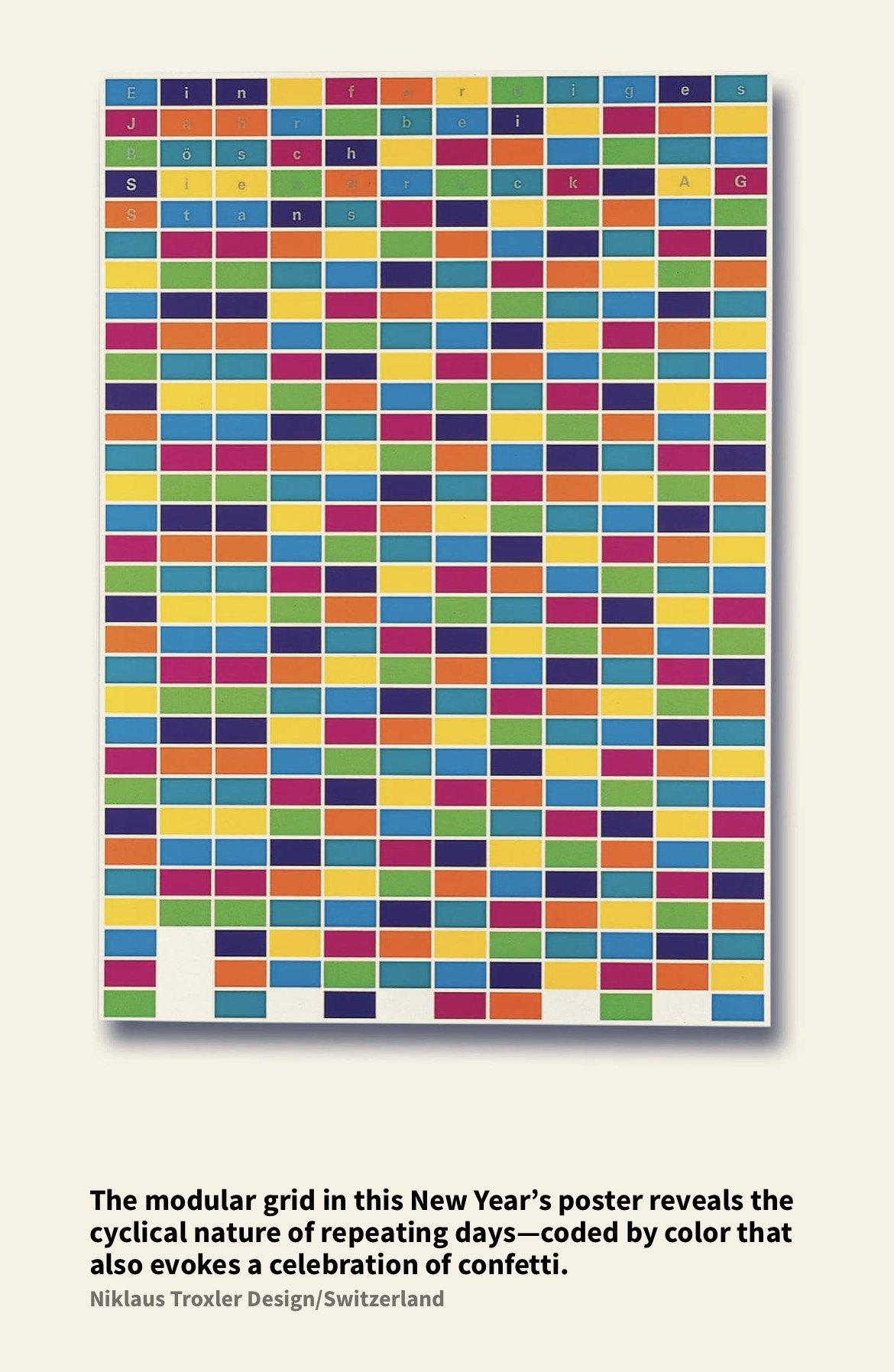
Inspired by a "New Year's poster" spotted in the book Making and Breaking the Grid, the same HTML and JavaScript can produce a "Confetti Calendar" treatment. That version uses full month names and numbers in place of day names for readability, without any change to the markup or script: