

Why Formats Matter for Loaders
A question raised in an SVG workshop gets to the heart of it: how much faster is an SVG loader than simply spinning a raster image? For very small, specific cases, the difference in raw animation cost is negligible. The decision becomes interesting once you look at how each format is built and delivered.
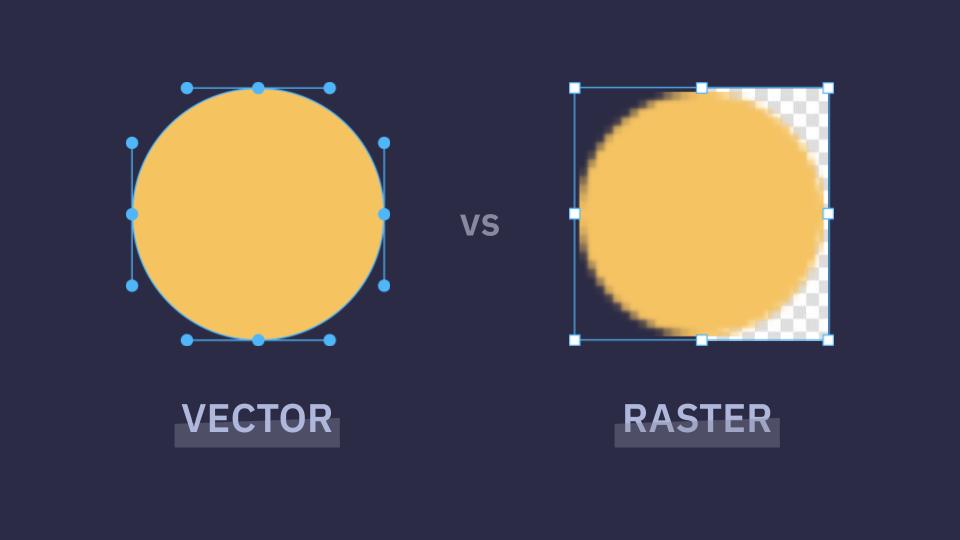
Raster images are pixel grids. Every pixel carries its own color information, all of which travels across the network and is painted individually by the browser. Consequences: fixed resolution that blurs when scaled, per-frame decode and paint work, and animation that amounts to frame-by-frame playback (GIFs, video loops).
Vectors are instructions. As Chris Coyier put it, "Why send pixels when you can send math?" An SVG describes how to draw the graphic, shifting effort to the browser and off the network. SVGs scale without quality loss, can be styled and scripted via CSS and JavaScript, and can sit directly in the DOM with no extra HTTP request.
Where SVG Beats Raster
Transparency quality
Transparency support is not uniform across image formats. GIFs offer only binary transparency — a pixel is either fully opaque or fully invisible — which produces jagged edges at larger sizes, particularly along curves or against opaque and transparent backgrounds. SVG provides true transparency and smooth edges, a visible difference for loaders layered over complex UI.
| JPG | GIF | PNG | SVG | |
|---|---|---|---|---|
| Vector | ❌ | ❌ | ❌ | ✅ |
| Raster | ✅ | ✅ | ✅ | ❌ |
| Transparency | ❌ | ✅ | ✅ | ✅ |
| Animation | ❌ | ✅ | ✅ | ✅ |
| Compression | Lossy | Lossless | Lossless | Lossless |
No request at all
Raw rotation performance is comparable between a small PNG and an SVG animated with CSS or JavaScript. SVG pulls ahead in practice for two reasons: it is gzip-friendly and it can be inlined. Pasting the SVG source into HTML removes an HTTP request entirely — and for a loader, whose whole job is to be visible while other assets load, rendering instantly from markup is a meaningful gain.
<!-- Inline SVG: Heart -->
<svg xmlns="http://www.w3.org/2000/svg" width="1em" height="1em" viewBox="0 0 24 24">
  <title xmlns="">Heart</title>
  <path fill="currentColor" d="M8.4 5.25c-2.78 0-5.15 2.08-5.15 4.78c0 1.863.872 3.431 2.028 4.73c1.153 1.295 2.64 2.382 3.983 3.292l2.319 1.57a.75.75 0 0 0 .84 0l2.319-1.57c1.344-.91 2.83-1.997 3.982-3.292c1.157-1.299 2.029-2.867 2.029-4.73c0-2.7-2.37-4.78-5.15-4.78c-1.434 0-2.695.672-3.6 1.542c-.905-.87-2.167-1.542-3.6-1.542"/>
</svg>

<!-- Raster image -->
<img src="https://css-tricks.com/img/heart.png" alt="Solid black heart">
Loaders also shape perceived performance: one that scales and fits its context can make the same wait feel shorter. The SVG source may look heavier than a single HTML line, but file size is what counts, and SVG measured in gzippable bytes carries little overhead.
An SVG can still be referenced through an <img> tag like a raster file (other embedding options exist too):
<img src="https://css-tricks.com/img/heart.svg" alt="Solid black heart">That approach costs a network request. It keeps the vector's sharpness at any scale but gives up the benefits below.
DOM control instead of frames
SVG loaders are DOM-based rather than frame-based, which allows you to:
- recolor through
currentColor, - respond to application state or user interaction,
- honor user preferences such as
prefers-reduced-motionandprefers-color-scheme, - change shapes in code without exporting new assets.
Manipulation works through CSS, JavaScript, or SMIL, opening interactivity raster images cannot match.
One file, still controllable
Animations can live inline in HTML or inside a single .svg file — one animated file, like a GIF, with far more control. <defs> and <use> keep the code tidy. An SMIL loader file looks like this:
<svg xmlns="http://www.w3.org/2000/svg" width="100" height="100" viewBox="0 0 100 100" overflow="visible" fill="#ff5463" stroke="none" role="img" aria-labelledby="loader-title">
  <title id="loader-title">Loading...</title>
  <defs>
    <circle id="loader" r="4" cx="50" cy="50" transform="translate(0 -30)"/>
  </defs>
  <use xlink:href="#loader" transform="rotate(45 50 50)">
    <animate attributeName="opacity" values="0;1;0" dur="1s" begin="0.13s" repeatCount="indefinite"></animate>
  </use>
  <use xlink:href="#loader" transform="rotate(90 50 50)">
    <animate attributeName="opacity" values="0;1;0" dur="1s" begin="0.25s" repeatCount="indefinite"></animate>
  </use>
</svg>
For richer interactions, CSS and JavaScript can be embedded in the SVG itself:
<svg width="100" height="100" viewBox="0 0 100 100" xmlns="http://www.w3.org/2000/svg">
<title id="titleId">Interactive Loading Spinner</title> <desc id="descId">A blue rotating circle. Clicking it toggles the rotation speed between fast and slow.</desc>
  <defs>
    <style>
      .loader {
        transform-origin: center;
        animation: spin 1s linear infinite;
        cursor: pointer;
      }
      @keyframes spin {
        to { transform: rotate(360deg); }
      }
    </style>
  </defs>

  <circle class="loader" id="loader" cx="50" cy="50" r="35"
          fill="none" stroke="#3b82f6" stroke-width="6"
          stroke-dasharray="150" stroke-dashoffset="50"
          stroke-linecap="round" />

  <script type="text/javascript">
    const loader = document.getElementById('loader');
    loader.addEventListener('click', function() {
      this.style.animationDuration = this.style.animationDuration === '0.3s' ? '1s' : '0.3s';
    });
  </script>
</svg>
That effectively makes the graphic a standalone mini-application. The encapsulation is the point: fully portable, fewer HTTP requests, and no style leakage into the host site.
The trade-off is functionality and security. Loaded via<img>or a CSS background, browsers treat SVG as a static image and disable JavaScript. Keeping interactivity requires inlining the code or loading it with an<object>tag — which is why inlining remains the preferred method for most modern web apps.
Brand and storytelling
Beyond performance, loaders can carry narrative. A B2B site that takes a few seconds to generate an online store could animate products "arriving" at that store instead of showing a generic spinner — even making the loader interactive. Such an SVG animation can stay under 20kb, where a raster GIF doing the same would run into megabytes. That efficiency lets you extend brand voice during waits without wrecking performance.
When Raster Still Fits
Raster loaders are not wrong; they are limited. They remain sensible when:
- the loader is photographic or relies on complex, illustration-heavy textures,
- you are stuck in legacy systems that disallow SVG injection,
- you need a fast one-off drop-in with no customization.
| Feature | Raster (GIF/PNG) | SVG |
|---|---|---|
| Visual quality | Might be blurry on retina screens | Crisp and sharp at any scale |
| File size | Typically larger (KB/MB) | Very small (bytes) |
| Customization | Requires re-exporting | Modify directly with CSS/JavaScript |
| Network requests | Typically one HTTP request | Zero if inlined directly into HTML |
The Short Version
For a spinner as simple as a rotating dot, the two formats are effectively tied. Factor in scalability, transparency, accessibility, and brand storytelling and the choice stops being purely about performance. An SVG loader is a loader built for the modern web.