

Why Frontend Teams Need to Know Kubernetes
Kubernetes (k8s), created by a Google engineer in mid-2014, has become the de facto standard for managing containerized applications in the cloud. As a container orchestration tool, it handles the tasks that would otherwise require manual intervention: scaling under load, recovering from hardware failures, and managing configuration updates.
The official Kubernetes documentation describes it as an open-source platform for managing containerized workloads and services that enables declarative configuration and automation.
For frontend developers, understanding Kubernetes is no longer optional. While backend engineers traditionally manage cluster setup and configuration, the developer should be responsible for the minimum setup necessary to run their application. Having this knowledge allows you to test deployments, understand how your project should be deployed, and participate in the release process.
The practical benefits are significant. Understanding deployment configuration lets you spot and fix crucial micro performance issues such as caching, request volumes, and time-to-first-byte. You can also understand how staging and testing environments differ from production before releasing your app. Teams with shared understanding of Kubernetes around the software stack can more easily communicate and address project requirements together.
Knowing RBAC (Role-Based Access and Control) permissions, which namespaces your project sits in, and which ports and services your application exposes creates common ground between frontend and backend teams. As one senior software engineer described, having control over how their application is deployed on Kubernetes allowed her team to define their own deployment strategy rather than leaving it entirely to the backend team.
Containers vs. Microservices vs. Orchestration
Docker is the most popular container technology. A Docker image contains an application’s code, libraries, tools, and dependencies; when executed, the image turns into a container. Think of an image as a template of instructions that abstracts application code from the underlying infrastructure, enabling portability across deployment environments and simplifying version management.
Containerized applications are stateless by design. Because multiple instances of a container image can run simultaneously, developers can replace failed instances without disrupting the application. Containers are also more resource-efficient than VMs since their access to physical resources such as memory, storage, and CPU is constrained by the host OS.
Monolithic architecture builds infrastructure as a single unit that includes the user interface, server-side framework, and database. Changing one component requires updating the entire application because all layers are interconnected. In contrast, microservice architecture breaks programs into loosely coupled components. Each component — with its own lifecycle, protocols, and database — can be designed, scaled, and managed independently.
Containerization is the bridge between microservices and orchestration. Each standalone unit gets packed into a container, which is then enclosed in a Pod. Kubernetes manages these Pods, creating and destroying them based on application requirements. The Service object maps IP addresses to a collection of Pods, routing requests from any authorized source within or outside the cluster through a designated port.
Not every organization needs microservices. The architecture becomes worthwhile when an application is too large for any single developer to maintain, or when orchestration and interaction between services increases after every release.
Kubernetes vs. Docker Compose
Docker Compose accepts a YAML file specifying a cross-container application and automates the creation and removal of those containers — saving you from writing dozens of Docker commands. Use it for testing and development.
Kubernetes is a platform for production-ready containerized workloads that supports declarative setup and automation. For production applications, choose Kubernetes; for local development and testing, Docker Compose is sufficient.
Key Kubernetes Terminology
- Docker — A container resource that provides the configuration Kubernetes needs to deploy, execute, expose, monitor, and safeguard the container.
- Container — The standard unit of software that packages code and all application dependencies needed to run reliably.
- Pods — A collection of one or more containers sharing storage and network resources. In multi-container Pods, all containers are handled as a single entity sharing the Pod’s resources, including the namespace, IP address, and network ports. The smallest deployable unit Kubernetes creates and manages.
- Nodes — Physical or virtual machines (worker nodes) that run applications. They execute tasks assigned by the master node.
- Cluster — A set of master nodes and worker nodes that run containerized applications. Minikube is recommended for beginners building their first cluster.
- Objects — Persistent entities that represent the state of the cluster, including the desired state for applications, available resources, and policies.
- Namespaces — Distribute cluster resources for various teams or projects with many users.
- Ingress Controller — An API object that manages external user access to services using routing rules, typically via HTTPS/HTTP, without creating Load Balancers or exposing each service on a node.
Deployments and Services
A Deployment creates the resources identified in a configuration file. These YAML files specify fields such as version, name, kind, replicas (the desired number of Pods), selector, and labels.
While a Deployment describes the desired state, a Kubernetes Service is an abstraction layer that groups Pods and enables external traffic exposure, load balancing, and service discovery for those Pods.
....
  name:
spec:
  selector:
    matchLabels:
      app:
      tier:

  replicas:
    metadata:
      labels:
        app:
        tier:

    spec:
      containers:
        - name:
          image:
          ...
Updating a Deployment
Deployment updates are declarative: modify the objects in the configuration file and redeploy. Using the rolling update strategy, old Pods are gradually replaced by new ones, ensuring both versions are deployed and accessible simultaneously with zero downtime.
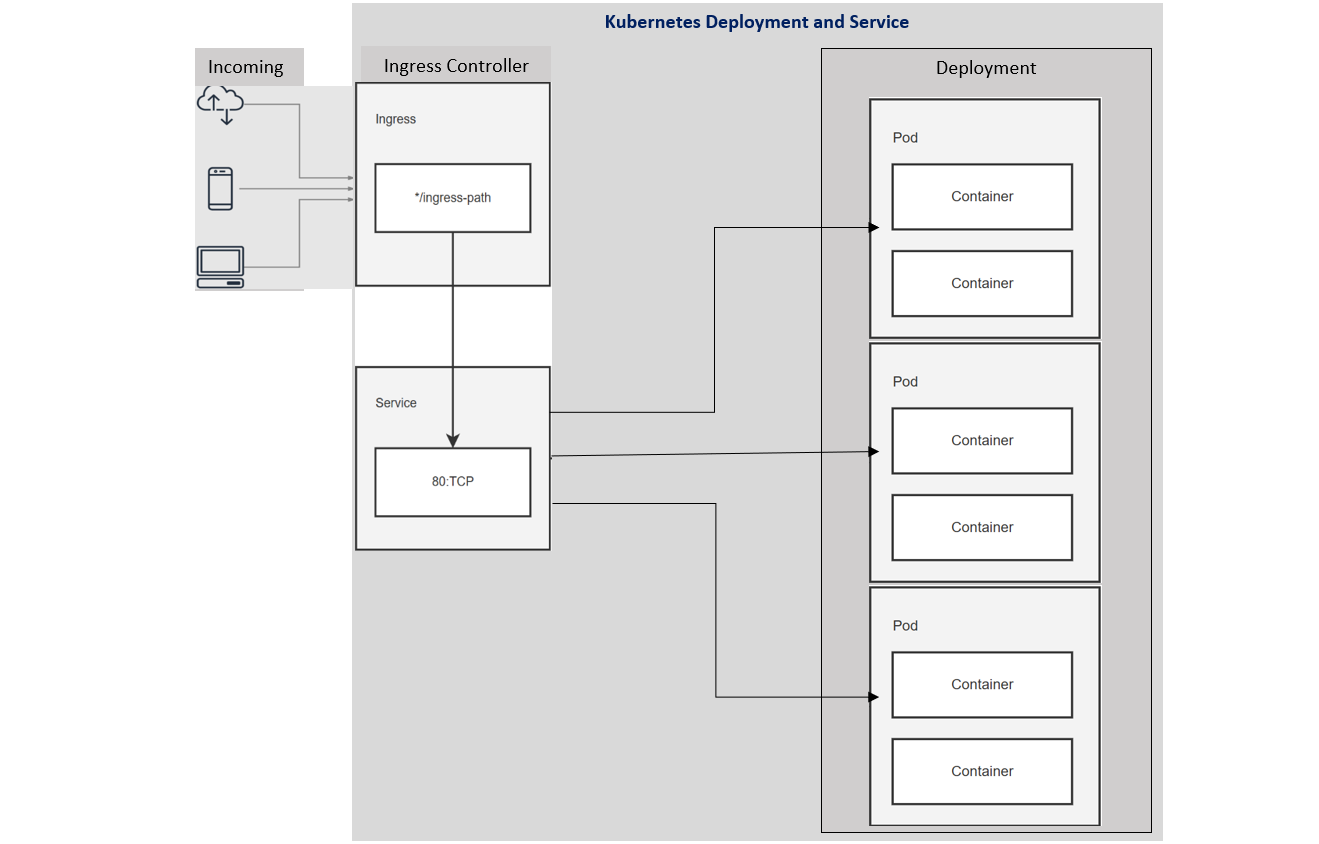
Exposing the Backend With a Service
To allow the front-end Deployment to reach the backend application, we need a Service that points at it. A Service provides a stable IP address and DNS name for a set of Pods, and it uses label selectors to determine which Pods should receive traffic.
A backend-service.yaml configuration file would expose the backend app to other Pods, routing traffic only to Pods labeled app: hello and tier: backend on port 80:
---
apiVersion: v1
kind: Service
metadata:
  name: backend-serv
spec:
  selector:
    app: hello
    tier: backend
  ports:
  - protocol: TCP
    port: 80
    ...
Building and Connecting the Frontend
In a typical setup, you would build a container image of your application and push it to a registry before referencing it in a Pod. For this walkthrough, we use the sample front-end image from the Google container repository. The frontend communicates with the backend Worker Pods using the DNS name assigned to the backend Service, which is the value of the name field in the Service's YAML.
The front-end Deployment runs an Nginx image configured to proxy requests to the backend Service. The configuration file specifies the server and the listening port; when an ingress is created, nginx upstreams point to Services that match the specified selectors.
nginx.conf Configuration File
upstream Backend {
    server backend-serv;
}
server {
    listen 80;
    location / {
                proxy_pass http://Backend;
    }
}
The internal DNS name used by the backend Service inside Kubernetes identifies the upstream target.
Like the backend, the frontend consists of both a Deployment and a Service. The front-end Service uses type: LoadBalancer, which provisions a load balancer via the cloud provider, making the service reachable from outside the cluster:
---
apiVersion: v1
kind: Service
metadata:
  name: frontend-serv
spec:
  selector:
    app: hello
    tier: frontend
  ports:
  - protocol: "TCP"
    port: 80
    targetPort: 80
  type: LoadBalancer
...
---
apiVersion: apps/v1
kind: Deployment
metadata:
name: frontend-depl
spec:
selector:
matchLabels:
app: hello
tier: frontend
track: stable
replicas: 1
template:
metadata:
labels:
app: hello
tier: frontend
track: stable
spec:
containers:
- name: nginx
image: "gcr.io/google-samples/hello-frontend:1.0"
...Creating the Front-End Resources
With the configuration files prepared, run kubectl apply to create the resources:
kubectl apply -f [insert URL to saved frontend-deployment YAML file]

kubectl apply -f [insert URL to saved frontend-service YAML file]
The output confirms that both the Deployment and the Service were successfully created:
deployment.apps/frontend-depl created
service/frontend-serv created
Reaching the Frontend From Outside
To retrieve the external IP after the LoadBalancer Service is created, use:
kubectl get service frontend-serv –watch
This command displays the Service's configuration and monitors for changes. The internal cluster IP is allocated right away, while the external IP initially appears as pending:
  NAME          TYPE           CLUSTER-IP      EXTERNAL-IP   PORT(S)  AGE
frontend-serv   LoadBalancer   10.xx.xxx.xxx   <pending>     80/TCP   10s
Once an external IP is provisioned, the output updates, showing the new address under the EXTERNAL-IP heading:
NAME       TYPE           CLUSTER-IP      EXTERNAL-IP        PORT(S)  AGE
frontend-serv   LoadBalancer   10.xx.xxx.xx   XXX.XXX.XXX.XXX    80/TCP   1m
That provisioned IP allows communication with the front-end service from outside the cluster. Because the frontend and backend are linked, you can send traffic through the frontend—for example, by using curl on the Service's external IP to reach the endpoint.
Kubernetes and Microservices Fit
A broad understanding of Kubernetes and how your application operates on it can support a company-wide goal of delivering reliable software. The microservice architecture is most useful for complex, evolving applications, offering a practical way to manage a system that combines many distinct functions and services.
That said, a microservice design isn't right for every organization. If your idea is new and not yet validated, starting with a monolith is more sensible. For a small technical team building a straightforward application, microservices can be overkill—you can deploy a monolith through Kubernetes without issue and still benefit from replication and other platform features.


