
Google’s rendering pipeline, tested
For years, the SEO community has operated on a set of assumptions about how Google handles client-side JavaScript. To separate fact from folklore, Vercel partnered with MERJ, an SEO and data engineering consultancy, to put several long-held beliefs to the test. The resulting study analyzed over 100,000 Googlebot fetches across nextjs.org, monogram.io, and basement.io during April 2024, using Vercel’s Edge Middleware and MERJ’s Web Rendering Monitor technology to track and verify rendering behavior.
From static HTML to universal rendering
Google’s crawling and indexing capabilities have evolved through several distinct phases. Understanding this trajectory helps explain why older SEO wisdom often no longer applies.
- Pre-2009: Google indexed static HTML almost exclusively. JavaScript-generated content was effectively invisible, pushing sites toward static pages for any content that needed to rank.
- 2009–2015: Google introduced the AJAX crawling scheme, which required developers to serve pre-rendered HTML snapshots of dynamic content as a stopgap workaround.
- 2015–2018: Google began using a headless Chrome browser for rendering, but this older browser version struggled with modern JavaScript features.
- 2018 to present: Google’s renderer now operates on a current stable version of Chrome/Chromium, with a set of key characteristics that define modern indexing behavior.
Today’s system reflects several important technical parameters. Google attempts to render essentially all HTML pages, using a modern browser that supports current JavaScript specifications. Each page is rendered in a fresh, stateless browser session: cookies, localStorage, and other state are not carried over, and Google generally will not interact with page elements like tabs or cookie consent banners. Google prohibits serving different content based on User-Agent, treating that practice as cloaking. Finally, asset caching is handled through Google Web Rendering Service’s internal heuristics rather than HTTP Cache-Control headers.


How the research was conducted
The study relied on a custom Edge Middleware deployed on the target sites to intercept requests from search engine bots. This middleware identified and tracked traffic from Google and other engines, and injected a lightweight JavaScript beacon library into HTML responses intended for bots. Once a page finished rendering in Googlebot, the library sent data back to a server containing the page URL, the unique request identifier (which allowed matching against standard server access logs), and a timestamp for the rendering completion.
Cross-referencing server logs with beacon data answered two core questions: whether a page was fully rendered, and how much time lapsed between the initial crawl and the rendering completion. The analysis for this article focused exclusively on Googlebot data, which provided the most reliable dataset with over 37,000 matched server-beacon pairs. Data from other engines, including OpenAI and Anthropic crawlers, is still being gathered.
Myth: Google can’t render JavaScript content
The belief that Google’s renderer fails on JavaScript-heavy pages has driven many developers away from frameworks or toward complex prerendering setups. The test data suggests those fears are outdated.
- Framework compatibility:
nextjs.orgrelies on Next.js with a mix of static prerendering, server-side rendering, and client-side rendering. Googlebot’s interactions with the site confirmed full compatibility with this React-based framework. - Dynamic content: Pages that loaded content asynchronously via API calls were indexed successfully even though that content was absent from the initial HTML response.
- Streamed content: Content delivered incrementally via React Server Components with the Next.js App Router was fully rendered, confirming that streaming does not negatively impact SEO.
- Rendering success rate: Of over 100,000 Googlebot fetches analyzed after excluding error status codes and non-indexable pages, Google fully rendered 100% of the HTML pages — including those with complex client-side behavior.
Myth: Google treats JS pages differently
Many assume Google maintains separate process queues or ranking criteria for JavaScript-heavy pages. Experiments combining the beacon methodology with several targeted tests indicate otherwise.
- CSS
@importtest: A test page without any client-side JavaScript loaded a CSS file that@imports a second stylesheet. The second file only downloads when the renderer executes the first CSS import, proving that Google’s rendering process runs regardless of whether JavaScript is present. - Status code handling: A Next.js test application with middleware exposed Google’s behavior across HTTP status codes. All 200-status HTML pages were rendered regardless of JS content. Pages returning 304 used the original 200 response’s content for rendering. Other 3xx, 4xx, and 5xx statuses were not rendered.
noindexbehavior: Pages with anoindexmeta tag in the initial HTML response were not rendered at all — the JavaScript never executed. Client-side removal ofnoindextags is therefore ineffective for SEO. If the tag appears in the source HTML, Google won’t waste resources on a render.- JavaScript complexity and delays: Comparing pages ranging from minimal to heavily dynamic JavaScript found no significant difference in rendering success. At the scale of
nextjs.org, there was also no observed correlation between JavaScript complexity and rendering delay. More complex JavaScript can still affect crawl efficiency on substantially larger sites, but not rendering throughput.
These results align with Google’s own public statements positioning JavaScript pages inside the same unified rendering pipeline as any other web page.
Rendering Delays Are Real but Rarely Severe
A common fear among SEO practitioners is that JavaScript-heavy pages sit in a rendering queue for hours or days before Google gets around to processing them. Data from more than 37,000 matched server-beacon pairs on nextjs.org paints a different picture.
The measured delay between Google's initial crawl and completed rendering breaks down as follows:
- 50th percentile (median): 10 seconds
- 75th percentile: 26 seconds
- 90th percentile: ~3 hours
- 95th percentile: ~6 hours
- 99th percentile: ~18 hours


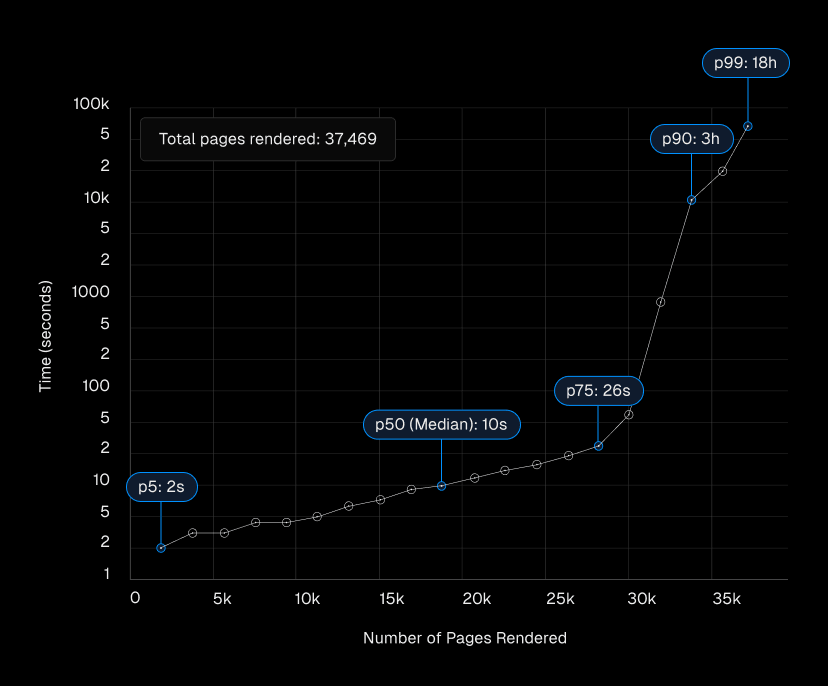
Notably, the 25th percentile of pages were fully rendered within 4 seconds of the initial crawl. While a meaningful tail exists—up to roughly 18 hours at the 99th percentile—those cases are the exception rather than the rule.
URL Type | 50th Percentile | 75th Percentile | 90th Percentile |
|---|---|---|---|
All URLs | 10 seconds | 26 seconds | ~3 hours |
URLs without Query String | 10 seconds | 22 seconds | ~2.5 hours |
URLs with Query String | 13 seconds | 31 minutes | ~8.5 hours |
The data also shows that URL structure influences rendering speed. On nextjs.org, pages carrying query strings that don't alter content (like ?ref= parameters) experienced longer rendering delays, especially at higher percentiles. Content freshness matters too: frequently updated sections such as /docs had shorter median rendering times than more static pages. The /showcase page, despite being heavily linked, took longer to render, suggesting Google throttles re-rendering for content that doesn't change meaningfully.
Link Discovery Works Across Rendering Patterns
Another persistent belief is that client-side rendered pages—particularly SPAs—suffer slower page discovery. Tests on nextjs.org compared link discovery across server-rendered, statically generated, and client-side rendered pages. Researchers also injected a JSON object similar to a React Server Component (RSC) payload into the /showcase page, containing links to new, undiscovered pages, to test whether Google could extract URLs from unrendered JavaScript data.
The findings challenge several assumptions:
- Google discovered and crawled links in fully rendered pages regardless of the rendering method used.
- Google can find links inside non-rendered JavaScript payloads such as RSC data structures.
- In both initial and rendered HTML, Google identifies strings that look like URLs and uses the current host and port as the base for relative URLs. It did not discover an encoded URL (
https%3A%2F%2Fwebsite.com) in the payload, indicating strict link parsing. - Link source and format—an
<a>tag versus a JSON payload—did not affect crawl prioritization. Priority stayed consistent whether the URL appeared in the initial crawl or after rendering. - Client-side rendered pages must be rendered before their links are discoverable; server-rendered or partially pre-rendered pages hold a small advantage in immediate discovery.
- Google separates link discovery from link value assessment. Judging a link's importance for site architecture and crawl prioritization happens only after the full page has been rendered.
- An updated
sitemap.xmllargely eliminates time-to-discovery differences between rendering patterns.
What This Means for SEO Strategy
The research upends several long-held assumptions about JavaScript and search. Google renders and indexes JavaScript content effectively, including SPAs, dynamically loaded content, and streamed content. All pages—static or script-heavy—go through rendering. The rendering queue exists but is far shorter than feared; most pages are processed in minutes. JavaScript-heavy sites are not inherently disadvantaged in discovery, and when content like noindex tags is added to a page matters, since client-side changes may not be processed.
Rendering prioritization is not a simple first-in-first-out process. Content freshness and how often a page updates influence scheduling more than the complexity of its JavaScript. That said, rendering is still resource-intensive. Large sites (10,000+ unique, frequently changing pages) may see crawl budget pressure, so optimizing application performance and trimming unnecessary JavaScript helps both you and Google.
Recommended Practices
- Use JavaScript freely, but mind performance: Follow Google's best practices for lazy-loading to avoid bloating critical rendering paths.
- Handle errors gracefully: Implement error boundaries in React apps so a single failing component doesn't prevent the entire page from rendering.
- Keep SEO-critical tags server-side: Use SSR or static generation for important metadata and content so they appear in the initial HTML response.
- Don't block rendering resources: APIs, JavaScript, and CSS files needed for rendering should never be disallowed in
robots.txt. - Reflect content changes in HTML: For pages needing fast re-indexing, update server-rendered HTML rather than relying solely on client-side JavaScript. Incremental Static Regeneration balances freshness with performance and SEO.
- Build crawlable navigation: Use real HTML anchor tags (
<a href="...">) for important links rather than JavaScript-based navigation. This helps users and search engines alike. - Keep sitemaps current: Regularly update XML sitemaps, using the
<lastmod>tag for frequently changing sites—but only when content genuinely changes. - Verify with monitoring tools: Use Google Search Console's URL Inspection Tool or the Rich Results Test to confirm how Googlebot sees your pages, and monitor crawl stats for rendering issues.
Rendering Strategy Differences Are Fine-Grained
Each rendering approach has slight trade-offs in discovery speed and rendering behavior, but Google will find and index your content regardless of which one you choose.
Feature | Static Site Generation (SSG) | Incremental Static Regeneration (ISR) | Server-Side Rendering (SSR) | Client-Side Rendering (CSR) |
|---|---|---|---|---|
Crawl efficiency: How quickly and effectively Google can access, render, and retrieve webpages. | Excellent | Excellent | Very Good | Poor |
Discovery: The process of finding new URLs to crawl.* | Excellent | Excellent | Excellent | Average |
Rendering completeness (errors, failures, etc): How accurately and completely Google can load and process your web pages without errors. | Robust | Robust | Robust | Might fail** |
Rendering time: How long Google takes to fully render and process web pages. | Excellent | Excellent | Excellent | Poor |
Link structure evaluation: How Google assesses links to understand the website architecture and pages' importance. | After rendering | After rendering | After rendering | After rendering, links might be missing if rendering fails |
Indexing: The process by which Google stores and organizes your site's content. | Robust | Robust | Robust | Might not be indexed if rendering fails |
Those differences rarely matter in practice. What does matter is performance. Page speed remains a ranking factor through Google's Core Web Vitals assessment, and it correlates directly with user experience—every 100ms of load time saved is associated with an 8% uplift in conversion. Fewer abandoned visits improve how Google treats your site. Performance compounds, and milliseconds count.
Further reading on Core Web Vitals and their SEO impact, selecting the right rendering strategy, and frontend performance optimization is available from the original research team.


