

Building a Configurable Matching Game Component
Reactive programming is a style that treats user interactions and other asynchronous events as observable data streams. For Angular developers building interaction-heavy interfaces, combining this approach with RxJS can make event handling more compact and expressive. A clickstream—the sequence of click events from a user—provides a particularly clean example.
Project Setup and Core Structure
We'll create a pair-matching learning game where users associate related items from two columns. The game must be adaptable for different content and design needs. Start by scaffolding a new project:
ng new learning-app
Then generate the main game component and two demo components that will use it in different configurations:
ng generate component matching-game
ng generate component game1
ng generate component game2
Defining the Game Data Model
A pair of related items is represented by a Pair class (file pair.ts), holding leftpart, rightpart, and an id:
export class Pair {
  leftpart: string;
  rightpart: string;
  id: number;
}
For a species quiz demo (file animals.ts), create an array where each entry pairs an animal with its class:
import { Pair } from './pair';
export const ANIMALS: Pair[] = [
  { id: 1, leftpart: 'dog', rightpart: 'mammal'},
  { id: 2, leftpart: 'blickbird', rightpart: 'bird'},
  { id: 3, leftpart: 'spider', rightpart: 'insect'},
  { id: 4, leftpart: 'turtle', rightpart: 'reptile' },
  { id: 5, leftpart: 'guppy', rightpart: 'fish'},
];
Bind this test data in the game1 component's TypeScript file:
import { Component, OnInit } from '@angular/core';
import { ANIMALS } from '../animals';
@Component({
  selector: 'app-game1',
  templateUrl: './game1.component.html',
  styleUrls: ['./game1.component.css']
})
export class Game1Component implements OnInit {
  animals = ANIMALS;
  constructor() { }
  ngOnInit() {
  }
}
The First Game Component Version
Initially, the matching game merely renders its input data. The parent (e.g., game1) passes an array of pair objects via an @Input property. Internally, the game tracks two collections: unsolved and solved pairs. On initialization (in ngOnInit), all input pairs are placed in the unsolved array.
import { Component, OnInit, Input } from '@angular/core';
import { Pair } from '../pair';
@Component({
  selector: 'app-matching-game',
  templateUrl: './matching-game.component.html',
  styleUrls: ['./matching-game.component.css']
})

export class MatchingGameComponent implements OnInit {
  @Input() pairs: Pair[];
  private solvedPairs: Pair[] = [];
  private unsolvedPairs: Pair[] = [];
  constructor() { }
  ngOnInit() {
    for(let i=0; i<this.pairs.length; i++){
        this.unsolvedPairs.push(this.pairs[i]);
    }
  }
}
The template displays a container for unsolved pairs and a separate area for solved ones, with each pair's left and right parts rendered side by side. So that matches aren't trivial, the right column items are shuffled via a custom pipe, shuffle, applied to the unsolved array. This pipe is declared in shuffle.pipe.ts and registered in the module's declarations.
To exchange the default buttons for your own templates, use Angular's content projection. Inside the game component's HTML, replace the button tags with ng-template placeholders:
<div class="container unsolved" *ngIf="unsolvedPairs.length>0">
<div class="pair_items left">
    <div *ngFor="let pair of unsolvedPairs" class="item">
         <ng-template [ngTemplateOutlet]="leftpart_temp"
             [ngTemplateOutletContext]="{contextPair: pair}">
       </ng-template>
    </div>
</div>
<div class="pair_items right">
    <div *ngFor="let pair of unsolvedPairs | shuffle:test" class="item">
         <ng-template [ngTemplateOutlet]="leftpart_temp"
           [ngTemplateOutletContext]="{contextPair: pair}">
       </ng-template>
    </div>
</div>
</div>
...
In the component class, declare the two template references with the @ContentChild decorator so Angular expects the templates to be provided by the parent component between the host element's tags:
@ContentChild('leftpart', {static: false}) leftpart_temp: TemplateRef<any>;
@ContentChild('rightpart', {static: false}) rightpart_temp: TemplateRef<any>;
This allows the parent components (like game1) to define the templates inline. The context variable animalPair is assigned to each pair object using the attribute let-animalPair="contextPair":
<app-matching-game [pairs]="animals">
    <ng-template #leftpart let-animalPair="contextPair">
          <button>{{animalPair.leftpart}}</button>
       </ng-template>
    <ng-template #rightpart let-animalPair="contextPair">
          <button>{{animalPair.rightpart}}</button>
       </ng-template>
</app-matching-game>
Customized Template Design
For a more visually distinctive variant, game2 reuses the same data and logic as game1 but supplies custom div-based templates with its own CSS classes:
<app-matching-game [pairs]="animals">
    <ng-template #leftpart let-animalPair="contextPair">
          <div class="myAnimal left">{{animalPair.leftpart}}</div>
       </ng-template>
    <ng-template #rightpart let-animalPair="contextPair">
          <div class="myAnimal right">{{animalPair.rightpart}}</div>
       </ng-template>
</app-matching-game>
Composing the game app's main component to include both variants shows how the same game logic ends up with entirely different presentation:
<app-game1></app-game1>
Thanks to content projection and configurable inputs, this game component can be reused for a variety of educational contexts—a language trainer, a categorization test, and more—just by swapping data and template content.
Wiring User Interaction Through Reactive Streams
With the component structure in place, the next task is turning static markup into a playable game. User clicks need to be captured, interpreted, and converted into game state changes. RxJS provides a clean mechanism for this through the Observer pattern, where streams of events can be observed, filtered, transformed, and split without tightly coupling the parts of the application.
Because Angular ships with RxJS, no additional installation is required. The core idea is to treat every user action as a value in a stream, then apply operators to derive the streams you actually care about — in this case, one for correct matches and one for failed attempts.
Emitting Selection Events
The game component handles the visual selection state for each side. To keep that logic centralized, four output properties of type EventEmitter are defined in matching-game.component.ts, importing Output and EventEmitter from the core package:
@Output() leftpartSelected = new EventEmitter<number>();
@Output() rightpartSelected = new EventEmitter<number>();
@Output() leftpartUnselected = new EventEmitter();
@Output() rightpartUnselected = new EventEmitter();
In the template matching-game.component.html, the mousedown event on each side triggers an emission of the selected item's ID:
<div *ngFor="let pair of unsolvedPairs" class="item" (mousedown)="leftpartSelected.emit(pair.id)">
...
<div *ngFor="let pair of unsolvedPairs | shuffle:test" class="item" (mousedown)="rightpartSelected.emit(pair.id)">
Child components game1 and game2 receive these events. Each child defines handlers for leftpartSelected, rightpartSelected, leftpartUnselected, and rightpartUnselected. The $event variable carries the emitted ID:
<app-matching-game [pairs]="animals" (leftpartSelected)="onLeftpartSelected($event)" (rightpartSelected)="onRightpartSelected($event)" (leftpartUnselected)="onLeftpartUnselected()" (rightpartUnselected)="onRightpartUnselected()">

      <ng-template #leftpart let-animalPair="contextPair">
           <button [class.selected]="leftpartSelectedId==animalPair.id">
           {{animalPair.leftpart}}
           </button>
      </ng-template>
    <ng-template #rightpart let-animalPair="contextPair">
        <button [class.selected]="rightpartSelectedId==animalPair.id">
        {{animalPair.rightpart}}
        </button>
     </ng-template>
</app-matching-game>
In game1.component.ts, the event handler stores the ID of the selected element. The template binds a selected class to elements whose ID matches the stored one, with visual changes defined in the component's CSS file. Unselecting assumes that all pair IDs are positive:
onLeftpartSelected(id:number):void{
    this.leftpartSelectedId = id;
}
onRightpartSelected(id:number):void{
    this.rightpartSelectedId = id;
}
onLeftpartUnselected():void{
    this.leftpartSelectedId = -1;
}
onRightpartUnselected():void{
    this.rightpartSelectedId = -1;
}
Building the Assignment Stream
The matching game component now needs to evaluate whether a left-side selection corresponds to a right-side selection. The evaluation logic is expressed with RxJS operators, driven by a Subject called assignmentStream. This stream emits each element the user clicks on either side.
The goal is to derive two output streams:
solvedStream— pairs that match correctlyfailedStream— incorrect combinations
Subscriptions to these two streams handle the resulting UI updates. References to the subscription objects are kept so they can be cancelled in ngOnDestroy with unsubscribe. Subject and Subscription are imported from rxjs:
private assignmentStream = new Subject<{pair:Pair, side:string}>();

private solvedStream = new Observable<Pair>();
private failedStream = new Observable<string>();

private s_Subscription: Subscription;
private f_Subscription: Subscription;

ngOnInit(){

  ...
  //TODO: apply stream-operators on
  //assignmentStream
  this.s_Subscription = this.solvedStream.subscribe(pair =>
  handleSolvedAssignment(pair));
  this.f_Subscription = this.failedStream.subscribe(() =>
  handleFailedAssignment());
}

ngOnDestroy() {
   this.s_Subscription.unsubscribe();
   this.f_Subscription.unsubscribe();
}
When an assignment is correct, the matched pair moves to the solved container, and the unselect events are emitted to the parent. On a failed assignment, the selection on the side that was clicked first (the opposite side from the latest click) is undone — this preserves the most recently selected element.
Handler functions handleSolvedAssignment and handleFailedAssignment encapsulate these actions:
private handleSolvedAssignment(pair: Pair):void{
   this.solvedPairs.push(pair);
   this.remove(this.unsolvedPairs, pair);
   this.leftpartUnselected.emit();
   this.rightpartUnselected.emit();
   //workaround to force update of the shuffle pipe
   this.test = Math.random() * 10;
}
private handleFailedAssignment(side1: string):void{

   if(side1=="left"){
        this.leftpartUnselected.emit();
   }else{
        this.rightpartUnselected.emit();
   }

}
From the producer side, the template pushes the pair object into assignmentStream when an element is clicked. Both sides feed the same stream, since the order of left versus right doesn't matter for the evaluation:
<div *ngFor="let pair of unsolvedPairs" class="item" (mousedown)="leftpartSelected.emit(pair.id)"
(click)="assignmentStream.next({pair: pair, side: 'left'})">
...
<div *ngFor="let pair of unsolvedPairs | shuffle:test" class="item" (mousedown)="rightpartSelected.emit(pair.id)"
(click)="assignmentStream.next({pair: pair, side: 'right'})">
Declarative Game Logic With Operators
The transformation from raw click events to solved and failed streams is done with four operators chained in sequence. Each handles one concern.
pairwise
Assignments involve two selections. The pairwise operator groups consecutive stream values into pairs — the previous and current values. Given a stream of events:
„{pair1, left}, {pair3, right}, {pair2, left}, {pair2, right}, {pair1, left}, {pair1, right}“
The outcome is a new stream of paired events:
„({pair1, left}, {pair3, right}), ({pair3, right}, {pair2, left}), ({pair2, left}, {pair2, right}), ({pair2, right}, {pair1, left}), ({pair1, left}, {pair1, right})“
For instance, a user selecting dog (id=1) on the left and insect (id=3) on the right produces the combination ({pair1, left}, {pair3, right}).
filter
Pairs created on the same side — like ({pair1, left}, {pair4, left}) — are invalid and must be discarded. The filter condition is comb[0].side != comb[1].side.
partition
This operator takes a condition and splits the stream into two. The first stream holds elements that satisfy the condition; the second gets the rest. For validity testing, the condition is comb[0].pair===comb[1].pair.
In the example, the “correct” stream receives:
({pair2, left}, {pair2, right}), ({pair1, left}, {pair1, right})
And the “wrong” stream gets:
({pair1, left}, {pair3, right}), ({pair3, right}, {pair2, left}), ({pair2, right}, {pair1, left})
map
Correct assignments are reduced to the pair object itself — comb[0].pair. Failed assignments are mapped to the side string, comb[0].side, indicating which side's selection should be reset.
The pipe function chains all four operators. They are imported from rxjs/operators:
ngOnInit() {
   ...
   const stream = this.assignmentStream.pipe(
                   pairwise(),
                   filter(comb => comb[0].side != comb[1].side)
                  );
   //pipe notation leads to an error message (Angular 8.2.2, RxJS 6.4.0)
   const [stream1, stream2] = partition(comb =>
                                        comb[0].pair === comb[1].pair)(stream);
   this.solvedStream = stream1.pipe(
                         map(comb => comb[0].pair)
                       );
   this.failedStream = stream2.pipe(
                         map(comb => comb[0].side)
                       );
   this.s_Subscription = this.solvedStream.subscribe(pair =>
                             this.handleSolvedAssignment(pair));
   this.f_Subscription = this.failedStream.subscribe(side =>
                             this.handleFailedAssignment(side));
}
The result is a fully working game:
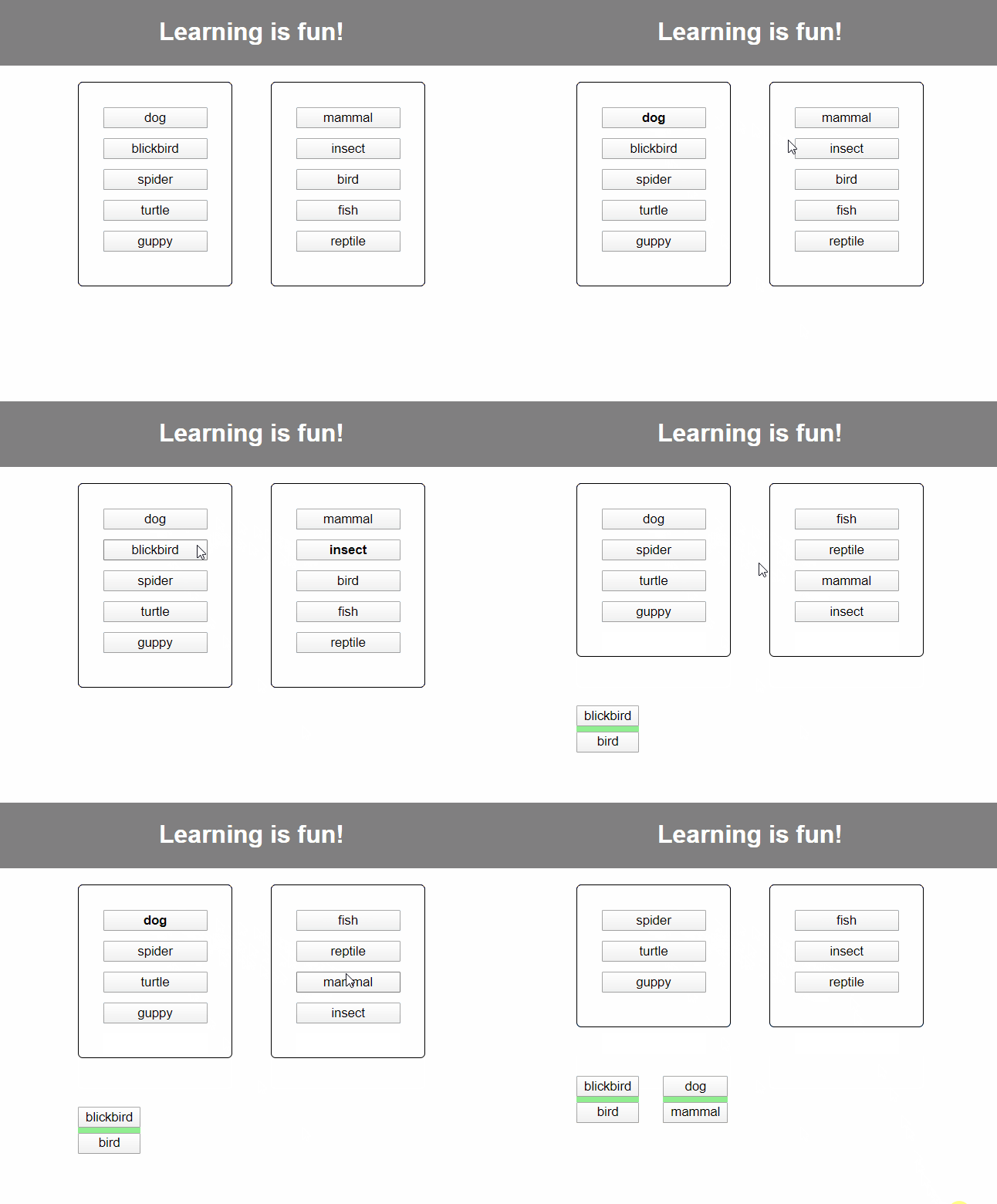
The advantage of this approach is that the logic is declared — describe the properties of the desired output streams, and the operators handle the implementation details. Without RxJS, the component would need to store and manage intermediate state manually, such as references to the last clicked items on each side. The operators encapsulate that state and raise the programming abstraction level significantly.
Summary
RxJS fits naturally into Angular component event handling. User interactions become streams that operators like filter, map, pairwise, and partition can transform into precisely the data structures the game logic needs. The final output streams are ready to subscribe to, leaving the component free of transient state.
Choosing the right operators and composing them efficiently takes practice, but the payoff is clearer, more maintainable interaction logic.


