
Combining the Paint API with prefers-color-scheme
A paint worklet doesn't automatically react to the user's light or dark preference. CSS custom properties close that gap: values declared in CSS are readable inside the worklet's drawing code, so a theme switch in the page cascades straight into what gets painted.
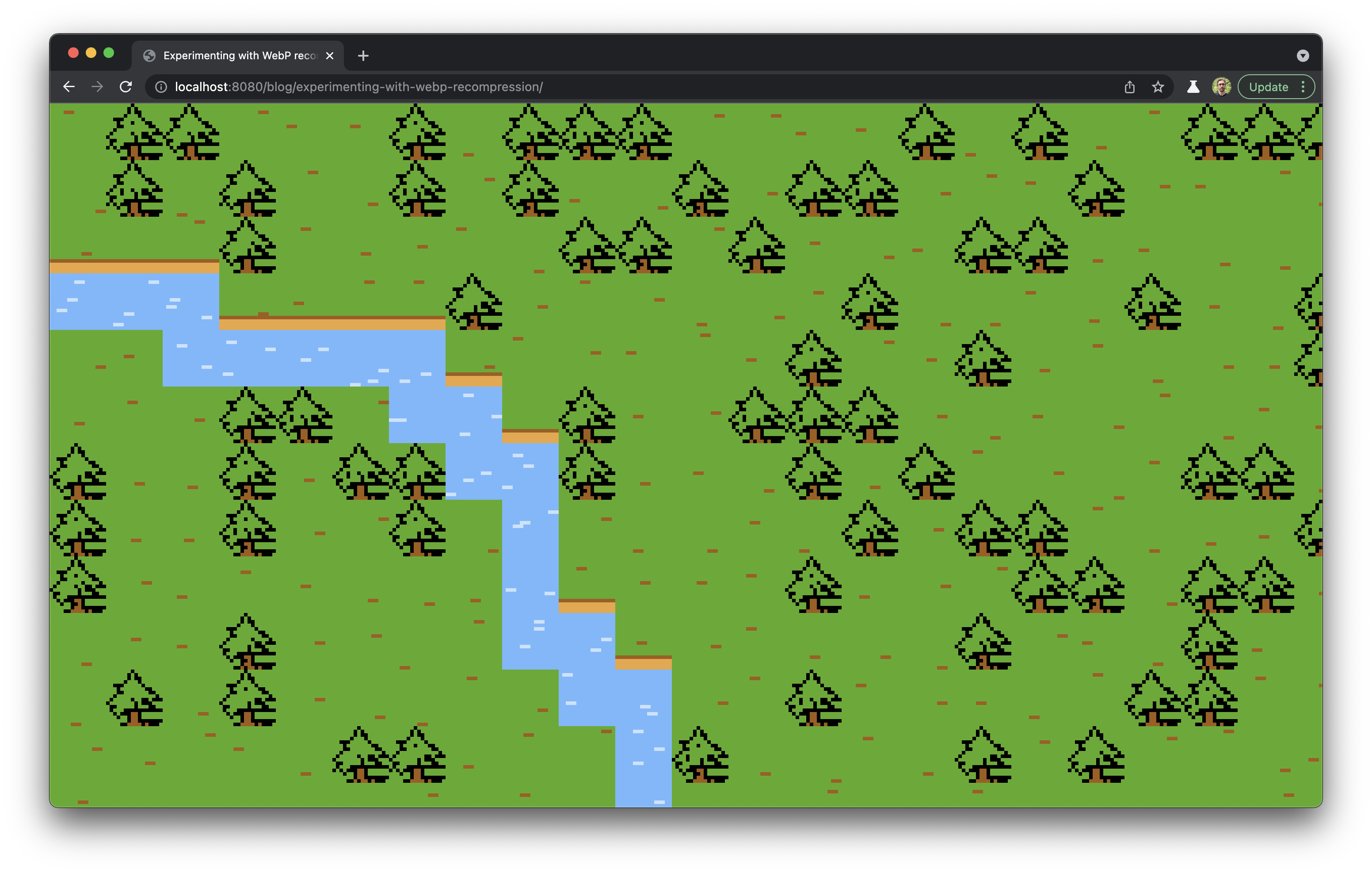
The example worklet is called overworld.js and draws a randomly generated Final Fantasy II–style landscape:
Feature detection and property registration
Both capabilities need checking before anything else. The guard below confirms the Paint API and custom properties are available:
const paintAPISupported = "registerProperty" in window.CSS && "paintWorklet" in window.CSS`Properties are then declared through CSS.registerProperty:
CSS.registerProperty({
  name,             // The name of the property
  syntax,           // The syntax (e.g., <number>, <color>, etc.)
  inherits,         // Whether the value can be inherited by other properties
  initialValue      // The default value
});
For overworld.js, the properties map to the landscape's regions — grass and trees, the river, the river banks, and so on — and their defaults are sized for light mode. They're registered by building an object and looping over Object.entries:
// Specify the paint worklet's custom properties
const properties = {
  "--overworld-grass-green-color": {
    syntax: "<color>",
    initialValue: "#58ab1d"
  },
  "--overworld-dark-rock-color": {
    syntax: "<color>",
    initialValue: "#a15d14"
  },
  "--overworld-light-rock-color": {
    syntax: "<color>",
    initialValue: "#eba640"
  },
  "--overworld-river-blue-color": {
    syntax: "<color>",
    initialValue: "#75b9fd"
  },
  "--overworld-light-river-blue-color": {
    syntax: "<color>",
    initialValue: "#c8e3fe"
  }
};

// Register the properties
Object.entries(properties).forEach(([name, { syntax, initialValue }]) => {
  CSS.registerProperty({
    name,
    syntax,
    inherits: false,
    initialValue
  });
});

// Register the paint worklet
CSS.paintWorklet.addModule("/worklets/overworld.js");
Because each property carries an initial value, callers never have to pass custom properties when invoking the worklet. Those defaults remain overridable, which is what makes the color-scheme switch possible.
Three-state theme switching
A settings menu in the site's main navigation lets users cycle through System, Light and Dark. System follows the operating system setting through prefers-color-scheme media queries. Light and Dark override it by placing a light or dark class on the <html> element. The variable definitions that drive this override are repetitive but reliable:
/* Kicks in if the user's site-level setting is dark mode */
html.dark {
  /* (I'm so good at naming colors) */
  --pink: #cb86fc;
  --firion-red: #bb4135;
  --firion-blue: #5357fb;
  --grass-green: #3a6b1a;
  --light-rock: #ce9141;
  --dark-rock: #784517;
  --river-blue: #69a3dc;
  --light-river-blue: #b1c7dd;
  --menu-blue: #1c1f82;
  --black: #000;
  --white: #dedede;
  --true-black: #000;
  --grey: #959595;
}

/* Kicks in if the user's system setting is dark mode */
@media screen and (prefers-color-scheme: dark) {
  html {
    --pink: #cb86fc;
    --firion-red: #bb4135;
    --firion-blue: #5357fb;
    --grass-green: #3a6b1a;
    --light-rock: #ce9141;
    --dark-rock: #784517;
    --river-blue: #69a3dc;
    --light-river-blue: #b1c7dd;
    --menu-blue: #1c1f82;
    --black: #000;
    --white: #dedede;
    --true-black: #000;
    --grey: #959595;
  }
}

/* Kicks in if the user's site-level setting is light mode */
html.light {
  --pink: #fd7ed0;
  --firion-red: #bb4135;
  --firion-blue: #5357fb;
  --grass-green: #58ab1d;
  --dark-rock: #a15d14;
  --light-rock: #eba640;
  --river-blue: #75b9fd;
  --light-river-blue: #c8e3fe;
  --menu-blue: #252aad;
  --black: #0d1b2a;
  --white: #fff;
  --true-black: #000;
  --grey: #959595;
}

/* Kicks in if the user's system setting is light mode */
@media screen and (prefers-color-scheme: light) {
  html {
    --pink: #fd7ed0;
    --firion-red: #bb4135;
    --firion-blue: #5357fb;
    --grass-green: #58ab1d;
    --dark-rock: #a15d14;
    --light-rock: #eba640;
    --river-blue: #75b9fd;
    --light-river-blue: #c8e3fe;
    --menu-blue: #252aad;
    --black: #0d1b2a;
    --white: #fff;
    --true-black: #000;
    --grey: #959595;
  }
}
Wiring the palette into the worklet
A small inline script in the document <head> adds a paint-api class to <html> when the API is supported:
/* The main content backdrop rendered at a max-width of 64rem.
   We don't want to waste CPU time if users can't see the
   background behind the content area, so we only allow it to
   render when the screen is 64rem (1024px) or wider. */
@media screen and (min-width: 64rem) {
  .paint-api .backdrop {
    background-image: paint(overworld);
    position: fixed;
    top: 0;
    left: 0;
    width: 100%;
    height: 100%;
    z-index: -1;

    /* These oh-so-well-chosen property names refer to the
       theme-driven CSS variables that vary according to
       the user's preferred color scheme! */
    --overworld-grass-green-color: var(--grass-green);
    --overworld-dark-rock-color: var(--dark-rock);
    --overworld-light-rock-color: var(--light-rock);
    --overworld-river-blue-color: var(--river-blue);
    --overworld-light-river-blue-color: var(--light-river-blue);
  }
}
Two constraints shape where the output is drawn. First, as of writing, a paint worklet's output cannot be rendered directly on the <body> element. Second, page height is a problem: filling an entire tall page with randomly generated, potentially expensive artwork isn't desirable. The workaround renders the worklet in a fixed-position element covering the viewport that follows the reader while scrolling.
What matters is that the custom properties inheriting into the worklet already track the chosen color scheme — system-level or site-level — so overworld paints itself with the matching palette.
More than a palette swap
Adjusting colors is the simplest use of this pattern. The same hook could add details that appear only in one color scheme, rewrite the rendering more drastically, or hide small easter eggs — all controlled from CSS.




