
What enterkeyhint does
Form markup is still a large part of front-end work, and enterkeyhint is an attribute worth knowing about for nearly every input — it changes the action key on a mobile virtual keyboard, altering both its text and its affordance.
https://twitter.com/stefanjudis/status/1249958064041734144
Take a form whose interface implies a save action. On an iPhone, the blue key in the keyboard reads "go" by default.
<form>
  <label>
    Name:
    <input type="text" name="name">
  </label>
  <label>
    Favorite songs:
    <textarea name="songs"></textarea>
  </label>
  <button>Save</button>
</form>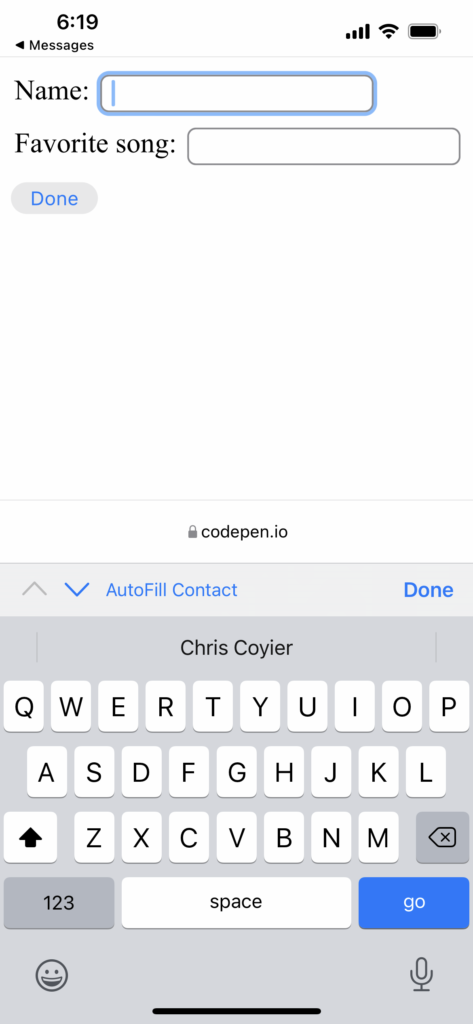
That isn't broken, but the attribute gives you control over the label. The spec refers to the accepted values as "input modalities":
| Keyword | Description |
|---|---|
enter | The user agent should present a cue for the operation ‘enter’, typically inserting a new line. |
done | The user agent should present a cue for the operation ‘done’, typically meaning there is nothing more to input and the input method editor (IME) will be closed. |
go | The user agent should present a cue for the operation ‘go’, typically meaning to take the user to the target of the text they typed. |
next | The user agent should present a cue for the operation ‘next’, typically taking the user to the next field that will accept text. |
previous | The user agent should present a cue for the operation ‘previous’, typically taking the user to the previous field that will accept text. |
search | The user agent should present a cue for the operation ‘search’, typically taking the user to the results of searching for the text they have typed. |
send | The user agent should present a cue for the operation ‘send’, typically delivering the text to its target. |
The value list and its limits
Applying the attribute means adding it to each interactive form element individually:
<form>
  <label>
    Name:
    <input type="text" name="name" enterkeyhint="done">
  </label>
  <label>
    Favorite songs:
    <textarea name="songs" enterkeyhint="done"></textarea>
  </label>
  <button enterkeyhint="done">Save</button>
</form>
For the example form above, enter or done feels closer than go. Repetition is the cost: longer forms require the attribute on every input, though that does let you vary the value according to what is focused.
Notably, save is not a valid option, despite it seeming like an obvious fit for many forms. One guess is that the platform avoids promising something it can't enforce — but that theory is shaky, since next and previous don't change behavior either. Moving focus between inputs requires your own code; the action button otherwise submits the form as usual.
A value outside the list, such as enterkeyhint="poop", is ignored by the browser. On Android the action button can switch to icons rather than text — send yields a paper airplane instead of a label.
Browser support and platform differences
Firefox now supports the feature, giving it largely complete coverage, and the attribute matters only to mobile browsers (or others with virtual keyboards). That raises a useful reminder: mobile browsers beyond Safari exist, at least on Android, where real Firefox can be installed.
Their behaviors also diverge. A video predating enterkeyhint support shows a virtual keyboard automatically offering next-focused UI on the first input with no way to submit directly; on the final input, the action becomes a submit button with no "previous" option. iOS instead offers only navigation arrows above the keyboard, a markedly different arrangement.
Worth being aware of, and worth using on most forms to match the intended behavior.




