
The color format landscape
CSS offers a surprising number of ways to express color: named keywords, hex codes, rgb(), hsl(), and newer options like lch() and the color() function. While they all ultimately describe the same thing — a pixel value — they differ meaningfully in how they let you think about and manipulate color.
Named colors: for placeholders, not production
HTML defines 140 named colors, including useful keywords like dodgerblue and tomato. These are wonderfully readable; nothing beats color: red when you need a quick placeholder in a prototype or an educational example.
That readability comes at a cost. A palette of 140 colors is extremely limited — smaller even than the 8-bit color set available on the original NES. For production applications, named colors simply don't offer the range designers need.
RGB: the physics of your screen
Your display is a grid of tiny red, green, and blue light emitters. The rgb() format is the least abstracted way to talk about color because it directly controls those three channels. Each channel accepts a value from 0 to 255, and by mixing them you can produce over 16 million colors. Crank all three to 255 for white, drop them to 0 for black.
An optional fourth value controls the alpha channel for transparency, ranging from 0 (fully invisible) to 1 (fully opaque).
Hex codes: RGB with a different numeral system
Hex codes are the most widely used format on the web, but fundamentally they're identical to rgb(). A six-digit hex code packs three two-digit values — one per red/green/blue channel — in base-16 instead of base-10. Since two hexadecimal digits can express 256 values (16 × 16), each pair corresponds exactly to a decimal RGB channel between 0 and 255.
You can also pass an eight-digit code to include an alpha channel. In the example below, the 80 pair equals decimal 128, so the box renders at roughly 50% opacity. Eight-digit hex enjoys around 96% global support, though it never made it into Internet Explorer.
HSL: matching human intuition
Both rgb() and hex codes require you to think in terms of light mixing. hsl() takes a different approach, modeling color the way people actually describe it — by pigment, vividness, and brightness.
- Hue: the pigment, specified in degrees from 0 to 360 on a circular scale, where
0degand360degboth resolve to red. - Saturation: how much pigment is present, from 0% (pure grayscale) to 100% (maximally vibrant).
- Lightness: how light or dark the color is, from 0% (black) to 100% (white).
This abstraction level is closer to the color pickers in design tools like Figma or Photoshop, which makes it an intuitive choice for many developers. Transparency works with a slash delimiter, just as in modern rgb() syntax.
Moving beyond sRGB
Every format so far — rgb(), hex, hsl() — is locked to the sRGB color space, a standardized palette that covers millions of colors but still falls short of the full range of human vision. Modern displays increasingly support wider gamuts, and new CSS color functions exist to take advantage of that hardware.
The color() function and Display P3
You can't express a P3 color using the old syntaxes; the color space is tied to the color format. To leave sRGB behind, you need the color() function, which accepts a color space name and then R/G/B values normalized to a 0-to-1 range rather than 0 to 255.
P3 colors look noticeably more vivid on wide-gamut displays — an sRGB red like rgb(255 0 0) appears orange-ish next to a P3 red. Many phones, especially iPhones, have supported wide-gamut color for years, so it's worth testing on mobile if your desktop monitor doesn't show the difference.
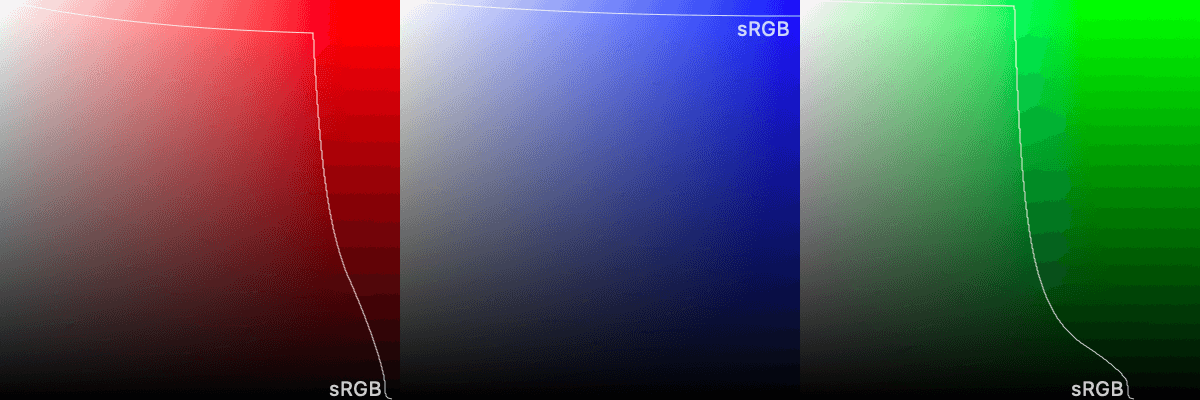
color() is now available in all modern browsers, but support hovers around 85% as of mid-2023, so provide an sRGB fallback before using it.
.box {
  /* Fallback for older browsers */
  background: rgb(255 0 0);

  /* ✨ Fancy new colors: */
  background: color(display-p3 1 0 0);
}
LCH: perception-aware and future-proof
The hsl() format is mathematically convenient but perceptually misleading. Two colors with the same lightness value — say, hsl(60deg 100% 50%) for yellow and hsl(240deg 100% 50%) for blue — do not appear equally bright to human eyes. Yellow feels far lighter.
LCH — standing for "Lightness, Chroma, Hue" — aims to fix that. It's designed to be perceptually uniform, so two colors sharing a lightness value genuinely look equally light. Conceptually it resembles HSL, but with two important differences:
- It accounts for human perception rather than raw physics.
- It's not bound to any particular color space.
That second property is why LCH doesn't cap chroma the way HSL caps saturation. Since LCH isn't tied to sRGB or even P3, there's no finite upper limit — as display technology improves and wider gamuts become standard, LCH can reference those expanded colors automatically by increasing chroma. The format is effectively future-proof.
.red-box {
  /* This is a very-red box in sRGB: */
  background: lch(50% 120 20);
  /*
    This is an identical color in sRGB, but will appear
    MUCH REDDER in the wider-gamut displays of the future:
  */
  background: lch(50% 500 20);
}
Adoption has been swift, and LCH now works in all major browsers. Support is still under 90% as of mid-2023, however, so either wait a bit or provide fallbacks. And as with color(), the relative unfamiliarity of the syntax is the main barrier — the underlying ideas are sound, and LCH's perceptual model makes it arguably the most intuitive format for designing color systems.
Choosing a color format for your projects
With so many color formats available, it's natural to wonder which one you should standardize on. The answer depends on your priorities.
Personally, I reach for HSL. It's intuitive and aligns with how people naturally think about color. Unlike hex codes #0F52B7 or #F32AB9, you can often picture an HSL value without a color picker. That readability makes on-the-fly adjustments trivial: lower the lightness to darken, crank saturation for intensity.
Hex codes remain popular because they're terse and easy to copy between design tools and code. But that terseness comes at a cost—deciphering and modifying them requires either deep familiarity or external tooling. HSL grants that control natively.
CSS variables and calc: a modern approach
The real power of HSL emerges when you pair it with modern CSS features. In the past, this kind of color manipulation required a preprocessor like Sass, which had built-in functions for adjusting colors.
Now you can achieve similar results in vanilla CSS using CSS variables and the calc() function. Instead of storing final colors, you store "color fragments" as variables and assemble them into complete colors:
CSS
html { --red-hue: 0deg; --red-sat: 100%; --red-lit: 50%; --red: hsl( var(--red-hue) var(--red-sat) var(--red-lit) ); --dark-red: hsl( var(--red-hue) var(--red-sat) calc(var(--red-lit) - 20%) ); --transparent-red: hsl( var(--red-hue) var(--red-sat) var(--red-lit) / 0.5 ); --soft-red: hsl( var(--red-hue) calc(var(--red-sat) - 30%) calc(var(--red-lit) + 10%) );}
Continuing with the --dark-red example:
html {
  --dark-red: hsl(
    var(--red-hue)
    var(--red-sat)
    calc(var(--red-lit) - 20%)
  );
}
Here, we take the standard red hue and saturation but reduce the lightness by 20%, transforming hsl(0deg 100% 50%) into hsl(0deg 100% 30%).
Yes, it requires more typing than a Sass function call. But the crucial distinction is that CSS variables are dynamic. They're not compiled away into hardcoded values at build time. If you update these variables via JavaScript, every color depending on them updates automatically. That makes this pattern excellent for supporting dark mode toggles, user-customizable themes, and similar dynamic styling needs.
The combination of an intuitive format like HSL (or OKLCH, when you're ready for it) and the modularity of CSS variables and calc() is a powerful toolkit for modern, maintainable stylesheets.


