
Web Code Verification Comes to Instagram
Meta has extended its Code Verify browser extension to Instagram Web, following earlier releases for WhatsApp Web and Messenger. The extension, available through Meta Open Source for Google Chrome, Microsoft Edge, and Mozilla Firefox, automatically checks that the JavaScript code served to your browser hasn't been modified. Users can confirm they're receiving the same Instagram Web experience as everyone else, with the extension running checks without logging data or accessing messages.
The Problem With Web App Security
WhatsApp introduced multi-device support in 2021, which led to more people accessing the service through web browsers. While WhatsApp Web has long used end-to-end encryption to protect messages in transit, the code running in the browser itself presented a different challenge. Unlike mobile apps, which go through third-party review before reaching users, web apps are served directly and can be affected by factors that don't apply to mobile, such as malicious browser extensions. That gap in the security model is what Code Verify aims to close.
How the Extension Works
Code Verify builds on the concept of subresource integrity, a security feature that lets browsers confirm fetched resources haven't been manipulated. Standard subresource integrity only covers individual files, so Code Verify expands the check across the entire webpage. To do this at scale, Meta partnered with Cloudflare as an independent third party. WhatsApp provides Cloudflare with cryptographic hashes of its web code as a source of truth. When the extension runs, it compares the code loaded on WhatsApp Web against the verified version published on Cloudflare. Any mismatch triggers an alert.
The checks happen in real time. When WhatsApp updates its web code, the hash source of truth and the extension update automatically. Cloudflare has published a technical deep dive on its role in the verification process.

Using Code Verify
The extension runs automatically when you visit WhatsApp Web. No data, metadata, or user information is logged, and WhatsApp and Meta won't know whether you've installed it. The extension doesn't read or send your messages, and nothing is shared with Cloudflare.
Pinning the extension to your browser toolbar shows its status at a glance, acting as a traffic-light indicator:
- Green means the code is fully validated.
- Orange means a page refresh is needed or another browser extension is interfering; pausing other extensions is recommended.
- Red indicates a possible security issue with the code being served.
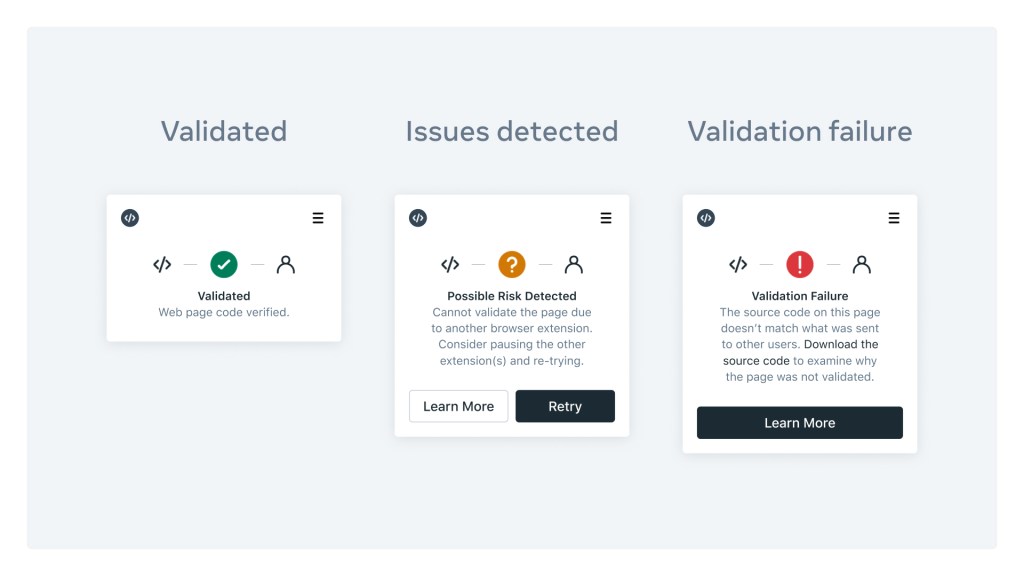
WhatsApp has published guidance on using the extension and handling validation failures.
Open Source for Wider Adoption
Code Verify is available on GitHub. Open-sourcing the extension serves several purposes. Other organizations can apply the same verification approach to their own applications, and the public codebase lets users inspect the extension itself for tampering. That same visibility provides protection for the extension through community oversight.
The goal is to make third-party verified web code a standard practice rather than an exception. With Code Verify available across Chrome, Edge, and Firefox, and now covering WhatsApp Web, Messenger, and Instagram Web, Meta hopes other services will adopt the open source tool to bring the same level of transparency to their users.


