
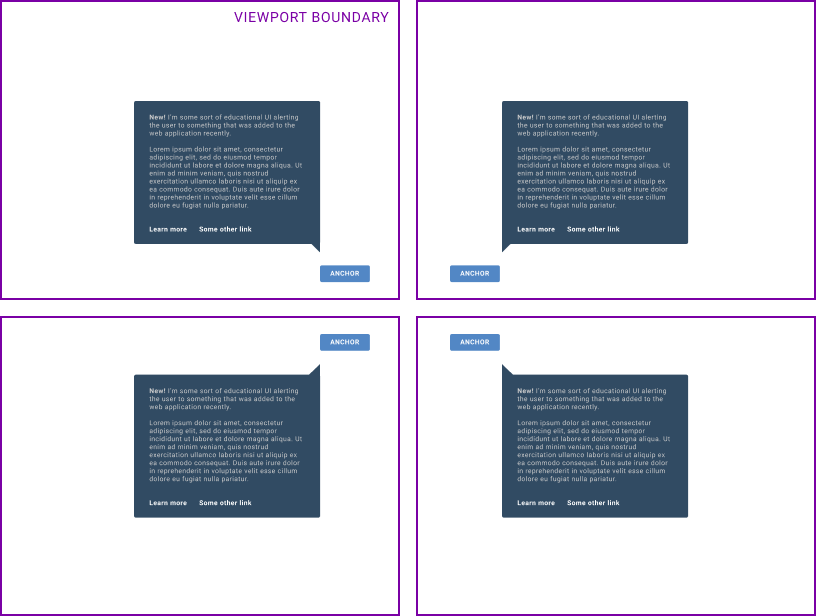
Positioning a tooltip next to its trigger is easy right up to the moment the trigger sits near a viewport edge. An element close to the top of the screen needs its tooltip to open below, not above; the same logic applies on the left and right sides. Without edge awareness, the overlay either spills outside the viewport or forces content to be clipped, and in some cases it triggers unwanted scrollbars.
Rolling the math by hand
This is an old problem on the web. jQuery UI tooltips were once chosen specifically for their edge-aware behavior. The JavaScript behind that feature is straightforward in principle: compute where the tooltip will land, compare that against the viewport, and if it doesn't fit, try another placement that does.

Floating UI carries that idea forward as a low-level toolkit for positioning floating elements while keeping them in view, aimed at tooltips, popovers, dropdowns and menus.
Moving the problem into CSS
Anchored positioning would make the browser handle placement natively instead of leaving it to a library. CSS Anchored Positioning currently exists only as an explainer document in the MicrosoftEdge MSEdgeExplainers repository, but it describes a familiar goal: pinning top-layer UI to another element, with placement shaped by the edges of the layout viewport.

The explainer builds on earlier work on popup, introduced in the "Enabling Popups" proposal, which made top-layer components such as content pickers, teaching UI, tooltips and menus easier to author. Anchoring extends that by treating the top-layer element as attached to an anchor element and letting viewport constraints influence how it is positioned.
The direction of travel is the pattern the platform follows best: observe what authors are building with libraries, then provide it natively — and ideally better.




