What Client Hints Do
Client Hints give the browser a standardized way to describe its context to the server, which the server can then use for proactive content negotiation. For images, that means faster loading, smaller payloads and less markup.
The mechanism isn't new — it shipped in Chrome 35 in 2015 — but privacy concerns led Google to partly withdraw it in Chrome 67, restricting hints to certain Chrome builds on Android and to first-party origins elsewhere. Chrome 84 enables Client Hints by default on all devices.
Combined with responsive images syntax, hints let the image CDN resize and optimize images in real time, so the <img> markup stays short and maintainable.
Step 1: Pick an Image CDN That Speaks Client Hints
Support is still uncommon among image CDNs; Max Firtman's survey of the field identified which ones handle hints. ImageEngine supports them fully along with other advanced features.
Setup follows the usual CDN model: the image origin (a web location or an S3 bucket) is mapped to a domain name pointing at the CDN address. A trial account gets a delivery address of the form xxxzzz.cdn.imgeng.in, which can be replaced by your own domain through a CNAME record. The examples below assume ImageEngine is mapped to images.example.com.
Step 2: Make the Browser Send the Hints
The browser only starts sending hints after your web server answers a request with two specific HTTP headers. You can add them in your site's code, at your hosting provider or CDN, in an Apache .htaccess file, or — for WordPress sites — via a plugin. In markup, the http-equiv form works too:
<meta http-equiv="Accept-CH" content="DPR, Width, Viewport-Width">The Accept-CH Header
Accept-CH tells the browser which hints it should begin sending:
Accept-CH: viewport-width, width, dprThe Feature-Policy Header
Hints must also be delegated to third parties — in this case the image CDN — or they won't accompany image requests to the delivery address from step 1. At the time of writing, this delegation happens through Feature Policies, a header naming which origins may use which browser features; it is slated to be renamed Permission Policies.
Feature-Policy: ch-viewport-width https://images.example.com;ch-width https://images.example.com;ch-dpr https://images.example.com;ch-device-memory https://images.example.com;ch-rtt https://images.example.com;ch-ect https://images.example.com;ch-downlink https://images.example.comReplace example.com with the actual ImageEngine address, whether the generic xxxzzz.cdn.imgeng.in-style name or your CNAME.
Two pitfalls apply to this header. First, every hint name carries the ch- prefix: ch plus the client hint name. Second, keep it lowercase — even where documentation writes Accept-CH: DPR, the policy header needs ch-dpr.

With both headers in place, server responses carry the policies shown above.
Step 3: Set the sizes Attribute
The src of each <img> must point at the same ImageEngine delivery address used in step 1 and named in the Feature-Policy header.
Then add the sizes attribute. As part of the responsive images syntax, it lets the browser compute the pixel size at which the image is actually displayed; that value travels to the CDN in the width hint.
<img src="https://images.example.com/test.jpg" width="200px" alt="image">
Where the displayed width is already fixed in CSS or a width attribute, you can retrofit existing images by copying that value into sizes.
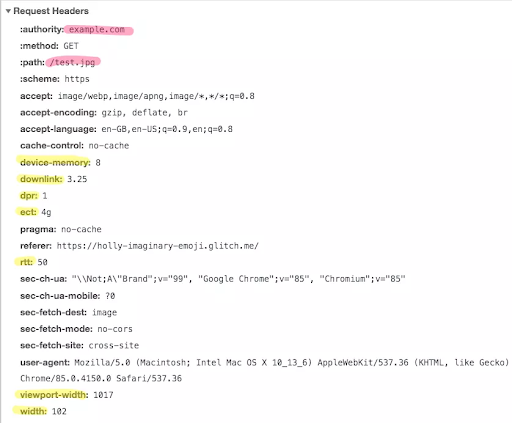
Requests to ImageEngine now include the hints; the width header tells the CDN the exact size needed, so no image larger than necessary is served.
Behavior Across Browsers and Formats
Test in Chrome 84 or newer, as well as older supporting versions; a reference implementation runs on glitch.com. Beyond resizing, ImageEngine converts and optimizes images into formats including WebP, JPEG2000 and MP4 alongside common image formats, and can act on the network- and connectivity-related hints as well.
Browsers without Client Hints support still receive optimized, correctly sized images, because the CDN applies device detection at the edge. Every device and browser thus gets an appropriately sized resource.