
Why Instant Video Playback Is Hard
Dropbox stores millions of user videos, and those files need to play back smoothly on whichever device happens to request them. Three technical hurdles make that more difficult than it sounds:
- Codec fragmentation: A file extension like
.mp4does not guarantee a particular internal encoding. Content can use codecs from Microsoft, Google, Adobe, or RealMedia (e.g., VC1/VP8). Modern phones produce mostly H.264/AVC in an MPEG-4 container, which is the majority of content on the service, but the broader ecosystem remains messy. - Network constraints: Home and mobile connections are often slower than advertised, so playback quality must adapt to available bandwidth.
- Device limitations: Hardware constraints vary by client. The iPhone 3GS, for example, supports only baseline profile H.264/AVC.
Transcoding on demand—rather than pre-processing every video for every possible target—is the obvious answer. A full pre-transcode approach would be far too expensive at Dropbox's scale. The on-demand model adapts to device and network conditions, keeps costs manageable, and still supports low startup latency.
HLS as the Delivery Framework
HTTP Live Streaming (HLS) solves the adaptation problem. The protocol organizes data into playlists and segments delivered over HTTP. A player first fetches a main playlist that lists available quality layers:
#EXTM3U
#EXT-X-PLAYLIST-TYPE:VOD
#EXT-X-STREAM-INF:PROGRAM-ID=1,BANDWIDTH=150000
https://streaming.dropbox.com/stream/<access_token_layer_1>
#EXT-X-STREAM-INF:PROGRAM-ID=1,BANDWIDTH=500000
https://streaming.dropbox.com/stream/<access_token_layer_2>
#EXT-X-STREAM-INF:PROGRAM-ID=1,BANDWIDTH=1500000
https://streaming.dropbox.com/stream/<access_token_layer_3>
#EXT-X-ENDLIST
Each #EXT-X-STREAM-INF tag points to a playlist for a different target bit rate. The client chooses the layer best suited to its connection. It then fetches the layer playlists, potentially in parallel to save roundtrips:
#EXT-X-VERSION:3
#EXT-X-PLAYLIST-TYPE:VOD
#EXT-X-TARGETDURATION:10
#EXTINF:10.0,
https://streaming.dropbox.com/stream/<access_token_layer_1_segment_1>
#EXTINF:10.0,
https://streaming.dropbox.com/stream/<access_token_layer_1_segment_2>
[...]
#EXTINF:10.0,
https://streaming.dropbox.com/stream/<access_token_layer_1_segment_N>
#EXT-X-ENDLIST
Each URL in a layer playlist points to a segment containing the actual media data.
Architecture and On-Demand Processing
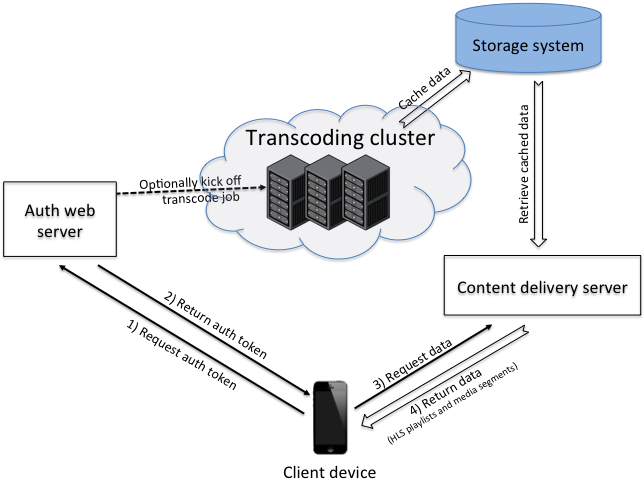
To start streaming, a client asks the Dropbox web servers for a temporary URL granting access to the main HLS playlist. Because playback typically occurs in a dedicated player rather than inside the Dropbox app, the URL carries a one-time password and expiration metadata that lets the servers authenticate the external player. The handler for this request checks whether the transcoded content is already cached. If not, it spawns a transcoding job parameterized for the client's capabilities and network conditions. The returned URL also embeds routing information so subsequent requests can go back to the specific worker handling that job—a requirement for serving partially transcoded content before it is stored in the cache.
The worker clusters run on Amazon AWS and comprise:
- Live transcoding servers on
cc2.8xlargeinstances, each running multiple transcodes in parallel with a hard concurrency cap. A health check exposes load so machines can be taken out of rotation. In practice, each instance handles up to about a dozen concurrent transcodes before falling behind. - memcache for distributed coordination, tracking job progress and machine load to inform a scheduling decision that prevents overload.
- Front-end load balancers on
cc1.xlargeinstances using Nginx for SSL termination and HAProxy to drop unhealthy machines quickly. - Persistent cache in a separate storage system. Storage is cheap relative to CPU, so transcoded results are retained and reused. Internal databases track cache references to support flexible retention policies.
Transcoding Pipeline Details
The actual media processing relies on ffmpeg and proceeds in three stages.
1) Fast-Starting the Input
To stream data progressively into the encoder, the input must be rearranged first. This "fast-start" process extracts the moov atom—which holds metadata like resolution and duration—moves it to the front of the file, and fixes internal offsets. Without this step, ffmpeg cannot begin transcoding until it reads the entire file. Dropbox wrote its own Python solution to do this for easier debugging and performance profiling.
2) Re-Encoding
The encoder invocation looks like this:
ffmpeg -i pipe:0 -dn -vcodec libx264 -vsync 1 -pix_fmt yuv420p -ac 2
  -profile:v baseline -level 30 -x264opts bitrate=<rate>:vbv-maxrate=<rate>
  -rc-lookahead 0 -r <fps> -g <fps> -refs 1 -acodec libfaac -async 1
  -ar 44100 -ab 64k -f mpegts -s <target_resolution> -muxdelay 0 pipe:1
The output uses H.264/AVC baseline profile level 3.0 for broad compatibility, including with the iPhone 3GS. Some settings reflect explicit trade-offs: lowering muxdelay, using a single reference frame, and disabling scenecut detection all reduce encoder-induced latency at a small quality cost. The output container is MPEG transport, as HLS requires.
3) Segmenting
Segmentation is handled by a custom C++ tool built on top of libavcodec. Apple's segmenter was ruled out because it is Mac-only, and ffmpeg 2.0's built-in segmenter adds unacceptable latency. The in-house tool gives Dropbox control over end-to-end latency, guarantees the placement of IDR frames at segment boundaries, and lets engineers set segment lengths.
Segment length directly affects perceived startup time on a constrained link—longer segments take longer to deliver. Very short segments, however, multiply the number of requests and per-request overhead. The compromise used for initial playout is a ramp: 2s, 2s, 3s, 3s, 4s, 4s, up to a target of 5 seconds per segment. These step sizes also respect HLS rate restrictions and avoid fractional durations, which Android does not tolerate.
Pre-Encoding the Opening Seconds

Tuning the live pipeline cut startup latency from around 15–20 seconds down to roughly 5 seconds. To do better, Dropbox revisited pre-transcoding—but only for the first few seconds of every video. A separate pre-transcoding cluster, triggered on file upload, processes and caches just the opening portion. The remainder is generated on demand when a user actually requests the video. That lets the server deliver initial segments almost immediately while the live transcoder spins up and seeks to the correct offset. As with the full cache, references to pre-processed material are tracked to enable different retention strategies.
What It Took to Hit the Startup Target
The pipeline changes — pre-transcoding, shorter leading segments, and a reduced buffering threshold — together brought startup time on a healthy client connection down to the 2–3 second range. That range was the explicit goal, and hitting it made the playback experience feel immediate rather than labored.
Building the pipeline at Dropbox's scale surfaced design tensions that don't show up in smaller systems. The team's approach balanced cost, compatibility, and latency in ways worth spelling out.
Pre-Transcoding Is a Cost Decision, Not Just a Performance One
Pre-transcoding every uploaded video would simplify the pipeline considerably: content would be ready to serve the moment a playback request arrives, and the serving tier wouldn't need to coordinate with an on-demand transcoder. But at Dropbox's ingest volume, that convenience is too expensive. The team reserves pre-transcoding for cases where the cost is justified, and relies on on-demand processing elsewhere.
Fast-Start Exists for Mobile-Generated Files
The faststart flag is not an optimization nicety. Video files produced by mobile devices commonly carry metadata at the end of the file. Without fast-start reordering, the transcoder cannot begin making progress until the entire file has been fed into it, which stalls the pipeline and defeats the latency budget. Fast-starting moves that metadata to the front so the transcoder can chew through the stream while bytes are still arriving.
HLS Gives Structural Flexibility
HLS proved to be the right container strategy for heterogeneous networks and client devices. Beyond its compatibility story, HLS allowed the team to structure output segments in ways that directly supported the startup-time goals — for instance, by tailoring segment sizes near the beginning of a stream. That flexibility is a real advantage when the encode pipeline is asked to meet interactive latency targets.
Load Balancing Deserves More Attention
The team flags load balancing as an underappreciated risk. Done poorly, it can overwhelm a distributed system even when aggregate capacity looks sufficient. The subtleties — session stickiness, worker selection, retry behavior — are easy to get wrong and expensive to discover late. The Dropbox experience treats load balancing as a first-class design problem in the pipeline, not an operational afterthought.
ffmpeg Parameters Are a Tunable Tradeoff
The encode settings selected for the pipeline came from deliberate experimentation with ffmpeg parameters. That experimentation mapped the quality-versus-latency frontier, and the team chose an operating point appropriate for an application whose primary requirement is fast starts, not archival fidelity. The parameter choices should be revisited as the quality tradeoff shifts. These lessons, taken together, define a pipeline that is instant when it needs to be and economical at scale, with the usual large-system caveats around cost and load balancing firmly acknowledged.


