
Why 8-bit bytes? The technical and historical case
The x86 architecture uses 8-bit bytes, but that wasn’t ever a foregone conclusion. Plenty of earlier machines had 6-bit bytes, 36-bit word sizes, or other arrangements. Whether 8 bits emerged from engineering logic or historical accident is a fair question, and the answer seems to be a mix of both.
Before digging into the reasons, it helps to clarify terminology. The byte size is the smallest unit of memory you can address — on a modern machine, addresses increment by one byte. The word size is a multiple of the byte size, but the exact relationship is processor-specific. On x86, a word is defined as 16 bits in the Intel architecture manual, even though the registers are 64 bits. So "word" can mean different things depending on context.
Reason 1: Fitting text into a single byte
The IBM System/360 introduced the 8-bit byte in 1964, and the decision was explicitly made with character processing in mind. Fred Brooks, who managed the project, described it as an executive decision between 6-bit and 8-bit bytes:
"The six bit bytes [are] really better for scientific computing and the 8-bit byte ones are really better for commercial computing and each one can be made to work for the other. So it came down to an executive decision and I decided for the 8-bit byte, Jerry's proposal.
My most important technical decision in my IBM career was to go with the 8-bit byte for the 360. And on the basis of I believe character processing was going to become important as opposed to decimal digits."
The math supports that choice: 6 bits can represent only 64 distinct values, which isn’t enough for lowercase letters, uppercase letters, and punctuation. The System/360 also introduced the EBCDIC encoding, an 8-bit character set, alongside the 8-bit byte.
Later, the Intel 8008 — built for the Datapoint 2200 terminal — continued the trend. Terminals need to handle letters plus control codes, and the Datapoint 2200 supported both ASCII (7-bit) and EBCDIC (8-bit).
Why 6-bit bytes suited scientific computing
Brooks noted that 6-bit bytes were better for scientific work, which seems counterintuitive at first. Gene Amdahl explained the reasoning in an interview:
"I wanted to make it 24 and 48 instead of 32 and 64, on the basis that this would have given me a more rational floating point system, because in floating point, with the 32-bit word, you had to keep the exponent to just 8 bits for exponent sign, and to make that reasonable in terms of numeric range it could span, you had to adjust by 4 bits instead of by a single bit."
Why early mainframes used 36-bit words
Many mainframes before System/360 used 36-bit word sizes, and that traces back to mechanical calculators. The state of the art in precision calculation was the ten-digit electrically powered mechanical calculator — ten columns of keys was a practical limit for operators. Early binary computers aimed at the same market used 36-bit words because that length is just enough to represent positive and negative integers to an accuracy of ten decimal digits (35 bits would have been the minimum).
The reasoning: computers were extremely expensive in the 1950s, so you’d size your word to exactly what you needed — no more. Modern machines are cheap and fast enough that wasting bits is rarely a concern. Some of those 36-bit machines even let you choose a byte size of 5, 6, 7, or 8 bits depending on context.
Reason 2: Compatibility with binary-coded decimal
In the 1960s, binary-coded decimal (BCD) was a popular integer encoding that stored each decimal digit in 4 bits. To encode 1234 in BCD, you’d store each digit separately:
0001 0010 0011 0100
A byte size that’s a multiple of 4 — like 8 bits — makes it easy to work with BCD values. This encoding also supports a popular theory about the term "nibble": a 4-bit half-byte is exactly the size of one BCD digit, so programmers needed a word for it. The Wikipedia article on nibbles supports this:
"The nibble is used to describe the amount of memory used to store a digit of a number stored in packed decimal format (BCD) within an IBM mainframe."
Why BCD was worth the inefficiency
BCD is less space-efficient than plain binary, but early computers didn’t have displays like modern ones. The contents of a byte were mapped directly to on/off lights on the front panel, as this photo of an IBM 650 shows:
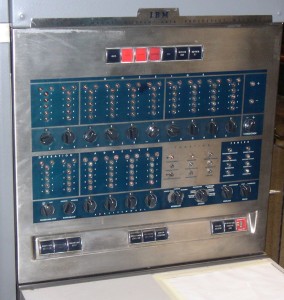
Reading a decimal number off those lights was far easier if each group of 4 bits represented one digit. BCD also mattered for financial calculations: dividing binary integers by 100 was very slow on 1970s hardware, so representing decimal amounts directly avoided that operation entirely.
Reason 3: Powers of 2 have real advantages
A number of people argued that a byte size being a power of 2 is important, though not all explanations were equally convincing. Some claimed every bit needs its own bus and that circuit logic benefits from divide-and-conquer techniques; those arguments were hard to pin down. More concrete advantages:
- Clock dividers: With an 8-bit byte, measuring "8 bits sent on this wire" can be done by chaining three halving clock dividers.
- Bit addressing: If you have an instruction that zeroes out a specific bit, a byte size of 8 (2^3) means only 3 bits of the instruction are needed to identify which bit. The Z80’s bit testing instructions work this way.
- Bitmaps: Memory is organized into pages (usually 2^n in size), and operating systems track free pages with a bitmap. Finding the right bit in a bitmap requires dividing by the byte size — dividing by 8 is a simple shift, while dividing by 9 is comparatively slow.
Historically, non-power-of-2 byte sizes existed — the Cyber 180 used 6-bit bytes, the Univac 1100/2200 used 36-bit words, and the PDP-8 was a 12-bit machine — so this wasn’t an absolute constraint.
Reason 4: Smaller bytes beat larger ones
If 8 bits beat 4 bits, why not keep going to 16-bit bytes? Two reasons stand out. First, space efficiency: a byte is the smallest addressable unit, and storing ASCII text (7 bits per character) in 16-bit bytes would waste nearly half the space. Second, hardware complexity: each bit needs a bus line, so simpler designs favored smaller bytes.
Reason 5: Compatibility and keeping what works
The Intel 8008 (1972) led to the 8080 (1974), which led to the 8086 (1978) — the first x86 processor. Once 8-bit bytes were working well, there was little incentive to change the design. Keeping the same byte size lets you reuse more of the instruction set across generations.
Network protocols also pushed in the same direction: TCP and other protocols from the 1980s use 8-bit bytes (the term "octet" is common in that world), so implementing those protocols practically required an 8-bit byte.
The synthesis
A 1962 IBM book laid out the rationale for 8-bit bytes essentially the same way:
- Its full capacity of 256 characters was considered to be sufficient for the great majority of applications.
- Within the limits of this capacity, a single character is represented by a single byte, so that the length of any particular record is not dependent on the coincidence of characters in that record.
- 8-bit bytes are reasonably economical of storage space.
- For purely numerical work, a decimal digit can be represented by only 4 bits, and two such 4-bit bytes can be packed in an 8-bit byte. Although such packing of numerical data is not essential, it is a common practice in order to increase speed and storage efficiency. Strictly speaking, 4-bit bytes belong to a different code, but the simplicity of the 4-and-8-bit scheme, as compared with a combination 4-and-6-bit scheme, for example, leads to simpler machine design and cleaner addressing logic.
- Byte sizes of 4 and 8 bits, being powers of 2, permit the computer designer to take advantage of powerful features of binary addressing and indexing to the bit level.
Collectively, the reasons converge on a practical answer. Early American computer companies prioritized English text processing, and 7 bits is the smallest size that accommodates all English characters plus punctuation. That leaves a choice between 7 and 8 — and 8 wins because it packs two 4-bit BCD digits, is a power of 2, and eventually became the standard that everyone had to stay compatible with.


