
Secret scanning alerts are now generally available for all public repositories
GitHub has announced that its secret scanning alert experience is now generally available and free for all public repositories. This follows a public beta that launched in December, during which 70,000 public repositories enabled secret scanning alerts, allowing users to triage thousands of leaked secrets.
Repository owners and admins can now enable secret scanning alerts across all repositories they own. When enabled, the feature notifies users of leaked secrets across their full repository history, including code, issues, descriptions, and comments. All alert actions are captured in a full audit log.
Broader coverage beyond partner notifications
GitHub secret scanning integrates with 100+ service providers in the GitHub Partner Program. When a secret from a partner is leaked, GitHub notifies both the user and the partner, who can then revoke the exposed credential. However, there are cases where partner notification is not possible, such as when self-hosted keys are exposed. With secret scanning alerts enabled, users receive alerts for these scenarios too, giving them full visibility into their risk at scale.
One notable example is DevOps consultant and trainer @rajbos, who enabled secret scanning on approximately 14,000 public GitHub Action repositories and discovered over one thousand secrets. He noted that despite training others on GitHub Advanced Security, he found secrets in his own repositories through the feature. He highlighted the importance of secret scanning, stating that with it enabled, users get notified of secrets and partners can revoke them automatically.
Enabling secret scanning in one click
Any owner or admin of a public repository can enable secret scanning alerts. Enterprise administrators and organization owners can also bulk enable alerts for multiple repositories at once. The process requires navigating to the repository's Settings tab, selecting Code security and analysis under Security, finding the Secret scanning option, and clicking Enable.
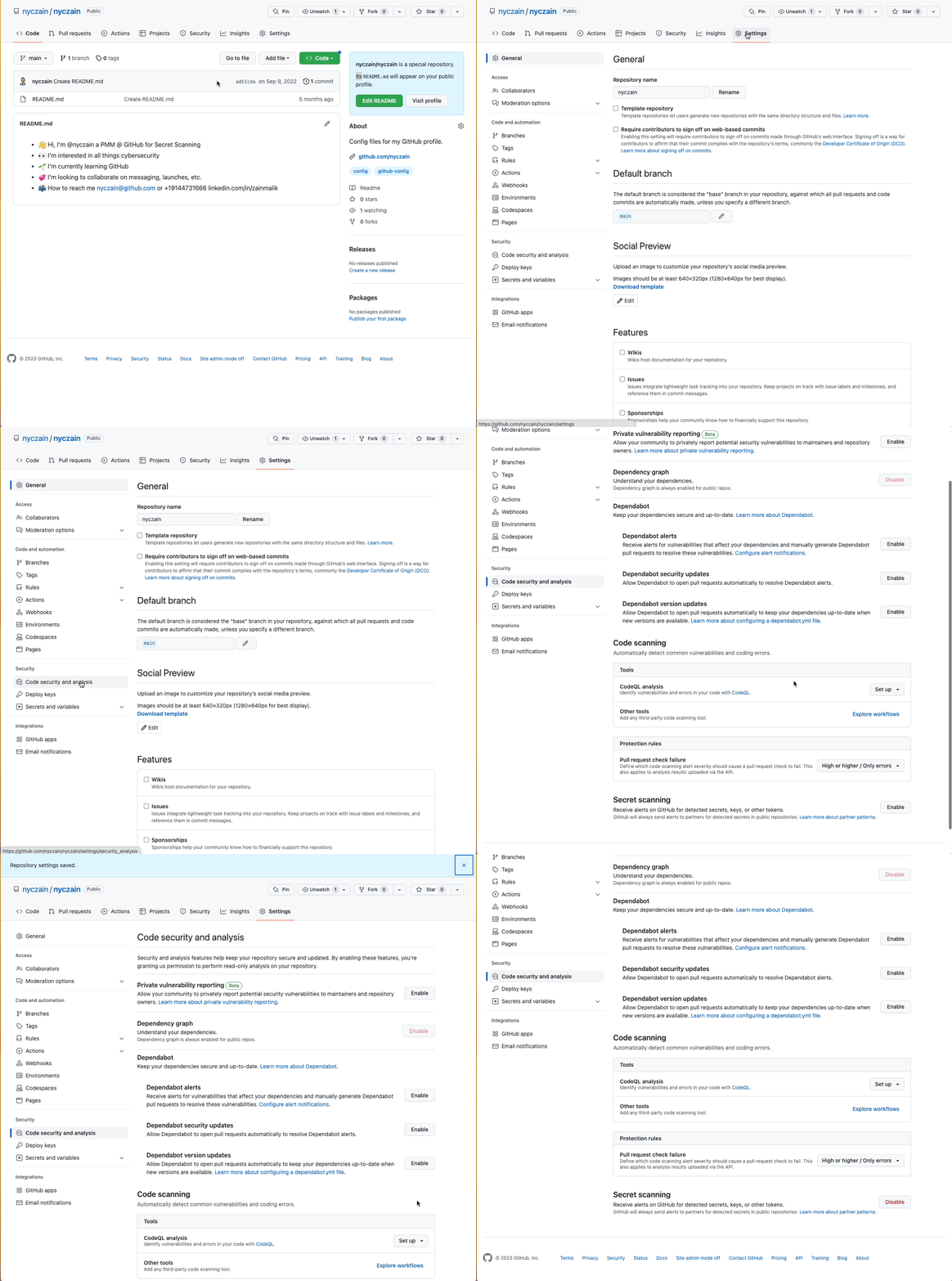
More detailed instructions are available in the GitHub documentation.
Partner program participation
Service providers interested in protecting users from leaked secrets can join the secret scanning partner program. The program currently supports 200+ patterns and 100+ partners. Interested parties can reach out via [email protected].


