
From broad admins to precise roles
Slack's original role model gave customers a handful of wide-ranging user types. In large enterprises, those buckets proved too coarse. Promoting someone to admin to manage a few channels also granted them visibility into dashboards and settings far beyond that scope. The engineering team needed a way to split the generic admin's capabilities into smaller, delegable pieces without abandoning the existing roles that long-standing customers already relied on.
Defining the building blocks
The new system rests on four concepts:
- Permission — the ability to perform a single action, such as inviting a user, archiving a channel, or viewing everyone in an organization.
- Role — a named set of permissions, for example a Channels Admin who can create, rename, and archive channels.
- Entity — the object a role applies to, such as an entire Enterprise organization or a single workspace within it.
- RBAC — a model where a user's action is allowed only if one of their roles carries the required permission.
How permission checks work
When a user attempts an action, the system runs an authoritative check against the roles granted to them. If no delegated role covers the action, the system falls back to the legacy model — the predefined owner and admin roles — before making a decision.
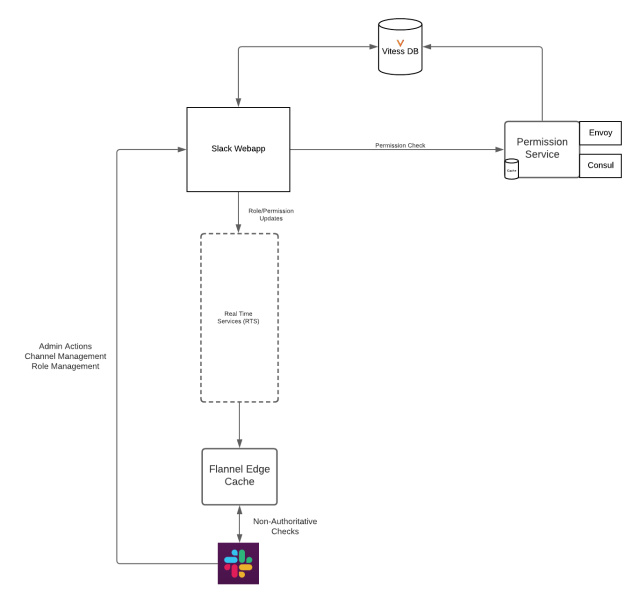
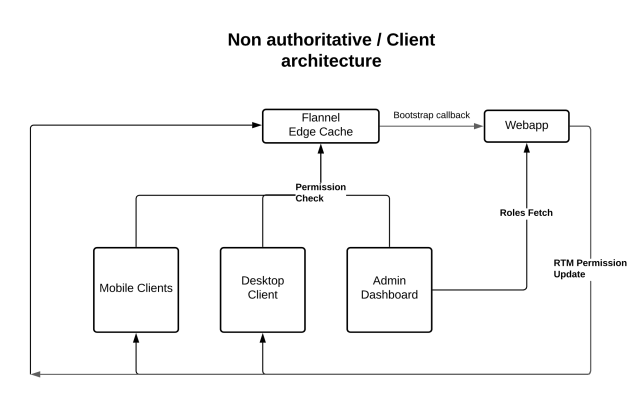
Client-side UI components are not authoritative. They read from Slack's Flannel edge cache to keep rendering fast, meaning the displayed controls can lag slightly behind real-time permission changes.
The permissions feature itself was built as a separate containerized Go service that the Hack webapp monolith talks to over gRPC. Three system roles launched initially:
- Channels Admin — archive and rename channels, create private channels, convert public to private.
- Users Admin — add and remove workspace members, view user groups.
- Roles Admin — assign users to roles and manage role configuration.
Data model and backend design
Role data lives in the same Vitess store the webapp already uses, avoiding a second source of truth and the drift that comes with it. The data is sharded by user_id, so a lookup for any user's roles touches only the relevant shard rather than scanning the table.
Working with legacy settings
Archiving a channel previously depended on a preference flag stored on the team model, such as {'who_can_archive_channels' : 'admin'}. With the RBAC system in place, a delegated Channels Admin should also be able to archive — meaning a simple boolean preference check no longer suffices.
When a user like Bob — a Channels Admin — tries to archive #proj-marketing-campaign, an API request reaches the webapp layer, which runs a policy check:
Channels\ChannelCanActorArchivePolicy::checkPolicy($permission_context, $channel)
Policies in this system are ordered sets of rules. For archiving channels, the rules are:
DenyIfActorRestricted, then AllowIfUserHasArchiveChannelLegacyPermissions, then AllowIfUserHasArchiveChannelPermission
Guests are denied immediately, short-circuiting the remaining checks. Next, the legacy path checks whether the user holds admin rights. If not, the final rule calls out to the permissions service with a request describing the user, their team, the channel, and the action in question:
EligibilityRequest(

'team_id' => T12345, // Bob's team

'user_id' => U12345, // Bob's user ID

'entity_id' => C12345, // #proj-marketing-campaign

'permission' => ['ARCHIVE_CHANNEL'] // What Bob intends to do with this channel

)
The Go service reads this over gRPC, queries Vitess, and returns an ALLOW or deny response.
Client-side presentation
Clients do not track which roles a user holds. They only ask whether an action is permitted. On startup, the client fetches essential permissions and caches them in redux. When an admin grants a new role, a real-time message arrives with the added permissions, dispatching an update that re-renders any affected controls.
Staged rollout
The team avoided a risky switch-over by releasing in phases:
- Stand up a loopback gRPC service inside the webapp itself.
- Deploy to Slack's internal workspace.
- Deploy to pilot customers.
- Run the external service in dark mode — computing results from both systems but still trusting the webapp.
- Switch to light mode, trusting the permissions service.
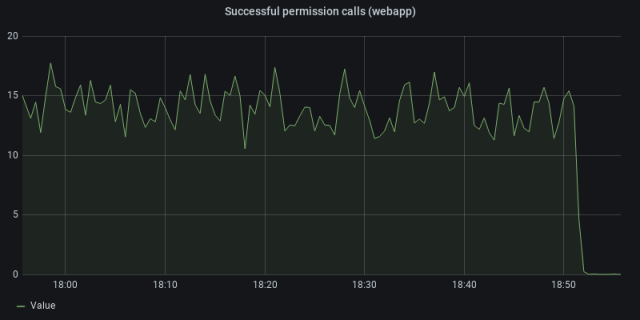
During dark mode, mismatches between the two sources were sent to Prometheus and alerted on. The switch to the dedicated service as source of truth happened once parity was confirmed:
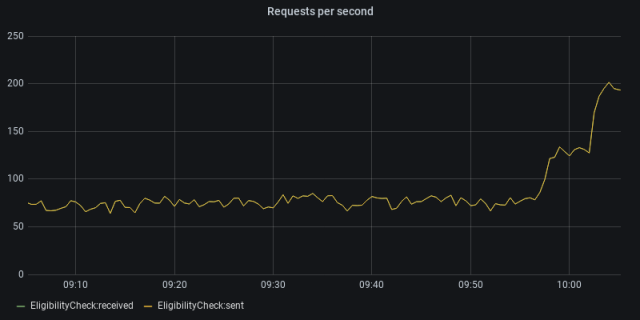
From there the change was enabled for the broader customer base:
Compatibility and developer experience
Backwards compatibility dictated that the new checks run alongside the existing preference-based ones. Tooling mattered too: other engineering teams would adopt this framework only if it were easy.HHAST's codegen library powers a CLI that generates the JSON files, protocol buffers, TypeScript definitions, and Hack code a new role or permission requires. That spares each team from learning the plumbing, letting them declare a role and have the tool place every required artifact correctly.
Shipping Roles on Enterprise Grid
Slack has launched an initial set of user roles across Enterprise Grid, laying the groundwork for more granular permissions and future controls. The feature is already in use by customers, who now have finer-grained management over user capabilities within their organizations.
The new system gives administrators a sustainable path for expanding control options without rearchitecting the permission model. Instead of bolting on individual settings, the role-based foundation is designed to accommodate additional capabilities as they are introduced.
This work was a collaboration between the Enterprise Admin and Flannel teams. For engineers interested in tackling scalable access control challenges, Slack is hiring.


