
Feature gates at Dropbox scale
Shipping code to production at Dropbox is rarely a quick affair. A full push to our web servers can take hours, and desktop or mobile releases take even longer. Deploying new code also risks introducing bugs across the entire stack. What we needed was a way to put configurable “knobs” into our products that give us flexibility and can be safely tweaked in near real-time.
To satisfy this need, we built Stormcrow, a system that lets us edit and deploy “feature gates”—configurable code paths that call out to Stormcrow to determine how to proceed. Typical code usage looks like this:
# Here we are in some Dropbox Python code.
# We need to decide whether to show a red button or a blue button to the user.
# Let's ask Stormcrow!
variant = stormcrow.get_variant("feature_x", user=the_user)
if variant == "RED_BUTTON":
  show_red_button()
elif variant == "BLUE_BUTTON"
  show_blue_button()
else:
  show_default_button()
Stormcrow feature gates:
- Are rolled out to production within 10 minutes of being changed.
- Work across all Dropbox systems, from low-level infrastructure to product features on web, desktop or mobile.
- Provide advanced targeting capabilities, including segmenting users based on data in our analytics warehouse.
Building a one-size-fits-all system like this is tricky: it must be expressive enough to handle varied daily use cases, yet robust enough to handle Dropbox-scale traffic.
How gating decisions work
Suppose we want to run an A/B test on button colors for German users, while knowing English speakers prefer blue. In the Stormcrow UI, we might configure the feature like this:
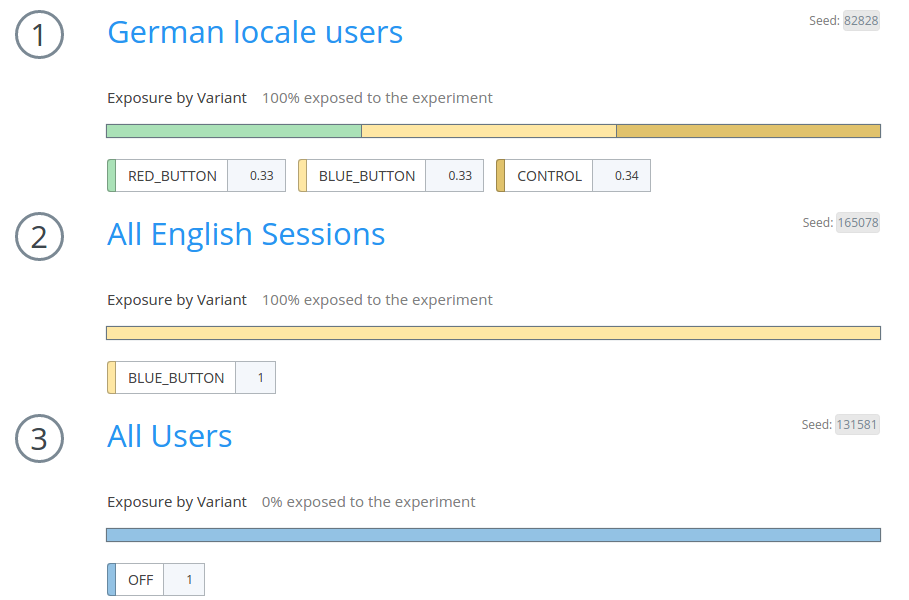
This shows that “German locale users” get RED_BUTTON at 33%, BLUE_BUTTON at 33%, and CONTROL at 34%; English sessions get 100% BLUE_BUTTON; and everyone else receives OFF. Notice the heterogeneous population types in one feature: a “user” population (logged-in users only) and a “session” population (any site visit).
Features are built from a sequence of populations matched using a fall-through system: try population 1 first, and fall through to population 2 on failure, and so on. Once a population is matched, a variant is picked according to that population’s variant mix.
Variant assignment is stateless—randomized by hashing the user’s ID with a seed (the gray box in the UI’s top right). Advance users can manipulate the seed for special behaviors; giving two different features the same seed assigns users identically across both.
Populations, selectors, and datafields
Two pieces of vocabulary are central to how populations work:
- A selector is a code object passed into Stormcrow to help it make decisions. Most commonly-used models serve as selectors; for example, the
userandsessionobjects both work. - A datafield is code that takes one or more selectors and extracts a value of a specified type: boolean, date, number, set, or string. Datafields are combined with a simple rule engine supporting boolean logic.
Here’s a real datafield, user_email, straight from the code:
@dataField(TYPE.STRING, [SELECTOR_NAMES.USER], "The user's email as a string.")
def user_email(**sel):
    return _user(**sel) and _user(**sel).email
The @dataField decorator specifies this datafield requires a USER object and produces a STRING. It also includes a help string for autogenerated documentation; the body simply pulls the email out of the object. Datafields can run arbitrary code, so they’re powerful—Dropbox has many to support various targeting needs, and teams add new ones regularly.
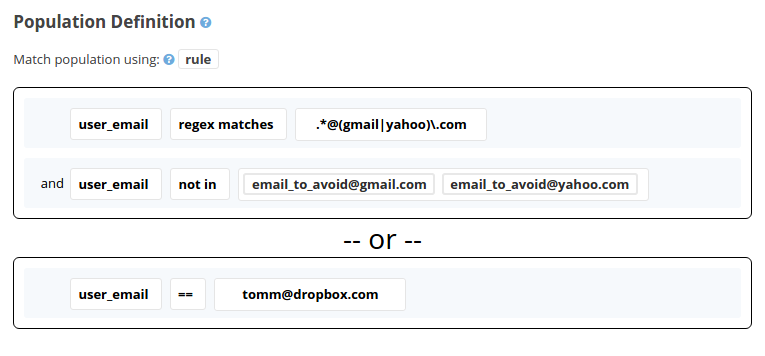
Once defined, a datafield can be used in a population. Here’s one matching Gmail and Yahoo users, minus a couple of excluded addresses, plus [email protected]:
Hive-based populations and data lag
Datafields have a limitation: they only access information reachable from server code—present in loaded models or efficiently queryable databases. But Dropbox also has a Hive analytics warehouse with valuable historical logging data. Sometimes a Dropboxer wants to select an arbitrary user set by writing a HiveQL query.
To make such populations available in production, we built a daily data pipeline that exports the full set of Hive-based populations into a scalable, production-queryable datastore.
The main trade-off is data lag. Unlike datafields, which always produce current data, Hive-based populations update only on a daily basis—sometimes slower if the pipeline fails. This is unacceptable for some gating but works fine for slowly-changing feature gates, like product launches to a predefined beta user set. It’s a fundamental trade-off between expressive power and data freshness.
Derived populations
Stormcrow also lets you define populations in terms of other populations and features—these are derived populations. For instance, here’s a population matching only when “Android devices” is matched and when the feature recents_web_comments returns variant OFF:
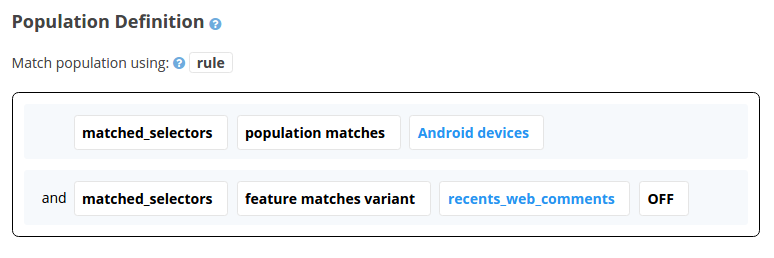
This solves the problem of repeatedly copying and pasting complicated rule configurations. Instead, targeting builds on a core set of basic populations, mixed and matched into arbitrarily complex logic. Designing derived population hierarchies is very similar to refactoring code—they can even replace coded “if” statements that choose between experiments with relationships expressed directly in the UI.
Selector inferring
Dropbox has many internal models: user (single account), team (Dropbox Business team), and identity (paired personal plus business user models), all connected via relationships. For developer convenience, Stormcrow understands these relationships well enough to “infer” extra selectors automatically. While a developer with a user object u could write:
variant = stormcrow.get_variant("team_related_feature", user=u, team=u.get_team())it is much more convenient to write just:
variant = stormcrow.get_variant("team_related_feature", user=u)
We represent model relationships as a graph called the selector inferring graph. Each node is a model type; an edge from A to B means B can be inferred from A. On any Stormcrow call, we compute the transitive closure of given selectors in this graph. To limit performance costs, inferring produces lazily evaluated thunks, computed only when a selector is actually needed.
Here’s our actual selector inferring graph. Note viewer is handy—it infers session, team, user, and identity. The special node (none) represents selectors auto-inferred from “thin air”: for example, session is always auto-inferred in server code.
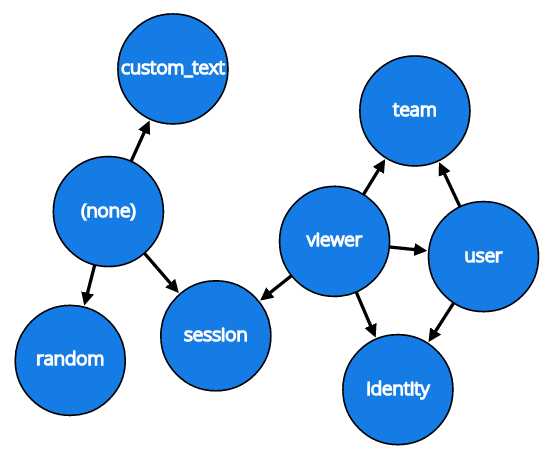
Selector inferring is a big win for convenience and easy to understand. We also have tooling to check that developers use the right selectors; see the “Auditing challenges” section.
Deployment: server infrastructure
With a large production fleet, we wanted to avoid keeping feature gating config only in a database—that would require network calls per gate, which adds up given the many gates on a typical dropbox.com page load. Even with careful caching (local plus memcached), the database becomes a single point of failure.
Instead, we deploy a JSON file called stormcrow_config.json to all production servers via our internal push system, every time Stormcrow configuration changes. Each server runs a background “Stormcrow loader” thread that watches the on-disk copy, reloading when it changes—without interrupting the server. If the file is missing, Stormcrow can fall back to direct database access, but that’s strongly discouraged for anything producing nontrivial traffic.
Deployment: desktop and mobile
Desktop and mobile clients take a different approach: they batch-request feature and variant information. Responses look like this:
{
  "feature_a": "VARIANT_X",
  "feature_b": "OFF",
  "feature_c": "CONTROL",
  ...
}
These clients pass special selectors with platform-specific information: mobile passes app and device details; desktop passes host information. As with other selectors, Stormcrow datafields can write rules based on these characteristics.
Real-time visibility into feature rollouts
Every feature assignment and exposure in Stormcrow is logged to Dropbox's real-time monitoring system, Vortex. The Stormcrow UI embeds graphs that let users track assignment and exposure rates over time, with different variants shown as separate colored lines. Each time a feature (or a population it depends on) is edited, the graph is annotated with a vertical line, making it easy to correlate configuration changes with shifts in variant assignment. The graphs also reveal usage effects that aren't tied to Stormcrow changes at all, such as organic growth in a particular variant's audience.
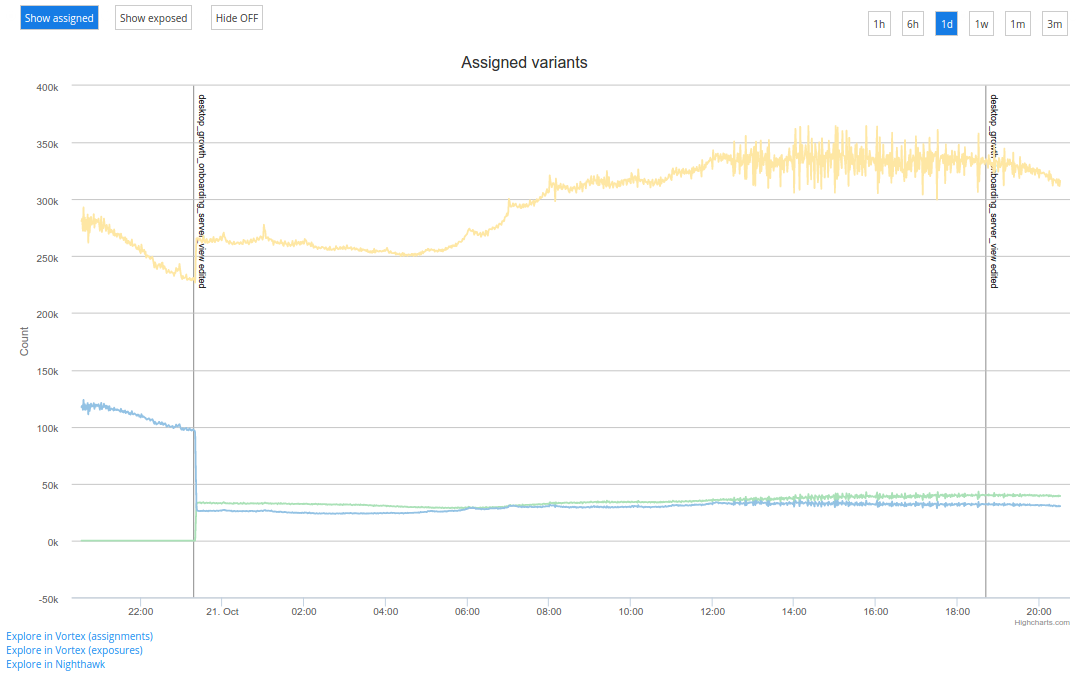
For deeper investigation, users can click through from the embedded graphs into Vortex or other data exploration tools.
Keeping I/O out of the hot path
Stormcrow's modular datafield design means anyone at Dropbox can create a datafield. That flexibility has a downside: a datafield that's perfectly safe for a small use case can end up driving significant traffic toward a fragile system if adopted more broadly. The lesson learned is clear — avoid database calls and other I/O inside the feature gating system itself.
The recommended pattern is to have the caller pass as much information into the system as possible. When the caller always performs the I/O regardless of feature state, a Stormcrow edit cannot alter the performance characteristics of the code. In an ideal world, Stormcrow would be completely pure in the functional programming sense. That hasn't been practical to achieve: offering a convenient API sometimes requires Stormcrow to do its own heavy lifting, particularly when gating decisions depend on information that lives a database call away. For those cases, a highly scalable data store like Edgestore helps make the I/O safe.
Tracking what changed and when
Feature gates sit outside version control, which makes them awkward to manage. Code at Dropbox moves through predictable daily pushes and platform-specific release processes, but feature gate edits can happen at any hour. That makes solid auditing tools essential for tracking down feature-gating regressions quickly.
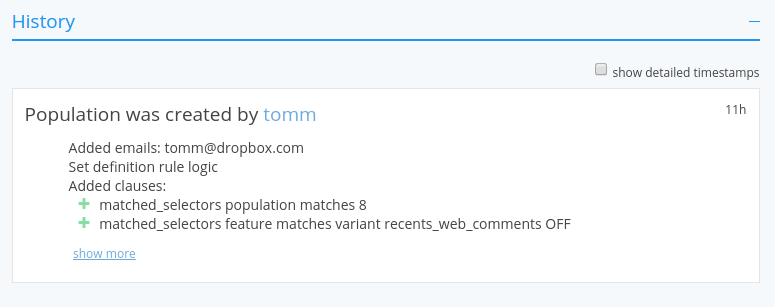
Stormcrow addresses this with full audit history and static analysis of the codebase. Audit history is presented as a news-feed style view of every edit to a given feature or population, including edits to transitive dependencies that arise through derived populations.
The Stormcrow Static Analyzer complements the audit trail. It clones and scans the codebase searching for feature usages. For a given feature, it produces two outputs: a list of every occurrence in the current master branch, and a historical view showing the commit hashes where the feature entered or exited the codebase. Here's an example for the can_see_weathervane feature:
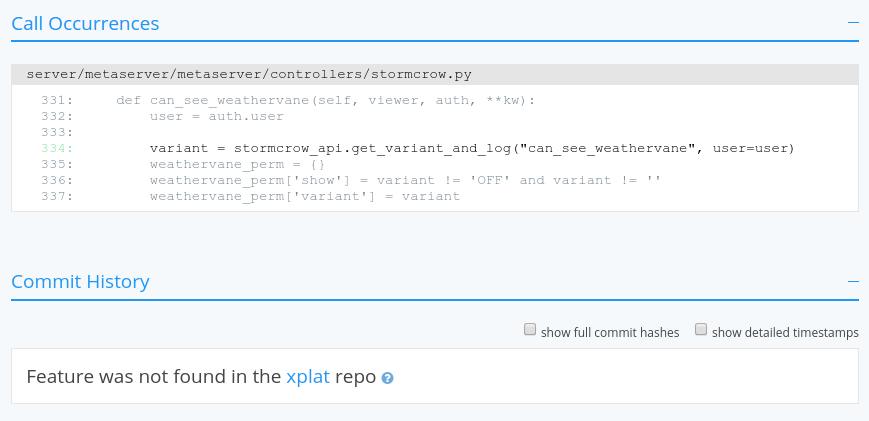
The static analyzer also verifies that the most common variant in production code matches what unit tests exercise. It sends notification emails to feature owners about mismatches and about stale features that are no longer used and should be removed.
Testing with overrides
For manual QA, Stormcrow supports overrides that let Dropboxers temporarily place themselves into any feature or population. Datafield overrides go one step further, allowing a single datafield value to be changed — for example, forcing a locale to German to test the German experience.
Unit tests run against a mock Stormcrow where every feature gets a default variant. Any test can override that variant, and special decorators exist to require that a test passes under every possible variant.
The name Stormcrow carries a bit of history: it replaced Dropbox's previous feature gating system, called Gandalf ("You shall not pass!"). Stormcrow, one of Gandalf's many names in The Lord of the Rings, fit the bird-themed naming convention for internal projects at the time.


