
Reading your own web traffic: a practical look at undocumented APIs
Reusing an undocumented web API in your own code can be a surprisingly straightforward exercise. It's mostly browser developer tools plus a little bit of careful copy-and-paste. The payoff is a small program that can pull data for you directly, without an official SDK. It's a useful technique to see once, if only because it makes clear how exposed your own backends are.
The demonstration below uses Google Hangouts as the example backend. Google isn't the ideal target — it has a real API and its scale makes it safe for experimentation. Google Hangouts was chosen precisely because its infrastructure is built to handle the load of casual poking around. The pattern applies far more often to smaller sites, where being polite matters more.
Finding a request worth replaying
Open https://hangouts.google.com in a browser with developer tools open on the network tab. Browsers are not magic: every request your browser makes to the backend is an ordinary HTTP request that you can replay. Filters help narrow the noise. A promising response type is JSON. In this case, a people endpoint surfaced that returns details about contacts, a reasonable thing to inspect.
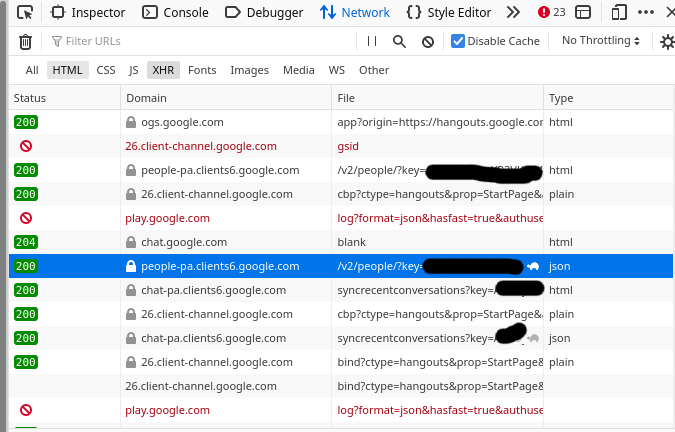
Firefox's developer tools are used here, but Chrome's work the same way. Look for entries whose type column says json and whose responses contain structured data you recognize as belonging to you. That's your entry point.
From browser request to Python script
Right-click the interesting request and choose "Copy as cURL". That produces a full command line, complete with every header the browser sends. Pasting it into a terminal will probably dump compressed binary data to the screen; the culprit is the Accept-Encoding: gzip, deflate header. It's easier to strip that header than to pipe everything through gunzip.
curl 'https://people-pa.clients6.google.com/v2/people/?key=REDACTED' \
-X POST \
-H 'Authorization: SAPISIDHASH REDACTED' \
-H 'Content-Type: application/x-www-form-urlencoded' \
-H 'Origin: https://hangouts.google.com' \
-H 'Cookie: REDACTED'\
--data-raw 'personId=101777723309&personId=1175339043204&personId=1115266537043&personId=116731406166&extensionSet.extensionNames=HANGOUTS_ADDITIONAL_DATA&extensionSet.extensionNames=HANGOUTS_OFF_NETWORK_GAIA_GET&extensionSet.extensionNames=HANGOUTS_PHONE_DATA&includedProfileStates=ADMIN_BLOCKED&includedProfileStates=DELETED&includedProfileStates=PRIVATE_PROFILE&mergedPersonSourceOptions.includeAffinity=CHAT_AUTOCOMPLETE&coreIdParams.useRealtimeNotificationExpandedAcls=true&requestMask.includeField.paths=person.email&requestMask.includeField.paths=person.gender&requestMask.includeField.paths=person.in_app_reachability&requestMask.includeField.paths=person.metadata&requestMask.includeField.paths=person.name&requestMask.includeField.paths=person.phone&requestMask.includeField.paths=person.photo&requestMask.includeField.paths=person.read_only_profile_info&requestMask.includeField.paths=person.organization&requestMask.includeField.paths=person.location&requestMask.includeField.paths=person.cover_photo&requestMask.includeContainer=PROFILE&requestMask.includeContainer=DOMAIN_PROFILE&requestMask.includeContainer=CONTACT&key=REDACTED'
Not every header is essential. Trial-and-error works well: delete one, rerun, repeat until the request breaks. Sending Accept*, Referer, Sec-*, DNT, User-Agent, and caching headers is generally unnecessary. For the Hangouts example, the command reduces to four headers: Authorization, Content-Type, Origin, and Cookie. After splitting the single-line output using shell backslashes, it's easier to see which pieces matter.
The cleaned-up cURL command maps line-for-line to the core of a Python program. Using Python's requests library is standard here. Iterate the output curl produces, identifying what headers the server really validates. The body once defined in a string can live comfortably as an array of tuples; a key-value list is far easier to manipulate than one very long string, especially if parameters need to change later.
import requests
import urllib

data = [
    ('personId','101777723'), # I redacted these IDs a bit too
    ('personId','117533904'),
    ('personId','111526653'),
    ('personId','116731406'),
    ('extensionSet.extensionNames','HANGOUTS_ADDITIONAL_DATA'),
    ('extensionSet.extensionNames','HANGOUTS_OFF_NETWORK_GAIA_GET'),
    ('extensionSet.extensionNames','HANGOUTS_PHONE_DATA'),
    ('includedProfileStates','ADMIN_BLOCKED'),
    ('includedProfileStates','DELETED'),
    ('includedProfileStates','PRIVATE_PROFILE'),
    ('mergedPersonSourceOptions.includeAffinity','CHAT_AUTOCOMPLETE'),
    ('coreIdParams.useRealtimeNotificationExpandedAcls','true'),
    ('requestMask.includeField.paths','person.email'),
    ('requestMask.includeField.paths','person.gender'),
    ('requestMask.includeField.paths','person.in_app_reachability'),
    ('requestMask.includeField.paths','person.metadata'),
    ('requestMask.includeField.paths','person.name'),
    ('requestMask.includeField.paths','person.phone'),
    ('requestMask.includeField.paths','person.photo'),
    ('requestMask.includeField.paths','person.read_only_profile_info'),
    ('requestMask.includeField.paths','person.organization'),
    ('requestMask.includeField.paths','person.location'),
    ('requestMask.includeField.paths','person.cover_photo'),
    ('requestMask.includeContainer','PROFILE'),
    ('requestMask.includeContainer','DOMAIN_PROFILE'),
    ('requestMask.includeContainer','CONTACT'),
    ('key','REDACTED')
]
response = requests.post('https://people-pa.clients6.google.com/v2/people/?key=REDACTED',
    headers={
        'X-HTTP-Method-Override': 'GET',
        'Authorization': 'SAPISIDHASH REDACTED',
        'Content-Type': 'application/x-www-form-urlencoded',
        'Origin': 'https://hangouts.google.com',
        'Cookie': 'REDACTED',
    },
    data=urllib.parse.urlencode(data),
)

print(response.text)
Running the converted script returns JSON output, and at this point the only necessary edits are to replace your personal access tokens and cookie values, marked REDACTED here. Nobody else should be able to replay the request against your account. A functioning program that prints JSON is the finish line for the mechanical part; from there, tweaking parameters comes naturally. It's not advisable to do anything interesting with this specific endpoint — the goal is demonstrating the workflow, not building software on ad-hoc scraping. Even so, the response is fully structured and workable.
The hard part is the parameter soup
Nothing about this process guarantees that the API makes sense. A lot of the parameters in these endpoints are unknown. The practical strategy is to guess what you can from names: requestMask.includeField.paths=person.email most plausibly asks for the email field on each person. Focus on the parameters you understand, and disregard what's opaque until a specific need arises for more.
Note in that spirit that curlconverter.com can translate cURL commands into Python and several other languages directly. Working through the process manually is a fine way to build understanding but it isn't necessary effort.
What can go wrong
Session cookies expire. The script you write stops working when the authentication cookie in your browser times out, meaning the approach doesn't suit long-running services. For a quick one-off data grab, you'll rarely care.
Traffic surges from your script are a real concern. A small site with undocumented APIs might be small precisely because its resources are limited. Dozens of quick requests may take it down. That outcome is not just an engineering failure but an ethical one; be conservative with request rate and total volume. Excessive use can also get your account suspended, deservedly, so if your script misbehaves it's better to slow it down than to hide it.
Stick to data that belongs to you or is intended to be public. Testing for vulnerabilities on someone's backend without consent is not the point of this exercise.
Anyone can do this to your API
Understanding this trick matters more for what it means to an engineering team than it does for enthusiasm about discovering secret interfaces on other services. It's a genuinely fun and educative technique, but the reverse insight is the sobering part of the lesson: developer tools are present in every browser, and anyone who can code can inspect the network requests of any public-facing application you ship.
A backend that trusts the parameters it receives is one structural change away from exposing another user's private data. Familiarity with this technique is neither optional sophistication nor parlour trick. Companies ship endpoints with far too little assurance. Every developer must know for the first time at some point: the network tab can reveal exactly which inputs you are accepting. Nothing should be "private" about an internal field that a typo in a request could change.


