
Classifying Invites with Domain Context
Slack Connect lets users collaborate with people outside their organization in shared channels, but the invite flow needs to know up front whether each email address belongs to an internal employee or an external collaborator. Slack built an email classification system that makes this prediction by analyzing email domains against several context layers about the team and the person doing the inviting.
There are two invite paths in Slack: a workspace invite, which makes someone a full member or guest, and a Slack Connect invite, which connects through a DM or shared channel. When a user enters email addresses during either flow, the classification engine must decide for each one whether it represents an internal teammate or an external party.
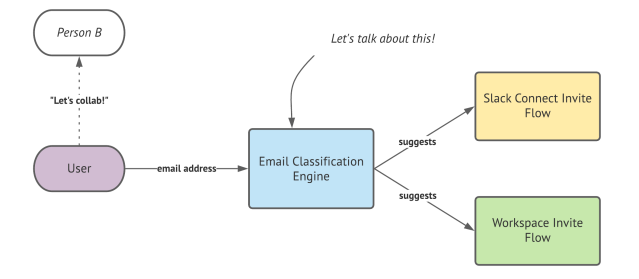
How the Classification Engine Works
The engine pulls from three data sources to make a call on any given email domain:
- Settings Context: the relationship between the domain and organization-level settings
- Inviter Context: how the domain relates to the inviter’s own user profile
- Team Context: how the domain relates to existing team members
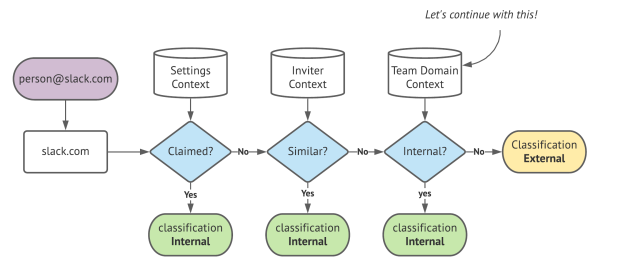
The engine first extracts unique domains from all entered addresses, then runs each domain through the pipeline. Settings and Inviter Context checks run in O(1) by comparing the domain against information already available in the execution context — for example, whether the team has claimed the domain or whether it matches the inviter’s own email domain. These checks can often resolve the classification without any extra work.
At Slack’s scale, keeping the overall algorithm at O(N) for N unique domains matters. Only the Team Context lookup requires a database round-trip per domain. That lookup compares each domain against an aggregate dataset of email domain counts for the team, broken down by user role. If a domain’s count clears a configurable threshold, the engine treats it as internal.
Storing Team Domain Aggregates
With slack teams sometimes exceeding a million users, running a live aggregation query at request time is too costly. Instead, Slack uses Vitess to maintain a single table keyed by team_id, ensuring that every classification query touches only one shard since all lookups happen in the context of a single team.
CREATE TABLE `domains` (
   `team_id` bigint unsigned NOT NULL,
   `domain` varchar NOT NULL,
   `count` int NOT NULL DEFAULT '0',
   `date_update` int unsigned NOT NULL,
   `role` varchar NOT NULL,
   PRIMARY KEY (`team_id`,`domain`,`role`)
)
The table stores total user counts grouped by role and email domain. This lets the engine apply different weights: an admin on slack-corp.com is a far stronger signal of an internal domain than a guest on the same domain.
Notably, the count column is a signed number. This is deliberate — if the value dips below zero, it signals data drift that a separate “Healer” component must fix. The count value is therefore treated as eventually consistent.
A Threshold Example
Consider Company A with 100 employees split across US and Canadian offices, where the HR department assigns region-based email addresses. The US office’s 70 employees use <name>@example-a.com, and the 30 Canadian employees use <name>@example-a.ca. Company A also has three consultants from Consult Co as full members.
The team domain context table reflects those distributions:
| Team | Role | Domain | Count |
|---|---|---|---|
| Company A | admin | example-a.com | 2 |
| Company A | member | example-a.com | 68 |
| Company A | member | example-a.ca | 30 |
| Company A | member | consult-co.com | 3 |
The workspace has 103 total members. With a 10% threshold configured, a domain is only “internal” if at least 10% of the organization uses it. That gives us:
- example-a.com: 67.9% — internal
- example-a.ca: 29.1% — internal
- consult-co.com: 2.9% — external
An Eventually-Consistent System
Domain-to-team relationships don’t stay static. Users change email addresses, new employees join, and others are deactivated. For a platform like Slack, recomputing full aggregates on every event would be prohibitively expensive, so the system instead uses an eventually-consistent architecture with a smaller compute footprint.
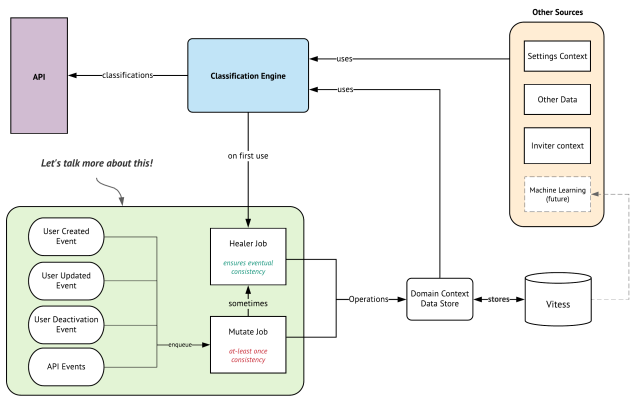
At the center is the classification engine itself, which combines the data sources to answer the API request. The mutation logic on the left keeps the aggregate tables fresh in near real-time.
Real-Time Mutations
Events like a user joining a workspace or changing an email address push a Mutate Job onto a job queue. That job runs one or more arithmetic UPSERTs that add to or subtract from existing count values directly in Vitess, avoiding expensive application-level state synchronization.
Example: A New User Joins
Suppose Slack has five admins and 2,000 regular members all on slack-corp.com, and a new hire account is provisioned. The state starts at:
| Team | Role | Domain | Count |
|---|---|---|---|
| Slack | admin | slack-corp.com | 5 |
| Slack | member | slack-corp.com | 2000 |
Account provisioning fires an event that enqueues a mutation job which runs:
UPSERT count=count+1 WHERE team_id=7 AND domain='slack-corp.com' AND role='member';The existing row increments by one:
| Team | Role | Domain | Count |
|---|---|---|---|
| Slack | admin | slack-corp.com | 5 |
| Slack | member | slack-corp.com | 2001 |
Every UPSERT takes a row-level lock and works off the current local state, so even with heavily overlapping operations the totals wind up correct.
Example: Role Change and Deactivation
When two events land at once — one user is deactivated (−1) while another shifts role from member to owner — the system fires multiple queries. A role change requires two operations: a decrement from the old role’s aggregate and an increment to the new one.
Initial state with 2,005 users:
| Team | Role | Domain | Count |
|---|---|---|---|
| Slack | admin | slack-corp.com | 5 |
| Slack | member | slack-corp.com | 2000 |
The two role-change operations:
--Query 1:
UPSERT count=count=1
WHERE team_id=7 AND domain='slack-corp.com' AND role='member';

--Query 2:
UPSERT count=count+1
WHERE team_id=7 AND domain='slack-corp.com' AND role='owner';
And the separate deactivation mutation:
--Query 3:
UPSERT count=count-1
WHERE team_id=7 AND domain='slack-corp.com' AND role='member';
Job queues don’t guarantee ordering, so these queries can interleave unexpectedly. A possible execution order:
UPSERT count=count=1 WHERE team_id=7 AND domain='slack-corp.com' AND role='member';

UPSERT count=count-1 WHERE team_id=7 AND domain='slack-corp.com' AND role='member';

-- snapshot here --

<span style="font-weight: 400">UPSERT count=count+1 WHERE team_id=7 AND domain='slack-corp.com' AND role='owner';</span>
If you take a snapshot between the second and third queries, the totals look wrong — 2,003 total users as though two were deactivated:
| Team | Role | Domain | Count |
|---|---|---|---|
| Slack | admin | slack-corp.com | 5 |
| Slack | member | slack-corp.com | 1998 |
Once that third query runs, the state heals itself:
| Team | Role | Domain | Count |
|---|---|---|---|
| Slack | admin | slack-corp.com | 5 |
| Slack | member | slack-corp.com | 1998 |
| Slack | member | slack-corp.com | 1 |
The final total of 2,004 reflects exactly one net deactivation, which checks out.
Detecting and Repairing Data Drift
Asynchronous job queues don’t guarantee exactly-once execution. Jobs can fail, retry, or complete twice, driving natural drift in the counts over time. If drift goes unattended, classification accuracy erodes.
Consider a team with four guest users on example.com, where three are later removed:
| Team | Role | Domain | Count |
|---|---|---|---|
| slack | guest | example.com | 4 |
If one of the removal jobs fails to acknowledge to the coordinator before a timeout, it gets re-queued and runs multiple times. Execute one of those decrements too many, and the snapshot shows an impossible negative count:
| Team | Role | Domain | Count |
|---|---|---|---|
| Slack | guest | example.com | -1 |
The original count of four drops to −1 after five decrements — clear data drift.
Self-Healing with the Healer
A Healer component continuously recalculates drift and issues the compensating operations needed to realign counts. Critically, the healer can’t simply sum all active users and replace the table wholesale, because that would clobber any records for events that land while the heal itself is running.
The healer runs in five phases:
- Fetch all current domain counts for the team
- Iterate through every user and build an in-memory count
- Compare in-memory counts against stored counts
- Calculate the delta operations needed
- Run those deltas with the same UPSERT queries used by regular mutations
Because heal operations are themselves atomic UPSERTs, any mutations occurring between phases are safe — they adjust the value in the database after the healer’s reads, and the eventual state was already recalculated.
The signed nature of the count column also feeds back into this loop. When any mutation job drives a value negative, the system enqueues an additional healer job automatically. Heals are likewise triggered when a user first enters an email address, upon a plan upgrade, or after a period of inactivity.
The End Result
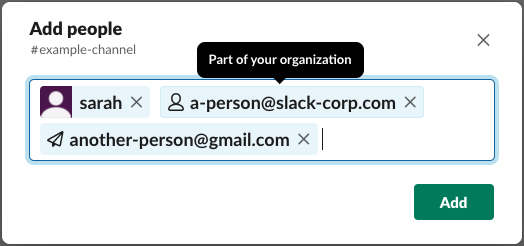
Plugging the classification engine into the invite tokenizer gives the product the data it needs to tailor the UI. Addresses classified as internal surface workspace-invite options, while external ones like [email protected] present the Slack Connect path.
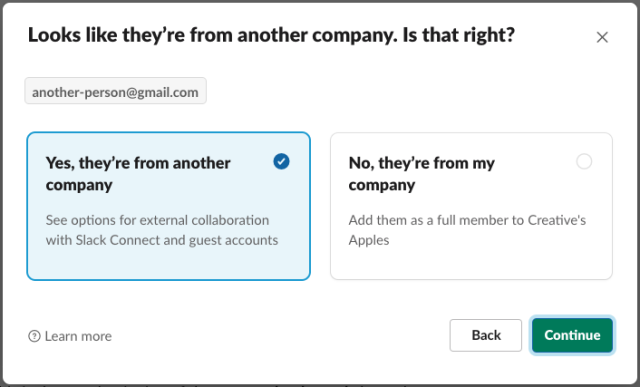
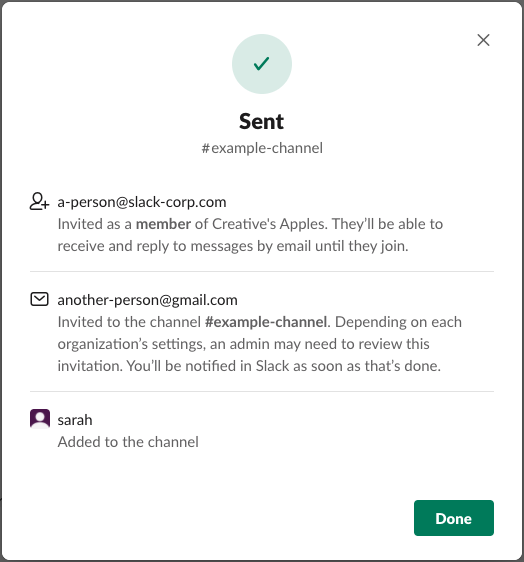
A per-team aggregation over millions of users would be too slow to run by backfill on any regular schedule. Choosing an eventually consistent model avoided that cost entirely — updates land in real time through lightweight mutations, while the healer keeps the dataset aligned over the long run. The result is a classification model with high accuracy, informed by live team context rather than a static snapshot.
Performance trade-offs
The classification stack leans on eventual consistency to keep predictions fast. In practice, this means trading a small amount of accuracy for significant gains in throughput. The threshold-based logic handles most edge cases well, but as with any such system, the balance between precision and speed must be tuned for the specific workload.
The critical path is deliberately short: prediction runs in near real-time against cached features, while the slower retraining and model-update cycles happen asynchronously. This separation lets the service absorb spikes in email volume without backpressure on the scoring endpoint.
What this architecture enables
By decoupling the feature store from the model inference layer, the team can iterate on classifiers without redeploying the serving infrastructure. New rules or model versions roll out through the async pipeline, and the thresholds ensure that any regression is bounded before it affects user-facing predictions.
The current implementation handles a meaningful slice of the classification problem, but the design leaves room to grow. Deep learning models, which will likely replace some of the hand-tuned thresholds, can drop into the same async update path. The existing feature pipeline and cache layer were built with that future in mind.
Lessons learned
Building a real-time classification system is an exercise in compromise. The most important takeaway is to define early what you are willing to give up — in this case, a small slice of accuracy for a large gain in speed. Once that trade-off is explicit, the rest of the architecture decisions follow naturally.
Another lesson is that async does not mean eventual everywhere. The prediction path must stay synchronous and fast, while everything that can be deferred — training, validation, feature refresh — should be pushed off the critical path. This split is what makes the system practical under load.
Finally, the threshold approach is not a dead end; it is a solid foundation. The same service boundaries and data model will support more sophisticated inference later, so the work done here is forward-compatible.


