

Getting Oriented in Lean
Lean is a programming language that doubles as a proof assistant. You can write ordinary programs in it that compile to C, but you can also state and prove facts about those programs during typechecking. That dual nature shapes its syntax in ways that can trip up newcomers, so this primer focuses on the mechanical details: how definitions are declared, how functions are written, and how proofs are constructed.
Definitions and Types
Top-level definitions use := for assignment, not =, because = is reserved for equality statements:
def name := "Alice"
def age := 42
Lean infers types when you don't annotate them. Hovering over name in an editor or the online playground reveals name : String, and age gets type Nat, the type of natural numbers (0, 1, 2, and so on, unbounded). You can make the type explicit by inserting : SomeType before the :=:
def name : String := "Alice"
def age : Nat := 42
A negative literal such as -140 will be inferred as an Int, Lean's type for arbitrary whole numbers. If you want a specific type, declaring it explicitly nudges inference in that direction:
def roomTemperature : Int := 25Alternatively, you can wrap the expression itself in a type ascription:
def roomTemperature := (25 : Int)If Lean can't produce a value of the requested type from the expression, you get a type error.
Running Code
There are two distinct ways to use Lean. You can run code, or you can prove facts about code. To see a result inline, use the #eval command:
def name := "Alice"
def age := 42
def birthYear := 2025 - age

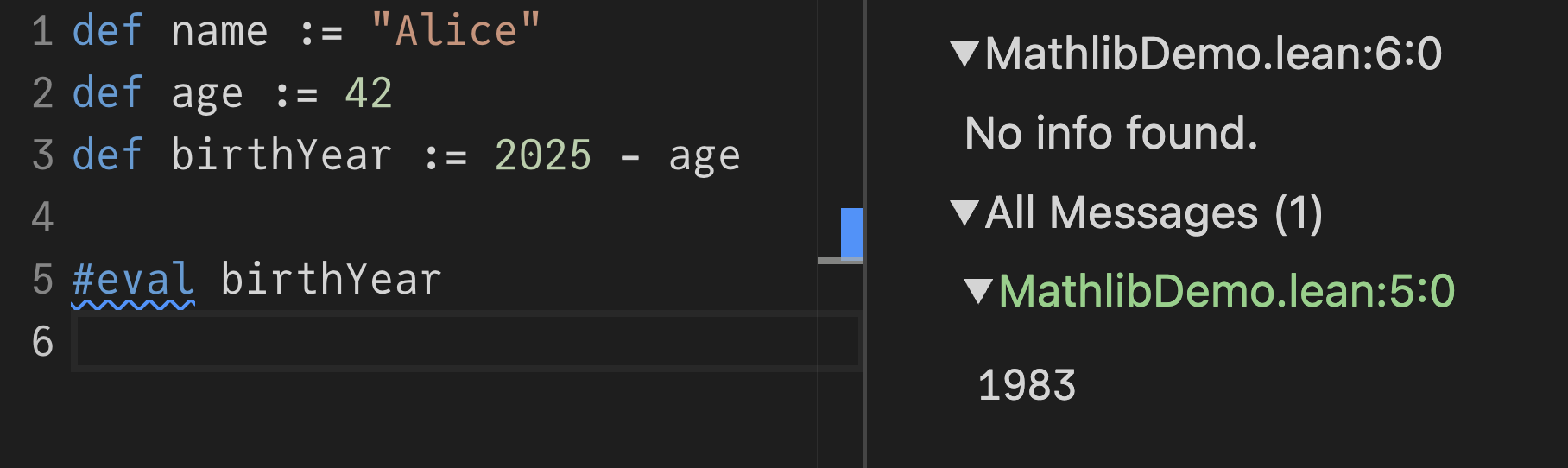
#eval birthYear
The result appears when you hover, and also in the InfoView panel that editors and the online playground display:
To make a real program, define main:
def name := "Alice"
def age := 42
def birthYear := 2025 - age
def main := IO.println birthYear
Technically main is not a function—hovering reveals its actual type—but you can run it from the command line and it behaves like a program entry point. The Lean compiler will produce an executable that prints the value when run.
Proofs as Typechecking
The more distinctive mode is proving. Here is a theorem alongside a program:
def name := "Alice"
def age := 42
def birthYear := 2025 - age

theorem my_theorem : age + birthYear = 2025 := by
  sorry
A theorem is like a def whose stated type is a proposition. After the by keyword, Lean enters tactic mode, where you construct a proof interactively. The InfoView initially shows the goal age + birthYear = 2025. You can step through it by unfolding definitions one at a time:
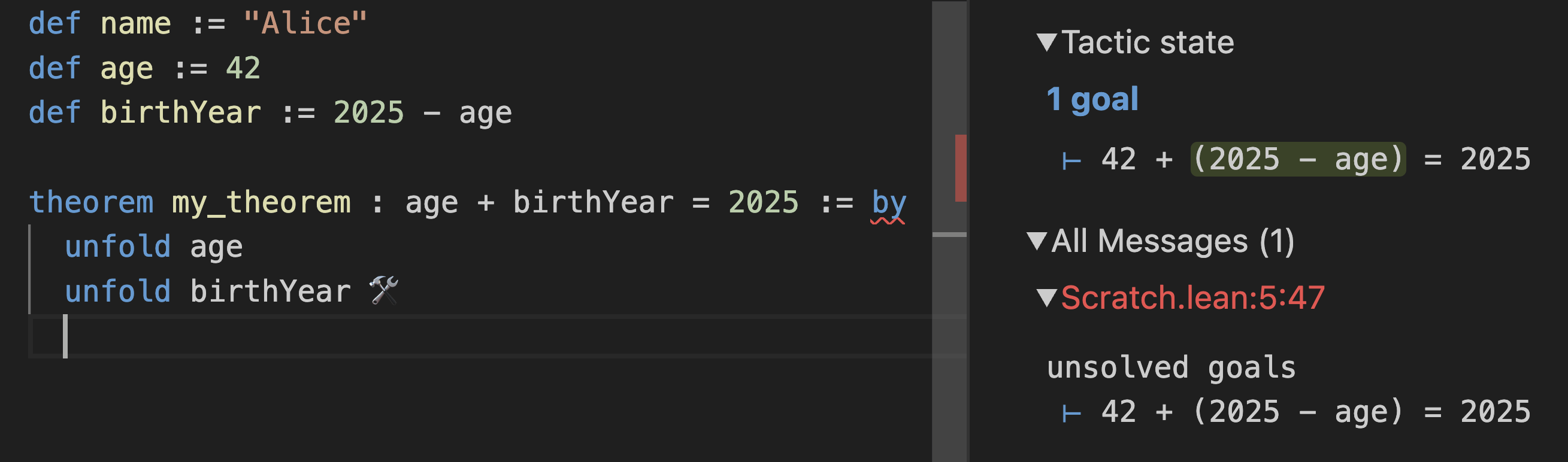
Unfolding repeatedly transforms the goal until it becomes plain arithmetic that the built-in decide tactic can settle:
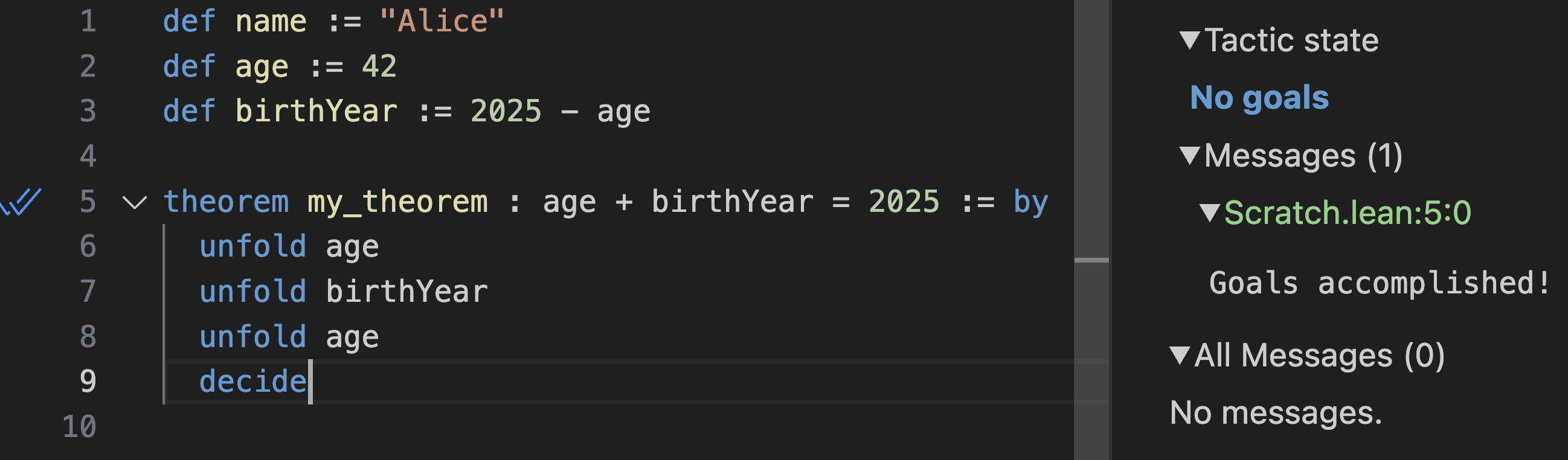
This proof is checked during typechecking—no code runs. If you change a definition so the statement no longer holds, the theorem stops compiling. The simp tactic can unfold definitions recursively and solve goals in one step:
![simp [age, birthView] solves the same theorem](https://overreacted.io/a-lean-syntax-primer/13.png)
Namespaces
Functions can live inside namespaces. IO.println is a call to println in the IO namespace. Write open IO to make the shorter name available everywhere below that line:
open IO

def name := "Alice"
def age := 42
def birthYear := 2025 - age
def main := println birthYear
An open ... in declaration scopes the import to a single definition:
def name := "Alice"
def age := 42
def birthYear := 2025 - age

open IO in
def main := println birthYear
Function Call Syntax
Lean does not use parentheses or commas for function calls. Instead of f(a, b, c), you write f a b c. Parentheses are used only for grouping expressions. Consider a direct call with a compound argument:
def name := "Alice"
def age := 42
def main := IO.println 2025 - age
Without parentheses, Lean parses this as (IO.println 2025) - age and fails to find a subtraction operation for the resulting types. Wrapping the compound argument fixes it:
def name := "Alice"
def age := 42
def main := IO.println (2025 - age)
The takeaway: rather than something(f(x, y), a, g(z)) as in JavaScript, Lean expects something (f x y) a (g z).
Nesting and let Bindings
Definitions can't be nested, but you can introduce local bindings with let inside any definition:
def name := "Alice"
def age := 42

def main :=
  let birthYear := 2025 - age
  IO.println birthYear
Each let uses :=. The last line of a definition is its value—there is no return statement. A let chain just breaks one expression into named pieces; it doesn't change the result.
Declaring Functions
Adding an argument to a definition turns it into a function:
def name := "Alice"
def age := 42
def birthYear currentYear := currentYear - age
Hovering over birthYear shows its new type, displayed as birthYear (currentYear : Nat) : Nat. The explicit form renders the same information:
def birthYear (currentYear : Nat) : Nat := currentYear - ageThere are many equivalent syntaxes for the same function. All of the following definitions are identical in behavior:
/-- Concise definition -/
def birthYear currentYear := currentYear - age
def birthYear (currentYear: Nat) := currentYear - age
def birthYear (currentYear: Nat) : Nat := currentYear - age

/-- Definition set to an anonymous function -/
def birthYear := fun currentYear => currentYear - age
def birthYear := fun (currentYear: Nat) => currentYear - age

/-- Definition (with explicit type) set to an anonymous function -/
def birthYear : Nat → Nat := fun currentYear => currentYear - age
The underlying type is Nat → Nat—a function from Nat to Nat. The arrow is typed as \to followed by a space. A middle ground is to annotate argument types but let the return type be inferred:
def birthYear (currentYear: Nat) := currentYear - ageIf a function's body uses arguments whose types are ambiguous, Lean may produce a confusing error about "typeclass instance is stuck". The remedy is to annotate the argument types:
def name := "Alice"

def birthYear (currentYear : Nat) (age : Nat) :=
  currentYear - age

def main := IO.println (birthYear 2025 42)
When several arguments share a type, you can group them under a single declaration:
def name := "Alice"

def birthYear (currentYear age : Nat) :=
  currentYear - age

def main := IO.println (birthYear 2025 42)
Mixing types is fine. A birthYear that accepts a Nat age but an Int current year has type Int → Nat → Int. Because Lean functions are curried, partially applying birthYear 2025 yields a Nat → Int function waiting for the age:
def birthYear (currentYear : Int) (age : Nat) := currentYear - age
def birthYear (currentYear : Int) := fun (age : Nat) => currentYear - age
def birthYear := fun (currentYear : Int) (age : Nat) => currentYear - age
def birthYear := fun (currentYear : Int) => fun (age : Nat) => currentYear - age
def birthYear: Int → Nat → Int := fun currentYear age => currentYear - age
def birthYear: Int → Nat → Int := fun currentYear => fun age => currentYear - age
Proving Universal Statements
A theorem can quantify over all inputs. This statement says that for any current year cy and any age a, the sum of age and birth year equals the current year:
def name := "Alice"

def birthYear (currentYear : Int) (age : Nat) :=
  currentYear - age

theorem my_theorem : a + birthYear cy a = cy := by
  sorry
Lean implicitly inserts variables that appear free, but it's clearer to declare them explicitly:
def name := "Alice"

def birthYear (currentYear : Int) (age : Nat) :=
  currentYear - age

theorem my_theorem (cy : Int) (a : Nat) : a + birthYear cy a = cy := by
  sorry
Inside the proof, the tactic state shows variables cy : Int and a : Nat above the ⊢ symbol, which precedes the goal. Those variables have no concrete values—you're working with all possible values at once, knowing only their types. Unfolding birthYear brings the goal to ↑a + (cy - ↑a) = cy, where the up arrow marks a coercion from Nat to Int:
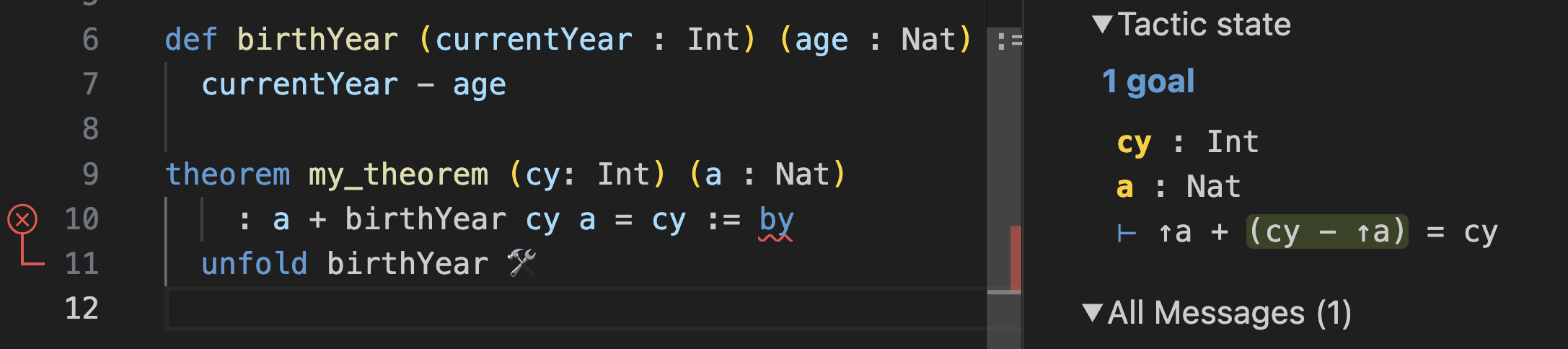
The decide tactic only handles concrete arithmetic. For goals with unknown variables, the omega tactic can reason about linear integer arithmetic:
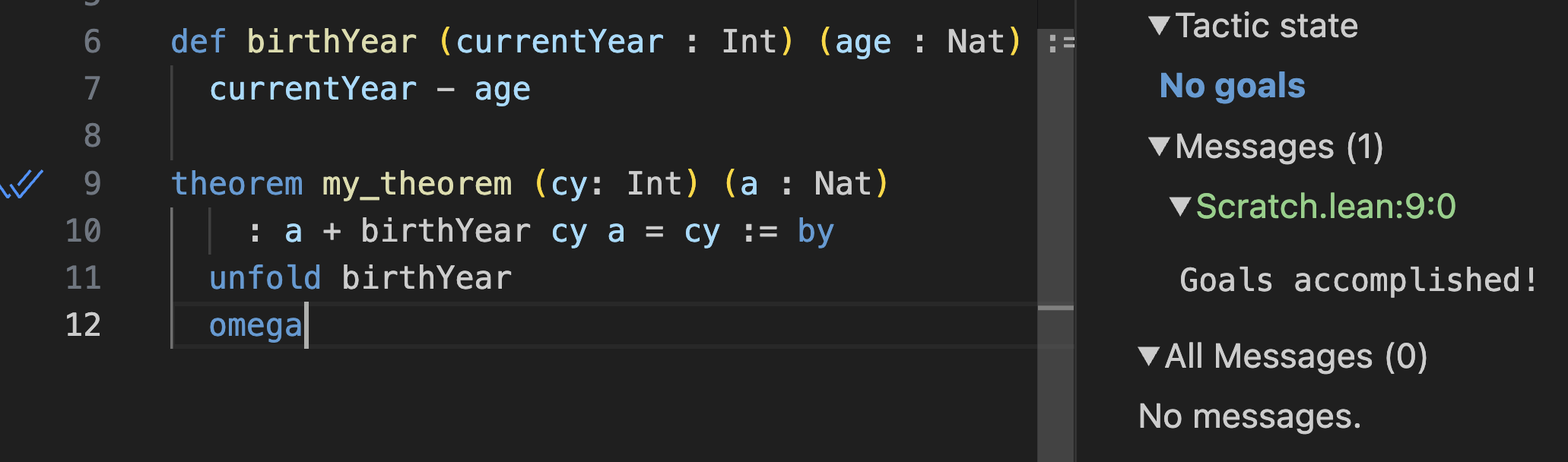
A theorem about a function behaves like a test that runs for every possible input at typechecking time. Altering the function's formula so the statement no longer holds makes the proof fail to compile.
Mathematicians write such universal statements with the quantifier ∀ (typed as \all + space). The theorem signature is identical:
theorem my_theorem : ∀ cy a, a + birthYear cy a = cy := by
  sorry
With ∀, the variables aren't yet in the tactic state. The intro cy a tactic brings them in as arbitrary but fixed values:

From there, the same unfold and omega steps complete the proof:
theorem my_theorem : ∀ cy a, a + birthYear cy a = cy := by
  intro cy a
  unfold birthYear
  omega
Implicit and Instance Arguments
Hovering over a call like IO.println reveals a signature full of unfamiliar symbols:
![IO.println.{u_1} {a : Type u_1} [ToString α] (s: α) : IO Unit](https://overreacted.io/a-lean-syntax-primer/25.png)
The pieces in {} and [] are actual arguments, but Lean fills them in automatically. Curly braces mark ordinary implicit parameters, resolved by type inference from the explicit arguments. In {α} → [ToString α] → α → IO Unit, the α is determined by what you pass: print an Int and α becomes Int.
Brackets mark instance implicit parameters. Lean maintains a registry of interface implementations—how to render an Int as a string, how to subtract two Ints, and so on. The [ToString α] parameter asks for an implementation that converts your type to a string; core provides ToString Int, which Lean supplies automatically.
To see what Lean infers, prefix the call with @ to make every argument explicit, using _ as a placeholder:
def name := "Alice"

def birthYear (currentYear : Int) (age : Nat) :=
  currentYear - age

def main :=
  let year := birthYear 2025 42
  @IO.println _ _ year
Hovering over each placeholder reveals the inferred value—for instance, the implicit type parameter resolves to Int and the instance parameter to instToStringInt:
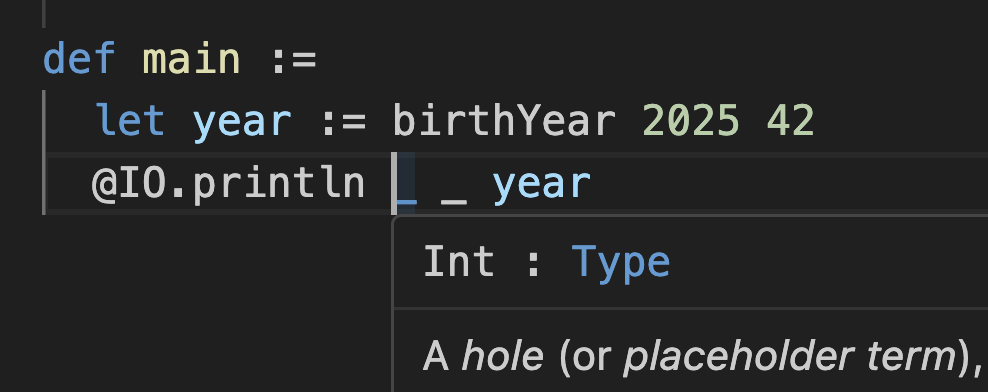
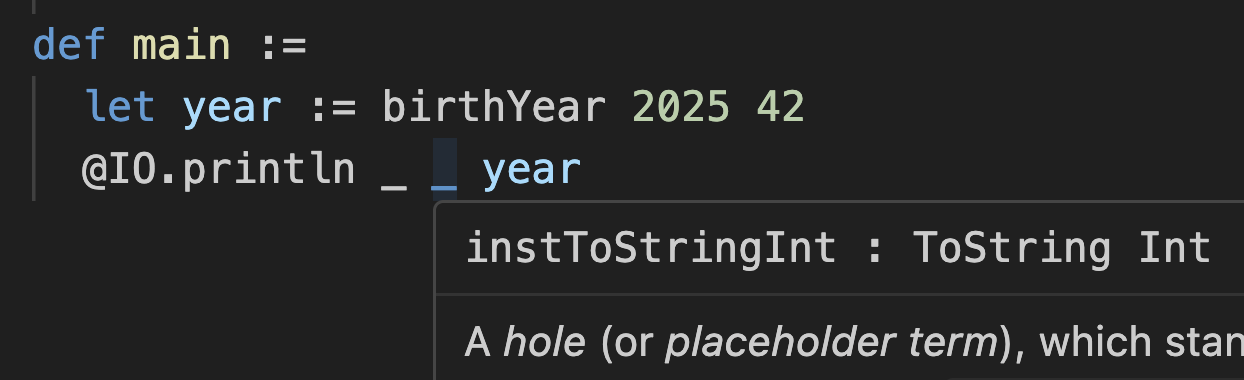
Filling them in manually shows the fully explicit form:
def name := "Alice"

def birthYear (currentYear : Int) (age : Nat) :=
  currentYear - age

def main :=
  let year := birthYear 2025 42
  @IO.println Int instToStringInt year
Command+Clicking instToStringInt jumps to the source implementing ToString Int:
instance : ToString Int where
  toString
    | Int.ofNat m   => toString m
    | Int.negSucc m => "-" ++ toString (succ m)
Clicking Into the Core
Lean is aggressive about letting you inspect definitions. Command+Click works on data types like Nat and String, and even on syntax like ∀. Much of Lean is implemented in Lean itself:
/--
The natural numbers, starting at zero.
This type is special-cased by both the kernel and the compiler, and overridden with an efficient
implementation. Both use a fast arbitrary-precision arithmetic library (usually
[GMP](https://gmplib.org/)); at runtime, `Nat` values that are sufficiently small are unboxed.
-/
inductive Nat where
  /-- Zero, the smallest natural number. -/
  | zero : Nat
  /-- The successor of a natural number `n`. -/
  | succ (n : Nat) : Nat
Numbers turn out to be recursively generated structures. The same machinery that proves the area of a circle or the birthday paradox also underpins ordinary programs. The Lean core itself mixes code with proofs—list append is defined alongside proofs that (as ++ bs).length = as.length + bs.length and that append is associative. Using such data structures means you automatically inherit known facts about them when proving things about your own code.