
Why cross-origin isolation matters
Certain powerful web platform features are gated behind cross-origin isolation. If you need to use SharedArrayBuffer, performance.measureUserAgentSpecificMemory(), or high-resolution timers with better precision, your page must be cross-origin isolated. Before enabling it, however, you should assess how it will affect cross-origin resources on your site, such as embedded ads.

Find where SharedArrayBuffer is used
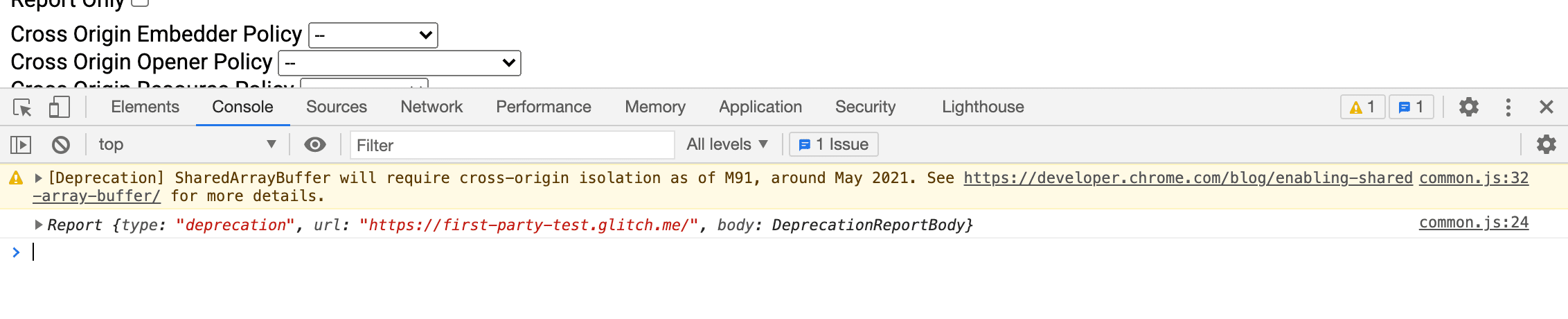
Since Chrome 92, features relying on SharedArrayBuffer require cross-origin isolation. If you see a deprecation warning, either your code or a resource embedded on your page is using it. Start by identifying the source.
Check with Chrome DevTools
- Open Chrome DevTools on the page you suspect is using
SharedArrayBuffer. - Go to the Console panel.
- If the API is in use, you'll see a deprecation message with a filename and line number at the end (for example,
common-bundle.js:535). - If the reference points to a third-party library, contact the developer. If it's your own code, continue with the steps below.
Use Deprecation Reporting for a broader view
For a more systematic approach, some browsers support the Deprecation Reporting API, which sends reports about deprecated API usage to an endpoint you control.
- Set up a report server and obtain a reporting URL, either with a public service or your own implementation.
- Add the following HTTP header to pages that may serve
SharedArrayBuffer:
Report-To: {"group":"default","max_age":86400,"endpoints":[{"url":"THE_DEPRECATION_ENDPOINT_URL"}]}
Once the header is live, your endpoint will start receiving deprecation reports. You can see an example implementation for reference.
Assess the impact before flipping the switch
You don't have to guess how cross-origin isolation will affect your site. The Cross-Origin-Opener-Policy-Report-Only and Cross-Origin-Embedder-Policy-Report-Only headers let you observe potential breakage without enforcing anything.
- Set
Cross-Origin-Opener-Policy-Report-Only: same-originon your top-level document. This only reports whatCOOP: same-originwould do—it does not yet block popup communication. - Configure a server to receive and store the reports.
- Set
Cross-Origin-Embedder-Policy-Report-Only: require-corpon the top-level document. Like the previous header, this reveals which embedded resources would fail to load without actually blocking them.
Preparing cross-origin resources
Once you know which resources will be affected, opt them in for cross-origin isolation:
- On cross-origin resources (images, scripts, stylesheets, iframes), set
Cross-Origin-Resource-Policy: cross-origin. For same-site resources, useCross-Origin-Resource-Policy: same-site. - For resources loaded via CORS, enable it by adding the
crossoriginattribute to the HTML tag (e.g.,<img src="example.jpg" crossorigin>). Forfetch(), make surerequest.modeiscors. - To use powerful APIs inside an iframe, add
allow="cross-origin-isolated"to the<iframe>element. - If you have nested iframes or worker scripts, apply these same steps recursively.
- Once everything is opted in, set
Cross-Origin-Embedder-Policy: require-corpon iframes and worker scripts—this applies to same-origin and cross-origin contexts alike. - Eliminate cross-origin popup windows that rely on
postMessage(); they will not work under cross-origin isolation. Move that communication to a non-isolated document or switch to an alternative method like HTTP requests.
Enabling cross-origin isolation
With the mitigation steps complete, you can now enforce cross-origin isolation:
- Set
Cross-Origin-Opener-Policy: same-originon your top-level document, replacing any-Report-Onlyvariant. This disables communication between your page and its popups. - Set
Cross-Origin-Embedder-Policy: require-corpon the top-level document, again replacing the report-only version. This blocks any cross-origin resources that haven't opted in. - Verify in the console that
self.crossOriginIsolatedreturnstrue.


