

A repository is more than code
Software projects are rarely solo efforts. Even a personal project benefits from a second pair of eyes catching bugs, suggesting improvements, or simply using the code in ways you didn’t anticipate. But collaborators can only help if you’ve given them the right entry points. A repository that’s ready for collaboration has clear instructions, sensible access controls, and a well-protected main branch.
Your primary job as a repository owner is making sure others can use, understand, and contribute to the project. That involves three areas: repository settings, repository contents, and the automation that guards your code.
Start with settings
Repository settings determine who can see your project, who can contribute, and how those contributions get reviewed. In an organization, these settings can also shift developers away from siloed work and toward a “search-first, collaborate-first” mindset — an approach sometimes called innersourcing that reduces redundant effort across teams.
Visibility and access
Maximizing collaboration doesn’t necessarily mean making everything public, especially where corporate privacy matters. GitHub provides several visibility levels under the repository’s Settings tab:
- Public: anyone can view and copy the code, file issues, or open pull requests. Good for personal projects or the occasional company project that’s cleared for outside contributions.
- Internal: a GitHub Enterprise option that lets anyone inside your organization see the repository, but keeps it hidden from the outside. This is often the right default for company projects without siloed sensitive data.
- Private: the most restrictive option, best used sparingly since it naturally limits collaboration. If you do make a repository private, be sure to invite some collaborators.
- Collaborators: specific individuals or teams you invite in, with roles ranging from Read (view access) to Write (direct commits) to Admin, among others.
Protect the main branch
Broad visibility is good, but unreviewed changes are a liability. On your main branch, set up a repository rule — the modern replacement for branch protection — that requires a pull request before merging. Require at least one approval, ideally from someone listed in your CODEOWNERS file. Also require status checks, so automated tests run against every pull request before it can merge.
Stock the repository with guidance
Code alone doesn’t make a project approachable. A collaboration-ready repository includes a few key Markdown files that explain what the project is, how to use it, and how to contribute.
README.md is the first thing visitors see. It should describe what the project does, how to use it, and what configuration it needs. A good README also explains the project’s mission and who maintains it.
LICENSE.md defines what others may do with your code. Whether you want permissive reuse or stricter terms, pick a license — choosealicense.com helps with that decision — and add it to the repository.
CONTRIBUTING.md reduces friction for potential contributors by spelling out the types of contributions you’re looking for, how to propose a feature or bug fix, and what the pull request process looks like. Include coding standards or style guidelines if you have them. If the process fits in a paragraph or two, your README can hold it; otherwise give it its own file.
CODEOWNERS assigns users responsible for specific parts of the repository. When a pull request touches code they own, those users are automatically requested as reviewers. Note that this file has no .md extension, unlike the others here.
CODE_OF_CONDUCT.md sets expectations for participant behavior. GitHub makes it easy to add one manually or from a template.
With these files in place, your repository gives collaborators everything they need to understand your project and contribute effectively. From there, the next step is making sure the process runs smoothly with automation and checks.
Automation and checks

GitHub Actions lets you automate workflows triggered by file changes, pull requests, external events, or scheduled cron jobs. By putting checks in place before human review, you reduce the manual burden on reviewers and catch problems early.
Linters
Linters analyze code for errors and enforce consistent style, which improves readability and makes projects easier for newcomers to contribute to. Super-Linter is a popular option that can be set up with a single cut-and-paste step.
Build and test pipelines
The right build and test tooling depends on your stack, but most CI systems can run them automatically. Browse the GitHub Marketplace for Build and Test Apps & Actions, or invoke command-line scripts directly in your workflow.
Status checks and merge queues
Once a linter or test action has run at least once, you can configure it as a status check so failures appear inside the pull request and, if desired, block merges and deployments. Browse the Marketplace for other code quality, dependency management, or pre-release automation components. You can also write a custom GitHub Action for deployment. High-traffic projects with many simultaneous changes should consider merge queues to prevent conflicts on rapidly changing branches. These automation tools give you more confidence in the consistency of contributions and free up maintainer time.
Security and access control

Security matters more when collaborators have varied backgrounds. A few straightforward settings can protect your code, data, and users.
Repository roles
Assign roles deliberately. Use "Read" for the general public. Grant "Triage" or "Write" to trusted individuals, but only after you've configured protected branches and automated checks. Reserve "Maintain" and "Admin" for core maintainers who review and control what ships. Remember that "Triage" and above can manage issues, discussions, and comments, so those roles come with metadata-management responsibilities. Enterprise customers can define custom repository roles for finer-grained control.
Secrets management
API keys, passwords, and certificates should never appear in code or logs. Use a third-party keystore, or GitHub's native secret settings under "Secrets and Variables" in your repository settings. GitHub maintains separate sections for Codespaces and for Actions, since development and production often warrant different credentials.
Vulnerability scanning
Security scanning covers three main areas, which address different entry points:
- Dependencies: Third-party packages make up most application code. Dependabot, available on all public repositories, alerts you when a dependency is insecure and can be enabled org-wide. Enable version updates to stay current even without a known vulnerability.
- Secrets: Despite best practices, tokens get committed. Secret scanning, via third-party tools or GitHub Advanced Security for enterprises, flags or blocks secrets as they're pushed.
- Novel vulnerabilities: New code can introduce fresh flaws. Several Marketplace options scan whole applications, and Advanced Security's code scanning catches issues from SQL injection to circular references across the most common languages.
Security policy and reporting
Tell researchers and users how to report problems by adding a security policy file. Then enable private vulnerability reporting so findings are delivered securely rather than posted publicly.
Advanced options

Beyond the essentials, additional settings reduce friction and make a repository friendlier to outside contributors.
Issue templates
Unstructured issue reports often require back-and-forth before they're actionable. Issue templates guide users through required and optional fields, capturing necessary context the first time an issue is filed.
Codespaces configuration
A well-configured GitHub Codespaces setup gives anyone a complete, consistent dev environment without local setup. This removes the "works on my machine" problem because every contributor works from an identical configuration.
Deployment environments
GitHub Environments restrict where specific tasks—like deployments—happen and apply protection rules to keep those tasks controlled and secure.
Maintaining momentum
Repository configuration is just the start. Healthy collaboration depends on your ongoing habits as a maintainer.
Responsiveness
The speed with which you handle issues and pull requests shapes the contributor experience. Set regular time to review changes and fix problems, and measure your project's responsiveness with the Metrics Action.
Project management and visibility
Use GitHub Projects for your planning. Public visibility into scheduled work helps newcomers see where their help fits. Then make sure people can find the project at all—promote it through blog posts, demos, or a dedicated portal so potential contributors and users know it exists.
Community engagement
Sustained participation comes from active engagement—organizing meetups, running a project blog, or simply joining discussions. By combining these practices with a well-configured repository, you create an environment where a contributor community can develop and grow. Refer to the checklist each time you create or revisit a repository to make sure nothing is overlooked.
Practical Resources to Finish the Job
Even with a clear process, it helps to have something concrete to tick off as you work through each repo. GitHub has published a printable checklist that walks through everything covered here—from documentation and issue labels to contribution guidelines and project boards.
The PDF version is available for download and can be printed or kept on screen as a working document. For teams that prefer to keep their workflow inside GitHub, there’s also an issue template based on the same checklist. You can drop it straight into your repository and use it as a living, updatable task list that everyone on the team can see and comment on.
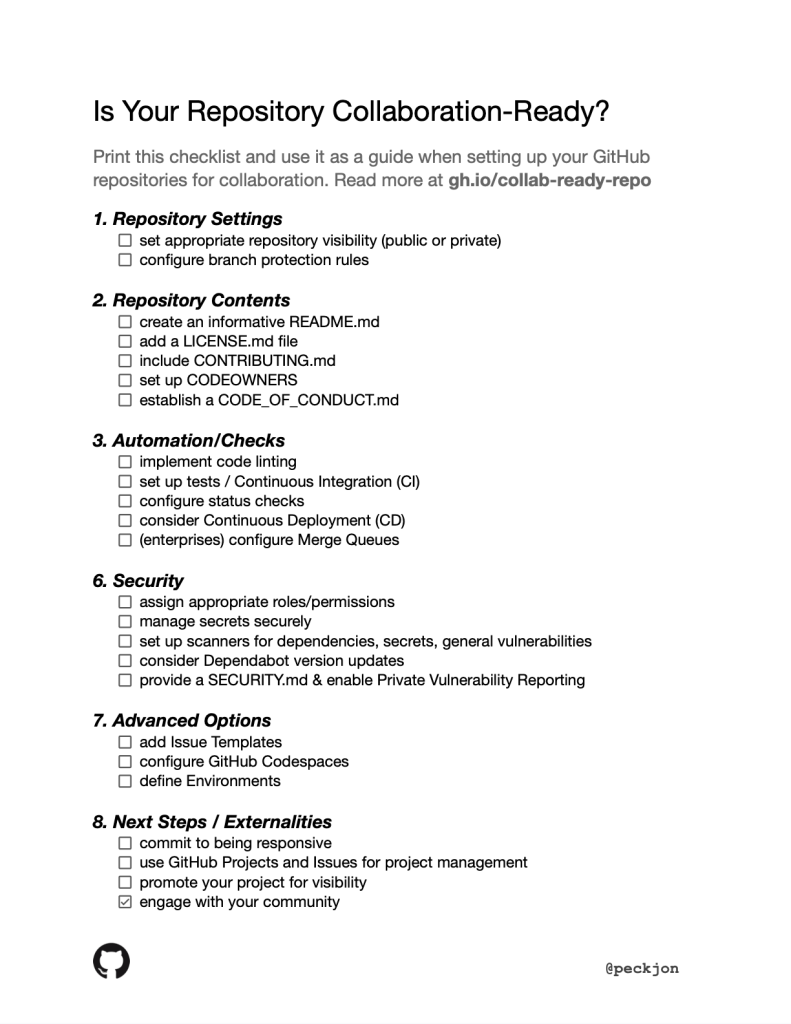
That template approach is particularly useful because it turns the checklist into something shared. Instead of one person holding the state of readiness in their head, the issue becomes the single source of truth. Contributors can check off items, add notes, and link pull requests or commits that address specific gaps.
Keeping the Momentum Going
Making a repository collaboration-ready is not a one-time event, especially as teams move toward more AI-assisted workflows. GitHub’s annual Galaxy conference is one place where engineering leaders and practitioners share the latest on how those tools are reshaping development practices.<
At GitHub Galaxy 2024, we’ll explore cutting-edge research and best practices in the rapidly evolving world of AI—empowering your business to maximize productivity and innovate at scale.
Registration for the event is open, and the sessions cover practical ground: how organizations are integrating AI into their day-to-day development, what is working in production, and where the boundaries still are. For maintainers who want their repos to be ready for that shift, the core principle stays the same—clear structure, visible processes, and low friction for anyone who wants to contribute.


