

Security doesn't have to slow you down
Keeping code secure is rarely the most exciting part of development, but it doesn't have to be a chore that demands deep security expertise. GitHub has built several security features directly into its platform, so you can automate much of the heavy lifting. Here are five practical steps you can take today to harden your default development workflow.
Automate vulnerability scanning with CodeQL
CodeQL is GitHub's static analysis engine that treats code as queryable data. It uses an open source library of queries that map to known vulnerability patterns, scanning your codebase for potential security flaws automatically.
The easiest way to integrate CodeQL is through the CodeQL Analysis workflow in GitHub Actions. Navigate to the Actions tab in your repository, add a new workflow, and select CodeQL Analysis from the security dropdown. You can configure it to run on every push or on specific events, so the scanning happens without you having to remember to trigger it.
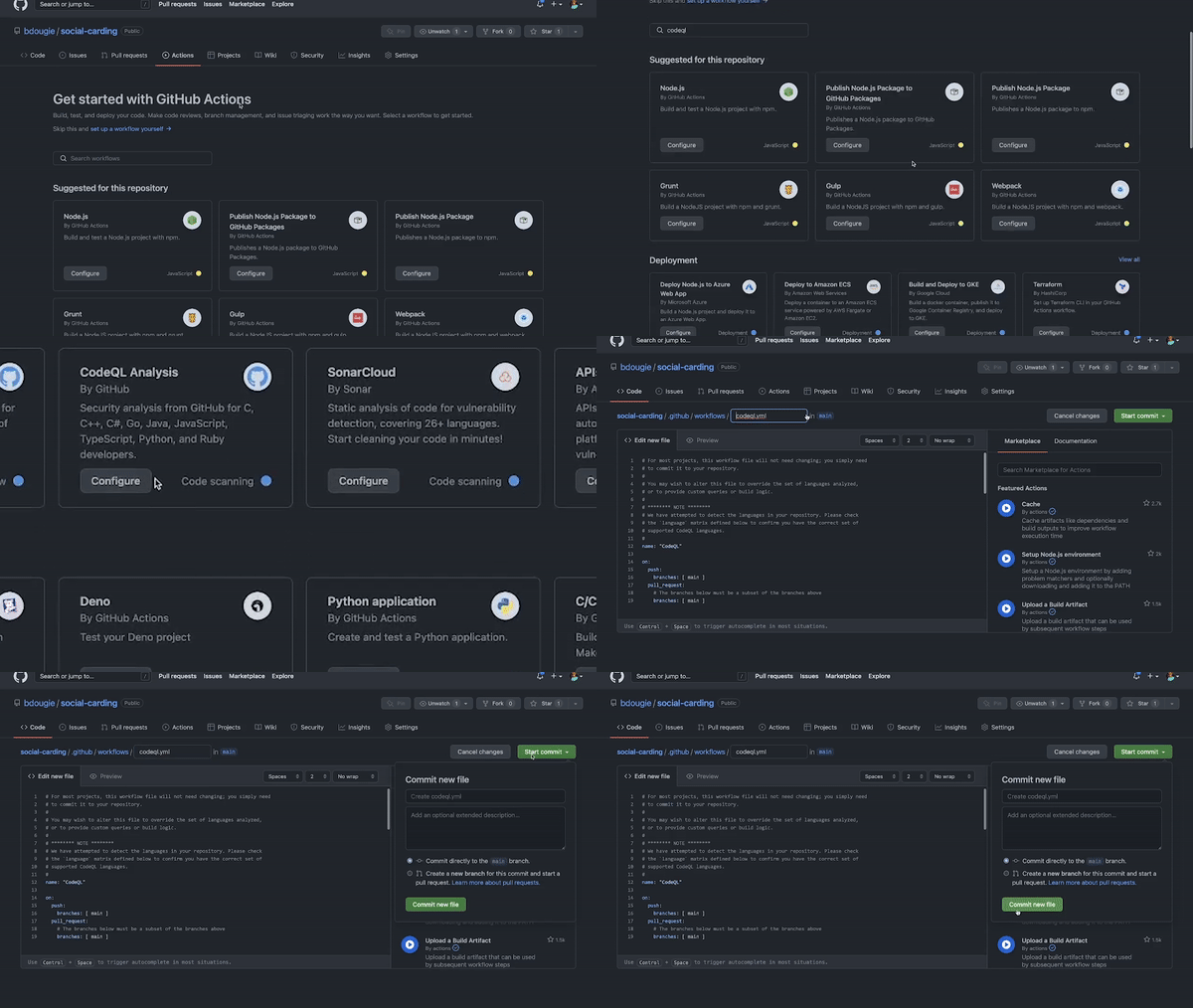
What makes this particularly powerful is the community-maintained query library. As new vulnerability patterns emerge, you don't need to manually update anything—the open source queries grow and evolve, protecting your code against newly discovered threats as they're added.
Keep your supply chain clean with Dependabot
Your dependencies are just as important as your own code when it comes to security. Dependabot handles the tedious work of tracking and updating them. It continuously scans your project's dependencies against GitHub's Advisory Database, alerts you when there's a known vulnerability, and can even open pull requests to upgrade you to patched versions automatically.
You can also configure Dependabot version updates through a dependabot.yml file, specifying which ecosystems to track and how frequently to check for updates. This ensures you're not scrambling when a vulnerability like the Log4j incident hits. When Log4j was disclosed, Dependabot pushed out 550,000 alerts; nearly half of active repositories addressed the issue within the first week. Repositories that had version updates enabled received automatic fixes without any manual intervention.
CodeQL and Dependabot complement each other well: CodeQL finds issues in code you write, while Dependabot catches problems imported through your dependencies. Together, they give you broad coverage of common attack surfaces.
Protect your production branches
Protected branches add a layer of control to how and when code reaches production. They allow you to test features in pre-production environments before release and restrict who can actually push to critical branches.
Setting this up is useful even for small projects. You can configure branch protection so that only maintainers have push access to alpha, beta, or main branches. This prevents both accidental breakage from contributors and intentional malicious changes—a real concern, as anyone adding code to an open source project can attempt to modify your workflow files or introduce unwanted behavior.
Control how GitHub Actions is used
In any open source project, anyone can submit a pull request that introduces a new GitHub Actions workflow. Most contributors mean well, but not all do. It's not hard to hide something like a crypto-miner inside a seemingly helpful workflow file.
To mitigate this risk, you can limit which workflows run by default for first-time contributors and restrict which actions are allowed in your repository. You can also limit what workflows are permitted on self-hosted runners. These settings give you tighter control over your CI/CD environment and prevent bad actors from abusing your resources or compromising your build process.
Lock down GITHUB_TOKEN permissions
GITHUB_TOKEN is an automatically generated access token for each GitHub Actions job. It expires when the job finishes, which limits risk exposure, but by default it carries read and write permissions. For a more secure setup, follow the principle of least privilege and restrict those permissions to read only—or setspecific permissions per workflow.
There are two ways to do this. You can modify permissions directly in your workflow YAML file:
permissions:
actions: read|write|none
checks: read|write|none
contents: read|write|none
deployments: read|write|none
issues: read|write|none
packages: read|write|none
pull-requests: read|write|none
repository-projects: read|write|none
security-events: read|write|none
statuses: read|write|none
Or you can change the default in your organization settings under Actions > General, setting workflow permissions to read access only by default.
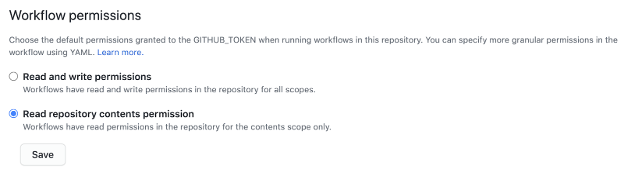
Using GITHUB_TOKEN instead of a Personal Access Token (PAT) is also wise. A stolen PAT can give an attacker broad, long-lived access to your account. GITHUB_TOKEN, on the other hand, is short-lived and scoped to a single job, making it a far lower-risk option for authentication in workflows. These settings give you granular control over who gets write access and the context in which they receive it.
Build security into your default workflow
The common thread across all these measures is automation. By integrating these tools into your routine, security checks happen behind the scenes—when you commit, when you open a pull request, or when a new version of a dependency is released. You don't have to become a security expert or spend extra time manually vetting every change. You just configure these features once, and they stay on guard for you continuously.


