
Automatic cleanup for inactive codespaces
Codespaces that go unused for 30 consecutive days will now be deleted automatically. The default retention period applies to all individual users on GitHub.com, and developers can lower the threshold for their own workspaces down from the 30-day maximum. The setting only affects codespaces created after this feature’s release.
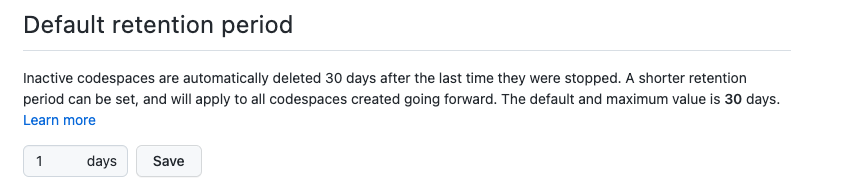
Users receive an email notification 24 hours before a scheduled deletion. Reconnecting to the codespace at any point resets the retention counter. Expiration dates are also visible on GitHub.com/codespaces and in the Green Code dropdown when creating a new codespace. If a codespace is deleted accidentally, owners can contact GitHub Support for recovery.


Organization-level retention caps
Organization administrators can now set a maximum retention policy that overrides individual settings for organization-owned codespaces. This gives admins a hard ceiling on how long stale environments can linger and accrue costs, without requiring teams to manually clean up. Members still get the same 24-hour email warning before deletion, and can save a codespace by connecting to it.

Organization management APIs in public beta
New organization-level REST API and CLI commands are available in public beta, letting admins manage codespaces programmatically across repositories and developers. The initial set of commands covers the common admin workflows:
API
- List all codespaces within your organization.
- Get information on a specific codespace within your organization.
- Stop or delete codespaces within your organization.
CLI
- List all codespaces within your organization.
- Stop codespaces within your organization.
- Delete codespaces within your organization.
For individual developers, user-level Codespaces APIs remain generally available, supporting CRUD operations, machine type queries, and management of user-level and repository-level secrets.
Availability
The default 30-day retention setting applies to all new codespaces across GitHub Free, Team, and Enterprise Cloud plans. The maximum retention policy is generally available, while the organization APIs are in public beta for GitHub Team and Enterprise Cloud.


