
Rethinking per-partner settings in Slack Connect
Slack Connect—previously known as shared channels—lets separate workspaces collaborate through channels shared by their member organizations. As the feature matured, it became clear that not every external connection is the same. Customers have different relationships with different partners, and the one-size-fits-all approval flow and configuration model quickly became a bottleneck. The engineering team needed a way to customize each connection individually while giving admins tools that could keep up with the volume of growing connections.
The original security model required that an external user first accept a Slack Connect invitation, after which admins on both sides would approve any new shared channel. That worked for occasional one-off channels between two companies, but daily channel creation across an organization placed a heavy review burden on admins who often lacked full context. The first fix was automation: a MySQL table representing a connection between two teams, where Team A could authorize automatic approvals for requests from Team B. Admins managed this via a dedicated dashboard, and the approach accelerated growth further. That success, in turn, exposed a new problem—approvals were only the first setting that needed connection-level control.
From per-setting tables to a single extensible store
Additional use cases soon emerged: restricting file uploads in Slack Connect channels and limiting visible user profile fields for external users, with more customization expected on a partner-by-partner basis. Building a new database table for each setting was not an appealing long-term path. Instead, the team designed a system with three layers of configuration: built-in defaults in application code, a team-wide override, and per-connection settings. A target team ID of zero modeled the org-level configuration; partner-level configuration used the actual team ID of the connection.
CREATE TABLE `slack_connect_prefs` (
  `team_id` bigint unsigned NOT NULL,
  `target_team_id` bigint unsigned NOT NULL,
  `prefs` mediumblob NOT NULL,
  `date_create` int unsigned NOT NULL,
  `date_update` int unsigned NOT NULL,
  PRIMARY KEY (`team_id`,`target_team_id`),
  KEY `target_team_id` (`target_team_id`)
)
Defining evaluation precedence helped the team borrow the existing approvals table schema and generalize it. The new table stored source and target team IDs plus a payload column, with an index over those IDs and partitioning by source team ID—a standard Slack sharding strategy that keeps all rows for a source team on the same shard. Rather than modeling each setting as a set of columns, they opted for a single column holding a Protobuf blob. This supported complex data types per setting, reduced storage needs, and sidestepped MySQL’s column-count limits.
message SlackConnectPrefs {
    PrefOne pref_one = 1;
    PrefTwo pref_two = 2;
    ...
}
message PrefOne {
    bool value = 1;
}
On the application side, the team followed a familiar Slack pattern: a Store class handling all database interactions for a related set of tables. The SlackConnectPrefsStore exposed get, set, remove, and list operations, with Memcached in front to cut down database reads. The first implementation, however, was tightly coupled to the prefs it managed. Each pref needed custom handling for transformation, validation, cache busting, and error paths, all inside the same store functions. A change for one pref risked breaking others, and the code grew unwieldy.
Isolating prefs with wrapper classes
Two designs were considered to fix the isolation and extendability problems: code generation for per-pref logic, or wrapper classes around each Protobuf message. The team chose wrappers after design reviews, since code generation couldn’t easily capture the unique aspects of each pref without heavy customization anyway. The resulting class structure mirrored the Protobuf definition. A container class held a registry of all supported prefs and orchestrated them; an abstract pref class declared common methods like transform, isValid, and migrate; and individual prefs inherited from that abstract class and implemented only what they needed. The container built itself from the top-level SlackConnectPrefs message, dispatching each relevant sub-message to its corresponding pref class. Store-level complexity stayed hidden, so adding a new pref meant implementing just its own class. To make this self-serve, the team maintains detailed documentation for would-be implementers.
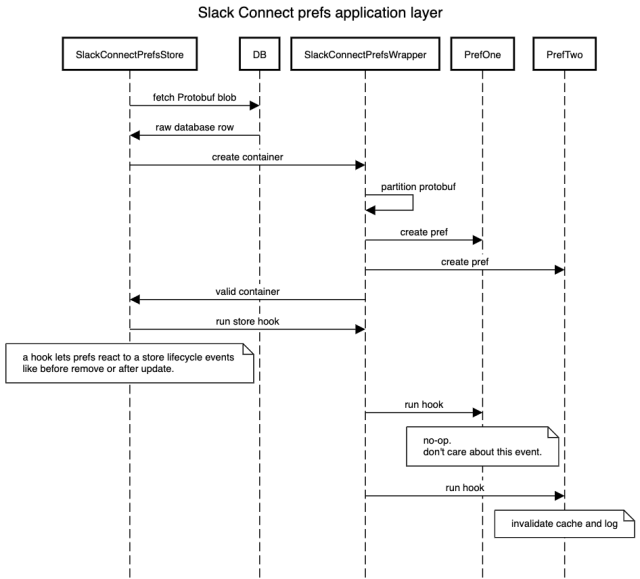
Even with class-level isolation, one more safeguard was necessary. If validation of one pref threw an exception, the others should still complete. The container handles that: when the Store calls the container’s isValid, it iterates through each pref, catches exceptions, and logs them rather than aborting the whole batch.
Admin dashboards at scale
The new storage and application layers solved the configuration problem, but the admin dashboards for external connections, pending invitations, and approvals were struggling under load. Their APIs followed a common pattern: read rows from several database tables, combine them, then apply search, sort, and filtering based on request parameters. That held up for thousands of external connections, but latency climbed, timeouts mounted, and the unbounded result sets were increasingly unhelpful. Caching helped only so much; the APIs made too many database requests.
Merging those calls into one SQL query with many joins was ruled out; joining over partitioned tables is expensive and against Slack’s preferred practices at that scale. That left denormalizing the data into a separate queryable store. The debate came down to MySQL versus Solr. MySQL would return data immediately after a write, while Solr had a five-second delay. Solr, however, kept all documents fully indexed for efficient sorting, filtering, and text search, offered an easier path for array-based fields, and made adding new fields to a document simpler than altering a database table. The team chose Solr later rebuilding the search index offline via a job and keeping the denormalized view in sync with the source of truth.
The payoff: the admin dashboard now handles millions of external connections with fast text-based searching and filtering. New Slack Connect settings are automatically added as fields to Solr documents, so indexing stays current without DDL operations.
What’s next
Per-connection configuration opened new possibilities. Current permission and policy controls, such as who can create Slack Connect channels, are not connection-aware, and making them so would unlock further growth. The scaling work continues as both connected teams and external users multiply, but the extensible pref model plus Solr-backed admin views give Slack a posture that can adapt—rather than a pile of fixed columns and hardcoded settings.


