

Merge queue exits beta for GitHub Enterprise
GitHub's merge queue is now generally available for all managed organizations with public repositories and GitHub Enterprise Cloud users. The feature, designed to ease bottlenecks on high-traffic branches, can be enabled per repository from the branch protection settings.
The core problem merge queue addresses is the collision that happens when multiple developers try to merge pull requests into the same busy branch. Previously, engineers would merge directly onto a branch that was already receiving updates, often creating conflicts that spiraled into repeated rounds of rework and slowing overall shipping velocity.
With merge queue enabled, GitHub automatically creates a temporary branch containing:
- The latest changes from the base branch
- Changes from other pull requests already in the queue
- Changes from your pull request
Continuous integration runs against this combined branch, and all required status checks must pass before the branch—and the pull requests it represents—are merged. The system acts as a traffic controller, testing each queued change for compatibility with everything ahead of it and alerting the author if something breaks.
Enterprise customer Block has been using the workflow in preview, demonstrating the queue-then-next play in action.
We would routinely experience post-merge build failures in our monorepo several times a week and merge queue has practically eliminated all build failures in that category. This has greatly reduced our on-call burden and lessened the friction our developers’ experience during their daily workflows.
Configuring and using merge queue
Repository administrators enable the feature under branch protection rules for the target branch. The setup requires:
- Enabling the branch protection setting “Require merge queue.”
- Setting preferences for merge method, build on currency, merge limits, merging of non-failing pull requests, and status check timeout.
For engineers, the workflow is straightforward: open a pull request and click “Merge when ready” to add it to the queue.

To view the state of the merge queue, navigate to the repository's branches page and click on the “pull requests queued to merge” link.
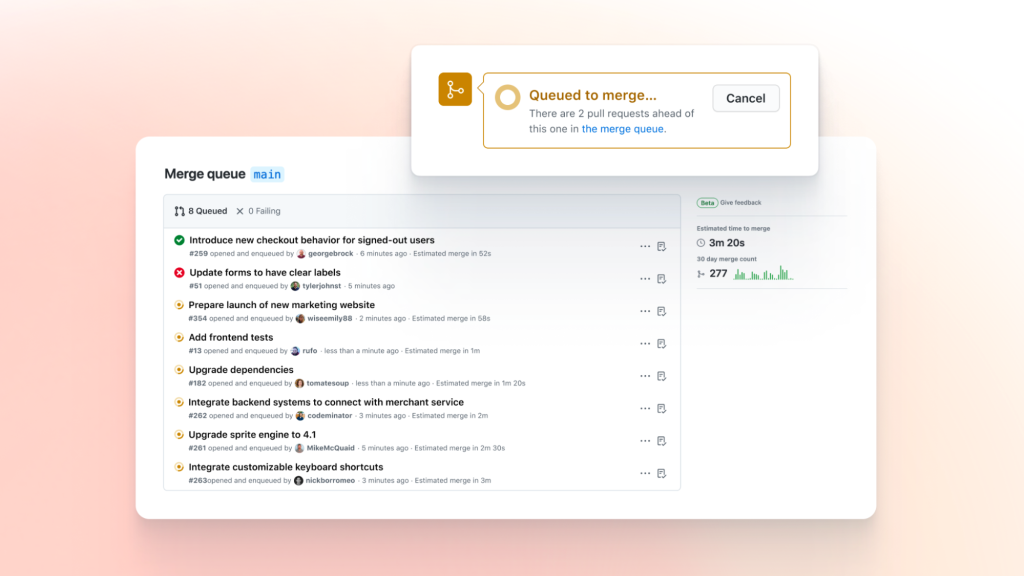
If a merge fails, GitHub removes the pull request from the queue and notifies the author to investigate. Detailed setup and access instructions are available in GitHub's documentation for managing a merge queue.


