
Real-Time Video Effects in Slack Clips
Slack Clips, which launched last September, lets distributed teams communicate through video, audio, and screen recordings. Since release, the feature has gained thumbnail selection, background blur, and most recently, background image replacement. This piece examines the technical architecture behind those background effects in browsers and Slack's desktop client.
The implementation relies on a combination of WebGL, WebAssembly, and experimental browser APIs. A key design decision was moving the video processing workload off the main thread to a worker thread, minimizing the risk of frame drops caused by main-thread activity like message processing.
Frame Processing Pipeline
The pipeline begins with video input. Slack Clips uses the Media Streams API to read from webcam and screen capture feeds. Individual frame data is accessible through the experimental Insertable Streams API, which exposes a media stream as a readable stream of VideoFrame objects.
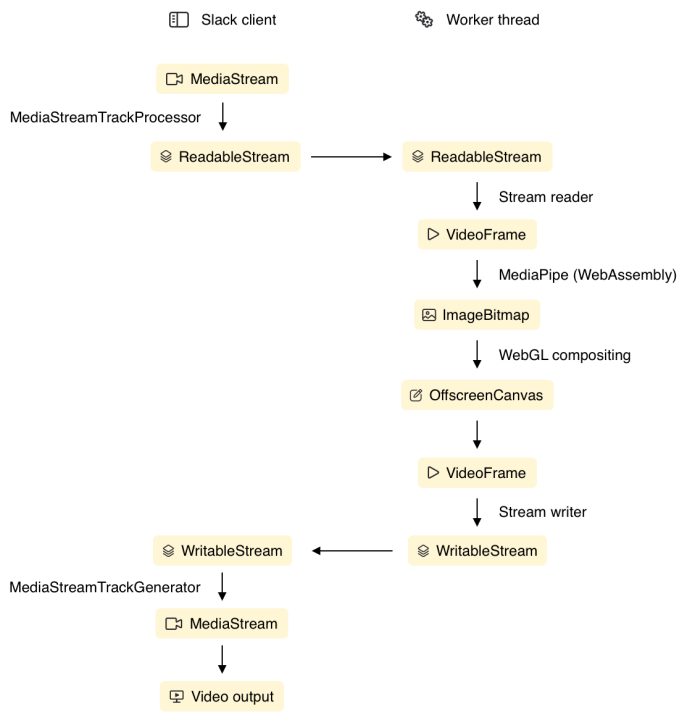
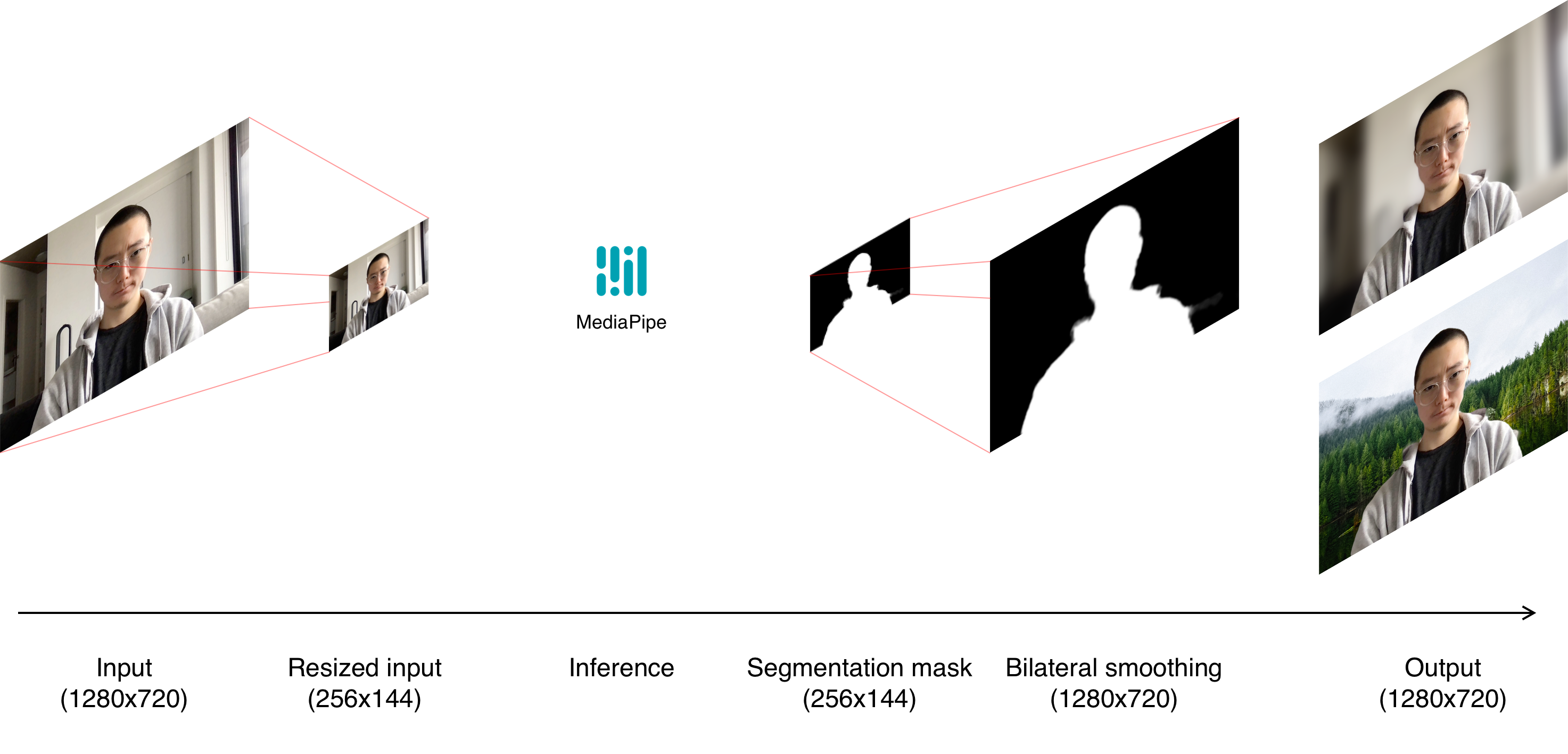
From the input stream, a render loop copies each video frame into a manipulatable source such as a canvas or ImageBitmap. Frames are resized down to 256x144 pixels to match the requirements of the segmentation model. A WebAssembly module performs inference on the resized frame, producing a segmentation alpha mask. In the final stage, WebGL composes the segmentation mask with the original video to create the desired effect.
Segmentation with MediaPipe
The alpha mask is generated using Google's open-source MediaPipe selfie segmentation model. The underlying ML model is a TensorFlow Lite model, but MediaPipe's NPM library wraps it in a WebAssembly module with a JavaScript interface. Slack chose the smaller "landscape" model variant, which accepts 256x144 images and outputs a same-sized alpha image. Although the general model operates at 256x256, the landscape model proved faster and still sufficiently accurate.
Using the MediaPipe API is straightforward: instantiate the module, then pass each input frame as an ImageBitmap. The alpha mask arrives asynchronously via a callback function. Each pixel in the mask reflects the model's confidence that the pixel belongs to a person: 1.0 means the pixel is part of the foreground, 0.0 means background, and intermediate values represent uncertainty.
Before MediaPipe, Slack prototyped with TensorFlow's body-pix model but found MediaPipe both faster and more precise. MediaPipe also had a production track record, powering background effects in Google Meet.
Mask Preprocessing
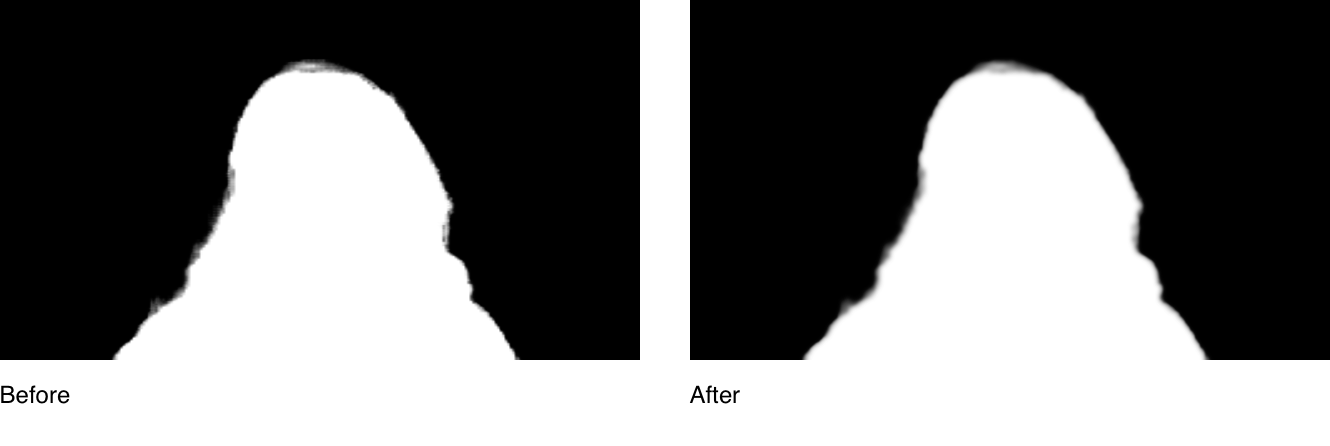
The raw model output is not directly usable for compositing. Two preprocessing steps are required before combining the mask with video: upsampling the mask to full resolution and applying a bilateral filter. This edge-preserving blur smooths mask edges, reducing pixelation, noise, and artifacts like choppy contours or halos around hair and facial features.
A bilateral filter functions as a blur where each pixel's weighted average considers both spatial distance and color difference. Similar pixels blur together while distinct pixels remain separate, preserving edge contrast while reducing detail and noise.
Background Blur Algorithm
For the blur effect, Slack applies a Gaussian blur weighted by the smoothed mask. The implementation samples three "steps" away from each source coordinate in each direction, with step size proportional to the blur radius at that pixel.
Preserving mask edges is critical to prevent haloing. Areas where the mask weight is zero or near zero must neither be blurred nor sampled. So each sample is weighted both by the mask value at the target pixel (determining blur radius) and the mask value at the sampled location. The latter weighting prevents background pixels from pulling in foreground content or vice versa.
Background Replacement Challenge
Background image replacement presents a harder problem than blur. The blur effect forgives mask imprecision because gradients look natural. Background replacement, however, demands crisp edges. Users notice a person composited at half opacity; it reads as ghostly.
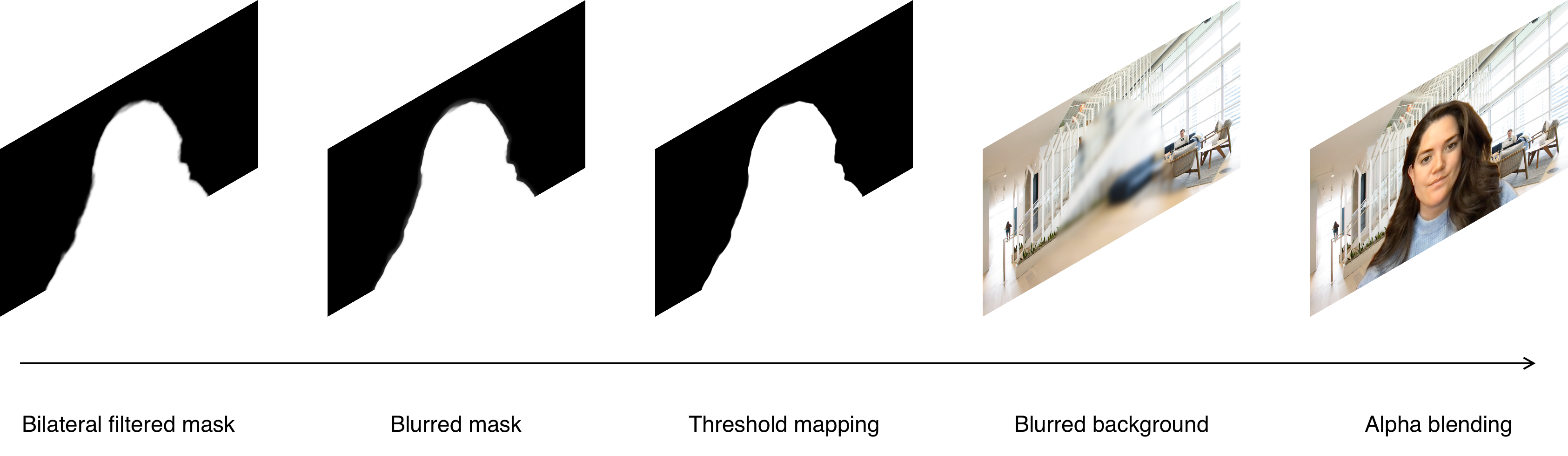
Slack's replacement pipeline runs in four steps. First, a weighted blur is applied to the mask itself. The weight is based on an inverted parabola centered at 0.5, maximizing blur radius where confidence is lowest. This smooths uncertain regions and reduces jagged edges and temporal flickering. Next, the blurred mask is compressed so values above a threshold map to 1.0 and values below map to 0.0. Combined with the preceding blur, this yields a smooth yet sharp edge delineation around the person.
Simultaneously, the background image receives a mask-weighted blur. This removes high-frequency detail in background regions where mask alpha is ambiguous (near 0.5), preventing those details from bleeding through the composite. Finally, the blurred mask drives a simple alpha blend between the webcam video and the blurred background image.
Why Not Use Video Edge Detection?
During prototyping, Slack evaluated a hybrid approach: merging edge detection from the source video with the ML segmentation mask. The technique segmented complex shapes like hands and hair accurately. Yet it frequently mislabeled or omitted noisy regions rich in edges and struggled in low-contrast areas. The method showed promise but did not produce reliable enough results to ship. With further refinement, combining video-derived edges with model output could still yield higher-quality segmentation.

Open Questions and Next Steps
The current effects ship stable, but Slack sees room for quality and performance gains. Ongoing experiments include reordering steps in the mask processing pipeline, varying blur radii, and tuning the threshold mapping. Edge detection remains promising if reliable methods emerge for fusing fine-grained video details with contextual segmentation mask information.
Slack credits the success of this work to the contributions of Patrick Kane, Johnny Rodgers, Alfred Xing, Julie Haynes, Olivia Grace, Issac Gerges, and the MediaPipe team.


