

OSM extracts as PostGIS-ready SQL dumps
CYBERTEC has launched a free download service that provides periodic OpenStreetMap extracts as SQL dumps, sparing users the effort of building an import pipeline themselves. The service is available at https://gis.cybertec-postgresql.com/ and covers regions aligned with country or continent boundaries.
The extracts are generated from pure OSM data in pbf format. Each dataset is delivered with pre-configured import parameters, reflecting how the data was loaded into a PostgreSQL/PostGIS database. Custom import variants can be arranged on request.
Two prepared dataset types
The first variant targets analysis and tiling use cases. It follows a generic import structure similar to OpenStreetMap Carto (https://github.com/gravitystorm/openstreetmap-carto), making the dumps suitable as a data source for tile servers such as https://switch2osm.org/serving-tiles/ or https://github.com/Overv/openstreetmap-tile-server. The import chain is documented at https://gis.cybertec-postgresql.com/osmtile/readme.txt.
The second variant is aimed at routing workloads. It leverages osm2po (https://osm2po.de/) to convert source OSM data into a routable graph, designed for use with pgRouting (https://pgrouting.org/). Details are provided at https://gis.cybertec-postgresql.com/osmrouting/readme.txt.
Coverage and update frequency
Worldwide coverage is offered, organized hierarchically by continent and country:
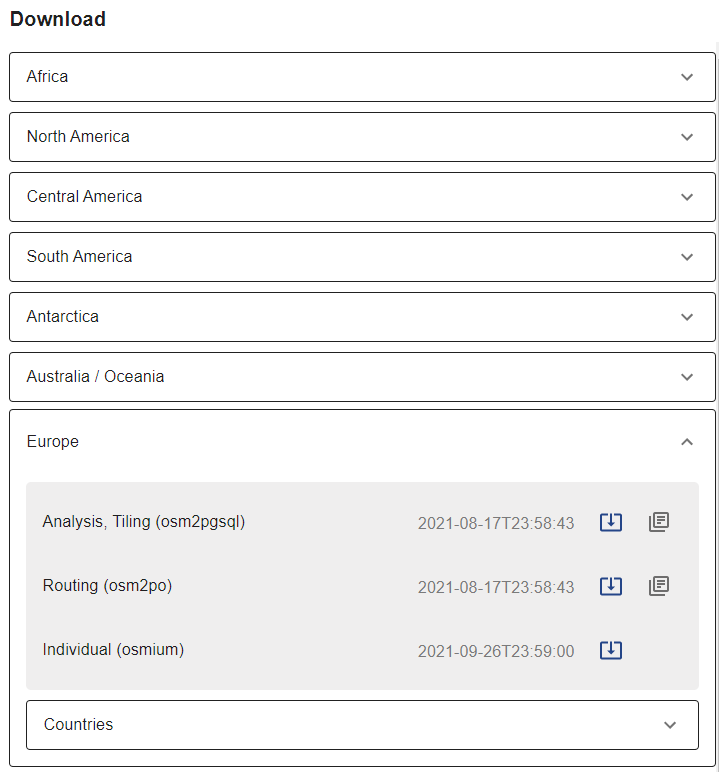
Dataset hierarchy
Native pbf extracts are refreshed daily. SQL dumps are produced one to two times per month; the generation process is being optimized for more frequent updates.
Restoring a dump: a worked example
Consider a user who wants raster tiles for Austria and already has tile-serving infrastructure in place, but needs a populated database behind it. Rather than importing OSM data with osm2pgsql, the corresponding SQL dump can be restored directly.
The service lists available regions; for Austria, the current datasets appear as https://gis.cybertec-postgresql.com/osmtile/europe/austria/. Selecting the “Analysis, Tiling” variant yields the compressed dump at https://gis.cybertec-postgresql.com/osmtile/europe/austria/osmtile_europe_austria_latest_compressed.dump.
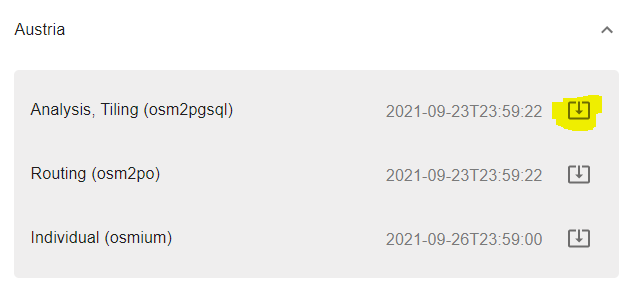
Dataset download and restore instructions
Full restore instructions accompany each dump as a readme.txt. For Austria that file is at https://gis.cybertec-postgresql.com/osmtile/europe/austria/readme.txt. The required extensions are PostGIS and hstore:
|
1 2 3 4 5 6 7 8 9 |
postgres=# create database tilingdb; CREATE DATABASE postgres=# c tilingdb psql (13.3 (Ubuntu 13.3-1.pgdg20.04+1), server 13.4 (Ubuntu 13.4-1.pgdg20.04+1)) You are now connected to database 'tilingdb' as user 'postgres'. tilingdb=# create extension postgis; CREATE EXTENSION tilingdb=# create extension hstore; CREATE EXTENSION |
The dump itself is then restored as follows:
|
1 2 |
pg_restore -j 4 --no-owner -d tilingdb osmtile_europe_austria_latest_compressed.dump |
The restore creates a dedicated schema, osmtile_europe_austria:
|
1 2 3 4 5 6 7 |
tilingdb=# dn List of schemas Name | Owner ------------------------+---------- osmtile_europe_austria | postgres public | postgres (2 rows) |
The generated tables within the schema can be listed with:
|
1 2 3 4 5 6 7 8 9 10 11 12 |
tilingdb=# dt+ osmtile_europe_austria. List of relations Schema | Name | Type | Owner | Persistence | Size | Description ------------------------+--------------------+-------+----------+-------------+---------+------------- osmtile_europe_austria | planet_osm_line | table | postgres | permanent | 1195 MB | osmtile_europe_austria | planet_osm_nodes | table | postgres | permanent | 3088 MB | osmtile_europe_austria | planet_osm_point | table | postgres | permanent | 323 MB | osmtile_europe_austria | planet_osm_polygon | table | postgres | permanent | 1865 MB | osmtile_europe_austria | planet_osm_rels | table | postgres | permanent | 102 MB | osmtile_europe_austria | planet_osm_roads | table | postgres | permanent | 130 MB | osmtile_europe_austria | planet_osm_ways | table | postgres | permanent | 1996 MB | (7 rows) |
Next steps and feedback
The service is newly released, and CYBERTEC welcomes comments at [email protected], whether for assistance, feedback, or requests for additional import variants. A separate post covers getting started with PostgreSQL and PostGIS.


