

Scenario and prerequisites
The task is a single-pass move from PostgreSQL 13 with PostGIS 2.5.5 to PostgreSQL 15 with PostGIS 3.3.2. The demo machine is an Ubuntu 20.04.02 server hosting two clusters side by side: PostgreSQL 13 with PostGIS 2.5.5, and PostgreSQL 15 with PostGIS 3.3.2.
The work proceeds in three stages: establish the status quo, run pg_upgrade, then upgrade PostGIS at the database level.
Taking inventory
Start at the OS level by listing installed packages.
|
1 2 3 4 5 6 7 8 9 10 11 12 |
root@ubuntu-s-2vcpu-2gb-intel-fra1-01:~# apt list --installed | grep postgresql postgresql-13-postgis-2.5-scripts/focal-pgdg,now 2.5.5+dfsg-1.pgdg20.04+2 all [installed,automatic] postgresql-13-postgis-2.5/focal-pgdg,now 2.5.5+dfsg-1.pgdg20.04+2 amd64 [installed] postgresql-13/focal-pgdg,now 13.10-1.pgdg20.04+1 amd64 [installed] postgresql-15-postgis-3-scripts/focal-pgdg,now 3.3.2+dfsg-1.pgdg20.04+1 all [installed,automatic] postgresql-15-postgis-3/focal-pgdg,now 3.3.2+dfsg-1.pgdg20.04+1 amd64 [installed] postgresql-15/focal-pgdg,now 15.2-1.pgdg20.04+1 amd64 [installed] postgresql-client-13/focal-pgdg,now 13.10-1.pgdg20.04+1 amd64 [installed,automatic] postgresql-client-15/focal-pgdg,now 15.2-1.pgdg20.04+1 amd64 [installed,automatic] postgresql-client-common/focal-pgdg,now 248.pgdg20.04+1 all [installed,automatic] postgresql-common/focal-pgdg,now 248.pgdg20.04+1 all [installed,automatic] |
Next, pull the cluster states to confirm both are running.
|
1 2 3 4 |
root@ubuntu-s-2vcpu-2gb-intel-fra1-01:~# pg_lsclusters Ver Cluster Port Status Owner Data directory Log file 13 pg_13 5432 online postgres /var/lib/postgresql/13/main /var/log/postgresql/postgresql-13-main.log 15 pg_15 5433 online postgres /var/lib/postgresql/15/main /var/log/postgresql/postgresql-15-main.log |
The legacy cluster listens on port 5432 and serves exactly one spatially enabled database, pgdemo, which uses PostGIS 2.5.5. A quick connection confirms what needs to move.
|
1 2 3 4 5 6 7 |
postgres@ubuntu-s-2vcpu-2gb-intel-fra1-01:/root$ psql -p 5432 postgres=# c pgdemo pgdemo=# select postgis_full_version(); postgis_full_version ------------------------------------------------------------------------------------------------------------------------------------------------------------------------------------------------------------- POSTGIS='2.5.5' [EXTENSION] PGSQL='130' GEOS='3.8.0-CAPI-1.13.1 ' PROJ='Rel. 6.3.1, February 10th, 2020' GDAL='GDAL 3.0.4, released 2020/01/28' LIBXML='2.9.10' LIBJSON='0.13.1' LIBPROTOBUF='1.3.3' RASTER (1 row) |
Migrating the cluster with pg_upgrade
Rather than upgrading PostgreSQL and PostGIS separately, pg_upgrade handles both in one pass. Stop the clusters first.
|
1 2 3 4 5 |
root@ubuntu-s-2vcpu-2gb-intel-fra1-01:~# systemctl stop postgresql root@ubuntu-s-2vcpu-2gb-intel-fra1-01:~# pg_lsclusters Ver Cluster Port Status Owner Data directory Log file 13 pg_13 5432 down postgres /var/lib/postgresql/13/pg_13 /var/log/postgresql/postgresql-13-pg_13.log 15 pg_15 5433 down postgres /var/lib/postgresql/15/pg_15 /var/log/postgresql/postgresql-15-pg_15.log |
Then, as user postgres, build the pg_upgrade command with the check parameter, which verifies upgrade compatibility before anything is actually migrated.
|
1 2 3 4 5 6 7 8 9 10 11 12 13 14 15 16 17 18 19 20 21 22 23 24 25 26 27 |
root@ubuntu-s-2vcpu-2gb-intel-fra1-01:~# su postgres postgres@ubuntu-s-2vcpu-2gb-intel-fra1-01:/root$ cd ~ postgres@ubuntu-s-2vcpu-2gb-intel-fra1-01:~$ /usr/lib/postgresql/15/bin/pg_upgrade > --old-datadir=/var/lib/postgresql/13/pg_13 > --new-datadir=/var/lib/postgresql/15/pg_15 > --old-bindir=/usr/lib/postgresql/13/bin > --new-bindir=/usr/lib/postgresql/15/bin > --old-options '-c config_file=/etc/postgresql/13/pg_13/postgresql.conf' > --new-options '-c config_file=/etc/postgresql/15/pg_15/postgresql.conf' --check Performing Consistency Checks ----------------------------- Checking cluster versions ok Checking database user is the install user ok Checking database connection settings ok Checking for prepared transactions ok Checking for system-defined composite types in user tables ok Checking for reg* data types in user tables ok Checking for contrib/isn with bigint-passing mismatch ok Checking for user-defined encoding conversions ok Checking for user-defined postfix operators ok Checking for incompatible polymorphic functions ok Checking for presence of required libraries fatal Your installation references loadable libraries that are missing from the new installation. You can add these libraries to the new installation, or remove the functions using them from the old installation. A list of problem libraries is in the file: /var/lib/postgresql/15/pg_15/pg_upgrade_output.d/20230424T070230.213/loadable_libraries.txt |
Handling the library mismatch
The check fails with a familiar line: Checking for presence of required libraries fatal. The referenced log reports PostGIS 2.5 libraries missing for PostgreSQL 15 — libraries pg_upgrade needs before it will continue.
|
1 2 3 4 5 |
postgres@ubuntu-s-2vcpu-2gb-intel-fra1-01:~$ cat /var/lib/postgresql/15/pg_15/pg_upgrade_output.d/20230424T070230.213/loadable_libraries.txt could not load library '$libdir/postgis-2.5': ERROR: could not access file '$libdir/postgis-2.5': No such file or directory In database: pgdemo could not load library '$libdir/rtpostgis-2.5': ERROR: could not access file '$libdir/rtpostgis-2.5': No such file or directory In database: pgdemo |
pg_upgrade demands that both clusters carry not only the same extensions but the same extension versions. The PostGIS compatibility matrix in the PostGIS Wiki is the place to work out the options.
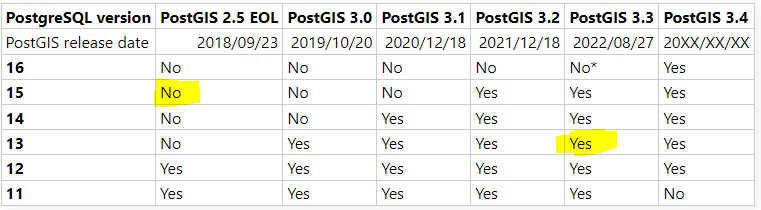
- Install PostGIS 2.5 for PostgreSQL 15 at the OS level, run
pg_upgrade, then upgrade to PostGIS 3.3.2 at the database level. More work, but the legacy system stays untouched. - Install PostGIS 3.2 for PostgreSQL 13 on both the OS and database level to remove the version mismatch — again, more work.
- Persuade
pg_upgradethat the required 2.5 libraries are already present for PostgreSQL 15.
Option 3 is the shortcut. It is not an official upgrade procedure, so back up first. Because the pg_upgrade log spells out exactly which libraries it expects, symbolic links from PostGIS 3 to PostGIS 2.5.5 satisfy the check.
|
1 2 3 |
root@ubuntu-s-2vcpu-2gb-intel-fra1-01:~# cd /usr/lib/postgresql/15/lib/ root@ubuntu-s-2vcpu-2gb-intel-fra1-01:/usr/lib/postgresql/15/lib# ln -s postgis-3.so postgis-2.5.so root@ubuntu-s-2vcpu-2gb-intel-fra1-01:/usr/lib/postgresql/15/lib# ln -s postgis_raster-3.so rtpostgis-2.5.so |
With that in place, the conflicting-extension complaint disappears:
|
1 2 3 4 5 6 7 8 9 10 |
root@ubuntu-s-2vcpu-2gb-intel-fra1-01:/usr/lib/postgresql/15/lib# su postgres postgres@ubuntu-s-2vcpu-2gb-intel-fra1-01:/usr/lib/postgresql/15/lib$ cd ~ postgres@ubuntu-s-2vcpu-2gb-intel-fra1-01:~$ /usr/lib/postgresql/15/bin/pg_upgrade --old-datadir=/var/lib/postgresql/13/pg_13 --new-datadir=/var/lib/postgresql/15/pg_15 --old-bindir=/usr/lib/postgresql/13/bin --new-bindir=/usr/lib/postgresql/15/bin --old-options '-c config_file=/etc/postgresql/13/pg_13/postgresql.conf' --new-options '-c config_file=/etc/postgresql/15/pg_15/postgresql.conf' --check Performing Consistency Checks Checking for presence of required libraries ok Checking database user is the install user ok Checking for prepared transactions ok Checking for new cluster tablespace directories ok *Clusters are compatible* |
Now run pg_upgrade without the check parameter. An excerpt of the output:
|
1 2 3 4 5 6 7 8 9 10 11 12 13 |
Setting next OID for new cluster ok Sync data directory to disk ok Creating script to delete old cluster ok Checking for extension updates notice Your installation contains extensions that should be updated with the ALTER EXTENSION command. The file update_extensions.sql when executed by psql by the database superuser will update these extensions. Upgrade Complete ---------------- |
Upgrading PostGIS inside the database
Start cluster pg_15 and connect to pgdemo.
|
1 2 3 4 5 |
root@ubuntu-s-2vcpu-2gb-intel-fra1-01:~# pg_ctlcluster 15 pg_15 start root@ubuntu-s-2vcpu-2gb-intel-fra1-01:~# su postgres postgres@ubuntu-s-2vcpu-2gb-intel-fra1-01:/root$ psql -p 5433 postgres=# c pgdemo You are now connected to database 'pgdemo' as user 'postgres'. |
The PostGIS version registered in the database is still 2.5.5.
|
1 2 3 4 5 6 7 |
pgdemo=# dx List of installed extensions Name | Version | Schema | Description ---------+---------+------------+--------------------------------------------------------------------- plpgsql | 1.0 | pg_catalog | PL/pgSQL procedural language postgis | 2.5.5 | public | PostGIS geometry, geography, and raster spatial types and functions (2 rows) |
postgis_extensions_upgrade() resolves this — run it twice, because from PostGIS v3 onward vector and raster functionality live in two separate extensions.
|
1 2 3 4 5 6 7 8 9 10 11 12 |
pgdemo=# select postgis_extensions_upgrade(); WARNING: unpackaging raster WARNING: PostGIS Raster functionality has been unpackaged HINT: type `SELECT postgis_extensions_upgrade();` to finish the upgrade. After upgrading, if you want to drop raster, run: DROP EXTENSION postgis_raster; NOTICE: ALTER EXTENSION postgis UPDATE TO '3.3.2'; pgdemo=# select postgis_extensions_upgrade(); NOTICE: Updating extension postgis 3.3.2 NOTICE: Packaging and updating postgis_raster postgis_extensions_upgrade ------------------------------------------------------------------------------------ Upgrade to version 3.3.2 completed, run SELECT postgis_full_version(); for details (1 row) |
postgis_full_version() then confirms the result:
|
1 2 3 |
pgdemo=# select postgis_full_version(); POSTGIS='3.3.2 4975da8' [EXTENSION] PGSQL='150' GEOS='3.8.0-CAPI-1.13.1 ' PROJ='6.3.1' GDAL='GDAL 3.0.4, released 2020/01/28' LIBXML='2.9.10' LIBJSON='0.13.1' LIBPROTOBUF='1.3.3' WAGYU='0.5.0 (Internal)' RASTER (1 row) |
Outcome
Clusters holding mismatched PostGIS versions can be upgraded in one pass, which saves time and sidesteps PostGIS version conflicts during the migration. Back up the databases before trying it.


