
Remote Communication Is a Skill, Not an Accident
Products are not built in isolation. A large part of professional life is spent discussing, brainstorming, and deciding alongside others. No matter the field of expertise, a team’s collective knowledge amplifies an individual's own. As remote work grows, teams are communicating more in written form than spoken, and they need to adapt. If communication fails, everything else fails too.
Face-to-face conversation is effective because we receive a lot of information beyond words. We can read the room to pick up on unspoken agreements, alliances, tensions, and the overall mood, and react accordingly—almost unconsciously. Yet that same mechanism makes in-person communication messy. When someone is having a bad day, it might be misread as tension or a lack of investment in the project. For outsiders without knowledge of the complex dynamics of a team, this can lead to wrong conclusions.

Office work also makes it easy to create information silos. Having colleagues next to us makes it easier to tap them on the shoulder than to write documentation and rely on it. This creates information disparity, where a few individuals hold critical knowledge. Are you relying on a single person’s knowledge, or is knowledge safely stored in software?
This happened to me once. I worked on an over-engineered product where only one person fully understood it. We relied on him for tricky tasks and were “too busy to document” the system. Instead we spent a year slowly refactoring it. In hindsight, we should have taken the time to document how it worked and then run a workshop for everyone to catch up. That would have made us more productive and eased the whole process.
Defaulting to Asynchronous Collaboration
Becoming a productive remote team requires a change of mindset: default to asynchronous instead of synchronous collaboration. This allows people to focus on what matters by decreasing distractions and prevents a culture of “always online,” which is just tap-on-the-shoulder communication adapted to chat and email.
Research has shown that we need 15 to 30 minutes of focus on a task before we are fully immersed and able to do meaningful work. Every interruption—a tap on the shoulder, a call, a notification—breaks that focus, and we have to start over. Being “in the zone” makes us more productive by letting our minds solve one hard problem at a time instead of multitasking, which we are terrible at. This is commonly called Deep Work. It should be the goal in any team, but an office setting makes it challenging due to constant distractions. Asynchronous communication in a remote setting is perfect for achieving it.
However, once you are no longer required to be always-online, your ability to get help quickly slows down. How do we get the best of both worlds?
Treating Documentation as a First-Class Citizen
Working groups form a network of knowledge where each individual has unique information accessible to everyone. Sharing information builds an institutional memory that makes the team more productive—but it can also hinder us.

When you solve a hard problem, others might ask for help when they face the same issue. But what happens if someone needs your knowledge in two weeks while you are on holiday? The solution is to offload knowledge onto software that is always accessible, and to foster an environment where everyone sees the value of documentation as a first-class citizen. That is easier said than done.
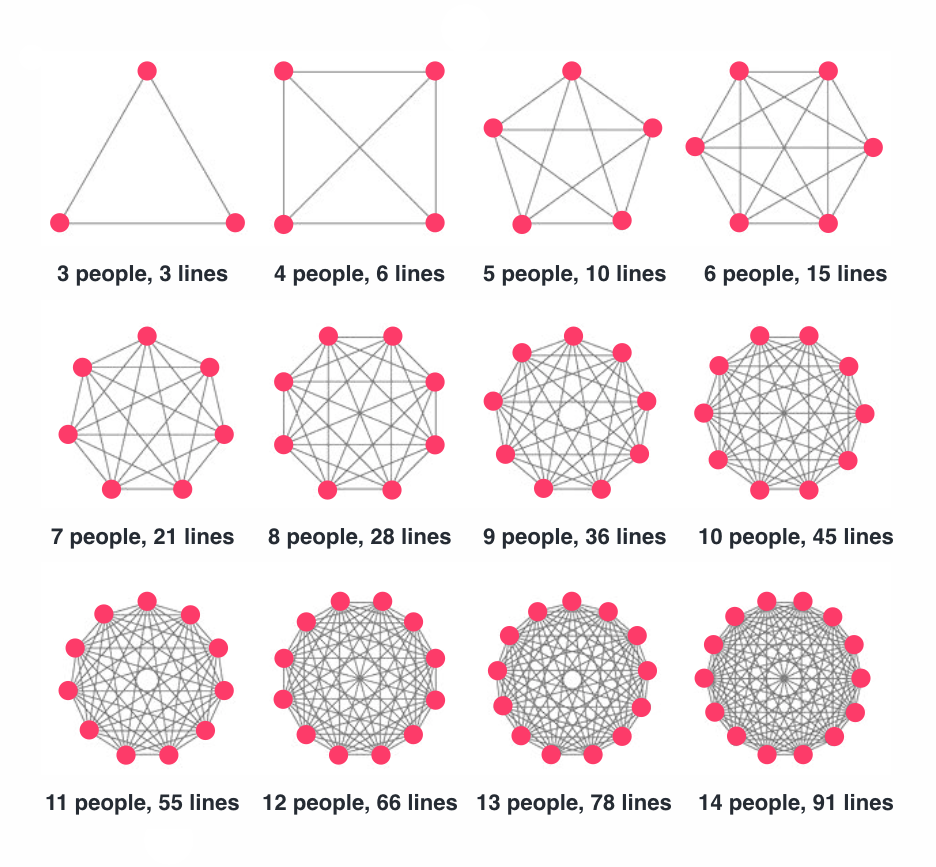
In an office, asking a colleague to document something is logical but is often ignored since everyone is nearby. Remote teams, by contrast, appreciate being self-reliant when facing issues. The bigger the team, the harder communication gets, and a central knowledge repository helps tame that complexity. Making documentation the default instead of an afterthought improves your institutional memory and keeps critical information accessible to anyone, anytime, anywhere.
What should you document? Solutions to thorny problems, outages and their causes, onboarding procedures, new tools or tech introduced, and fruitful—along with unfruitful—discoveries. All of it is valuable and should be accessible.
At a remote-first company, my manager assigned me a Notion document with goals for my first two weeks. The first week was dedicated to reading the “Engineering Documentation,” which explained most of the tech stack and local setup. The second week I had to complete my first task, whose requirements, deliverables, and stakeholders were fully documented. It was the best onboarding I have had.

Communicating in the Open
Private communication hurts remote teams. When knowledge is not shared equally, no matter how trivial a discussion seems, others might benefit from it. Keeping communication private is similar to skipping documentation—you store information in your head and nowhere else, which fosters information silos and decreases productivity.
Some topics are sensitive enough to warrant private conversations, such as health or workplace issues. But if you are collaborating privately, consider your motivations and try to switch to public instead.
Public communication in an office is hard because you cannot interrupt everyone all the time. That is why daily stand-ups exist. With asynchronous collaboration, everyone can read announcements in the team channel whenever they have time. Daily stand-ups can either be dropped or repurposed as time to socialize.
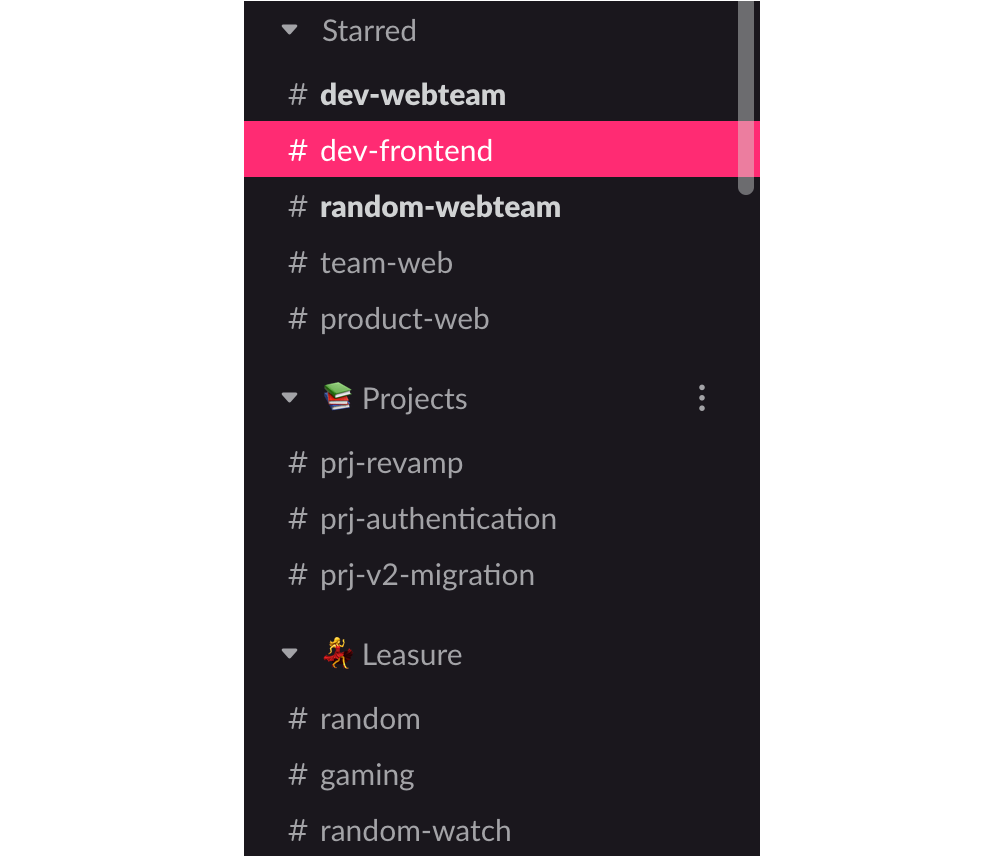
Shifting a privately communicating company to a public mindset is challenging, but the payoff is significant. A few tips help: create clearly defined channels for different topics in your chat app so everyone knows where to ask questions, and make sure everyone knows the team should communicate in public.
Beware of too many channels, private or public—they hurt productivity because people spend more time deciding where to communicate instead of how. Keep only the channels you really need, only invite necessary people, and understand that it is OK to mute unimportant channels.
When discussions happen in public, your team becomes more interconnected. It also facilitates leading by example, since everyone rises to the challenge of being better.
Rules for Better Messages
Expressing ideas effectively is hard, but some rules can dramatically improve how useful each message we send is.
Every Message Actionable, Questioning, or Informative—With Context
From the perennial “let’s go for a coffee” to the water cooler brainstorming session, in-person communication is full of habits that simplify complex collaboration. Online, we are still figuring out the best habits. A strong set of rules is to make every message actionable, a question, or informative, and to include its context.
Actionable Messages
Actionable messages imply something that can be done: create a ticket, propose a solution, or hold a discussion. Compare a non-actionable message with little context:
“I clicked the subscribe button and a modal showed up.”
with an actionable one:



