
The Onboarding Gap Email Bridge Fills
Slack works best when everyone who needs to be in a conversation is actually in it. But for large organizations, that dependency created a bottleneck: a user had to accept an email invitation before they could appear in search, be added to a channel, or receive messages. If they didn't click the link promptly, their future teammates simply couldn't collaborate with them.
Email Bridge was built to remove that wait. Invited users now show up in Slack immediately and begin receiving notifications via email. They can reply to those emails and have their responses posted directly into the relevant Slack channel or thread—all without ever opening the Slack app.
How Users Were Added Before
Prior to Email Bridge, there were two primary ways to bring a user into a workspace, each with its own limitations.
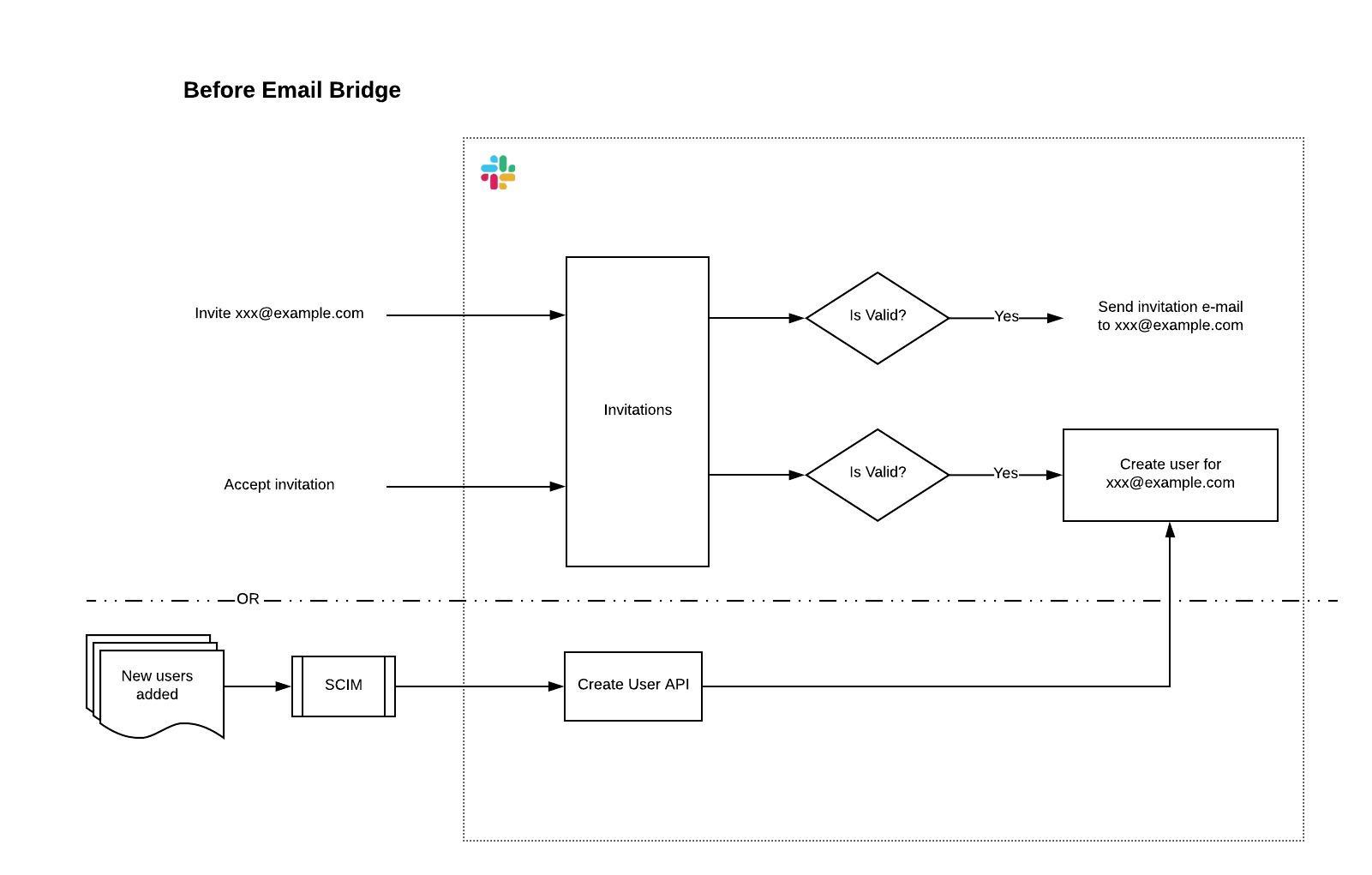
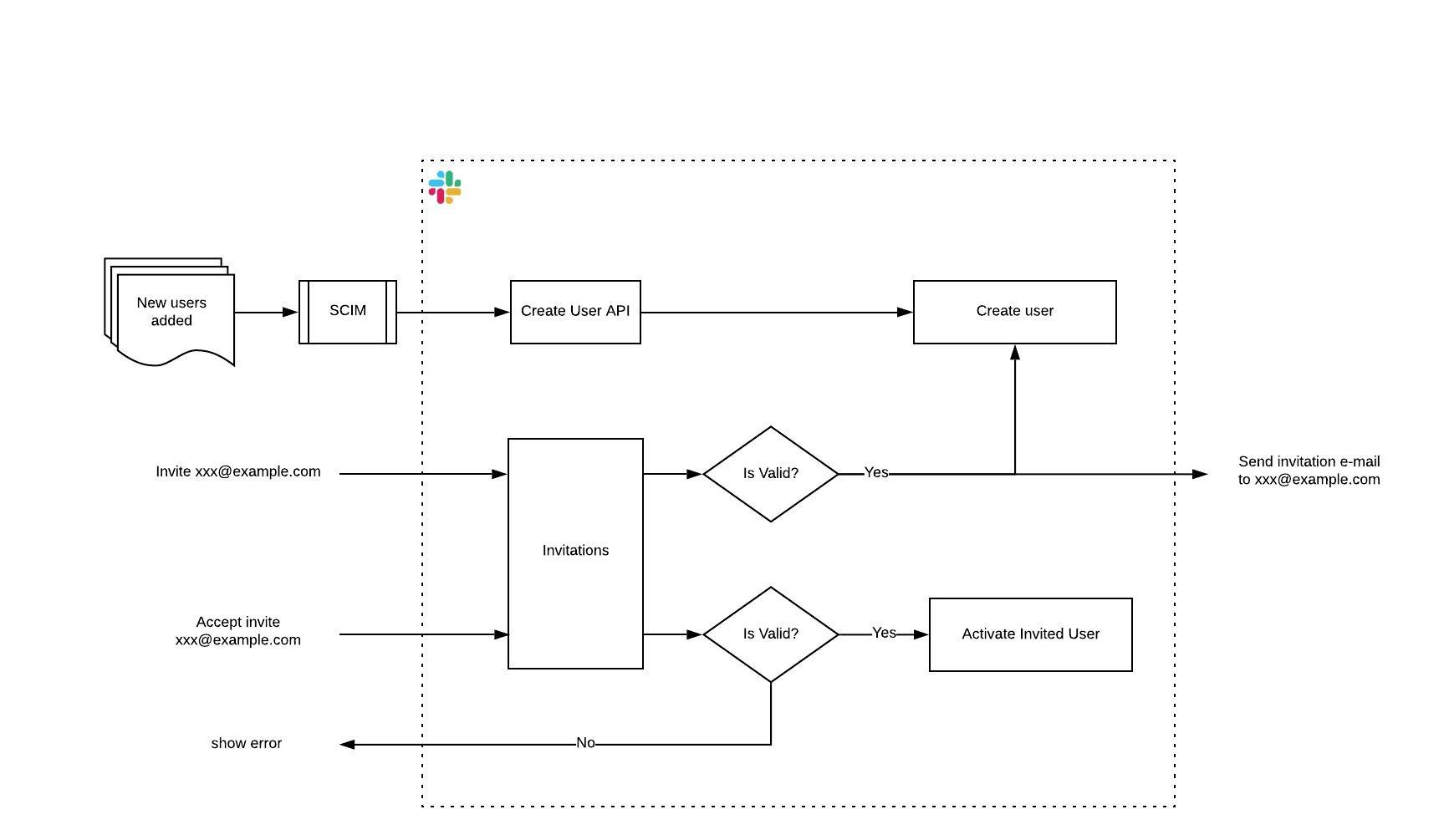
Manual invitations. Smaller teams typically send manual invitations. The flow is straightforward: pick an email address, assign a name, select a role (Full Member, Single-Channel Guest, or Multi-Channel Guest), and choose the channels they should join. The system sends an invitation email immediately, followed by a reminder after 24 hours if it goes unaccepted.
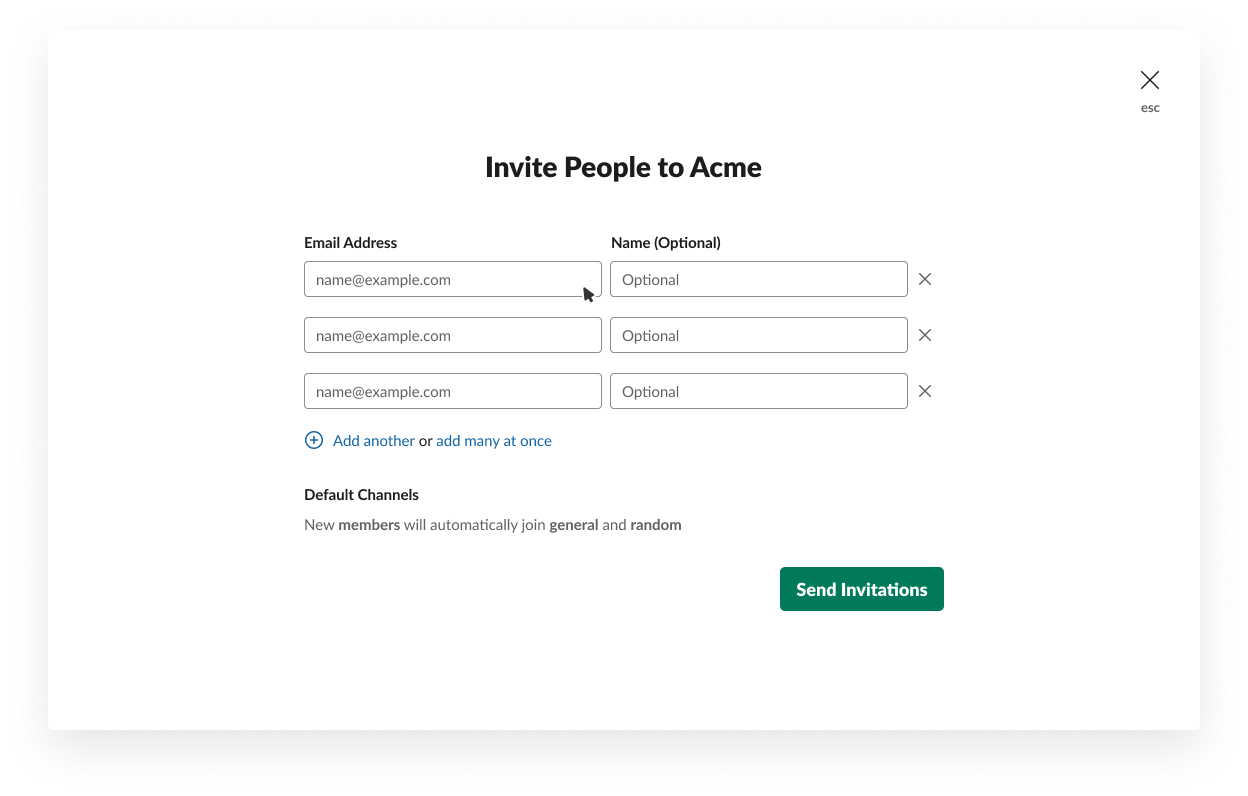
Only after the invitee accepts does the system create a User entity under the team with the appropriate role, add them to the specified channels, and mark the invitation as accepted. Until that happens, the invitee is invisible.
SCIM provisioning. Larger customers usually rely on identity management systems like Okta via the System for Cross-domain Identity Management (SCIM) protocol. This approach automatically creates a User entity for each request, but drops the user into a pre-provisioned state. That's essentially an inactive placeholder: the user isn't discoverable in Slack and receives no email, because no invitation object exists. When the user finally signs in via their identity provider, the system marks them active and makes them searchable.
The Email Bridge Architecture
Email Bridge acts as an interoperability layer between the email world and the Slack message stream. It relies on three key pieces working together.
Making Invitees Visible Early
Since the eventual acceptance of an invitation is now assumed, the system creates a full User entity up front, flagged to show the user has not yet accepted. This label—an Invited member—applies both to users invited manually and to those added through SCIM. These users remain excluded from fair billing calculations until they activate their accounts, at which point the flag is simply unset.
On the client side, banners and user information messages indicate the invited state.
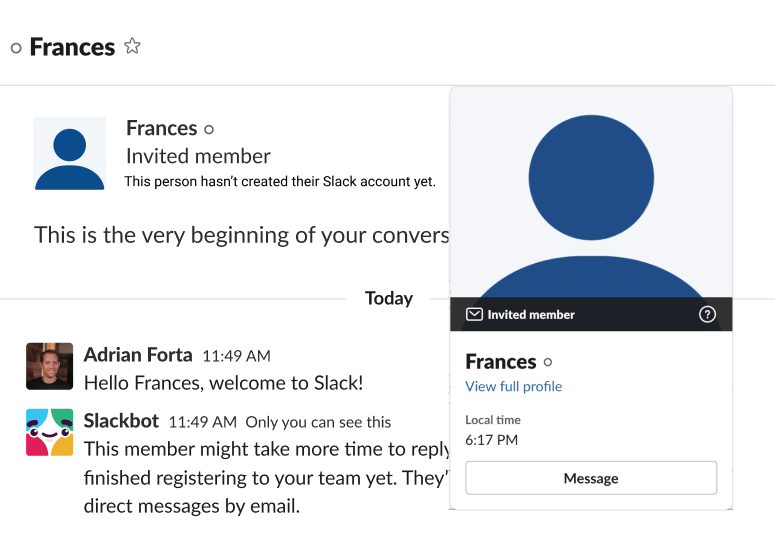
The critical change is making Invited members visible in search and available for @mention. That allows them to be pulled into channels and conversations before they ever sign in for the first time.
The Email Interoperability Service
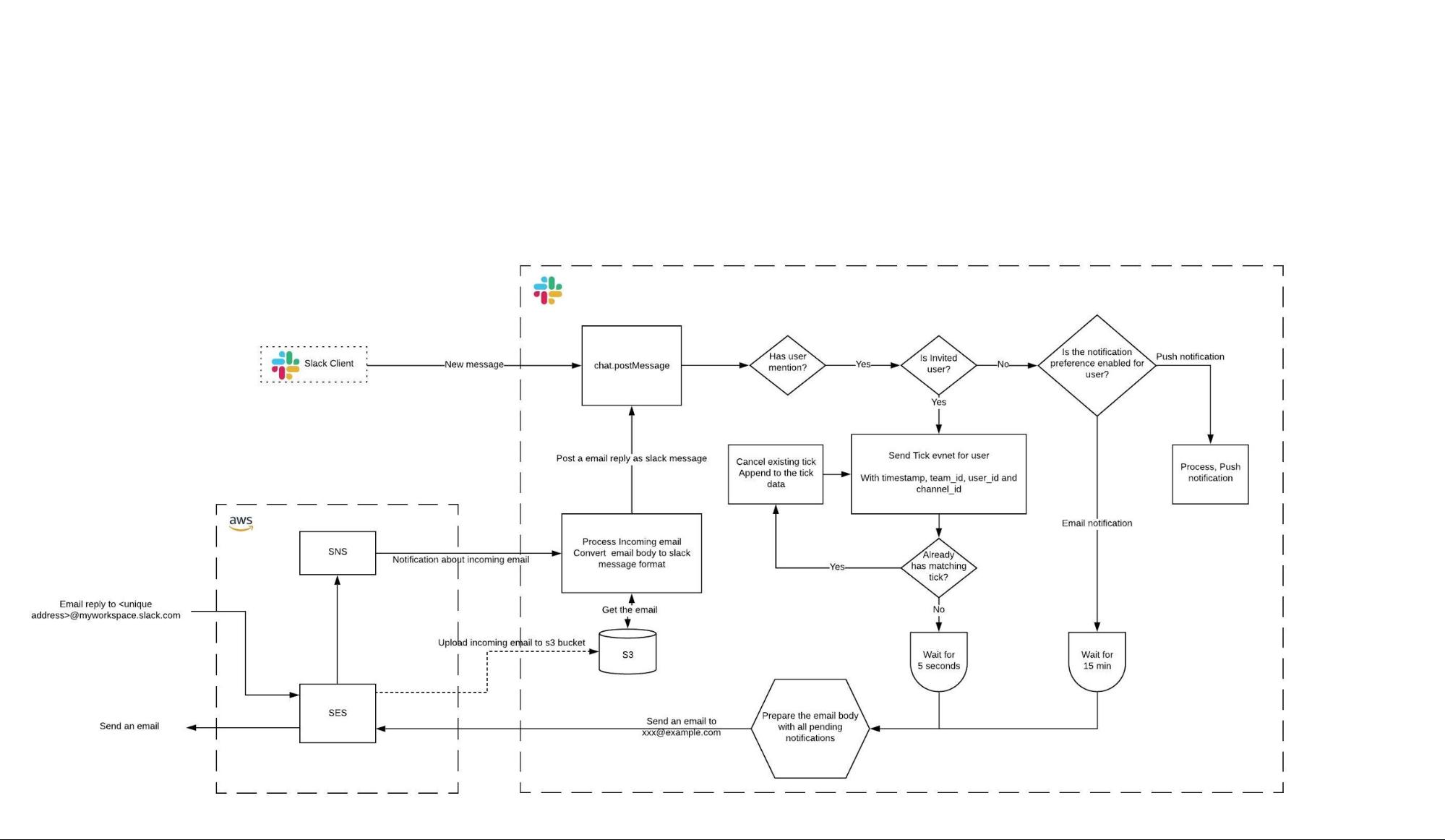
This service handles both directions of communication: sending notifications to Invited members and routing their email replies back into the right Slack channel.
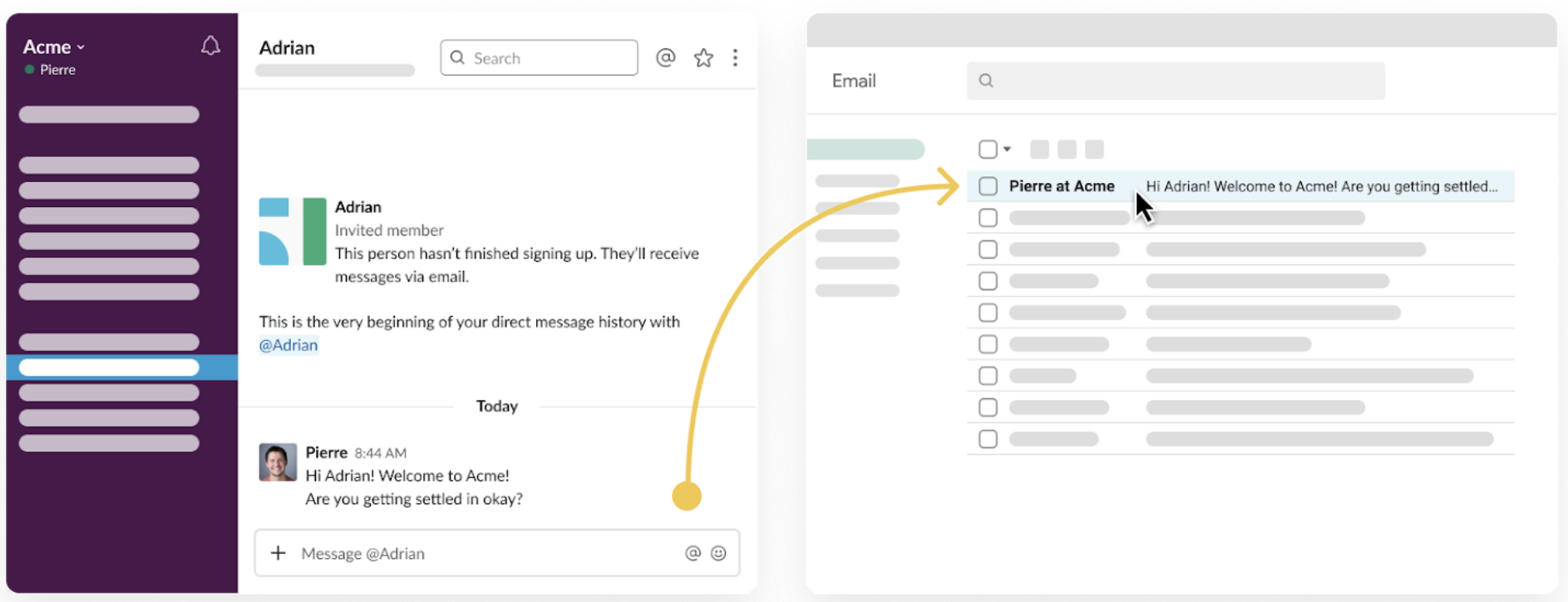
Because Slack conversations move fast, the service doesn't send one email per message. Instead, it waits a few seconds to collect messages and delivers them in a single batched email. Each email carries a unique Reply-To address in the format <unique-id>@<domain>.slack-mail.com, which the system uses to trace the message back to its source channel when the user replies. Delivery is handled through AWS Simple Email Service (SES).
Handling Replies
A user can respond to any notification email by clicking the Reply call-to-action in the body of the message or by using their email client's native reply feature. Either way, a compose window opens for them to type their message.
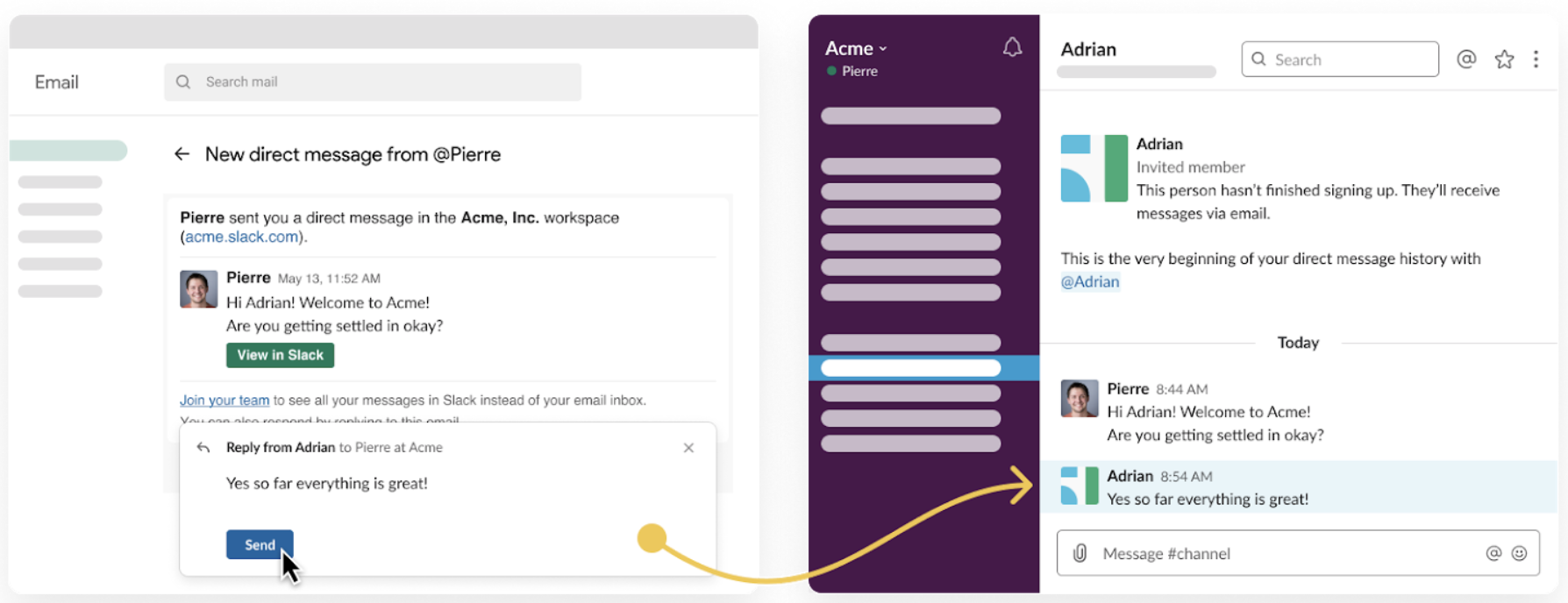
Sent replies arrive at the unique <unique-id>@<domain>.slack-mail.com address via AWS SES. SES then notifies Slack through a webhook using Simple Notification Service (SNS), passing along a payload to identify the message. On receipt, the email service validates the authenticity of the incoming email, sanitizes the body, and converts it to a Slack message—preserving most of the original formatting—before posting it on behalf of the invited user to the correct channel or thread.
Lessons from Shipping
Building Email Bridge meant changing fundamental assumptions about the user lifecycle, which surfaced several practical lessons.
Roll Out to Grid Last
Slack's Enterprise Grid flow carries significantly more complex business logic and enterprise-level preferences. The team spent over two months rolling the feature out to Free, Standard, and Plus teams first. Only once it proved stable there did they design a gradual rollout for Grid customers. That careful staging let them catch bugs early and fix them without wide-reaching impact.
Instrument Early or Pay Later
Changing the core user data model had a major side effect on existing instrumentation. Because the definition of "what is a user" changed, internal metrics and dashboards showing user counts were skewed by a large margin—data pipelines simply weren't aware of this new user type. The team realized this late in the process. The takeaway: discussions about instrumentation and metrics should happen at the start of product development, not after the model changes are already in place.
Don't Let a Proof-of-Concept Become a Permanent State
To get the feature in front of early users quickly, the engineering team deliberately chose not to redesign the onboarding flow holistically. Instead, they added conditionals: if the user is invited member → do something. This made the workflow more complex for a while, but it was a trade-off made to ship faster. Once the product cycle stabilized, they completed a rewrite informed by a much better understanding of the features and their side effects. It's acceptable to move fast with what works in the moment, but the technical debt must be revisited and cleaned up afterward.
What Comes Next
Customer feedback on Email Bridge has been positive, and a common request is to extend the email reply feature to existing, active Slack users. That rollout is currently in progress: soon, any Slack notification email related to a user mention will be replyable directly from the inbox.
The team is also working on delivering relevant Slack messages and team updates to invited users via email. Those messages will include important conversations, new member information, and a list of recommended channels to join.



