

Putting AI agent taskflows to work on code audits
GitHub Security Lab’s recently open sourced taskflow repository, built on the seclab-taskflow-agent, pairs YAML-based task definitions with large language models to audit source code for security vulnerabilities. The framework’s initial focus was triaging CodeQL alerts; the new auditing taskflows target web application vulnerabilities specifically. So far the project has resulted in more than 80 reported vulnerabilities in open source projects, roughly 20 of which have been disclosed and tracked on the project’s advisories page. The findings have skewed toward high-impact issues: authorization bypasses, one-user-to-another login flaws, and information disclosure in e-commerce shopping carts and chat applications.
If you want to run the taskflows against your own project, the requirements are modest: a GitHub Copilot license, a few minutes of setup, and some patience. The instructions from the seclab-taskflows README boil down to:
- Open the repository in a codespace and wait for initialization to complete.
- Run
./scripts/audit/run_audit.sh myorg/myrepoin the terminal. - Expect a large number of tool calls and quota consumption—medium-sized repos can take an hour or two to process.
Results land in an SQLite database. Open the audit_results table and look for rows flagged in the has_vulnerability column.
| Tip: Due to the non-deterministic nature of LLMs, it is worthwhile to perform multiple runs of these audit taskflows on the same codebase. In certain cases, a second run can lead to entirely different results. In addition to this, you might perform those two runs using different models (e.g., the first using GPT 5.2 and the second using Claude Opus 4.6). |
The taskflows support private repositories, but you will need to adjust the codespace configuration to permit access to them.
Drilling down with tasks instead of a single prompt
Taskflows are YAML files that describe a sequence of tasks executed by an LLM via the seclab-taskflow-agent framework. The framework handles running the tasks sequentially and passes the results from one to the next. Using separate tasks rather than one monolithic prompt is intentional: context windows have limits, complex multi-step instructions are error-prone, and isolating steps makes it easier to control and debug the process. The agent also supports templated prompts, which means the same task can be run on multiple components in parallel much like a for loop, substituting component-specific details each time.
A two-stage approach to curb hallucinations
General security auditing gives an LLM a lot of freedom, and with freedom comes the risk of hallucinated issues and an overwhelming number of false positives. The need for rigor was clear from the CodeQL triage work, where precise, verifiable instructions proved essential. For general audits, repository components first go through a threat modeling stage that gathers the information required to separate real bugs from security vulnerabilities. For example, a command injection in a CLI tool designed to execute arbitrary scripts may be a bug, but not necessarily a vulnerability, because an attacker who can pass input to that CLI can already run scripts by design.
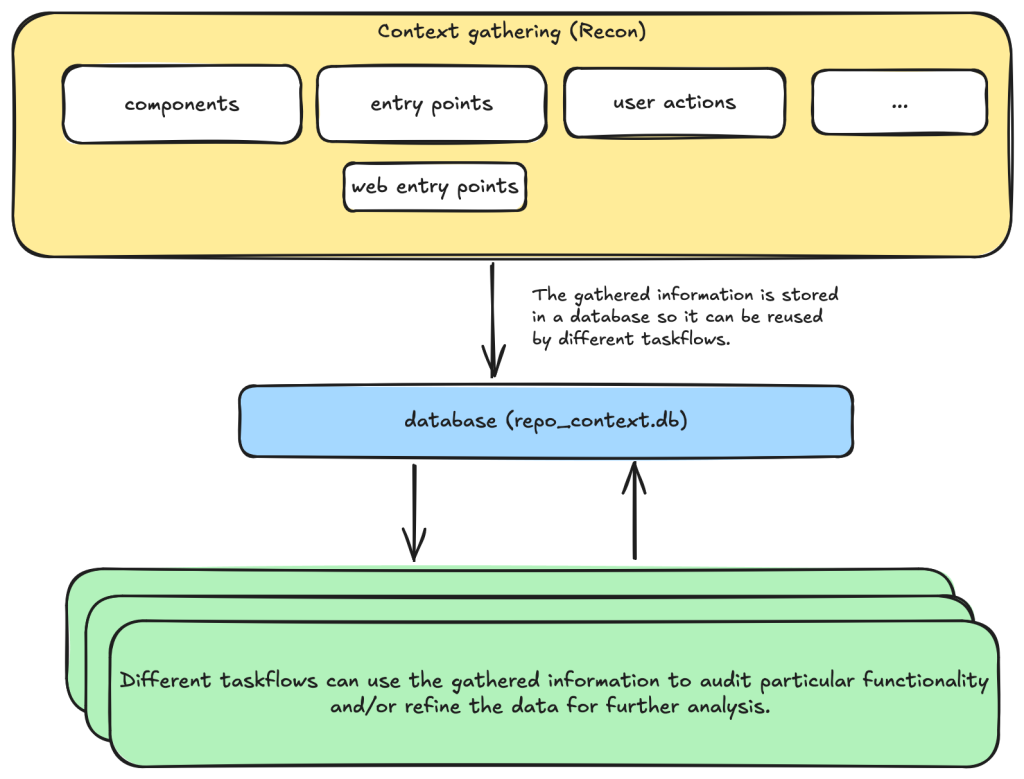
You need to take into account of the intention and threat model of the component in component notes to determine if an issue is a valid security issue or if it is an intended functionality. You can fetch entry points, web entry points and user actions to help you determine the intended usage of the component.The audit itself is split into two distinct tasks. First, an LLM reviews each component and suggests vulnerability types or high-risk areas likely to apply based on its entry points and intended use. The suggestions are deliberately not audited in this stage—the LLM is explicitly instructed to refrain—since mixing brainstorming with analysis defeats the purpose. Then each suggestion goes to a separate task with a fresh context and strict criteria to determine whether the issue is valid, mirroring the triage step used for static analysis alerts.
Threat modeling as a prerequisite
The project emphasizes that many false positives from static analyzers are due to incorrect threat models. A reverse proxy application, for instance, may have many SSRF-like findings that fall within its core functionality, while Continuous Integration (CI) tasks designed to execute arbitrary code in a sandbox present remote code execution “issues” that lack real security impact. To avoid wasting time on these, the workflow gathers concrete context first.
That context arrives via several taskflows:
- Identify applications: Repos often contain multiple components with distinct security boundaries. The
identify_applicationstaskflow inspects the source and documentation to split the repository into logical components. - Identify entry points: Determine how each component is exposed to untrusted inputs. Separate guidelines apply for libraries versus applications, as their risk profiles differ.
- Identify web entry points: Additional detail is collected for web applications, including HTTP methods and path information needed to reach an endpoint.
- Identify user actions: What functionality can a user access by design? Establishing the baseline privilege level clarifies the security boundary and exposes which vulnerabilities would be privilege escalation.
These findings are stored in a database for the next stage, anchoring the audit’s later steps in the component’s actual design.
Issue suggestions with curated boundaries
The issue suggestion stage prompts the LLM to propose plausible vulnerabilities or high-risk areas for each component, relying on the entry point and usage data from the prior step. Prompts instruct the model not to suggest issues if they are low severity or clearly non-security problems.
Base your decision on:
- Is this component likely to take untrusted user input? For example, remote web request or IPC, RPC calls?
- What is the intended purpose of this component and its functionality? Does it allow high privileged action?
Is it intended to provide such functionalities for all user? Or is there complex access control logic involved?
- The component itself may also have its own `README.md` (or a subdirectory of it may have a `README.md`). Take a look at those files to help understand the functionality of the component.
However, you should still take care not to include issues that are of low severity or requires unrealistic attack scenario such as misconfiguration or an already compromised system.Each of the above prompts leaves room for the LLM to suggest diverse vulnerability types, meaning the set serves as a starting point for the real auditing task that follows.
This two-step pattern—a broad, exploratory phase followed by focused triage—means tasks responsible for the audit never lose sight of a vulnerability’s impact. The result has been a stream of high-severity, actionable findings for maintainers, which is likely to draw more contributors to the framework and, in turn, eliminate more vulnerabilities across the open source ecosystem. The repository also hosts advisories and examples of the vulnerabilities the taskflows have uncovered, useful references if you want to measure the scope of what’s possible.
Auditing the candidates
After gathering information about the target repository and producing candidate vulnerability types, the workflow enters its final phase. The audit stage operates with fresh context, treating all previous suggestions as unvalidated. The model is explicitly instructed to verify each candidate by tracing through the source code.
The issues suggested have not been properly verified and are only suggested because they are common issues in these types of application. Your task is to audit the source code to check if this type of issues is present.To prevent the model from reporting non-security issues, the prompts emphasize that intended usage of the component must be considered.
You need to take into account of the intention and threat model of the component in component notes to determine if an issue is a valid security issue or if it is an intended functionality.Hallucination prevention is another central concern. The prompt demands a concrete, realistic attack scenario for every report and limits findings to actual errors in the source code.
Do not consider scenarios where authentication is bypassed via stolen credential etc. We only consider situations that are achievable from within the source code itself.
...
If you believe there is a vulnerability, then you must include a realistic attack scenario, with details of all the file and line included, and also what an attacker can gain by exploiting the vulnerability. Only consider the issue a vulnerability if an attacker can gain privilege by performing an action that is not intended by the component.
The model must also cite specific evidence—including file paths and line numbers—for each claimed vulnerability.
Keep a record of the audit notes, be sure to include all relevant file path and line number. Just stating an end point, e.g. `IDOR in user update/delete endpoints (PUT /user/:id)` is not sufficient. I need to have the file and line number.The final guard against fabrication is a direct instruction that a component may simply be secure, and that the model should not invent issues when none exist.
Remember, the issues suggested are only speculation and there may not be a vulnerability at all and it is ok to conclude that there is no security issue.With these strict guidelines in place, the audit stage rejects many implausible and unexploitable candidates while producing few hallucinations. The design question that remained was whether these conservative instructions would cause too many genuine vulnerabilities to be filtered out. Running the workflows against real repositories quickly answered that.
Three real-world findings
The following cases, all disclosed as vulnerabilities, demonstrate what the framework can do. The GitHub Security Lab has reported over 80 vulnerabilities so far, all published on the advisories page.
Privilege escalation in Outline (CVE-2025-64487)
Because the information-gathering workflows are tuned for web applications, the first target was Outline, a multi-user collaboration suite. Its appeal as a test case: documents have owners, visibility levels, and per-user/per-team permissions.
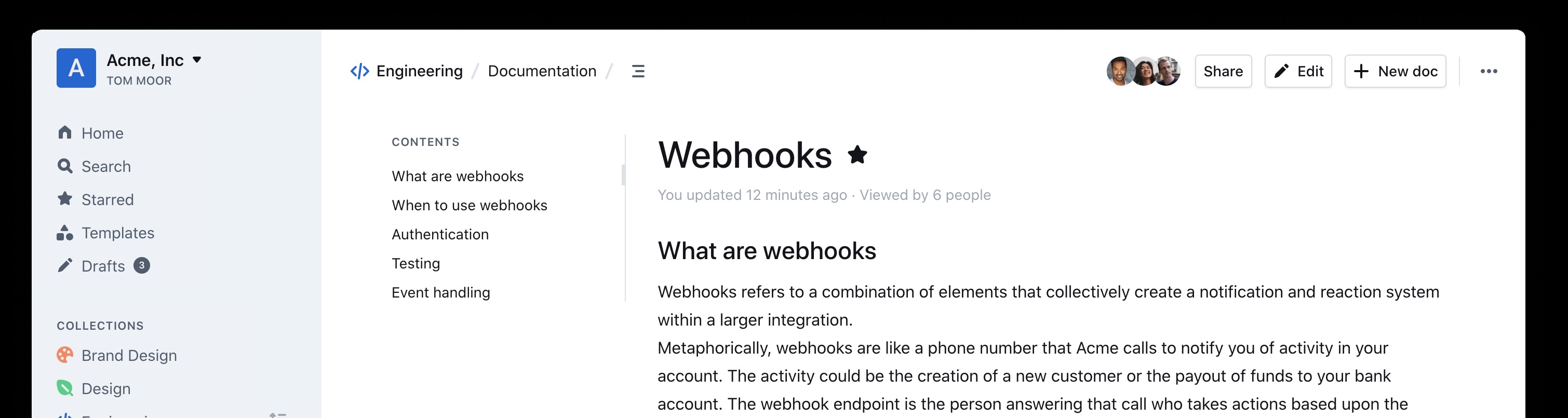
Such, custom access rules are difficult for static application security testing (SAST) tools, which generally do not model which actions a standard user should be permitted to perform. The first run found a bug in the authorization logic. The audit noted:
Audit target: Improper membership management authorization in component server (backend API) of outline/outline (component id 2).

Summary conclusion: A real privilege escalation vulnerability exists. The document group membership modification endpoints (documents.add_group, documents.remove_group) authorize with the weaker \"update\" permission instead of the stronger \"manageUsers\" permission that is required for user membership changes. Because \"update\" can be satisfied by having only a ReadWrite membership on the document, a non‑admin document collaborator can grant (or revoke) group memberships – including granting Admin permission – thereby escalating their own privileges (if they are in the added group) and those of other group members. This allows actions (manageUsers, archive, delete, etc.) that were not intended for a mere ReadWrite collaborator.
Checking the TypeScript source and reproducing on a test instance confirmed the issue was exploitable as described. The steps were precise:
Prerequisites:
- Attacker is a normal team member (not admin), not a guest, with direct ReadWrite membership on Document D (or via a group that grants ReadWrite) but NOT Admin.
- Attacker is a member of an existing group G in the same team (they do not need to be an admin of G; group read access is sufficient per group policy).

Steps:
1. Attacker calls POST documents.add_group (server/routes/api/documents/documents.ts lines 1875-1926) with body:
   {
     "id": "<document-D-id>",
     "groupId": "<group-G-id>",
     "permission": "admin"
   }
2. Authorization path:
   - Line 1896: authorize(user, "update", document) succeeds because attacker has ReadWrite membership (document.ts lines 96-99 allow update).
   - Line 1897: authorize(user, "read", group) succeeds for any non-guest same-team user (group.ts lines 27-33).
   No \"manageUsers\" check occurs.
3. Code creates or updates GroupMembership with permission Admin (lines 1899-1919).
4. Because attacker is a member of group G, their effective document permission (via groupMembership) now includes DocumentPermission.Admin.
5. With Admin membership, attacker now satisfies includesMembership(Admin) used in:
   - manageUsers (document.ts lines 123-134) enabling adding/removing arbitrary users via documents.add_user / documents.remove_user (lines 1747-1827, 1830-1872).
   - archive/unarchive/delete (document.ts archive policy lines 241-252; delete lines 198-208) enabling content integrity impact.
   - duplicate, move, other admin-like abilities (e.g., duplicate policy lines 136-153; move lines 155-170) beyond original ReadWrite scope.
Following them, a low-privileged user who could only update a document was able to add arbitrary groups to it—even though that change normally requires the manageUsers permission, which the user did not possess. In the reproduced case, the group "Support" was attached to a document by a user named "gg."

The Outline project patched this and another reported issue within three days (repo advisory).
Ecommerce guest-order leaks (CVE-2025-15033, CVE-2026-25758)
Pointing the workflows at online shops exposed recurring weaknesses in cart logic. In the WooCommerce PHP codebase, the framework found that signed-in users could view all guest orders—their names, addresses, and phone numbers. Automattic responded with a fix that was published as CVE-2025-15033, with an accompanying announcement explaining the update.
That result prompted audits of additional ecommerce applications. Spree, a Ruby-based platform, contained two related flaws. The more serious one, CVE-2026-25758, let unauthenticated users enumerate every guest order's address and phone number by stepping through a predictable sequence number.
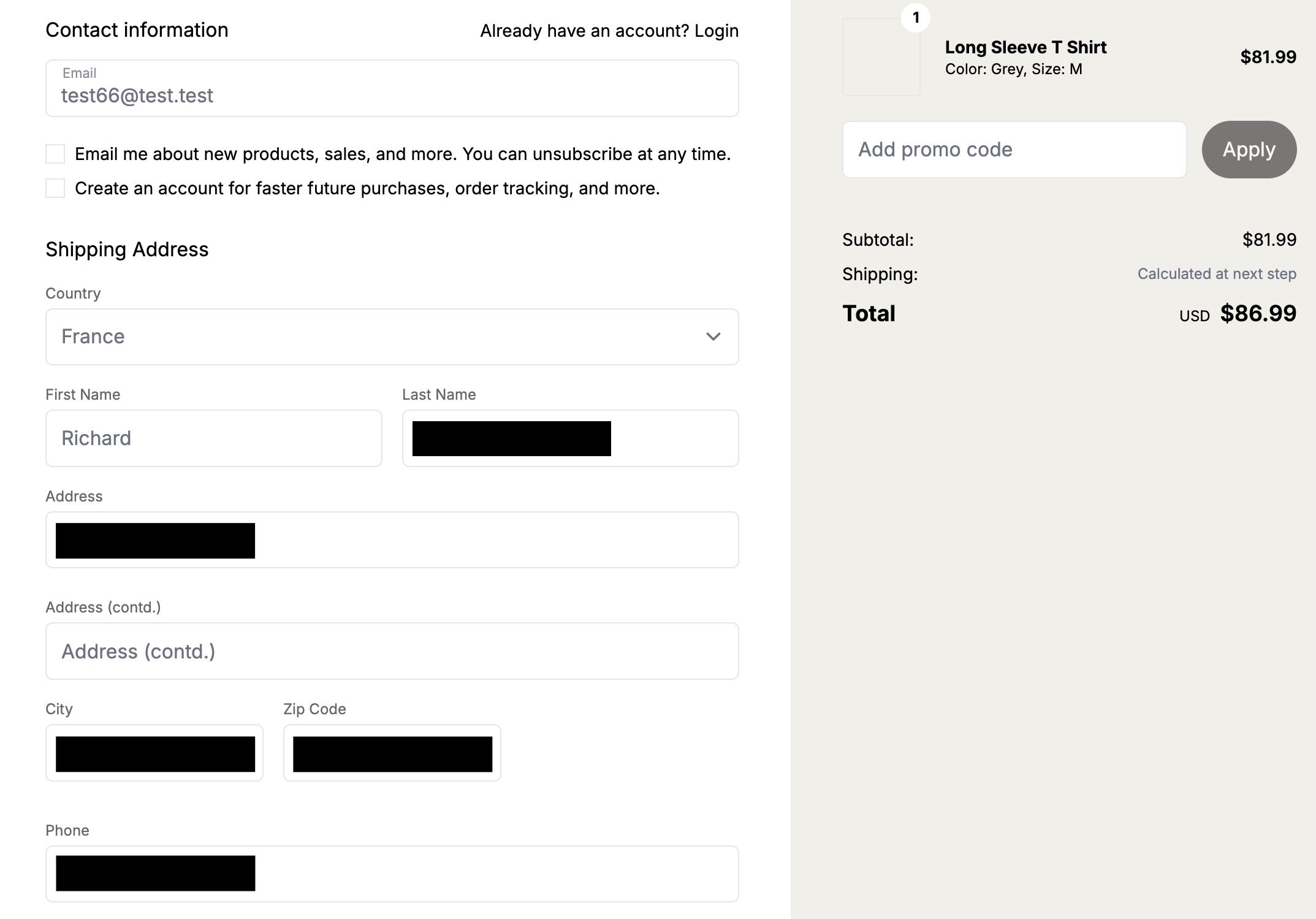
The spree expanded beyond Spree: similar authorization failures surfaced in two more shops, flaws undiscovered for years.
Rocket.Chat: any password works (CVE-2026-28514)
Some findings seem impossible until reproduced. The report from Rocket.Chat was one:
VULNERABILITY: password authentication bypass in account-service allows logging in as any user with a password set.The workflow's continued notes began to explain the mechanism, though the claim felt outlandish.
Root cause:
- ee/apps/account-service/src/lib/utils.ts:60-61: `validatePassword` returns `Promise<boolean>` (bcrypt.compare(...)).
- ee/apps/account-service/src/lib/loginViaUsername.ts:18-21: `const valid = user.services?.password?.bcrypt && validatePassword(password, user.services.password.bcrypt);` but does NOT `await` the Promise; since a Promise is truthy, `if (!valid) return false;` is never triggered when bcrypt hash exists.
- ee/apps/account-service/src/lib/loginViaUsername.ts:23-35: proceeds to mint a new login token and saves it, returning `{ uid, token, hashedToken, tokenExpires }`.
The root cause sat in Rocket.Chat's micro-services architecture. The user account service is reachable via the DDP Streamer service.
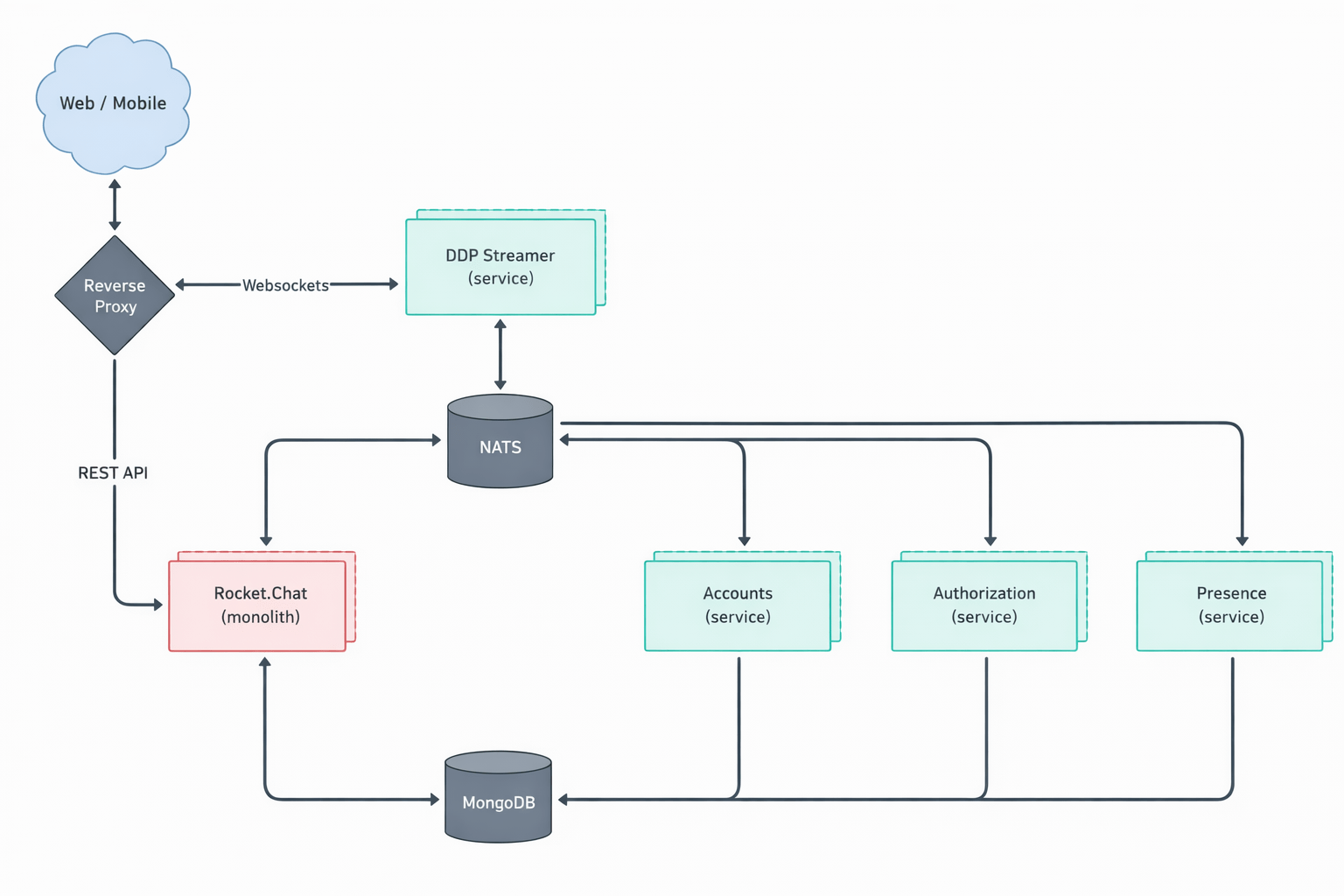
The agent's audit already included the JSON construct for connecting over Meteor's DDP protocol. After setting up a realistic Rocket.Chat test instance and building a quick proof of concept, the team connected to the WebSocket endpoint. It was genuinely possible to log in to the exposed service with any password. Once inside, the session allowed operations like joining arbitrary chat channels and listening for messages—demonstrated by receiving "HELLO WORLD!!!" on the "General" channel.
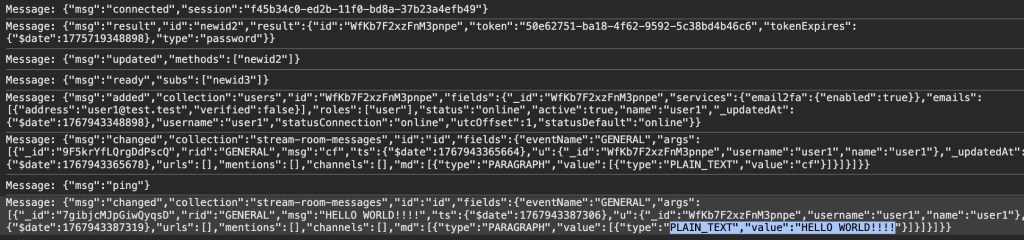
The technical details reveal the subtle nature of the bug. Rocket.Chat, principally a TypeScript application, stores local passwords as bcrypt hashes. Its own validatePassword function correctly returns a Promise<boolean>, a reflection of what the underlying bcrypt.compare returns.
export const validatePassword = (password: string, bcryptPassword: string): Promise<boolean> =>
    bcrypt.compare(getPassword(password), bcryptPassword);
At the call site, however, the returned Promise was never settled—no await in front of validatePassword—so the expression ANDed the Promise object itself with true.
const valid = user.services?.password?.bcrypt && validatePassword(password, user.services.password.bcrypt);

if (!valid) {
    return false;
}
In JavaScript, any Promise is truthy. Therefore, whenever the account had a bcrypt password set, the resulting valid boolean became unconditionally true. The finding is a testament to the model's ability to track logic across files—a small, easy-to-miss omission in a dynamically typed language produced a catastrophic authentication bypass.
Quantitative results
Across more than 40 repositories, mostly multi-user web apps, the framework suggested 1,003 candidate vulnerabilities. The audit stage approved 139 as exploitable. Deduplicating (each repo has run a few times) left 91 items for manual inspection.
- 20 (22%) were rejected as unreproducible false positives.
- 52 (57%) were dismissed as too low-impact to report (e.g., blind SSRF leaking only an HTTP status, or an issue assuming a malicious admin during install).
- 19 (21%) were rated high or critical severity and reported—such as personal data disclosure, system overwrite, or account takeover.
This data came from runs using gpt-5.x for the analysis and audit stages, with two caveats: runs since this data was collected are not included in these numbers, nor are all results reflected in the table.
| Issue category | All | Has vulnerability | Vulnerability rate |
|---|---|---|---|
| IDOR/Access control issue | 241 | 38 | 15.8% |
| XSS | 131 | 17 | 13.0% |
| CSRF | 110 | 17 | 15.5% |
| Authentication issue | 91 | 15 | 16.5% |
| Security misconfiguration | 75 | 13 | 17.3% |
| Path traversal | 61 | 10 | 16.4% |
| SSRF | 45 | 7 | 15.6% |
| Command injection | 39 | 5 | 12.8% |
| Remote code execution | 24 | 1 | 4.2% |
| Business logic issue | 24 | 6 | 25.0% |
| Template injection | 24 | 1 | 4.2% |
| File upload handling issues (excludes path traversal) | 18 | 2 | 11.1% |
| Insecure deserialization | 17 | 0 | 0.0% |
| Open redirect | 16 | 0 | 0.0% |
| SQL injection | 9 | 0 | 0.0% |
| Sensitive data exposure | 8 | 0 | 0.0% |
| XXE | 4 | 0 | 0.0% |
| Memory safety | 3 | 0 | 0.0% |
| Others | 66 | 7 | 10.6% |
Breakdown by issue type shows the agent suggested roughly even numbers of logic issues (439 total of IDOR, auth, misconfiguration, business logic, sensitive-data exposure) and technical issues (501; XSS, CSRF, path traversal, SSRF, injection, RCE, template injection, file upload, deserialization, redirects, SQLi, XXE, memory safety). Only three suggestions involved memory-safety defects, which h—is unsurprising given most targets are memory-safe languages, but also hints that the workflows align less with C/C++ binary analysis than dedicated fuzzers do.
Takeaways
The standout patterns from the numbers: a 25% rate for "business logic issue" and a particularly high count of IDOR findings—in fact, more IDOR cases were flagged vulnerable than the next two technical categories (XSS and CSRF) combined. Models excel at a code-review-like task: absorbing the application's user model, following high-level data flow, and spotting where a logical check is missing or incorrectly wired. That is precisely the kind of logic flaw that traditional SAST tools routinely miss.
Filtering out noise with LLM judgment
Perhaps the most unexpected result from our testing was that none of the false positives qualified as hallucinations. Every report, including the incorrect ones, was supported by concrete evidence that we could trace back to the code. Each identified endpoint existed, and the suggested payloads were applicable. The false positives stemmed from conditions outside the codebase, such as browser-level XSS mitigations, or from genuine mistakes a human auditor would also likely make—for instance, overlooking one of several layered authentication checks.
This insight turned out to be directly actionable. Because the LLM’s low-severity findings were consistently rejected for sound reasons, we built a filter taskflow that runs after the audit stage to drop low-severity issues. In our experiments, this cut roughly 50% of low-severity reports. A few borderline cases we had already reported were also flagged as low severity, but we kept the filter inclusive so as not to lose anything potentially impactful. The prompt and threshold are tunable to match your own appetite for risk.
We have since expanded testing to more repositories with additional vulnerabilities; the ratio of findings to repositories remained consistent.
Reasonable threat modeling across application types
Threat modeling is another area where the LLM performed strongly. We tested it against desktop apps, multi-tenant web services, applications that execute code in sandboxes (where injection is by design), and reverse proxies (where SSRF-like behavior is expected). In each case, the taskflow accounted for the application’s intended usage and made sensible decisions. Desktop applications proved the most challenging, mainly because it is often ambiguous whether other processes on a user’s machine should be trusted.
The model also showed disciplined reasoning when it came to privilege. In one instance it dismissed an access-control inconsistency because the issue provided no advantage over manually copying and pasting the data:
Security impact assessment:

A user possessing only read access to a document (no update rights) can duplicate it provided they also have updateDocument rights on the destination collection. This allows creation of a new editable copy of content they could already read. This does NOT grant additional access to other documents nor bypass protections on the original; any user with read access could manually copy-paste the content into a new document they are permitted to create (creation generally allowed for non-guest, non-viewer members in ReadWrite collections per createDocument collection policy)
We also observed more advanced technical reasoning. In a test against an application running scripts in a sandboxed Node.js environment, the LLM proposed a sandbox escape technique:
In Node’s vm, passing any outer-realm function into a contextified sandbox leaks that function’s outer-realm Function constructor through the `constructor` property. From inside the sandbox:
  const F = console.log.constructor; // outer-realm Function
  const hostProcess = F('return process')(); // host process object
  // Bypass module allowlist via host dynamic import
  const cp = await F('return import("node:child_process")')();
  const out = cp.execSync('id').toString();
  return [{ json: { out } }];

The presence of host functions (console.log, timers, require, RPC methods) is sufficient to obtain the host Function constructor and escape the sandbox. The allowlist in require-resolver is bypassed by constructing host-realm functions and using dynamic import of built-in modules (e.g., node:child_process), which does not go through the sandbox’s custom require.
That particular finding turned out to be a false positive because of other mitigating factors, but the suggestion demonstrates a solid grasp of the underlying technology.
Try the taskflows yourself
The taskflows that found these vulnerabilities are open source and straightforward to run against your own projects. We encourage you to also write your own. The examples here are just a fraction of what’s possible: other vulnerability classes remain unexplored, and the framework is well suited for problems like triaging SAST results or constructing development environments. If you build something with taskflows, share it in the discussions.


